8 QR Code Security Best Practices for Hosts
Follow qr code security best practices to protect guest data, secure welcome pages, prevent misuse, and respond quickly to QR code incidents.
A guest arrives, spots the welcome poster, and scans the QR code to find Wi-Fi details, checkout instructions, local recommendations, and optional services. The same public code can also be photographed, copied, or replaced with a malicious sticker without your team noticing immediately.
Good QR code security best practices aren't about making scanning difficult. They're about controlling where the code sends guests, limiting what the destination reveals, monitoring how the code is used, and having a clear response when something looks wrong. QR codes appeared in about 12% of all phishing attacks in 2025, while Microsoft telemetry reported a 146% increase in QR-code phishing during Q1 2026, from 7.6 million threats in January to 18.7 million in March. (Keepnet Labs' threat analysis and Microsoft telemetry reporting covered by SC World)
The following eight practices are designed for short-term rental hosts, co-hosts, boutique properties, and small hospitality teams using tools such as ScanStay. They follow the operating cycle of a rental, from creating and displaying a code to protecting guest information, reviewing activity, and revoking access when needed.
Table of Contents
- 1. Use HTTPS and secure URL protocols for QR code destinations
- 2. Use dynamic QR codes and controlled redirects
- 3. Authenticate guest access before revealing sensitive information
- 4. Rotate QR codes and limit their lifespan
- 5. Encrypt sensitive data and control what each person can see
- 6. Monitor scans and investigate unusual activity
- 7. Add rate limiting and protection against abusive traffic
- 8. Validate QR content and use a strong Content Security Policy
- 8-Point QR Code Security Comparison
- Make QR security part of the hosting routine
1. Use HTTPS and secure URL protocols for QR code destinations
The QR code isn't the security boundary. The destination is.
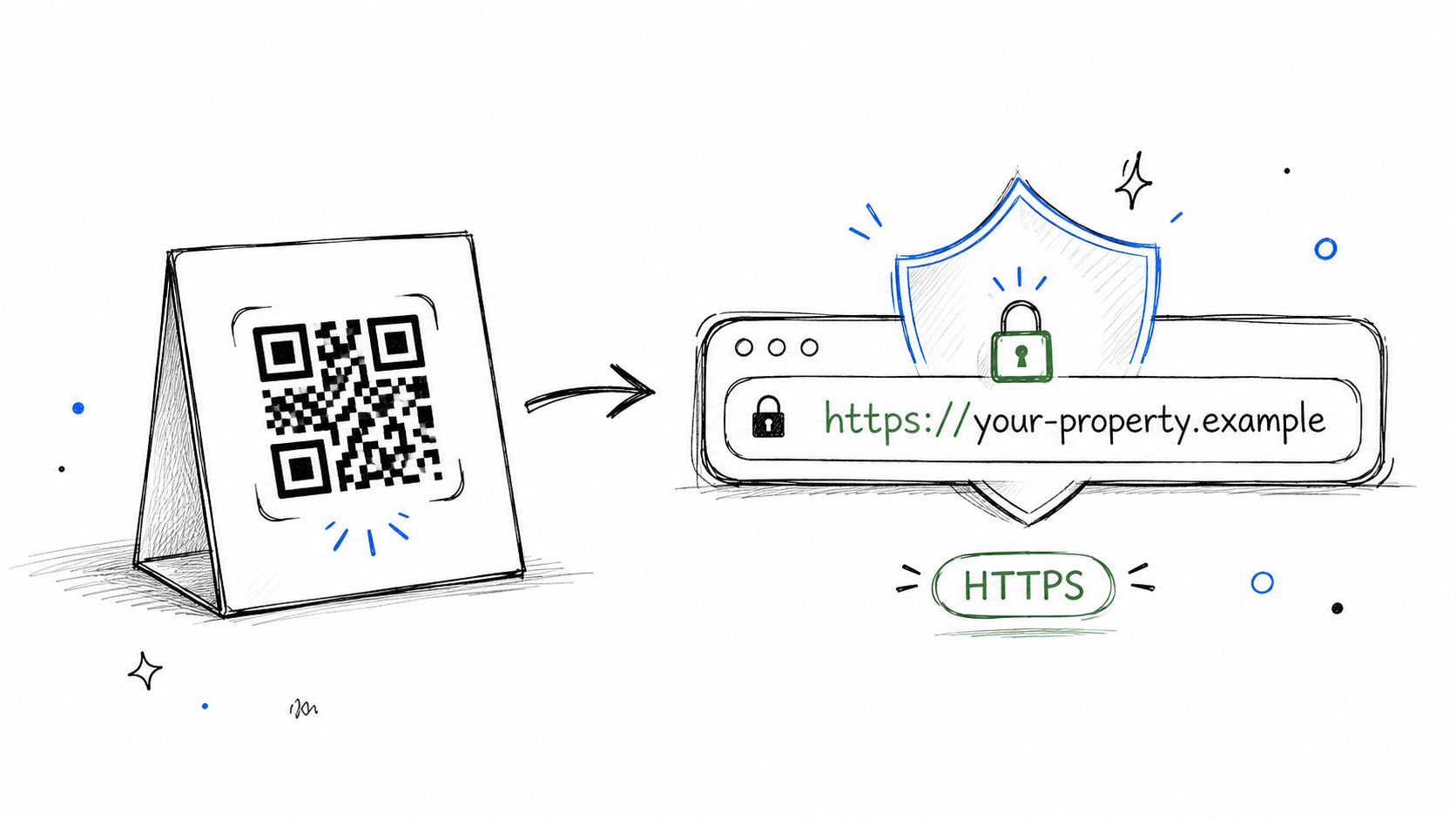
Every code should lead to a page beginning with ` using a valid TLS certificate. HTTPS encrypts traffic between the guest's phone and the website, which matters when the page contains Wi-Fi credentials, booking details, service requests, or payment-related information. It also helps guests distinguish a legitimate branded portal from an obviously unsecured page.
Before printing a code, scan it with a phone and inspect the full destination URL. Don't rely only on the padlock icon. A phishing page can use HTTPS too, so guests should still confirm the domain matches the property, platform, or trusted service they expect.
Check the destination before you print
For a ScanStay welcome page, the practical process is straightforward:
- Confirm the protocol: Make sure the destination starts with
not - Inspect the domain: Look for your approved brand or platform domain, including spelling and subdomains.
- Test several devices: Scan with both iOS and Android phones, using cellular data as well as property Wi-Fi.
- Review every redirect: A secure-looking short link shouldn't eventually send guests to an unrelated domain.
- Check certificate ownership: Confirm the certificate and domain remain valid before a busy arrival period.
Practical rule: HTTPS protects the connection, but it doesn't prove that the page is trustworthy. Verify both the encryption and the destination identity.
Don't put credentials directly into the QR payload. Use the code as a pointer to a controlled page, then deliver sensitive information through the protected page after the appropriate access checks. That approach gives you more control if the property's Wi-Fi password changes or a service page needs to be removed.
2. Use dynamic QR codes and controlled redirects
A guest scans the welcome card after a Wi-Fi change, a new manager takes over, or a property service is removed. If the printed code points to a dynamic redirect, you can update the destination without replacing posters, table cards, or binder inserts.
That control supports the rental's operating cycle. You can remove an outdated offer, redirect guests to a current portal, or temporarily disable a code if a sign appears tampered with. Scan activity can also help separate normal guest use from access that needs review.
Static codes still suit simple, stable content. They do not rely on a redirect service and can keep working as printed. The trade-off is physical maintenance. Changing the destination usually means replacing the material, or accepting an outdated link that remains in circulation.
Document each code before guests use it
ScanStay's QR code generator guidance supports the operational principle of connecting a printed code to an editable guest portal. Keep a small record for every property:
- Approved redirect: Record the exact domain and landing page assigned to the code.
- Physical location: Note whether it is at the entrance, in a guest room, or in a shared area.
- Intended audience: State whether the code serves current guests, staff, or the public.
- Fallback link: Print a short, readable URL below the code and include it in pre-arrival messages.
- Rollback path: Retain the previous destination long enough to restore it if an update disrupts arrival instructions.
Review the redirect after every content change. A successful scan only confirms that the route resolves. It does not confirm that the page still shows current house rules, reaches the right audience, or connects to a service the property still uses.
For a busy arrival period, test the updated route before guests arrive and keep the fallback link available. This adds a small maintenance task, but it reduces the need to reprint materials when the property's information changes.
3. Authenticate guest access before revealing sensitive information
A QR poster in a rental hallway is public by design. A passerby can scan it, and a guest can photograph or share it. Set the first screen accordingly: general property details, local recommendations, and emergency contacts can appear without a login. Booking information should not.
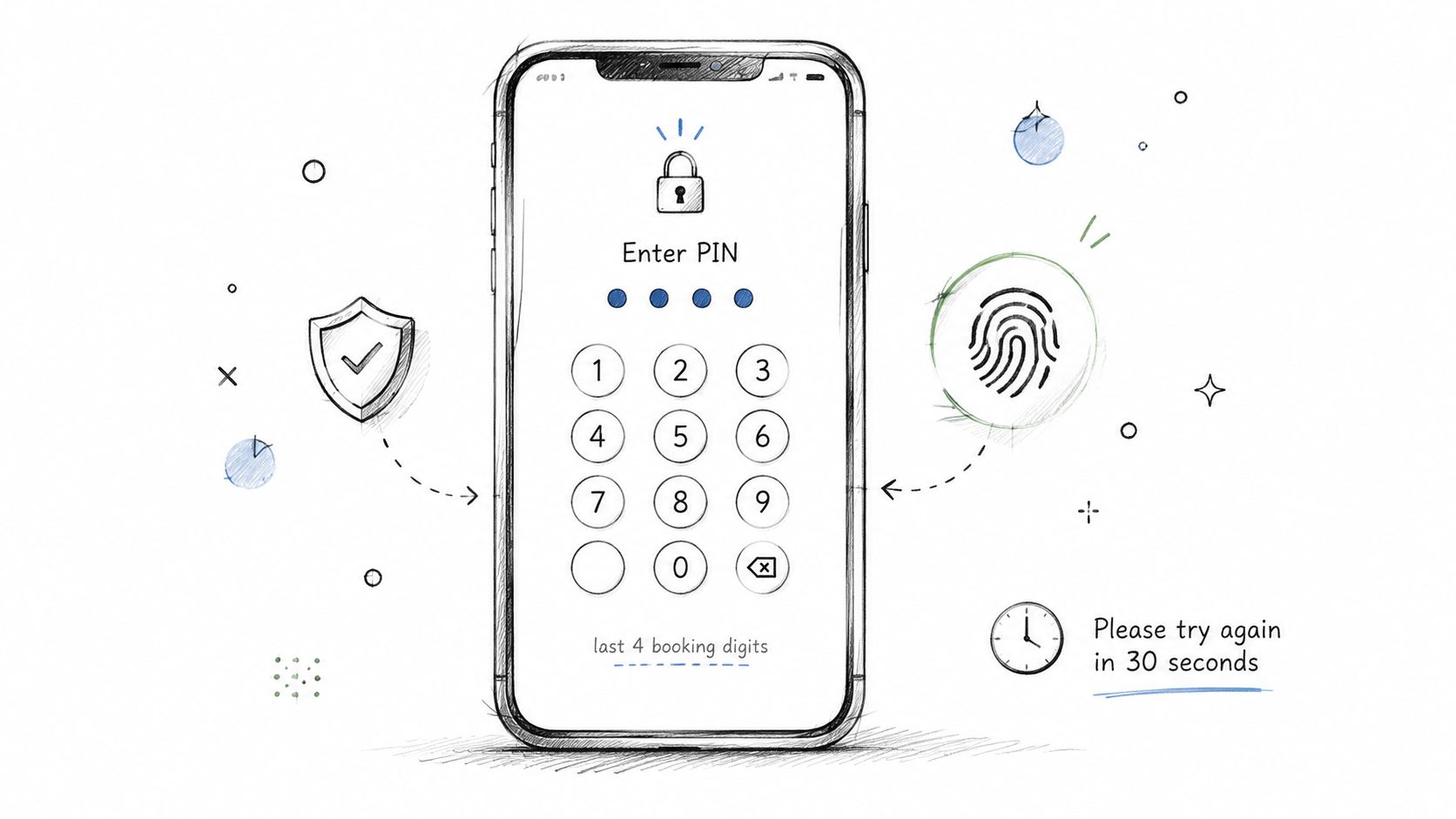
For a late arrival, let the guest open the guide immediately, then request a booking-linked PIN or email verification code before showing Wi-Fi credentials, door instructions, reservation messages, or payment actions. A secure message through the booking platform can also confirm the guest without adding another account to manage.
The right control depends on the information and the moment. A long identity check can delay a tired traveler at the entrance. No check can expose operational details to anyone who finds the poster online.
Match the check to the request
Use access levels rather than one login for everything:
- Public content: Show general property information, local recommendations, and emergency contacts.
- Booking-specific content: Request a short-lived PIN or verification code before displaying arrival details tied to that reservation.
- Sensitive actions: Authenticate again before payment, account changes, or service requests.
- Staff content: Give cleaners and contractors separate permissions. Do not reuse a guest-facing code.
- Support fallback: Provide a phone or messaging route when verification fails or a guest cannot receive the code.
A permanent poster works well with this model because the server, rather than the printed material, decides what the current guest may view. The guest scans once, completes a light check, and receives only the information needed for that stay. ScanStay's guest check-in guidance describes a mobile browser flow suited to this type of arrival process.
End the permission when the reservation ends. Booking-specific details should no longer be available after checkout, even if the QR poster remains in place. Operators considering stronger physical-entry controls can review this overview of commercial biometric access control in Perth, though biometric verification will usually be unnecessary for an ordinary digital welcome guide.
4. Rotate QR codes and limit their lifespan
A guest arrives late, scans the welcome poster, and finds that the link still exposes details from a previous reservation. A permanent QR code is easy to manage, but a copied photo or misplaced sticker can keep granting access after the original stay has ended.
Set the lifetime according to what the code does. The OASIS Secure QR Code Authentication specification describes nonces, cryptographic signatures, expiration, and nonce invalidation after use to reduce replay. For short-term rentals, sensitive QR links should behave like temporary access tokens rather than permanent secrets.
Match rotation to the rental workflow
Use the least complicated model that protects the action:
- Per-booking codes: Use for door access, reservation-specific instructions, or sensitive guest actions.
- Post-checkout revocation: Stop a shared poster from displaying reservation details after departure.
- Scheduled rotation: Replace codes on permanent signs at planned intervals when the public destination stays similar.
- Immediate revocation: Disable a code as soon as a poster goes missing, is covered by another sticker, or points to a compromised destination.
- Signed one-time actions: Apply to requests that should be confirmed or authorized only once.
Short lifetimes reduce exposure, but an overly aggressive expiry can leave a late arrival without access. Before enabling them, prepare a recovery process. Keep a staff-only replacement link, update the property record, and test the replacement before the next guest arrives.
The poster should explain the guest-facing purpose without revealing the token. For a general guide, rotate the sensitive session behind the printed code. For a code that authorizes one action, show its validity and scope on the landing page.
Review the setup at checkout, during turnover, and whenever a sign changes location. This makes rotation part of the hosting routine instead of a response after a code has already been copied.
5. Encrypt sensitive data and control what each person can see
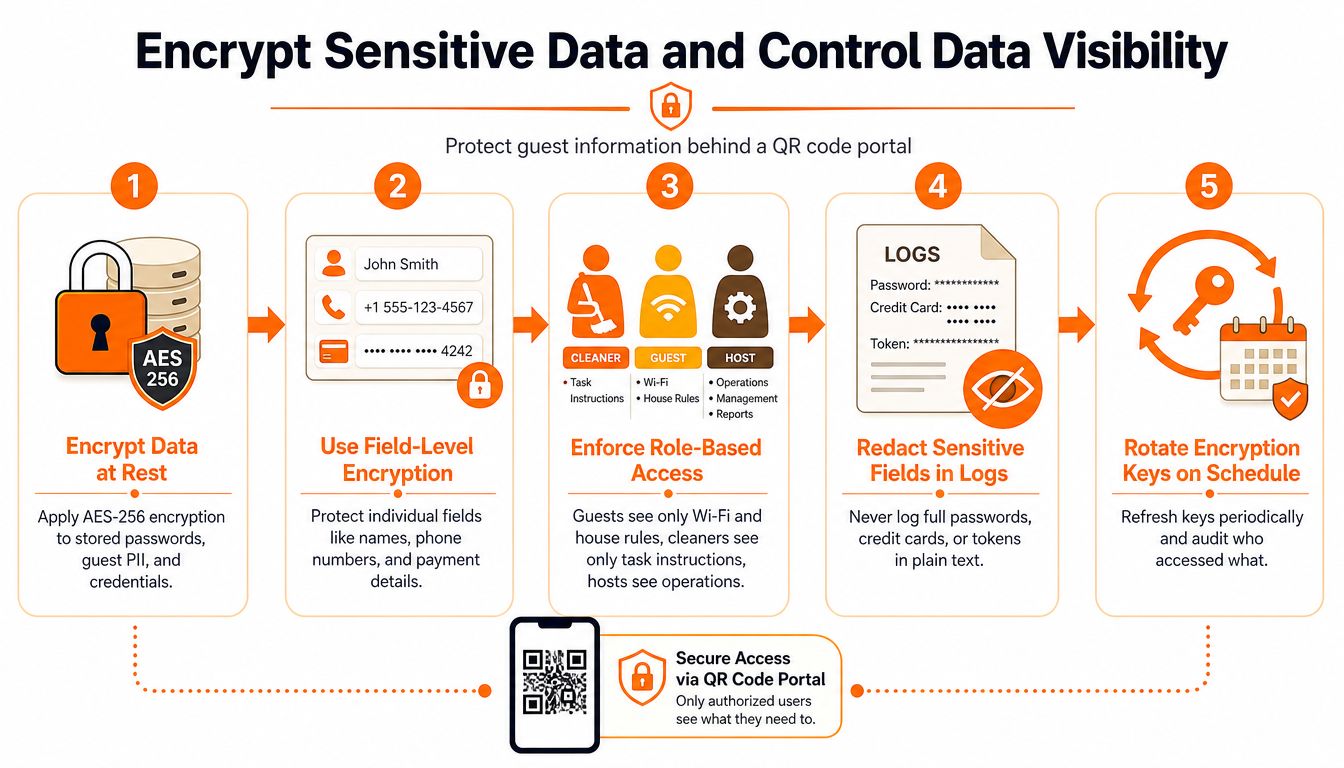
A guest scans the Wi-Fi code in the rental, while a cleaner scans a turnover code nearby. Those codes should reach different information, even if both users open the same property system. Protect data in transit and in storage, then limit each page to the role and booking that require it.
Keep passwords, guest phone numbers, access tokens, and private instructions out of the QR payload. Anyone can copy and decode that content without visiting the destination. Store only a controlled link in the code, and retrieve the relevant details server-side after authorization.
Set access around the work each person performs:
- Minimize the guest view: Display Wi-Fi details, arrival guidance, and checkout instructions for the current stay only.
- Restrict staff access: Give cleaners and maintenance providers task-specific pages, without exposing guest contact information.
- Separate properties: Prevent a user assigned to one rental from browsing another property's content.
- Protect logs: Check that passwords, tokens, and private fields never appear in analytics or error logs.
- Clear cached content: Test browser history, previews, and shared devices to confirm that sensitive pages do not remain available.
- Encrypt stored data: Verify that the platform protects information at rest as well as during transmission.
Keep permissions easy to review. A co-host may need operational details for one property, while a manager may need broader access. Document those differences in the property system instead of sharing one account.
Encryption and authorization solve different problems. Encrypted storage does not prevent every authenticated user from viewing every property's Wi-Fi credentials. Role controls also cannot protect a password printed directly in a QR code. Use both layers, test them with guest and staff accounts, and keep the data model simple enough to audit during turnover.
6. Monitor scans and investigate unusual activity
A QR code on a lobby wall or inside a rental connects a physical sign to a digital service. Scan records help confirm that the code, destination, and display location are working together. Use them to investigate access problems, not to track guests more closely than operations require.
Set a baseline for each code during normal turnover. Arrival instructions may receive scans around check-in, while a checkout page should see activity near departure. A lobby code can attract broader use than one displayed inside a private room. Review the scan location, booking window, device pattern, and destination before treating a single event as suspicious.
The threat warrants routine checks. Keepnet Labs' analysis reports that one security telemetry source recorded more than 11,000 malicious QR-code detections per day, while 75,000 QR codes were checked daily and 15% led to malicious links. Use that finding to justify monitoring your own QR system, not to create unnecessary concern for guests.
Set a response threshold
Investigate combinations of signals rather than reacting to every unusual scan:
- Unexpected geography: Activity comes from locations unrelated to current bookings or property operations.
- Rapid repetition: Requests arrive in a burst that does not match normal guest behavior.
- Out-of-window access: A booking-specific link is used before arrival or after checkout.
- Device inconsistency: A session changes sharply or behaves like an automated client.
- Destination mismatch: The redirect, page content, or branding differs from the approved version.
Keep the review proportionate. Aggregate timestamps, broad location data, device categories, and access outcomes may be enough. Explain analytics in your privacy notice, limit dashboard access to people who need it, and retain records only while they support security or operations.
A scan alert is a lead, not proof of compromise. Check the physical sign for tampering, test the redirect from a trusted device, compare activity with reservations, and revoke or rotate the code when the evidence supports it. Record what happened and what you changed so the next host or co-host can repeat the response.
For a practical explanation of how QR links can move users into risky mobile flows, review this QR phishing explainer.
7. Add rate limiting and protection against abusive traffic
A guest may scan a welcome code several times because a page loads slowly or checkout instructions need checking. Set limits that tolerate this behavior while slowing automated requests, repeated PIN guesses, and traffic designed to overwhelm the portal.
Use different thresholds for different actions. Public guide pages can handle routine bursts through caching or managed hosting. Authentication, payment, and booking-related routes need tighter controls because repeated requests could expose information, trigger messages, or start workflows.
Start with the paths that can cause the most harm:
- PIN and verification routes: Slow repeated guesses, add temporary blocks, and return the same response whether an identifier exists or not.
- Service and payment actions: Stop automated probing from triggering emails, reservations, or payment steps.
- Redirect services: Keep the approved QR destination available during repeated requests.
- Administrative dashboards: Separate them from guest endpoints and require stronger authentication.
A blocked guest needs a clear recovery path. Say when to wait and try again, and provide the short URL printed below the code. Do not confirm whether a guessed booking identifier was valid.
For hosts using ScanStay's guest Wi-Fi setup guidance, keep the Wi-Fi page separate from administrative controls. Guests need quick access to connection details, while that route should not expose dashboard functions or content controls.
Rate limits should be tested against real arrival patterns before enforcement. Several guests may connect at once, especially during a check-in window, so aggressive settings can create the same access problem they are meant to prevent. Record blocked requests, review whether they came from a guest flow or an automated client, and adjust thresholds when the evidence supports a change.
Cloud providers and managed platforms may offer network-level DDoS protection, but confirm its scope. Availability protection may leave a PIN endpoint exposed, and request limiting may operate without useful alerts. Include these checks in the incident process, with dashboard access limited to hosts or co-hosts who need it.
8. Validate QR content and use a strong Content Security Policy
A guest scans the code for check-in instructions, but the page now redirects to a fake payment form. This can happen after an attacker compromises the website, a content-management account, a third-party integration, or a redirect service. Review the destination whenever its content or integrations change, not only when the QR code is created.
Content Security Policy, or CSP, tells the browser which scripts, images, frames, styles, and network connections the page may load. A carefully configured policy can limit the effect of injected JavaScript, including cross-site scripting. A policy that is too strict may break maps, translation tools, video guides, or payment components. A loose policy leaves more room for unwanted code.
Check the guest page before publishing
Use a short review that matches the rental's actual setup:
- List third-party services: Record maps, payment processors, translation tools, analytics, and embedded media.
- Require HTTPS everywhere: Load images, scripts, and APIs only through secure connections.
- Remove unused integrations: Each external script creates another dependency to review.
- Scan common weaknesses: Check for cross-site scripting, injection, exposed APIs, and weak administrative controls.
- Update dependencies: Apply platform and integration updates before a known issue becomes urgent.
- Test custom branding: Custom JavaScript and CSS can add risks that a standard template avoids.
- Publish a privacy notice: Tell guests what information the portal collects and why.
Keep a record of every script and domain allowed by the CSP, especially for a white-label guest portal. Confirm who can change that list and how quickly the page can be disabled if a redirect or integration is compromised.
Managed platforms can reduce the security work required from a host, but they still need review. Ask whether the provider supplies security headers, monitors dependencies, renews certificates, and provides a clear vulnerability-reporting route. Test the recovery process before a busy check-in period, including who can remove a page or replace its destination.
The OWASP Content Security Policy guidance can support operators or developers configuring a custom portal. Small hosts do not need application-security expertise, but they should know who owns these controls and how to shut down a compromised guest page.
8-Point QR Code Security Comparison
| Approach | Complexity 🔄 | Resources & Maintenance ⚡ | Expected Impact 📊⭐ | Ideal Use Cases 💡 | Key Limitations |
|---|---|---|---|---|---|
| Use HTTPS and Secure URL Protocols for QR Code Destinations | Low–Moderate, certificate installation & renewals | Low, SSL certs (Let's Encrypt) and server config; periodic renewals | High, prevents MITM, required for payments, improves trust ⭐⭐⭐ | All guest-facing QR landing pages, payment flows, branded portals | Requires certificate management; older device CA issues; small perf overhead |
| Implement QR Code Dynamic Generation and URL Shortening | Moderate, integrate redirect service and management UI | Ongoing, redirect service uptime, analytics storage, domain management ⚡ | High, updatable links, analytics, fewer reprints, rapid incident response 📊⭐ | Multi-property hosts, frequently changing content, A/B testing | Dependency on third-party uptime; possible redirect latency; added complexity |
| Authenticate Guest Access with PIN or Biometric Verification | Moderate–High, auth flows, booking integration, secure storage 🔄 | Moderate, auth infrastructure, SMS/email costs, integration with booking APIs ⚡ | High, strong access control, audit trail, limits unauthorized access ⭐⭐📊 | Protecting sensitive Wi‑Fi, payment upsells, guest-specific content | Adds guest friction; delivery delays; key storage; biometrics not universal |
| Rotate QR Codes and Limit Code Lifespan | Moderate, automation for rotation and revocation 🔄 | Moderate, backend scheduling, messaging guests, possible reprinting | High, reduces exposure window; limits impact of leaked codes 📊⭐ | Short-term rentals with frequent turnover; time-limited access | Requires reliable dynamic infra; guest confusion if not communicated |
| Encrypt Sensitive Data at Rest and Control Data Visibility | High, encryption, RBAC, key rotation, audit trails 🔄 | Significant, key management, compliance processes, secure storage ⚡ | Very High, protects PII, reduces breach impact, aids compliance ⭐⭐⭐📊 | Any portal storing Wi‑Fi, PII, payment tokens; multi-role access systems | Key management complexity; harder debugging; careful error handling needed |
| Monitor QR Code Scanning Activity and Set Up Anomaly Alerts | Moderate, analytics, alerting rules, correlation with bookings 🔄 | Ongoing, analytics platform, alert tuning, privacy considerations ⚡ | High, early detection of leaks/abuse; operational insights 📊⭐ | Multi-property hosts, fraud detection, spotting shared/leaked codes | Privacy concerns; false positives; VPNs/IP inaccuracies |
| Implement Rate Limiting and DDoS Protection for QR Code Endpoints | Moderate, configure limits, integrate DDoS mitigation 🔄 | Moderate, CDN/WAF or provider costs; monitoring and tuning ⚡ | High, protects availability, stops brute-force and abuse 📊⭐ | High-traffic portals, PIN verification endpoints, public posters | Shared IPs (proxies) can trigger limits; mobile IP churn; tuning required |
| Validate QR Code Content and Implement Content Security Policy (CSP) | High, CSP tuning, vulnerability scanning, dependency checks 🔄 | Ongoing, security scans, patching, pen tests, dependency management ⚡ | High, prevents XSS/phishing, reduces third-party risk, strengthens defense-in-depth 📊⭐ | White-label/custom pages, integrations with third-party widgets, payment pages | CSP complexity may break features; requires continuous maintenance and testing |
Make QR security part of the hosting routine
QR security works best as a recurring operating habit, not a one-time design decision. Before each new property goes live, verify the HTTPS destination, scan the printed poster, inspect the visible brand and fallback URL, and confirm that guests see only the information intended for their stay.
Then repeat the check whenever something changes. A Wi-Fi password update, new payment integration, property handover, missing sign, or suspicious scan pattern should trigger a review. Hosts should know exactly how to disable a redirect, revoke an active session, replace a poster, and tell current guests which official link to use instead.
The threat environment supports that level of care. Naturalistic user research found that 67% of participants opened a QR-embedded link without inspecting the URL for phishing cues, while earlier surveillance work found that 85% of people who scanned a QR code then visited the associated URL. (The NDSS study) Guests won't reliably perform every security check themselves, particularly on personal phones with limited enterprise protection. Your destination, authentication flow, content permissions, monitoring, and revocation process have to carry most of the load.
Small operators don't need an elaborate security department. Start with secure infrastructure, keep sensitive data out of QR payloads and URLs, use a controlled redirect, give guests a clear fallback link, and make analytics transparent. Add short-lived access for sensitive actions, inspect physical signs regularly, and rotate or revoke a code whenever its trust is uncertain.
For a practical first step, audit one property's poster before the next check-in. Scan it from multiple devices, inspect every redirect, review the guest view, test the fallback URL, and write down the exact steps for disabling the code. Once that process works, copy it across the rest of your portfolio and assign ownership so it doesn't depend on memory.
ScanStay gives short-term rental hosts a single QR-linked digital welcome book for Wi-Fi details, check-in and checkout instructions, house rules, recommendations, and service options in a mobile browser. Visit ScanStay to see how a controlled guest portal, reusable property content, printable poster, and available scan analytics can support a safer QR code routine.