Boost Your Airbnb Host Experience: Tips for 2026 Success
Optimize your Airbnb host experience with proven tools & strategies. Boost efficiency, guest satisfaction, and reviews from listing to checkout.

At 8 AM, your phone is already busy. One guest wants the Wi-Fi password, another can't find the lockbox, your cleaner needs confirmation about a same-day turnover, and a third guest is asking whether late checkout is available. On the counter, a paper binder contains the answers, but nobody has time to search through it.
That morning is a familiar part of the Airbnb host experience. Hosting can create meaningful supplemental income, but it also creates a stream of small decisions that compete for your attention. When instructions are scattered across messages, binders, and memory, guests wait longer, hosts repeat themselves, and simple issues can overshadow an otherwise excellent stay.
A better system treats hospitality like a carefully designed journey. You'll define what the host experience includes, map each guest touchpoint, identify the friction that affects reviews and workload, and build a digital workflow that keeps personal service while reducing repetitive tasks. The practical foundation is simple: put the right information in the right place, make it easy to find, and keep your human attention available for the moments that need it. For a broader foundation on preparing and operating a property, review this Airbnb host guide.
Table of Contents
- Understanding the Airbnb Host Experience
- Mapping the Host Journey
- Common Pain Points and Key Metrics
- Actionable Strategies and Tool Recommendations
- Conclusion and Next Steps
Understanding the Airbnb Host Experience
The Airbnb host experience is more than receiving bookings and handing over keys. Think of your property as a small boutique hotel where you manage the room, the front desk, the concierge service, and the guest relationship, often without a lobby or a team standing beside you.
A boutique hotel manager makes sure the room matches its description, explains how the property works, responds when something goes wrong, and leaves the guest feeling cared for without hovering. You need to do the same through a sequence of digital and physical touchpoints.

The four operating responsibilities
Managing bookings starts with accurate availability, realistic preparation time, and a listing that accurately describes the property. A reservation creates more than occupied dates. It triggers cleaning, supply checks, access planning, and guest communication.
Setting expectations means answering practical questions before they become complaints. Explain parking, stairs, noise, pet rules, appliance use, check-in, checkout, and anything that might surprise a visitor. Clear information gives guests a reliable mental picture of the stay.
Delivering hospitality combines comfort with appropriate communication. A thoughtful local recommendation can feel personal, while a concise message that answers a question can feel professional. Guests don't need constant contact. They need confidence that help is available.
Earning strong reviews follows from the earlier work. Guests judge the gap between what they expected and what they found. Accurate presentation, reliable access, clean rooms, and calm problem-solving all shape that judgment.
The financial context matters. Airbnb reported that U.S. Hosts earned about $22 billion in supplemental income in 2022, with the typical Host earning more than $14,000 during the year, as described in Airbnb's host earnings report. That income helps explain why hosts care about both guest satisfaction and operational efficiency. Hosting isn't a casual exchange when it supports a household or property business.
You can also learn from broader hospitality principles without copying the operating model of a large hotel. This guide to Simply Hospitality's operator success tips is useful for thinking about consistency, team coordination, and service standards. For hosts who want to connect guest satisfaction with listing performance, this overview of the Airbnb search algorithm provides additional context.
Mapping the Host Journey
A guest doesn't experience your property as a collection of separate tasks. They experience one continuous promise, beginning with the listing and ending with the review. Mapping each stage helps you see where the promise can weaken.
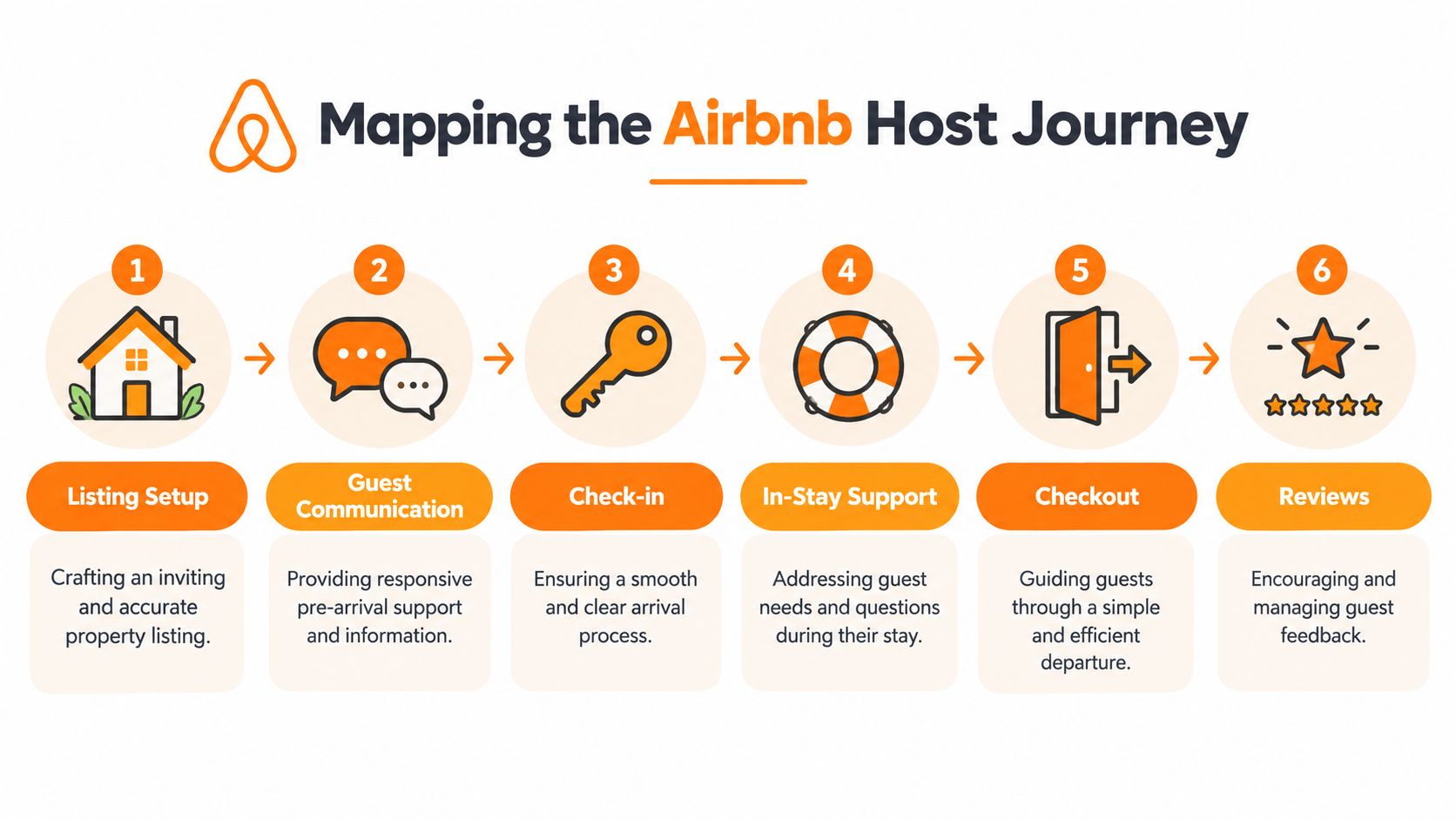
Stage one, listing setup
The listing is the first version of your guest guide. Use accurate photographs, explain the layout, identify limitations, and describe amenities in plain language. If the bedroom is reached by stairs or the shower has a particular control system, say so before booking.
A strong listing reduces mismatched expectations. It also gives you a reference point for later messages, because guests can find the same basic information before they arrive.
Stage two, guest communication
After booking, guests usually need confirmation, arrival guidance, and answers to questions about the area or property. Organize messages around decisions they need to make:
- Before arrival: Confirm the reservation and point guests toward essential preparation information.
- Near check-in: Provide directions, access instructions, parking details, and any time-sensitive information.
- During the stay: Keep help available without filling the guest's phone with unnecessary messages.
- Before departure: Explain checkout tasks clearly and keep them reasonable.
A digital welcome book for Airbnb can hold stable information, while Airbnb messages can handle personal or reservation-specific communication.
Stage three, check-in
Check-in is a test of clarity. The guest may be tired, unfamiliar with the neighborhood, and carrying luggage. Give them a simple path from arrival point to door, then from door to the essentials, such as Wi-Fi, heating, lighting, and bathroom facilities.
Test the instructions yourself. A host who knows the property intuitively may skip details that a first-time visitor needs.
Stage four, in-stay support
During the stay, guests may ask how to operate an appliance, where to find supplies, or whether a local service is suitable. Separate urgent problems from routine questions. A broken lock requires rapid attention. A question about the coffee machine may be answered through a concise guide entry or video.
Stage five, checkout
Checkout should protect the property without making guests feel like temporary staff. State where to leave keys, what to do with rubbish, and whether guests need to start appliances or strip beds. Avoid burying important actions in a long paragraph.
Stage six, reviews
The review reflects the whole journey, not just the final night. Invite honest feedback after checkout, record recurring issues, and look for patterns across stays. If guests repeatedly ask the same question, improve the information before trying to write another response.
Common Pain Points and Key Metrics
Small operational gaps create disproportionate stress because they appear at the exact moment a guest needs certainty. A delayed answer can make a guest wonder whether the host is available. An unclear access message can turn arrival into a search exercise. Repeated questions then consume the host's time, even though the answers rarely change.
The strongest evidence points to an important distinction. An analysis of 59,766 Airbnb reviews across 27,980 listings in 12 cities found that tangible property problems were the main source of dissatisfaction, while host interaction was a major source of satisfaction, according to the review analysis published in the National Library of Medicine. Communication can't compensate for a serious maintenance problem, but clear and responsive interaction can shape how guests experience the rest of the stay.
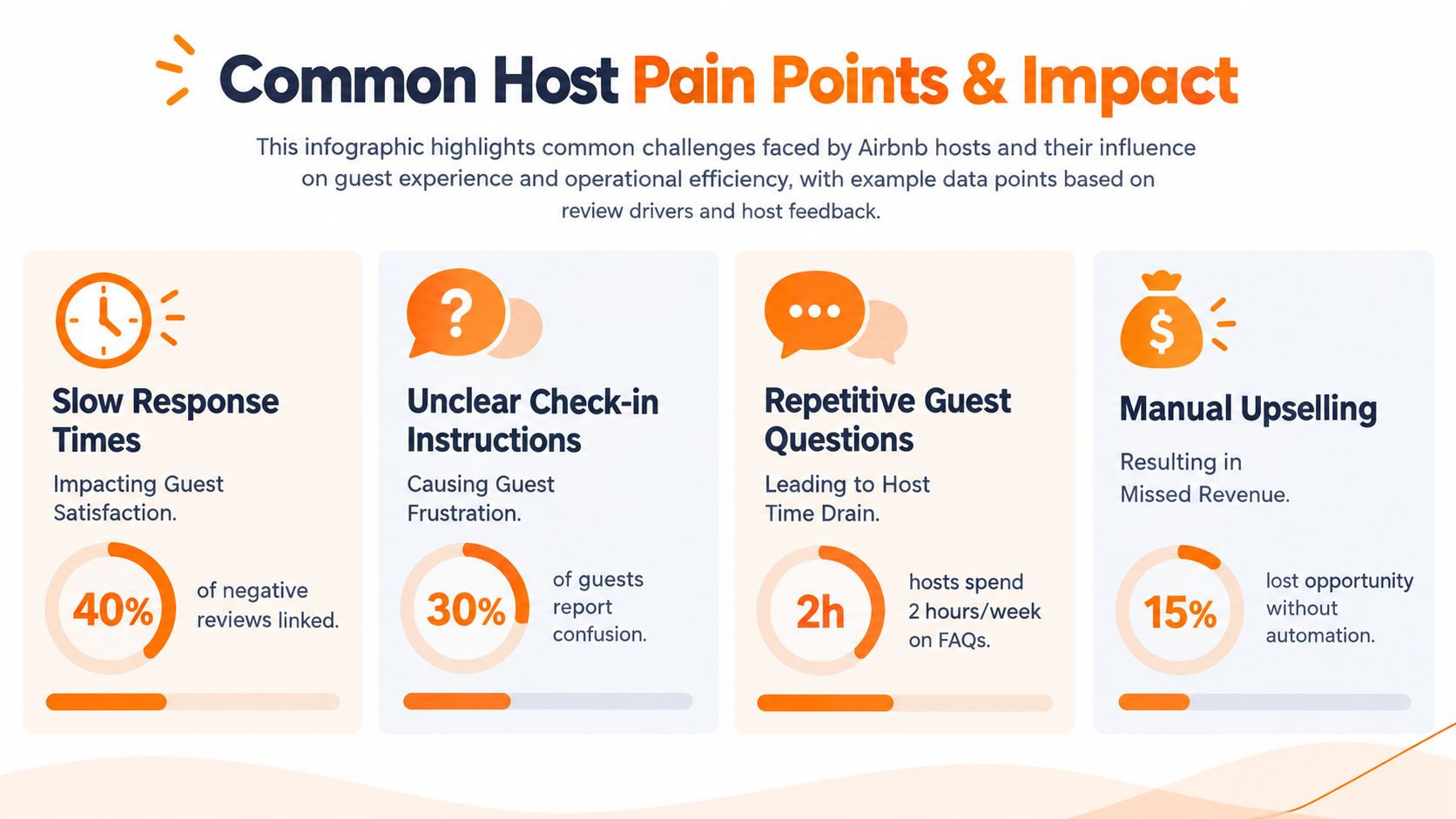
Metrics that help you diagnose friction
Don't track numbers because software makes them available. Track measures that lead to a decision.
- Response time: Review when guests ask for help and when you answer. A pattern of delayed replies may indicate that information belongs in a guide rather than in live messaging.
- Question repetition: Keep a short log of recurring questions. Wi-Fi, parking, heating, rubbish, and checkout instructions are common candidates for permanent answers.
- Check-in clarity: Ask guests whether they found the property easily and which instruction, if any, caused hesitation.
- Issue resolution: Record the problem, the first response, and the final resolution. This separates a property fault from a communication fault.
- Service interest: If you offer extras, compare which options guests ask about with which ones they can request easily. Don't assume an upsell is attractive because it's available.
Practical rule: If several guests ask the same question, improve the system before improving the wording of your reply.
This approach also protects your wellbeing. Research involving 136 hosts found that hosts who preferred to keep work and family separate reported higher work-family conflict, lower job and life satisfaction, and less desire to continue hosting, as documented in the host work and family study. The lesson isn't that every host must be constantly available. It's that unmanaged availability can make hosting harder to sustain.
Actionable Strategies and Tool Recommendations
The goal isn't to automate personality. It's to automate retrieval. Guests should be able to find routine information independently, while you reserve direct communication for exceptions, decisions, and genuine welcome.
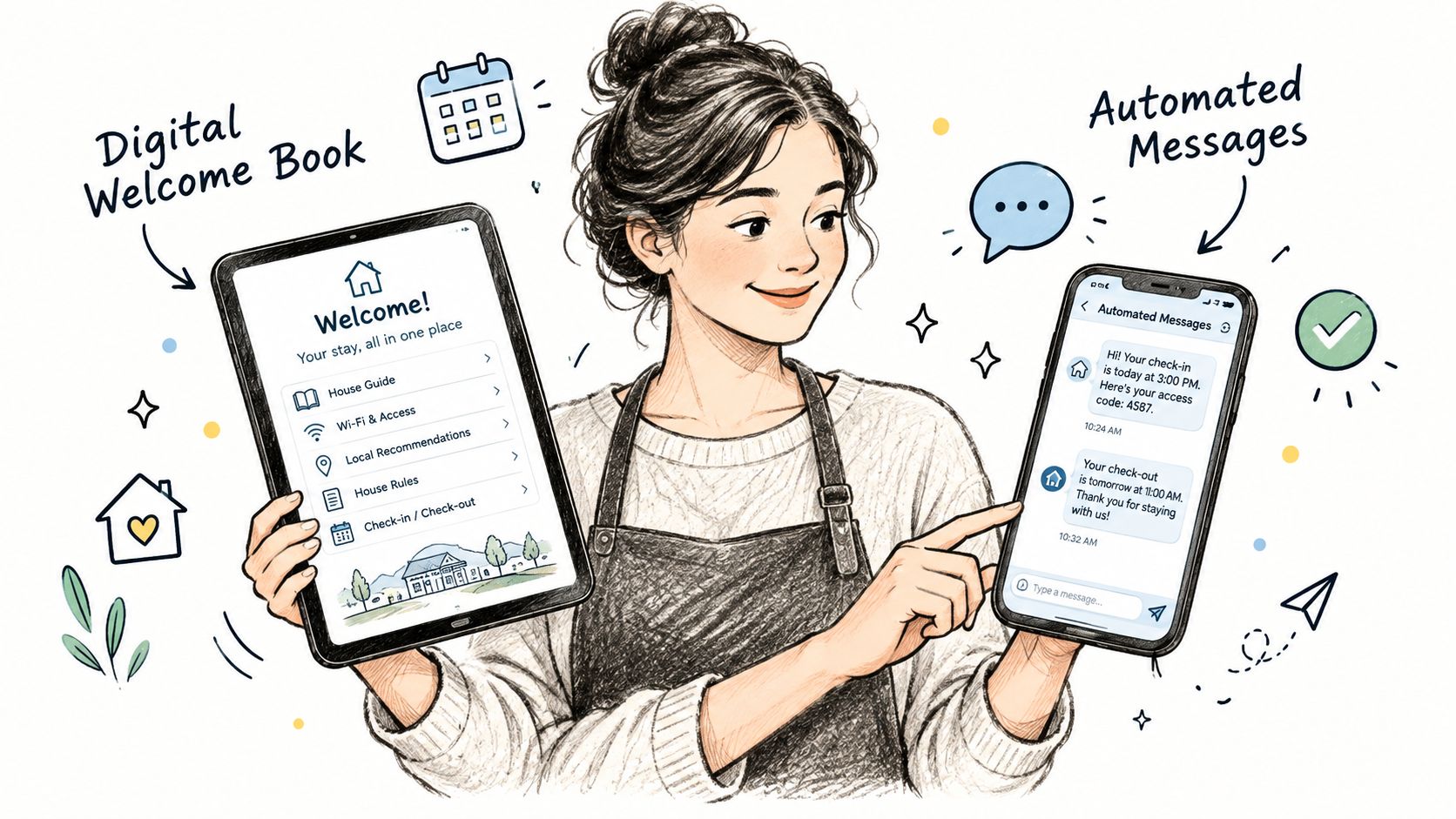
Replace the binder with one guest-facing hub
Start with the information guests need most often:
- Wi-Fi access
- Check-in and checkout
- House rules
- Heating, cooling, and appliance instructions
- Parking and rubbish guidance
- Emergency and support information
- Local recommendations
- Optional services and extras
A QR-code welcome book gives guests one physical entry point and one digital destination. Place the code near the entrance, then mention it in the arrival message. The best setup doesn't force guests to download an app or search through a long message thread.
ScanStay is one example of this model. It lets hosts create a mobile digital welcome book accessed through a QR code, with Wi-Fi details, check-in information, rules, recommendations, video instructions, multilingual AI translation, and optional service upsells. Hosts managing more than one property can reuse core content while changing property-specific details, and the platform includes scan analytics on eligible plans.
Personalization still matters. A 2025 Hospitable survey summary reports that 74.8% of short-term rental hosts viewed personalized guest experience as their biggest competitive advantage. A digital guide doesn't have to feel generic. Add a short welcome note, explain why you recommend a particular café, include neighborhood context, and use videos that show your actual appliances.
Build messages around moments
Use saved templates for predictable events, but leave room for a personal sentence. A pre-arrival message can confirm the booking and direct guests to the guide. A check-in message can highlight the access route. A checkout message can state the essential departure actions without repeating every house rule.
For multilingual guests, write the source text in short sentences before translating it. Avoid idioms, jokes, and ambiguous phrases. Pair translated instructions with visual cues, such as a photograph of the lockbox or a short appliance video. A language option is useful only when the underlying instructions are accurate and easy to follow.
Turn support into a decision tree
Classify each request before you respond:
- Urgent: Safety, access failure, flooding, heating failure, or another issue requiring immediate action.
- Routine: Wi-Fi, appliance use, parking, rubbish, or local directions.
- Optional: Late checkout, transfers, equipment, or other paid services.
Routine answers belong in the guide. Urgent cases need a clear human escalation path. Optional services should be visible without interrupting the stay. If your property appeals to a specific audience, such as group celebrations, resources like Hen Hideaways' property listing guidance can help you think about how to present relevant amenities and guest needs clearly.
For hosts comparing workflows, this video offers another way to think about guest communication and operational automation:
Improve through guest signals
Review your scan data, repeated questions, direct feedback, and cleaning reports together. If guests scan the guide but still message about parking, rewrite that section or move it closer to arrival information. If an appliance video receives attention, add similar videos for other confusing equipment.
Use channel management tools when you list across multiple platforms, and consider pricing automation when manual calendar and rate changes consume attention. Those tools solve different problems. The welcome guide solves the information problem, while channel and pricing systems coordinate inventory and revenue decisions.
Personal service scales when the routine path is clear and the exception path stays human.
Conclusion and Next Steps
A stronger Airbnb host experience gives guests clarity, hosts more control, and properties a better chance of earning positive feedback. Start by auditing the questions, delays, and arrival problems that repeat. Then replace scattered instructions with one digital welcome book, add personal recommendations, and measure response time, recurring questions, issue resolution, and guest feedback. Review the guide after each stay and improve the page that guests struggle to use.
ScanStay gives short-term rental hosts a QR-code digital welcome book for Wi-Fi, arrival details, house rules, local recommendations, videos, multilingual content, and optional guest services. Visit ScanStay to explore the platform and test a simpler way to deliver polished hospitality without carrying the whole operation in your phone.