Airbnb Host Guide: Setup, Pricing, and Guest Experience
The complete Airbnb host guide for 2026. Master listing setup, dynamic pricing, guest communication, and digital welcome books to boost reviews and revenue.

You know the feeling. It's late, a guest is asking about the Wi-Fi again, the cleaner needs a door code for tomorrow morning, and you're trying to remember whether the espresso pods were restocked. That's the point where an Airbnb host guide stops being a list of tips and starts becoming an operating system.
The hosts who stay sane treat every repeat question, handoff, and upsell as a system problem. The hosts who burn out keep solving the same problems manually, one message at a time. Airbnb's scale makes that difference matter, because the platform now has more than 4 million hosts, about 5.6 million active listings, and roughly 86% of hosts outside the United States. Recent reporting tied to Airbnb's IPO disclosures also says women make up over 55% of hosts, and since the start of 2020, 72% of nights booked were with individual hosts rather than professional hosts, which tells you this is a global, mostly individual-host marketplace, not a casual side-hustle club. Industry reporting on Airbnb host data
Table of Contents
- Why Most Airbnb Hosts Burn Out and How Systems Fix It
- Building a Listing That Converts Browsers Into Bookings
- Pricing Strategies That Maximize Occupancy and Revenue
- Automating Guest Communication From Booking to Checkout
- Replacing Paper Binders With a Digital Welcome Book
- Cleaning and Maintenance Workflows That Protect Reviews
- Amenity Upgrades That Actually Shift Demand in 2026
- Your 30-Day Hosting Systems Implementation Plan
Why Most Airbnb Hosts Burn Out and How Systems Fix It
A host usually does not get overwhelmed by one huge task. It happens in fragments. A midnight Wi-Fi question here, a late cleaner update there, a guest asking for parking instructions while you are at work, and suddenly the property is running the calendar instead of the other way around.
That is why strong airbnb host guide thinking starts with infrastructure. Airbnb's own hosting resources say a house manual should centralize the operational details guests need, like check-in and checkout procedures, Wi-Fi details, appliance instructions, and house rules. They also note that guests scan, they do not read long blocks of text, so the most-used information needs to come first and the rest needs clear headings. Airbnb house manual guidance
The core problem is repetition
Most host stress comes from answering the same questions in slightly different ways. The guest cannot find the door code. The cleaner needs to know whether linens are in the hall closet. Someone wants to know how the TV works, and the message thread becomes a substitute for documentation.
Practical rule: if you have answered a question twice, it deserves a permanent place in your guest workflow.
That mindset changes the business. Instead of being “available,” you build repeatable guest communication, standardized instructions, and turnover checklists that reduce the number of decisions you make under pressure. It also makes the property easier to manage if you ever add a co-host, a second cleaner, or a second listing. The same workflow can serve one unit or ten, which matters more than a lot of beginner advice admits.
For a host managing multiple properties, multilingual workflows start to matter. A welcome note, a door code message, and a checkout reminder should not live as one-off texts inside a phone inbox. They should sit in templates that can be reused, translated, and updated once without rewriting every stay by hand. That is also the point where tools like the Hen Hideaways property listing page matter, because good systems keep the guest-facing details consistent across every listing.
Systems protect both time and reviews
Airbnb itself defines occupancy rate as the number of nights booked divided by total nights available, and it defines overall cancellation rate as the percentage of confirmed reservations canceled by the host or guests. It also tracks average length of stay and average nightly rate using explicit formulas. Those dashboard metrics matter because they force hosts to manage the business, not just the guest experience. Airbnb hosting metrics and formulas
A strong hosting system does three things at once. It reduces repetitive messages, keeps operations from leaking into the guest stay, and gives you cleaner data to make decisions. That is the shift, from reacting to every issue personally to designing a property that answers many of its own questions.
When the system is in place, the work stops feeling like a stream of interruptions. You still handle real guest needs, but you are no longer rebuilding the same instructions, the same replies, and the same handoff process every week.
Building a Listing That Converts Browsers Into Bookings
A listing wins bookings when it removes doubt fast. Guests don't browse like a designer reviewing a portfolio, they scan for fit, trust, and convenience. That means the listing has to do three jobs quickly, show the space, answer objections, and signal that the host runs a tight operation.
Sequence the photos like a sales page
The photo order matters more than many hosts admit. Lead with the strongest hero shot, then move to the primary living area, the main bedroom, the feature that makes the place distinct, and finally the neighborhood context. That order mirrors how a guest evaluates a listing, first the feel, then the function, then the reason to choose this place over the one above it.
Don't waste the first few images on detail shots of pillows or soap unless those are exceptional. A good listing front-loads confidence. A weak one buries the best part halfway down.
Write the title for search and clicks
A good title balances two things, relevance and curiosity. It should tell a guest what the property is and why it matters without sounding stuffed with keywords. “Central studio with workspace near transit” beats vague branding because it gives the guest a use case, not a slogan.
The description should follow the same logic. Open with the property's strongest fit, then address the likely objections, noise, stairs, parking, check-in complexity, or whether the space works for families, business travelers, or longer stays. That's where the listing starts converting.
If you're comparing how other hosts present a property, the Hen Hideaways property listing page is a useful reference point for seeing how a structured listing can frame value without feeling cluttered.
Don't over-invest in fluff
A polished listing doesn't mean a bloated one. Hosts often overwork the description while underworking the basics that affect booking decisions. The cleaner the layout, the easier it is for a guest to say yes.
Guests book faster when the listing answers the obvious questions before they have to ask them.
The practical priority order is simple. Get the photos right, make the title specific, make the first screen of copy useful, and keep the calendar current. Everything else supports those four moves.
Pricing Strategies That Maximize Occupancy and Revenue
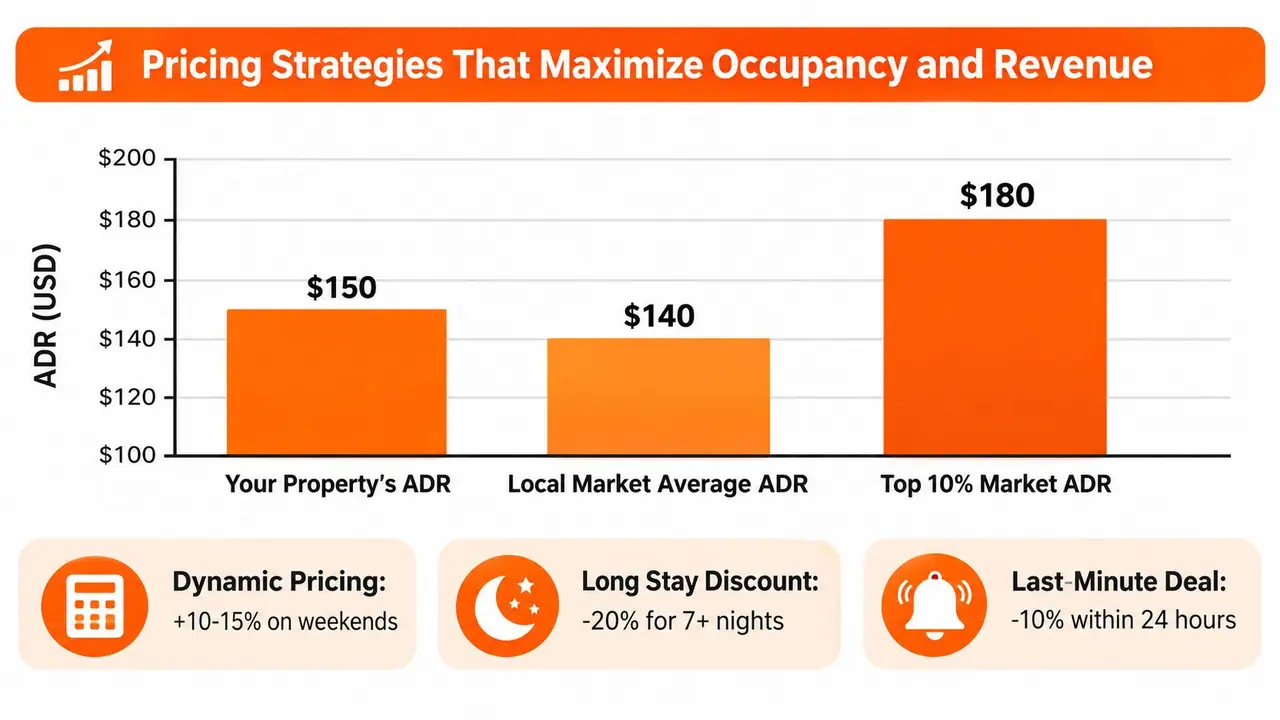
Pricing is where many hosts leave money on the table, because they price from emotion instead of market behavior. They anchor to the mortgage, they copy the listing next door, or they set one rate and forget it. None of those approaches reacts to actual demand.
A better approach starts with the formulas Airbnb already uses. If Airbnb tracks average nightly rate and occupancy rate explicitly, then the host job is to manage the relationship between those two numbers instead of guessing.
Use market ranges as guardrails, not rules
For pricing decisions, local benchmark reports are more useful than gut feel. A host still has to test the market in real time, but a revenue management framework gives you a cleaner starting point for rate setting, stay-length discounts, and last-minute adjustments. ScanStay revenue management guide
Those ranges are guardrails, not promises. If your property sits above the local level but does not justify it with location, design, or amenities, booking pace slows. If you price too low, the calendar fills and revenue leaks out of each stay.
Manage three levers, not one
The first lever is your base rate, which should reflect the property's core positioning. The second is the weekend differential, which captures higher demand on peak nights without making weekdays harder to book. The third is the length-of-stay discount, which can improve occupancy when a gap would otherwise sit empty.
A few simple rules help:
- Base rate: Set it from comparable listings, not your expenses.
- Weekend rate: Raise it where demand is stronger, especially when short stays are common.
- Long-stay discount: Use it to improve calendar fill only when the gap is meaningful.
- Last-minute availability: Adjust aggressively when unsold nights are close.
The goal is not to squeeze the highest rate out of every single night. The goal is to keep the calendar healthy across the whole month, because that is where revenue builds. Hosts managing several properties feel this difference fast. One badly priced weekday can be ignored, but a weak pricing structure across a portfolio shows up in every occupancy report.
Review pricing on a schedule
Weekly pricing reviews beat sporadic price changes. Look at upcoming gaps, local events, and the rate of pace on the calendar. If you wait until the month is over, you are managing history, not demand.
That review should also be practical for multi-property operations. I keep one pricing rhythm for every listing, then adjust for property-specific demand signals, language markets, and booking lead time. That matters more than trying to micromanage each night. The properties that stay competitive are usually the ones with a repeatable pricing routine, not the ones with the most complicated rules.
Automating Guest Communication From Booking to Checkout
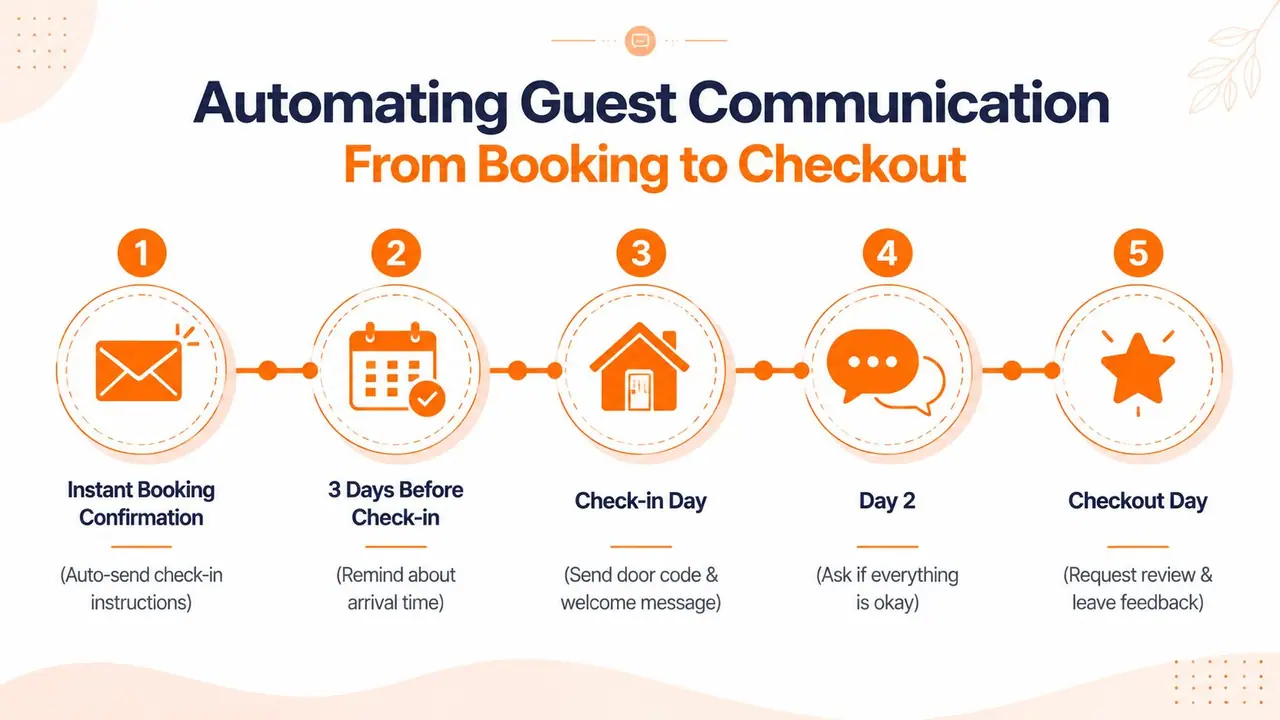
Guest communication is the fastest way to reduce support load without making the stay feel cold. The trick is timing. Send the right message before the guest thinks to ask, and you avoid most of the repetitive questions that clog inboxes.
Build a communication timeline
A good sequence starts with the booking confirmation, then moves into pre-arrival instructions, check-in-day guidance, a mid-stay check, and checkout reminders. Independent hosting advice recommends sending pre-arrival information 2 to 3 days before check-in, then adding check-in-day instructions, a mid-stay check-in, and checkout reminders. It also recommends aiming for response times around 1 hour during the day and under 12 hours overnight. Guest communication timing guidance
That timeline works because it answers the guest before friction starts. The arrival message handles access. The mid-stay check catches small problems before they become complaints. The checkout message closes the stay with less confusion.
Keep the message blocks reusable
For multi-property hosts, reusable content is a major advantage. Write the parts that never change, like parking, door code instructions, appliance basics, and checkout steps, then keep property-specific details in separate blocks. That way you're not rebuilding every message from scratch for every listing.
This is also where multilingual communication matters. Beginner advice usually stops at “reply quickly” and “use templates,” but that doesn't scale well if you manage more than one property or work with international guests. Reusable content blocks, paired with translation tools, cut the time spent rewriting the same instructions across languages.
Know which messages need a human touch
Automation should handle logistics, not personality. Booking confirmation, arrival details, and checkout reminders can usually be fully automated. Messages about a maintenance issue, a serious complaint, or a special request should feel personal.
The boundary is simple. If the message is about instructions, automate it. If it's about judgment, safety, or a problem in the property, respond as a person.
Practical rule: automate the predictable, personalize the exception.
Hosts who do this well don't sound robotic, they sound prepared. That's a better guest experience than trying to improvise every answer in real time.
The same logic is behind the ScanStay message automation guide, which fits neatly into a workflow where templates do the heavy lifting and the host steps in only where context matters.
Replacing Paper Binders With a Digital Welcome Book
Paper binders fail in all the ways that matter. Guests don't open them, cleaners move them, pages go missing, and the important details never stay in one place. A digital welcome book fixes that by turning guest information into a single, mobile-first system.
Put the right content in one place
The strongest use case is simple. Put Wi-Fi credentials, check-in and check-out details, house rules, local recommendations, and video how-tos behind a QR code so guests can open everything in their browser without an app. That removes the awkward “where's the binder” moment and makes the information easier to update across properties. ScanStay works in that category, with branded content, map pins for nearby places, one-tap upsells, and AI translation across 18 languages, all from a central dashboard. ScanStay digital welcome book
A digital guide also supports consistency. If you manage several properties, the shared structure keeps your brand voice stable while letting each home have its own details. That matters more than fancy formatting.
Use the guidebook as both service and sales tool
A welcome book should answer questions, but it can also surface optional services without interrupting the stay. Late checkout, airport transfers, and equipment rentals can live in the same place as the house manual, which means the guest sees them when they're already engaged with the property.
That's more effective than burying extras in message threads. The guest gets context at the right moment, and the host gets a cleaner way to present add-ons without sounding pushy.
Standardize the setup process
The setup shouldn't be complicated. Build the content once in a dashboard, reuse the core blocks across properties, add local recommendations, then deploy a printable QR poster where guests will see it. If the guidebook also tracks scan activity, you can see which parts guests use most and tighten the rest over time.
A good guest guidebook reduces repetitive messages and makes the property feel more organized than a paper binder ever can.
This is one of the few tools that helps both guest experience and host workload at the same time. That combination is why digital guidebooks are worth paying attention to, especially in multi-property or multilingual operations.
Cleaning and Maintenance Workflows That Protect Reviews
A clean property is expected. A sloppy turnover gets remembered. Hosts usually don't lose reviews because the house was almost clean, they lose them because a guest found evidence that nobody checked the details.
Build a turnover checklist that catches misses
The checklist needs to go beyond floors and counters. Add the small items that trip guests up, like remote control batteries, coffee maker descaling, and smoke detector testing. Those checks take less time than dealing with a complaint after check-in, and they catch the problems guests notice fast.
Your turnover process should also include consumables, linen rotation, and a damage inspection. Stock the basics in a way that lets the cleaner reset quickly, then verify that the inventory hasn't drifted since the last stay. That way, the house doesn't slowly degrade between bookings.
Make the system work with or without a cleaner
If you clean personally, use the same sequence every time. If you manage a team, document the sequence so a substitute cleaner can follow it without improvising. The property should look the same regardless of who's on site.
For hosts who scale beyond one property, the property management outsourcing guide is useful context for thinking about which tasks belong with the host and which ones should move into a delegated workflow. The important part is not outsourcing for its own sake, it's making sure the process stays consistent when people change.
Keep a real emergency plan
Maintenance issues are inevitable. What separates a calm recovery from a bad review is the response system. Keep a vendor contact list, define who gets called first, and write a short guest message that acknowledges the problem without overexplaining it.
Practical rule: guests forgive inconvenience faster than uncertainty.
That's why maintenance workflows should include escalation steps. If a problem can't be solved immediately, the guest still needs to know what happens next. A clear update often matters more than a perfect fix on the first try.
Amenity Upgrades That Actually Shift Demand in 2026
Most hosts buy amenities backwards. They add what sounds premium, then wonder why bookings don't change. The better approach is to match upgrades to the guest segment you want, then only buy what has a realistic chance of affecting demand.
Match the upgrade to the traveler
Remote workers care most about a workspace that works. That means a dedicated home office setup, a proper chair, and a quiet corner that doesn't double as a dining table. Wellness travelers respond to different features, and niche offerings like cold plunge or ice bath setups can stand out when the market is thin on that kind of experience.
Large groups want space to gather. EV drivers need charging access if your area supports it. These are not universal buys, but they're the kinds of features that can move a booking for the right guest.
Prioritize by property type and effort
Not every property can support every upgrade, and some changes make more sense than others. A small apartment may get more value from a better coffee station and smarter lighting than from a dramatic structural investment. A larger home with outdoor space might benefit more from sport-oriented amenities or a dedicated work area that can be photographed clearly.
A simple decision rule helps:
- Low effort, high visibility: coffee setup, smart home touches, clearer workspace.
- Medium effort, segment-specific: office station, stronger family-ready setup, better outdoor gear.
- Higher effort, narrower appeal: EV charging, wellness equipment, sport-focused features.
The point is to buy for the guest you want, not for the imaginary guest who wants everything.
Don't chase generic amenities
Generic amenities are table stakes. If everyone already offers them, they won't separate your listing. That's why hosts should think in terms of fit, not just feature count.
A property that's aligned with the right traveler often outperforms a richer property that tries to appeal to everyone. That's the part many beginner guides miss, because they treat amenities like a checklist instead of a demand strategy.
Your 30-Day Hosting Systems Implementation Plan
The fastest way to improve a listing is not to change everything at once. That usually creates half-finished systems and a lot of frustration. A better approach is to build the operational core first, then layer on pricing and amenities after the basics are stable.
Days 1 to 7
Set up your automated guest messages, write the core house manual, and replace the paper binder with a digital welcome book. Build the cleaning checklist at the same time so the guest-facing and turnover workflows match.
By the end of week one, the goal is simple. The same questions should produce the same answers every time, without you rewriting them manually.
Days 8 to 14
Review your listing photos, tighten the title, and clean up the first screen of description copy. Then review the current rate against your market and make your first pricing adjustment with the goal of better occupancy, not just a higher headline number.
This is also a good time to check where the listing creates doubt. If guests keep asking the same thing before booking, the listing isn't clear enough yet.
Days 15 to 21
Refine your turnover workflow. Add the overlooked checks, confirm your vendor list, and make sure the cleaner can execute the same process without being reminded. If you manage more than one property, standardization matters more here than speed.
Days 22 to 30
Choose one amenity upgrade tied to your guest segment. Don't buy three things and hope one works. Pick the feature that best fits the property, install it properly, and update the listing copy and welcome materials so guests notice it.
Progress compounds when the property, the message flow, and the turnover process all point in the same direction.
A solid airbnb host guide is really a set of working systems. Build them in order, keep them simple, and improve them one layer at a time.
ScanStay helps hosts replace paper binders and repetitive messages with a QR-based digital welcome book, so guests can find Wi-Fi, check-in steps, house rules, and local recommendations without another inbox thread. If you're ready to turn guest communication into a system instead of a scramble, visit ScanStay and see how it fits your property workflow.