How to Reduce Support Tickets for Short-Term Rentals
Learn how to reduce support tickets for your Airbnb or vacation rental with practical steps, templates, and a digital welcome book that deflects FAQs.

By 7:30 p.m., the messages start arriving faster than you can answer them. One guest wants the Wi-Fi password, another can't find the parking space, and a third is standing outside asking whether the keypad code includes the pound sign. Meanwhile, someone at another property needs help with the thermostat, and a departing guest wants to confirm checkout time.
If you manage several short-term rentals, this doesn't feel like customer service. It feels like recreating the same welcome instructions from memory every evening. The practical question isn't how to type faster. It's how to reduce support tickets by designing the guest experience so predictable questions get answered before they become messages.
Table of Contents
- The Evening Message Avalanche and Why It Happens
- Audit Your Ticket Drivers in 30 Days
- Build a Self-Service Layer Guests Actually Use
- Automate Replies and Workflows Without Sounding Robotic
- Comparing Static Guides vs Digital Welcome Books
- Measure Deflection Without Killing Guest Satisfaction
- Consolidate Everything Into One Scanable Hub
The Evening Message Avalanche and Why It Happens
During a busy check-in week, three properties can produce the same stream of questions in slightly different wording: Wi-Fi password, parking, late arrival, thermostat, checkout time, and door code. None of these guests is being unreasonable. They're asking at the exact moment the information matters, often while carrying luggage, standing at a locked door, or trying to settle children into an unfamiliar space.
The problem is structural. The answer exists, but it's trapped in a PDF attachment, an old Airbnb thread, a pinned message, or a cleaner's handoff note. Guests can't reliably find information that lives in several places, and hosts can't reliably keep several versions synchronized.
Three operational gaps create most of the repetition:
- Scattered information: Instructions sit across booking platforms, email, cloud folders, printed binders, and private team messages.
- Inconsistent handoffs: A co-host knows where the spare key is, while the cleaner knows the trash schedule, but neither update reaches the guest guide.
- Missing anticipatory guidance: Guests discover friction points only after arrival, such as a confusing lockbox, an unusual appliance, a strict parking arrangement, or a specific trash-day routine.
Practical rule: If a guest asks the same question twice across different stays, treat it as a design failure before treating it as a support task.
A QR-linked Wi-Fi page can remove one of the most common first-contact questions when it's placed where guests naturally look, such as beside the router or on the refrigerator. This QR code Wi-Fi password guide is useful for thinking through that placement and handoff.
The fix has four connected parts. First, audit the messages instead of relying on memory. Next, turn the biggest drivers into self-service content. Then automate the predictable follow-ups without hiding the human contact path. Finally, measure whether fewer tickets also mean a better stay. A digital welcome book connects all four because it gives hosts one place to improve, link, update, and monitor.
Audit Your Ticket Drivers in 30 Days
Start with evidence from your own inbox. A practical support audit begins by exporting guest message threads from Airbnb, Vrbo, and your property-management system into one spreadsheet. You don't need advanced software at first. You need consistent labels and enough detail to distinguish a genuine incident from a repeated request for information.
Use ten categories so the results remain comparable across properties:
- Check-in, including arrival timing, access steps, and door codes.
- Wi-Fi, including passwords, network names, and connection problems.
- Parking, including permits, spaces, garages, and restrictions.
- Appliances, such as thermostats, ovens, washing machines, and coffee makers.
- Checkout, including departure time, keys, trash, and linens.
- House rules, covering noise, pets, smoking, and visitors.
- Local recommendations, including restaurants, transport, and activities.
- Payments, including deposits, charges, and extensions.
- Noise, including neighbor concerns and quiet-hour questions.
- Emergencies, such as leaks, lockouts, outages, or safety issues.
The ticket categories that matter most are usually repetitive, low-complexity questions. Independent guidance on support-ticket reduction identifies how-to, onboarding, troubleshooting, billing, and account-management requests as categories that can account for 60% to 70% of total support volume in some support environments, as described by KnowledgeOwl's support-ticket guidance. Hospitality questions fit the same pattern, even though the wording is different.
Record the missing link, not just the question
For every message, record whether the answer already exists somewhere. A Wi-Fi answer might be in the house manual, while the correct door-code instructions might be in an automated message. If a guest still asks, the issue may be discoverability, timing, outdated content, or conflicting instructions.
| Date | Property | Category | Question Summary | Answer Currently Lives In | Fix Elsewhere? |
|---|---|---|---|---|---|
Add two operational notes to your working sheet: how long it took to resolve the question and whether the guest contacted you again about the same issue. This separates a quick answer from a failed self-service attempt that generated another message.
After the audit, rank categories by volume per property. Flag the top three drivers, then inspect the wording guests use. Your guide should reflect their language, not the internal label “access logistics.” Guests search for “How do I get in?” or “Where is the keypad?”
The audit also prevents over-automation. Some questions expose a missing instruction, while others reveal a physical problem, such as a dead battery, unclear parking sign, or unreliable appliance. Fix the environment when the environment is causing the ticket.
Build a Self-Service Layer Guests Actually Use
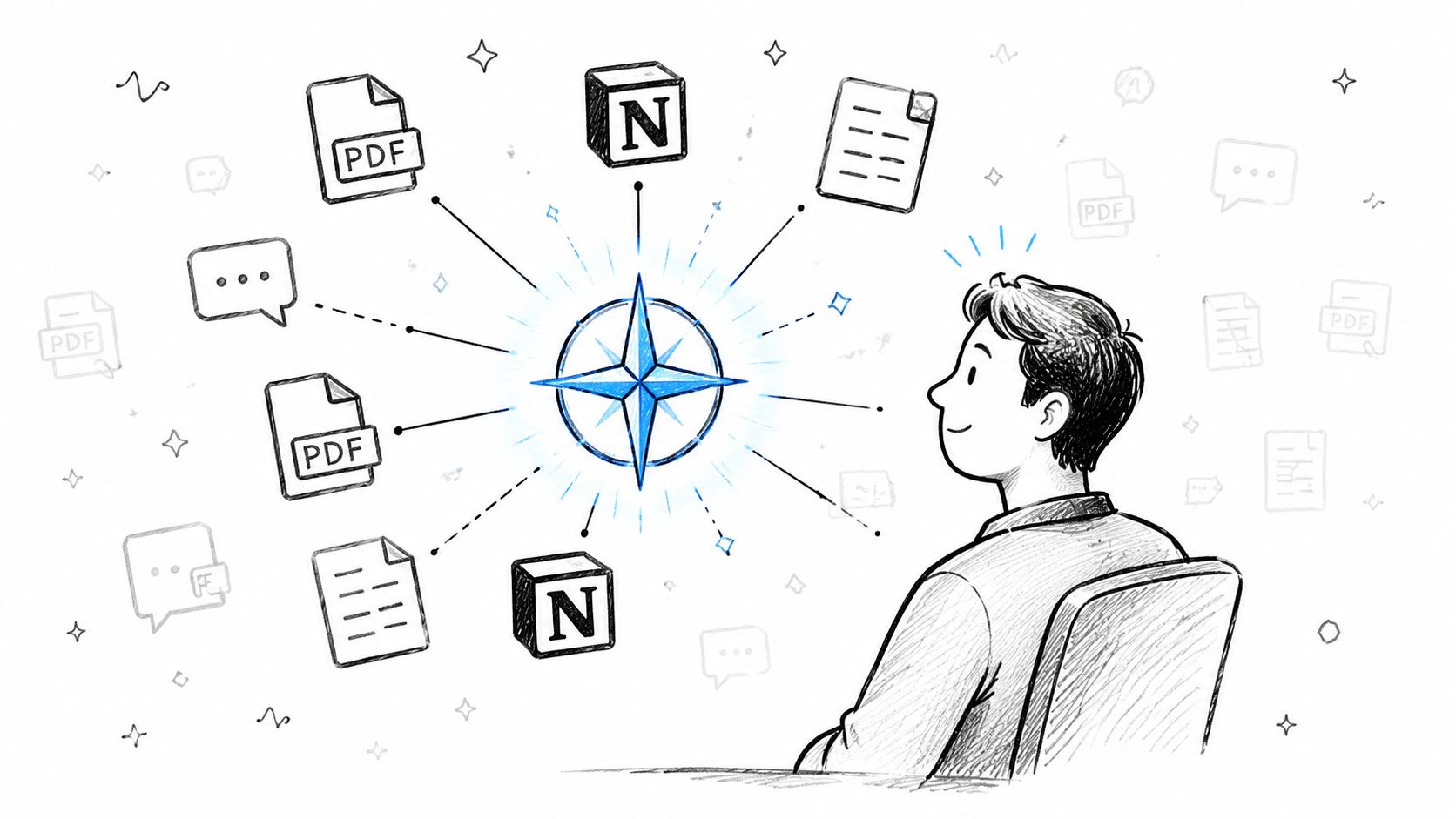
A useful self-service layer has one canonical destination. Guests shouldn't have to search an email attachment, a message thread, and a separate chatbot to find the Wi-Fi password. A mobile-first digital welcome book can bring Wi-Fi credentials, door codes, parking instructions, check-in steps, house rules, appliance guides, checkout details, and local recommendations into one searchable hub.
Place the highest-value content where guests can reach it quickly. A QR poster on the refrigerator or entry table can support in-home access, while the same link belongs in pre-arrival and check-in messages. Tools such as ScanStay can provide a browser-based digital welcome book, QR access, multilingual content, video how-tos, and reusable property information. Use it as one possible implementation, not as a substitute for clear content.
Build around the questions guests already ask
Use the audit to decide what gets built first. Choose a platform with search, deep links, mobile pages, and usage visibility. Then create one page or section for each leading ticket driver.
Write every answer for a quick scan:
- Start with the answer: Put the Wi-Fi network and password at the top, not beneath a welcome paragraph.
- Use visual hierarchy: Bold the door code, parking location, checkout time, and emergency contact.
- Add one troubleshooting step: For Wi-Fi, mention the usual router location and what to do if the network doesn't appear.
- Show the sequence: For check-in, number the path from parking to entrance to lockbox.
- Separate ordinary and urgent help: Guests need to know whether to consult the guide, send a message, or call immediately.
A Wi-Fi card might show the network name, password, router location, and a single fallback instruction. A checkout page might contain a short checklist that guests can screenshot on departure morning. A lockbox page might include a short video if the mechanism is difficult to explain in text.
Local content belongs in the same hub, but it shouldn't bury operational information. A restaurant list can include a map link, while activity pages can point guests toward useful resources such as kayak rental information when the property is near suitable waterways.
The standard isn't “How much content can we publish?” It's “Can a guest find the answer in under ten seconds?”
Pin the welcome-book link in every relevant message. Use deep links when a message concerns one action, such as “Open the parking instructions” or “See the checkout checklist.” Search helps guests who browse. Deep links help guests who are already in a hurry.
A mature self-service program can deflect 25% to 40% of inbound support volume before an agent receives it, while knowledge-base deflection is commonly cited at 15% to 25%, according to ticket-deflection benchmarks from Stealth Agents. The range depends on content quality, search, maintenance, and how well the resource matches the questions guests ask.
Give guests a clear human fallback on every important page. “If this doesn't solve it, message me with a photo of the keypad” is more trustworthy than a dead-end FAQ.
Before checking the automation settings, watch this overview of how a digital guide can organize guest information:
Automate Replies and Workflows Without Sounding Robotic
The welcome book should handle the information guests need to retrieve. Automation should handle timing, reminders, and simple routing. The two work best together when messages point to the same canonical page instead of reproducing an entire manual in the inbox.
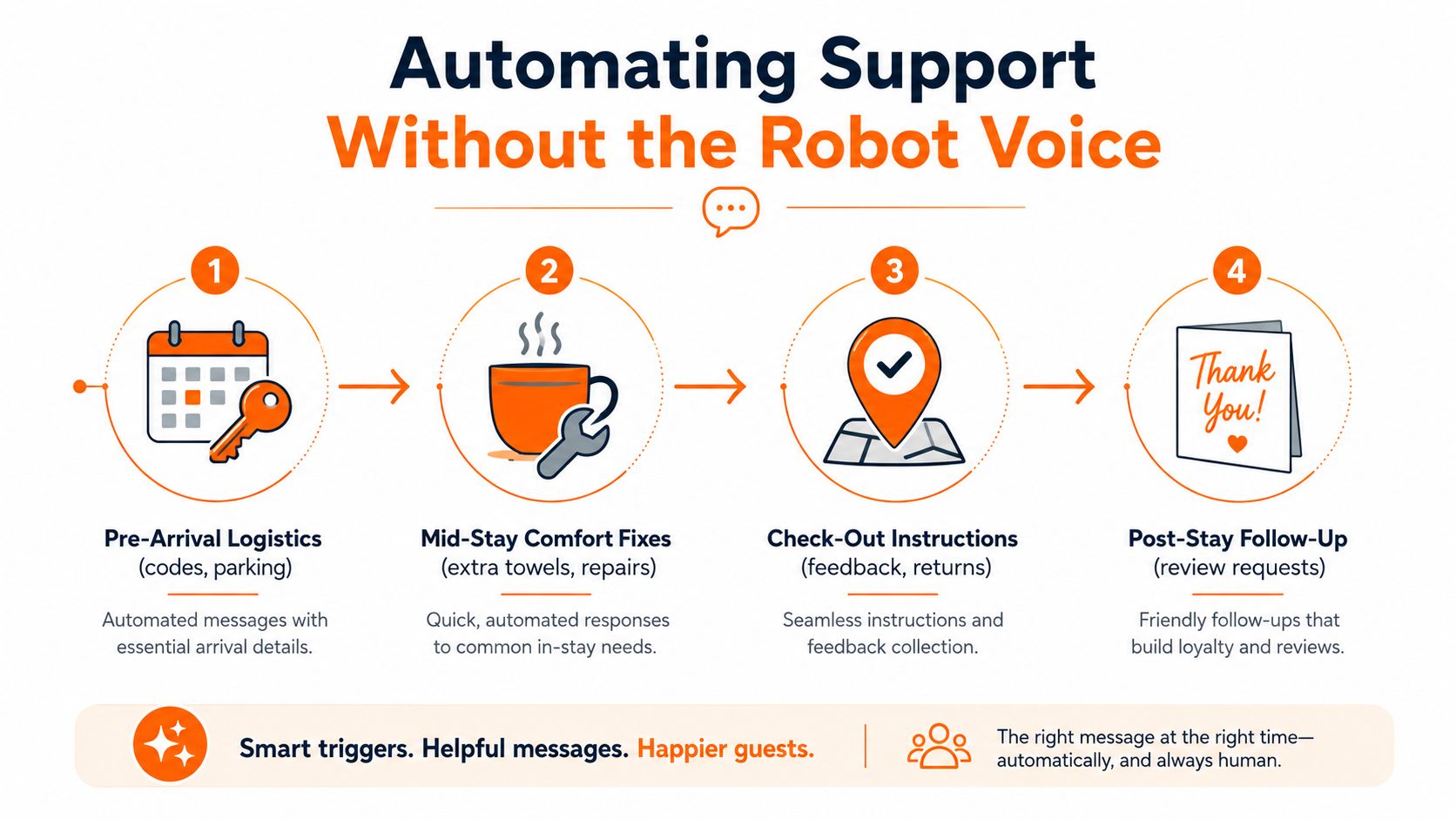
Four triggers usually deserve attention:
- Pre-arrival logistics: Send access, parking, and arrival guidance when the reservation reaches the appropriate stage.
- Mid-stay comfort: Offer a fast path for towels, supplies, minor maintenance, or late-checkout requests.
- Checkout: Deliver the departure checklist before the guest has to ask what to do with keys or trash.
- Post-stay follow-up: Request feedback after departure while the experience is still fresh.
Ready-to-paste scripts should sound like a host, not a notification system:
Pre-arrival rule: Send after the final arrival instructions are delivered.
“Hi [First Name], your [Property Name] arrival details are ready. Open the guide for parking and the door code, and text me if the keypad doesn't unlock it.”
Mid-stay rule: Send when a guest asks for a common item or opens the service page.
“Absolutely, [First Name]. I've noted the extra towels for [Property Name]. If you need anything else, reply here and I'll help.”
Checkout rule: Send before the scheduled departure window.
“Morning, [First Name]. Before you leave [Property Name], please check the guide for keys, trash, and the final door step. Text me if anything is unclear.”
Review rule: Send after the guest confirms departure.
“Thanks for staying at [Property Name], [First Name]. I hope the space worked well for you. If you have a moment, your honest review would mean a lot.”
Conditional logic keeps these messages relevant. A longer booking may need a mid-stay supply reminder, while a large party may need clearer parking and trash instructions. A booking from one channel may use different access details from another, so the automation should pull the correct property and reservation data rather than rely on one universal template.
The rule is simple: automate deterministic information and routine prompts, not judgment. Refunds, complaints, neighbor disputes, safety concerns, suspected damage, and emotionally charged messages should go directly to manual review. A bot that blocks a frustrated guest from reaching a person can create more work and damage trust.
Hosts who want to refine the message layer can use this guide to automate Airbnb messages, then test every trigger with an actual reservation scenario. Check the timing, the property-specific details, the links, and the fallback route before activating it across the portfolio.
Comparing Static Guides vs Digital Welcome Books
A PDF feels familiar. You can attach it to an email, print it for a binder, and hand it to a cleaner. That familiarity is useful, especially for guests who prefer conventional instructions. But familiarity doesn't solve the operational problems that generate repeat questions.
The comparison changes once you evaluate the formats by searchability, update speed, visibility, personalization, and automation. A PDF can contain excellent instructions and still fail if guests can't locate the relevant page or if the Wi-Fi password changed after the document was sent.
| Dimension | Static PDF / Binder | Digital Welcome Book |
|---|---|---|
| Content updates | Requires replacing and redistributing a file or page | Supports live editing from one central version |
| Guest search behavior | Depends on scrolling, page labels, or physical browsing | Supports mobile browsing, search, and direct links |
| Host visibility into usage | Usually shows no section-level behavior | Can provide usage and scan visibility when supported |
| Integration with automation rules | Links to a document but rarely changes by booking context | Can connect deep links and property-specific flows |
A digital guide also handles content that static documents struggle with. Hosts can embed a short lockbox video, link a map to a local attraction, or place the exact checkout checklist behind a single message link. When an instruction changes, the host updates the hub instead of chasing every old attachment.
The trade-off is that a digital guide needs maintenance, reliable access, and a deliberate structure. A poorly organized online page is still confusing. Search doesn't rescue vague headings, duplicate answers, or property details that were copied from another listing.
A static binder still has a place in remote cabins with unreliable signal, and some guests appreciate a physical backup. Keep it concise and current, then make the digital hub the primary source wherever guests have usable connectivity. The decision shouldn't be “paper or technology.” It should be whether every format points to the same truth.
For a closer look at how the central resource works, review this digital welcome book approach and compare it against the documents already circulating in your operation. The weak point usually becomes obvious when you ask a cleaner to locate the current parking instructions without opening the host's private message history.
Measure Deflection Without Killing Guest Satisfaction
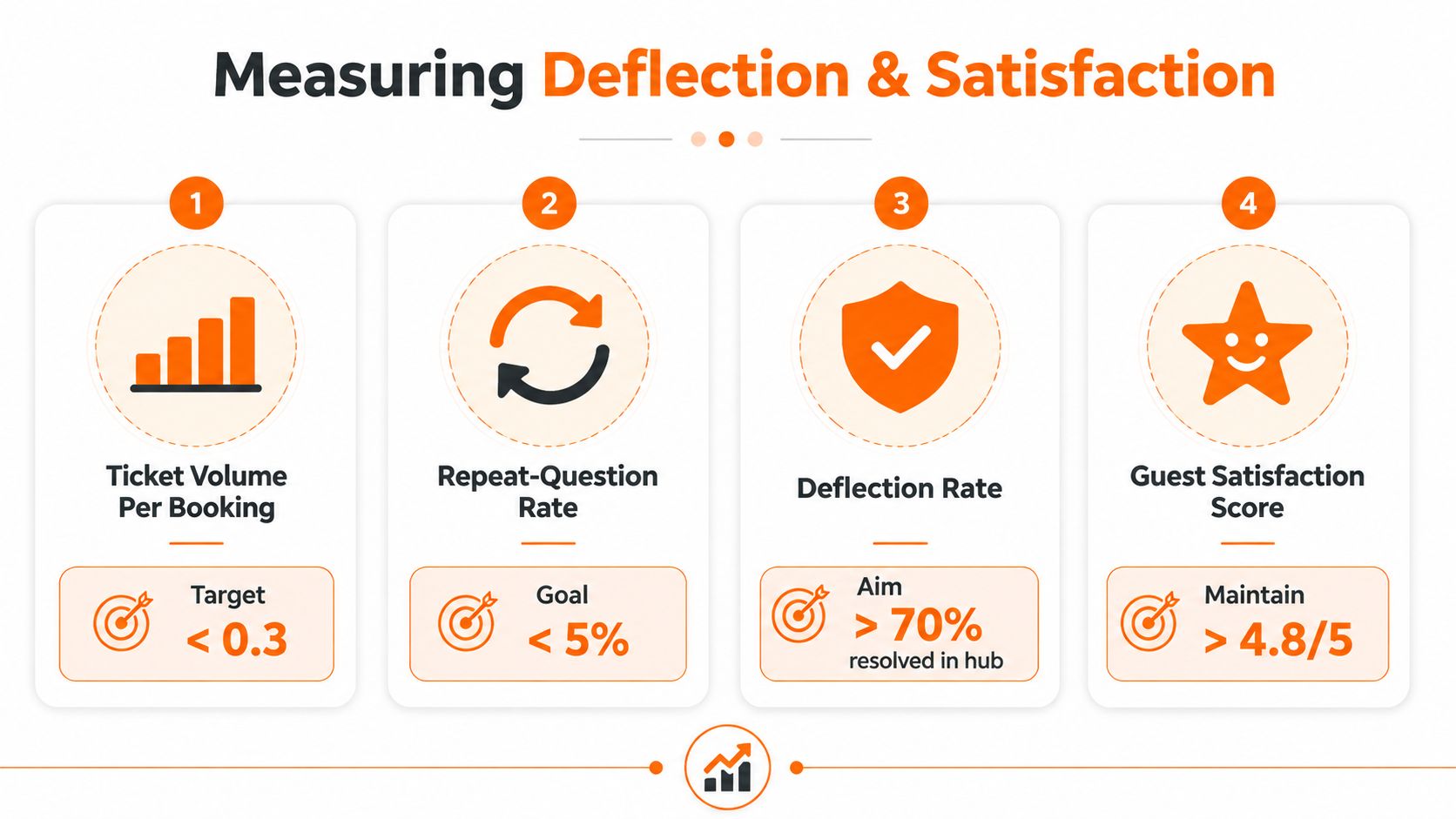
Ticket reduction is useful only when guests still feel supported. Track ticket volume per booking, repeat-question rate, deflection rate, and post-stay review score together. A falling inbox count can hide a broken contact path if guests stop asking for help and express their frustration in reviews instead.
Deflection means a guest resolved an issue through the welcome book or an automated reply without human intervention. It doesn't mean the guest opened a page, abandoned the search, and eventually found an answer elsewhere. A stronger operational definition counts self-service resolutions while excluding re-contacts within 48 hours, as described in knowledge-base measurement guidance.
Use a 30-60-90 review rhythm
At 30 days, establish the baseline. Count messages per booking, tag them by category, identify repeat questions, and record review sentiment. Don't change everything at once, or you won't know which fix affected the result.
At 60 days, compare the new deflection pattern with guest satisfaction. If a message sequence prevents questions but reviews mention confusion, shorten the automation, improve the page, or restore a human checkpoint. A weekly dashboard should include ticket volume, first response time, satisfaction, and deflection rate, because volume alone can hide quality regressions. Guideflow's measurement framework recommends this kind of metric pairing and a baseline before implementation.
At 90 days, inspect the three biggest remaining drivers. Decide whether each needs a new guide section, a better automation, or a physical and operational fix. If guests keep asking about hangers, add hangers. If they keep missing the parking sign, improve the sign. Documentation can't solve every environmental problem.
Keep the dashboard on one page:
- Tickets prevented: Self-service and automated resolutions without human handling.
- Tickets handled: Messages that required a host, co-host, or agent.
- Satisfaction trend: Review score and qualitative complaints over the same period.
- Repeat questions: Guests who contacted support again about the same issue.
For broader context on choosing meaningful hospitality measures, compare these service business growth metrics and adapt the principle to stays. Your aim isn't a silent inbox. It's fewer avoidable interruptions alongside a guest experience that remains easy, responsive, and personal.
Consolidate Everything Into One Scanable Hub
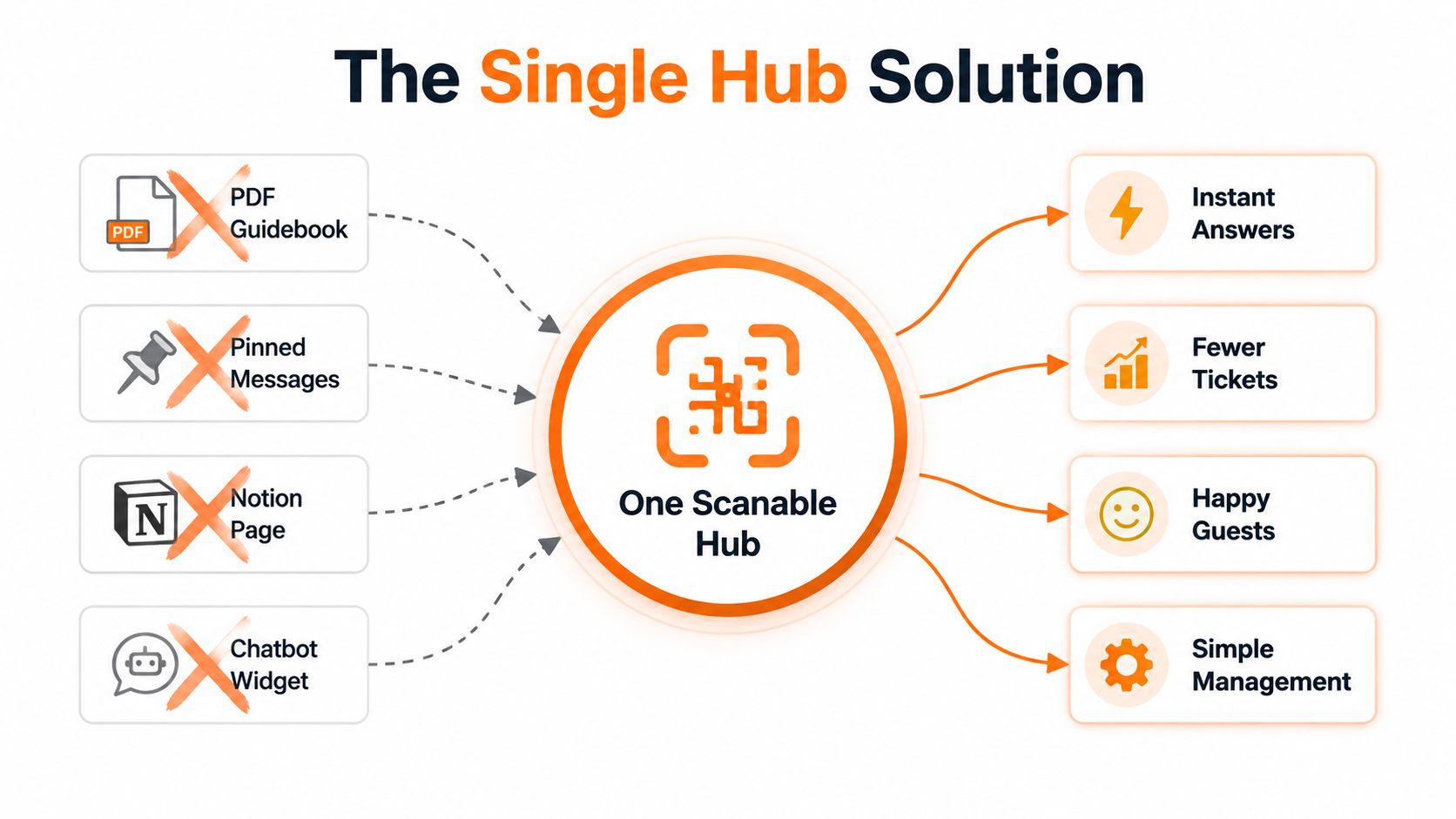
A PDF guidebook, three pinned messages, a Notion page, and a chatbot widget can look like a complete support system. To a guest, it often feels like four places to search. Fragmentation creates the same uncertainty that caused the evening message avalanche.
Choose one anchor hub and route every other channel back to it. Put the same QR code on the refrigerator, the check-in email, the house manual binder, and automated message threads. The hub should contain the practical details guests need most:
- Access: Door codes, entry steps, late-arrival instructions, and escalation contacts.
- Connectivity: Wi-Fi name, password, router location, and a basic troubleshooting step.
- Property use: Thermostat, appliances, hot water, laundry, and house rules.
- Departure: Checkout time, keys, trash, dishes, and damage reporting.
- Local context: Parking rules, restaurants, transport, attractions, and activity information.
The phrase to design around is one scan, one search, one answer. A guest shouldn't land on a directory of bookmarks and decide which document might contain the parking rule. Use a clear top-level tree, consistent page titles, and links that open the relevant section directly.
Connect booking data where your tools allow it so the guide can display the correct guest name, property, arrival timing, and stay details. Keep permissions tight around sensitive information, particularly door codes and personal contact details. Test the guest view on a phone before publishing, because hosts often review content on a desktop while guests use a small screen at the worst possible moment.
Set a retirement date for duplicates. Move old PDFs behind a clearly marked legacy link, remove outdated pinned messages, and give cleaners and co-hosts the current hub URL. If a password, parking rule, or appliance instruction changes, update one location and check every automated message that points to it.
The connected self-service model matters because a static FAQ can still cause re-contacts when it doesn't reflect property-specific or live details. Guidance on connected self-service portals makes the same operational distinction: self-service works better when it connects to the record and workflow the team uses.
ScanStay offers hosts a QR-based digital welcome book with browser access to Wi-Fi, check-in and checkout details, house rules, recommendations, videos, multilingual content, and reusable property information. If your current guides and messages are scattered across multiple locations, visit ScanStay to create one guest-facing hub, place its QR code throughout the stay, and start replacing repetitive evening questions with clear self-service.