For hotels, B&Bs and guesthouses

    The digital welcome book for hotels and B&Bs

    The in-room compendium is expensive to print, out of date within a month, and nobody wipes it down between stays. A ScanStay welcome book puts the same information — Wi-Fi, breakfast times, services, house policies and local recommendations — behind a QR code on the desk, in every guest's language, updated from one dashboard.

    • One QR card per room instead of a printed compendium
    • Update breakfast times or prices for every room at once
    • Guests order extras and services from the page
    • 16 languages, chosen automatically per guest

    Prueba gratis de 3 días · Listo en 2 minutos · 14 días de garantía de devolución

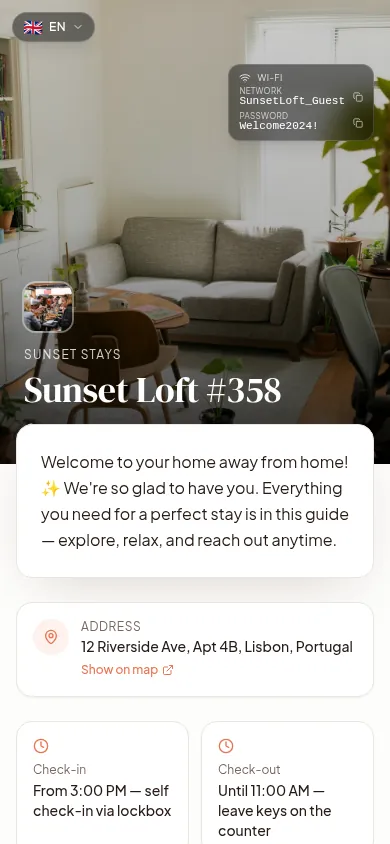
    The digital welcome book for hotels and B&Bs — ScanStay digital guest book shown on a phone

    What belongs in a hotel guest directory

    Guests check a directory for a handful of facts, usually within ten minutes of dropping their bags. Put those first and the rest underneath.

    • Wi-Fi network and password
    • Breakfast times and location, room-service hours
    • Reception hours, phone number and WhatsApp
    • Check-out time and late check-out options
    • Facilities: pool, gym, spa, parking, laundry
    • Policies: smoking, pets, quiet hours, damage
    • Local recommendations and transport
    • Paid services guests can order on the spot

    Cheaper than reprinting, cleaner than a binder

    A printed compendium costs money every time a price, a name or a phone number changes — and each room needs its own copy. A digital welcome book needs one edit, and every room reflects it instantly. The only thing you print is a small QR card, and it never goes out of date.

    • No reprint costs when rates or hours change
    • Nothing shared between guests but a wipeable card
    • Room-specific pages if floors or wings differ
    • See what guests actually read with scan analytics

    Turn the directory into revenue

    Every guest opens the welcome book, which makes it the highest-traffic surface in your property. Add late check-out, airport transfers, breakfast upgrades, spa slots, bike rental or a bottle of wine on arrival — guests order and pay from the page, and you get the order in your dashboard.

    Multi-property from one dashboard

    If you run several properties or a small group, each one gets its own page and QR code while shared content stays consistent. Duplicate a property to launch a new one in a minute instead of rebuilding it, and update house policies across the group without touching each page.

    Preguntas frecuentes

    Do we need a separate page per room?

    Usually one page per property is enough. If wings, floors or room types differ, you can create separate properties with their own QR codes.

    Can guests order room service or extras?

    Yes. You list services with prices and guests order from the welcome book; orders appear in your dashboard where staff can mark them fulfilled.

    Which languages are supported?

    16, including English, French, Spanish, German, Italian, Portuguese, Dutch, Polish, Czech, Swedish, Turkish, Ukrainian, Russian, Japanese, Korean and Chinese.

    How do guests access it without Wi-Fi?

    They scan on mobile data, or find the Wi-Fi details at the top of the page once connected — many properties also print the network name on the QR card itself.

    Is there a plan for several properties?

    Yes — plans scale by number of properties and start at $9/month, with a 3-day free trial and a 14-day money-back guarantee.

    Retire the compendium this week

    Build your digital guest directory, print the QR cards, and update everything from one place.