Digital Transformation Hospitality: Your Roadmap for 2026
Drive digital transformation hospitality with a practical roadmap, quick wins for small hosts, and a deployment checklist for multi-property managers.
You know the evening I mean. The inbox is full of the same three questions, the paper welcome binder is already outdated, and a guest is waiting on a door code while you're still answering the Wi-Fi message you've seen three times before. That's usually the moment hosts stop treating technology as a nice extra and start seeing digital transformation in hospitality as a way to get control of the day back.
The shift is bigger than convenience. During COVID, 92% of hotel managers in a 2021 survey said the pandemic promoted digitalization in their organizations, and 47% reported increased use of cloud file-sharing tools, which shows how quickly hospitality moved from paper-heavy routines to cloud-based collaboration and contactless workflows (Tourism & Management Studies survey). The industry hasn't moved back. Recent summaries show contactless check-in, mobile keys, contactless payments, chatbots, and analytics are now part of the operating model, not side projects (2026 hospitality digital transformation summary).
For small hosts, the win is fewer repetitive messages and fewer errors. For multi-property managers, the win is consistency across units without adding chaos. The hard part is choosing tools that reduce work instead of creating another layer of admin, which is why process design matters as much as software. A useful starting point is a guide like Minimising hospitality errors, because the goal isn't “being digital,” it's making fewer avoidable mistakes while serving guests faster.
Table of Contents
- Why Digital Transformation in Hospitality Starts With Evenings Like Yours
- Set Goals and KPIs Before You Touch Any Software
- Map the Guest Journey to Find the Right Moments to Digitize
- Choose and Integrate the Core Technology Stack
- Quick Wins for Solo Hosts vs a Phased Plan for Multi-Property Managers
- Privacy, Multilingual Content, and the Hidden Failure Points
- Pilot, Measure ROI, and Build the Iteration Loop
Why Digital Transformation in Hospitality Starts With Evenings Like Yours
The moment usually doesn't look strategic. It looks like a host standing in a kitchen, phone in hand, while a checkout reminder, a late-arrival message, and a “where do I park?” question all pile up at once. The paper binder still exists, but nobody opens it, and the answers guests need are trapped across old emails, screenshots, and memory.
That's why digital transformation in hospitality works best when it begins with repetitive friction. The first thing to remove isn't the glamorous part of the stay, it's the low-value work that eats the evening. Check-in instructions, Wi-Fi details, house rules, local recommendations, and routine upsells are all the sort of information a system can deliver consistently, while a human stays available for exceptions and service recovery.
Practical rule: if a guest asks the same thing every week, that message belongs in a system, not in your memory.
The operational side matters more than the buzzwords. A solid digital setup doesn't erase hospitality, it protects it from getting buried under admin. If a guest can get what they need in seconds, the host has more room for the personal touches that get remembered. That balance is the core trade-off, fast self-service for guests, less interruption for hosts.
The best implementations start with the smallest annoying tasks, then build outward. One property might only need a QR welcome guide and automatic pre-arrival replies. A multi-property operator might need a shared content layer and consistent guest messaging across the portfolio. Either way, the starting point is the same, use technology to remove repetition so the human part of hospitality can happen where it matters most.
Set Goals and KPIs Before You Touch Any Software
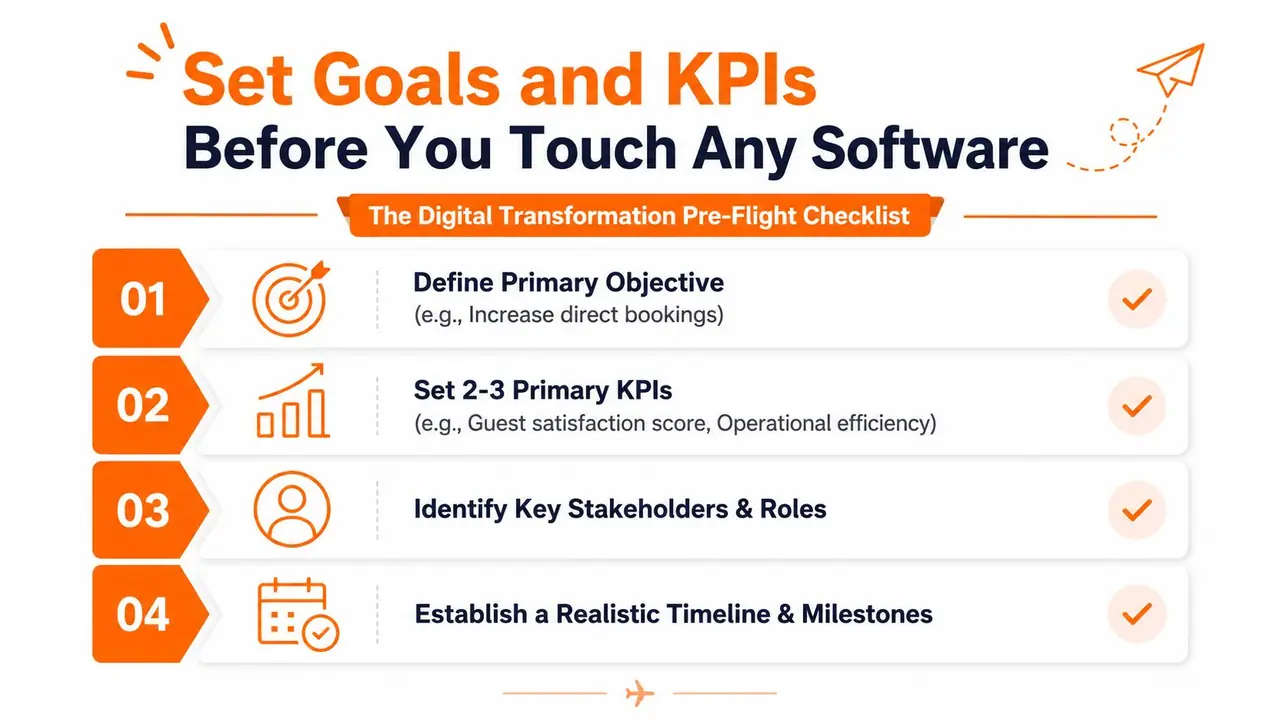
The easiest mistake is shopping for tools before you know what success looks like. A host sees mobile check-in, a chatbot, and a dashboard, then buys the thing that sounds modern. Three months later, nobody can prove what changed, and the team has more logins than before.
Pick outcomes, not features
Start with three to five measurable outcomes. For most hosts, the useful ones are straightforward, faster guest replies, fewer support messages, more upsells, fewer checkout errors, or better review sentiment. Keep the language in business terms, not software terms, because “we adopted AI” is not a goal, it's a purchase decision.
A simple way to frame it is this:
- Define the outcome: Reduce repetitive pre-arrival messages.
- Name the KPI: Messages per booking.
- Capture the baseline: Count a normal week before changing anything.
- Set the review point: Compare after the pilot ends.
The baseline matters because intuition is unreliable. One host may feel that messages dropped because the team is calmer, while the actual change was a new guest guide answering common questions. If you measure before you launch, you can separate a genuine improvement from a busy week.
Keep the metric sheet short
A one-page goal sheet is enough. Use one line each for the objective, the KPI, the baseline, the target, the owner, and the review date. If a proposed metric can't be tracked without heroic effort, it probably isn't the right metric.
Good KPI design is boring on purpose. If everyone can't explain the number in one sentence, the number probably won't survive the rollout.
The goal is to make the technology conversation concrete. Instead of asking whether a platform is advanced, ask whether it helps you save time, reduce errors, or sell more relevant add-ons. That frame keeps the project tied to guest experience and operating margin, which is where digital work pays off.
Map the Guest Journey to Find the Right Moments to Digitize
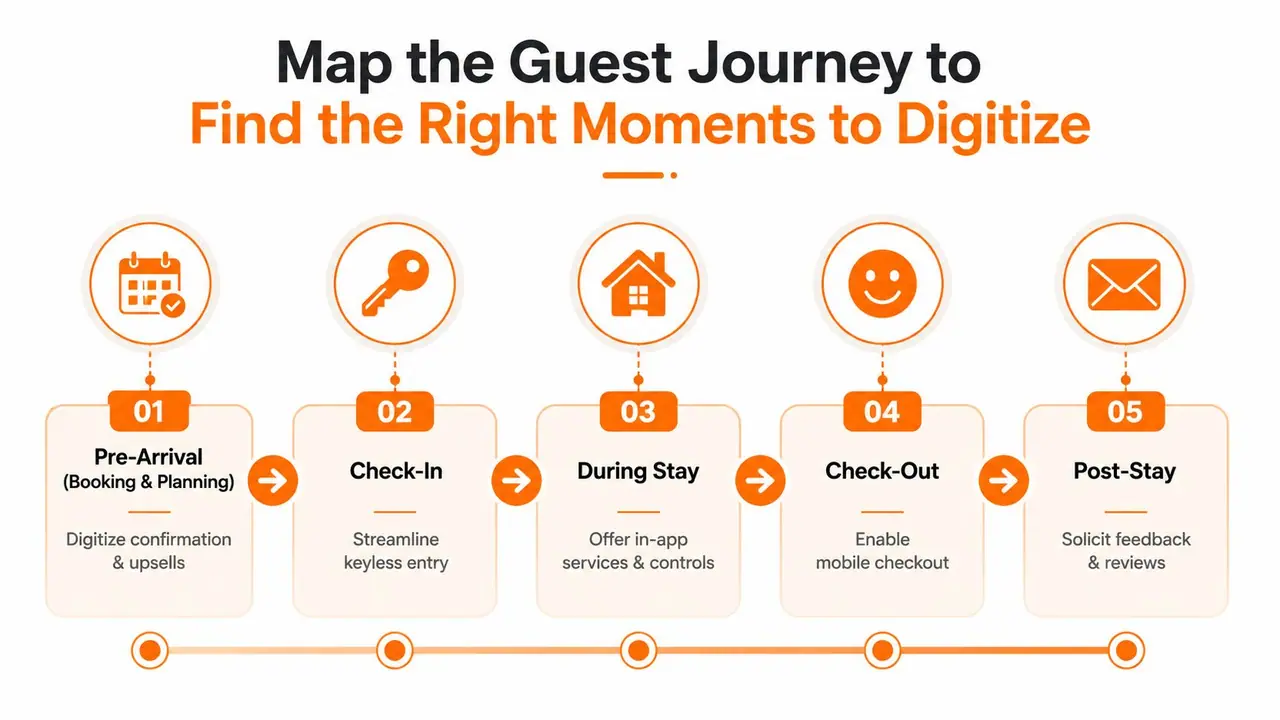
The guest journey gives you the clearest answer to where digital help belongs. Not every moment should be automated, and not every moment deserves a human reply. The trick is to separate moments that need speed from moments that need judgment.
A late-night arrival is the best example. If a guest reaches the property at 11 p.m., they don't need a warm essay, they need the door code, the Wi-Fi, and the right instruction in the right language. A pre-arrival message, a QR guide, or a mobile check-in flow can solve that without a call or a delay.
Where automation fits best
Think through the stay in four stages, pre-arrival, arrival, in-stay, and departure. At pre-arrival, digital tools handle confirmations, upsells, and practical details. At arrival, they reduce friction with keyless entry or clear access instructions. During the stay, they can answer routine questions, point guests to local recommendations, and reduce repetitive back-and-forth. At departure, they can make checkout easier and prompt feedback while the stay is still fresh.
The important distinction is between digital-first and human-first touchpoints. A local restaurant recommendation can live in a QR guide. A complaint about noise from the room next door should reach a person. A clean flow respects both the guest's time and the host's judgment.
The internal logic is simple, digitize the moments where delay creates frustration, and keep humans on the moments where nuance creates trust. That's why QR-based guest guidance works well for routine information, while personal follow-up still matters for service recovery, special requests, and tricky edge cases. A practical example of this approach is the QR check-in flow described in ScanStay's QR code guest check-in guide, which fits naturally into the arrival stage without forcing guests into an app.
Choose and Integrate the Core Technology Stack
The stack works only when the layers talk to each other. A smart lock that doesn't sync with the property system still leaves someone sending codes manually. A payment flow that sits outside the booking confirmation creates reconciliation work later. Integration is the core feature.
Build the stack in the right order
Start with the guest-facing content layer, then add contactless operations, then connect the property system and channel manager, then finish with payments and upsells. That order keeps each step useful on its own, while making the next layer easier to attach. If you start with the most complex integration first, you usually spend too much time debugging and too little time improving the stay.
The core layers usually look like this:
- Guest content layer: Digital welcome books, house rules, local tips, and simple mobile access.
- Contactless operations: Mobile check-in, digital keys, and clear arrival workflows.
- Property and channel integration: One system keeping calendars, reservations, and guest data aligned.
- Payment and upsell flows: Late checkout, transfers, rentals, and other add-ons tied to the stay.
For hosts evaluating PMS options, the quality of integration matters more than the pitch deck. A connected property system reduces duplicate entry and cuts down on the “did that sync?” problem that burns time across a portfolio. A practical overview of that decision sits in ScanStay's property management systems guide, especially if you're comparing a lightweight guest-content tool against a broader operating layer.
Choose tools that fit your operating size
The right stack for a single apartment is not the same as the right stack for a twelve-unit portfolio. Solo hosts usually need speed and simplicity first. Multi-property managers need consistency, shared content, and fewer handoffs between people.
Choose the tool that removes the most manual steps from your current workflow, not the one with the longest feature list.
ScanStay fits naturally in the guest-content layer for hosts who want a QR-based digital welcome book with multilingual access, but it still needs a sensible operational home around it. If the surrounding systems are messy, a great guest guide just hides the problem instead of solving it.
Quick Wins for Solo Hosts vs a Phased Plan for Multi-Property Managers
A solo host and a portfolio manager face the same guest expectations, but the deployment logic is different. One can make a change over a weekend. The other needs standardization, training, and a controlled rollout. Treating both as the same project is how good tools get blamed for bad process.
Solo hosts can move fast
For one or two properties, the quickest wins are practical. Replace the paper binder with a QR welcome guide. Automate the pre-arrival message. Create one upsell link for late checkout or add-on services. Set up a shared inbox or dashboard so repeat questions don't scatter across email, SMS, and platform chat.
Those changes don't need a huge implementation window. They need clear content and a clean workflow. A guest sees one place for information, and the host sees fewer repetitive messages. That's enough to justify the change.
Multi-property managers need sequence
For three or more units, the first step is standardizing content across properties. After that, connect calendars, reservations, and guest messaging. Only then should automation expand into more complex workflows like dynamic pricing or property-specific routing. The rollout should follow the team structure, not fight it.
| Stage | Solo Host (1-2 properties) | Multi-Property Manager (3+ units) |
|---|---|---|
| Content setup | One QR guide, one message flow, one upsell page | Shared templates across properties with controlled local edits |
| Operations | Manual oversight with a few automated messages | Centralized messaging and consistent workflows |
| Integrations | Basic calendar and payment sync | PMS, channel manager, analytics, and role-based access |
| Expansion | Add tools only after the first flow is stable | Roll out property by property after a successful pilot |
For access control in communities with gates or controlled entry, it's worth looking at secure access for gated communities as part of the arrival experience, because the entry problem often sits outside the guest guide but still shapes first impressions. That's a separate operational decision, but it affects the same friction point.
Privacy, Multilingual Content, and the Hidden Failure Points
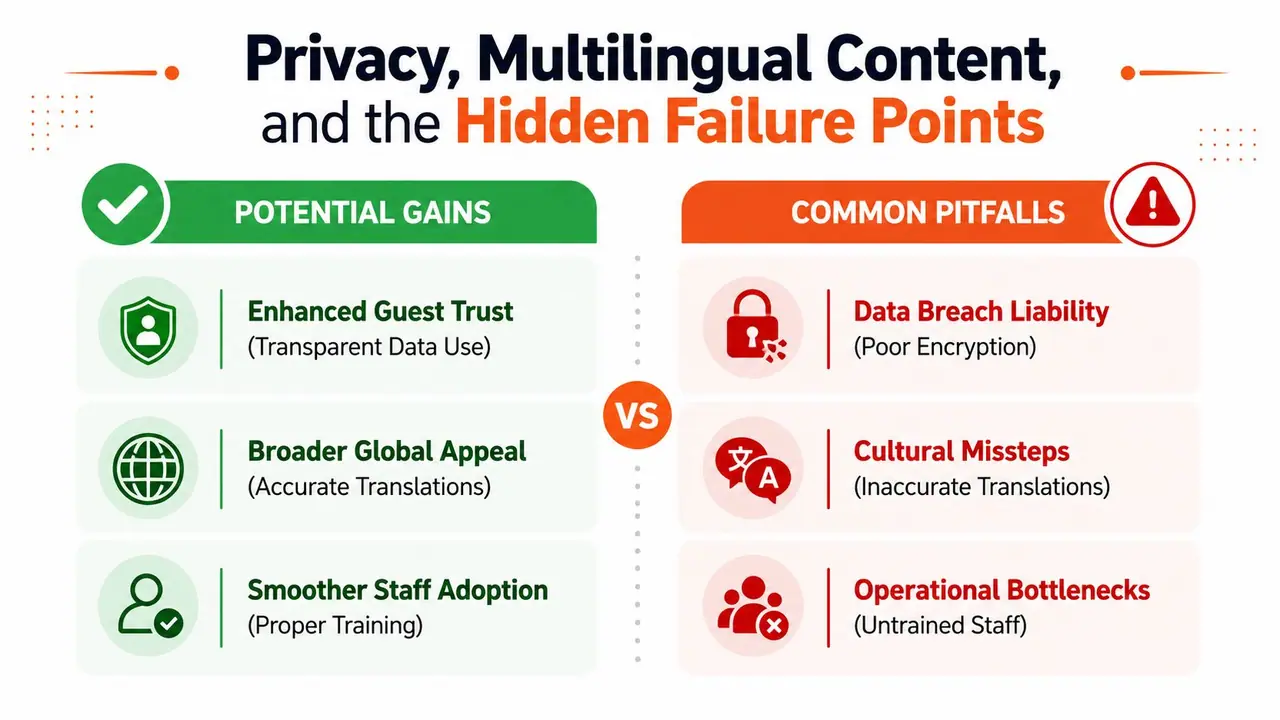
The risky assumption is that digital automatically means safer or cleaner. It doesn't. A weak rollout can expose guest data, create translation mistakes, and leave staff guessing how the system is supposed to work.
Privacy needs a process, not a promise
Guest phone numbers, ID images, and payment details all need careful handling. The practical question is who can see what, how long the data is kept, and where it lives once it's collected. If a host can't answer those questions clearly, the system isn't ready for launch.
The same is true for multilingual content. A platform can support translation, but the highest-stakes text still needs human review. Check-in instructions, access details, and house rules are not the place for casual mistakes, especially when one wrong phrase can create a late-night support call.
The SME challenge is capability, not just adoption. Smaller operators often don't have an IT team, so the burden shifts to the host or manager to maintain the content, the privacy settings, and the guest experience. That's why many rollouts fail quietly, the software gets installed, but nobody owns the ongoing upkeep.
A useful framing from broader tourism policy is that smaller businesses need skills, information, and support that fit their starting point, not enterprise-style expectations. The OECD discussion of the tourism SME digital divide makes that gap hard to ignore (OECD tourism policy report). For language-heavy guest content, a focused reference like what language localization means in hospitality helps separate simple translation from content that works effectively for guests.
Practical rule: if staff can't explain the privacy flow and language review process after launch, the rollout is too fragile.
Pilot, Measure ROI, and Build the Iteration Loop
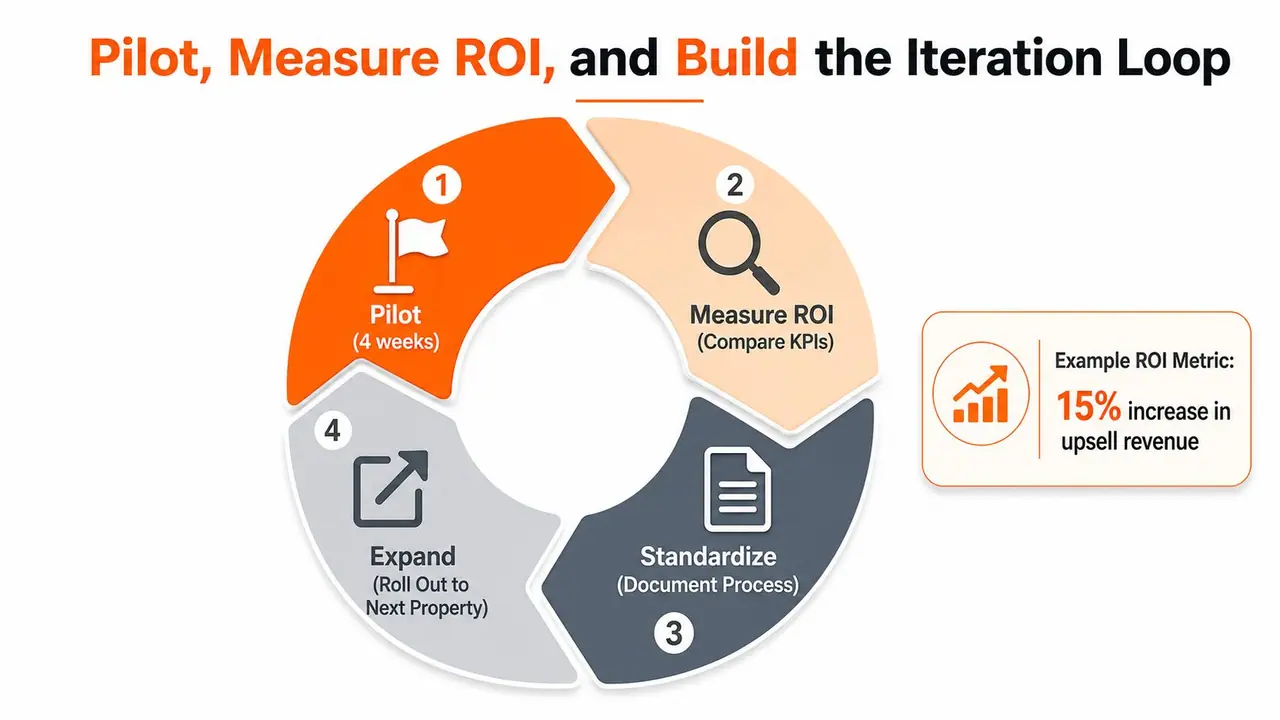
A pilot should be short enough to manage and long enough to reveal the mess. Four weeks is usually enough to see whether the new workflow reduces friction or just adds another thing to maintain. Start with one property, one unit type, or one clearly defined process.
Measure what changed
Use the KPIs from the beginning, then compare before and after. If guest messages dropped, check whether they dropped because the new content answered common questions. If upsells increased, see whether guests used the new flow or whether staff had to push it manually.
A simple ROI view is enough for most hosts. Add up labor time saved, upsell revenue improvements, and any reduction in avoidable errors, then compare that against the cost of the tool and the time spent implementing it. The point is not perfect finance, it's a decision that can be repeated.
For hosts who need a broader accessibility lens alongside guest communication and digital service, your comprehensive accessibility operating model is a useful check on whether the guest experience is genuinely usable, not just technically available. That matters when a digital workflow replaces older, more visible manual support.
Document what worked, standardize it, and only then roll it to the next property. The best portfolios don't chase novelty, they turn small wins into repeatable operations. That's what keeps digital transformation useful after the launch glow wears off.
If you want to simplify guest communication, reduce repetitive messages, and turn routine stay details into a cleaner digital workflow, visit ScanStay and see how the platform fits short-term rentals, boutique stays, and growing portfolios. It gives hosts a practical way to organize guest info, support multiple languages, and package upsells without forcing guests into an app.