Rental Management Solutions: Automate for Growth
Explore top rental management solutions to automate tasks, reduce messages, & boost revenue. Find features, ROI, & select the best software for 2026.
Your phone buzzes at 10:47 p.m. A guest wants the Wi‑Fi password. Another can't find the lockbox. Someone else asks for checkout time even though it's already in the listing. Meanwhile, a cleaner texts that the next turnover is missing details, and your calendar on one booking channel still doesn't match the other.
That's the point where most hosts realize they don't have a hosting problem. They have a systems problem.
The fix isn't working longer hours or answering faster. It's building an operating setup that handles repeatable work without you touching every step. That's why rental management solutions have moved from “nice to have” to standard operating equipment for serious hosts and managers. The category is growing fast. The global rental management system market was valued at USD 4.2 billion in 2024 and is projected to reach USD 9.2 billion by 2033 at a CAGR of 8.3%, driven by cloud adoption and demand for automation across rental workflows, according to this rental management system market projection.
For operators in short-term rentals, the shift is practical. If you're still handling guest messaging, check-in info, maintenance coordination, pricing decisions, and payment tracking through a mix of apps, notes, and memory, you're running an avoidable risk. You'll miss revenue opportunities, burn time on low-value work, and stay tied to your phone in ways that make growth miserable.
Table of Contents
- The End of Endless Messages and Late-Night Calls
- Decoding Rental Management Solutions
- The Four Pillars of Rental Management Software
- Essential Features That Boost Your Bottom Line
- How Successful Hosts Use These Solutions
- A Practical Checklist for Choosing Your Tech Stack
- From Manual Work to Smart Automation
The End of Endless Messages and Late-Night Calls
The pattern is always the same. A host starts with one property and manages fine with platform notifications, saved replies, and a spreadsheet. Then bookings increase. Guest expectations rise. Small delays start turning into bad reviews, missed upsells, and evenings spent doing work that should already be handled.
The biggest drain usually isn't a complex issue. It's repetition. Wi‑Fi details, parking instructions, check-in steps, appliance questions, late checkout requests, local recommendations. None of these are hard. They're just constant.
That's where good rental management solutions earn their keep. They remove routine work from the inbox and move it into systems guests and staff can use without waiting on you. Messaging automation helps, but automation alone won't save a messy operation. You need information in the right place, tied to the right workflow, and available when the guest needs it.
Practical rule: If you answer the same question three times in a week, it belongs in a system, not in your personal messages.
Hosts who get ahead of this usually stop thinking in terms of “respond faster” and start thinking in terms of “prevent the question.” A better pre-arrival sequence, a clearer guide, synced calendars, task routing for cleaners, and one source of truth for property details all reduce operational noise.
If guest communication is still eating your day, it helps to tighten your workflow before adding more tools. A useful starting point is this guide on how to automate Airbnb messages, especially if your inbox is full of predictable check-in and house-rule questions.
What changes when systems take over
A strong setup doesn't eliminate hospitality. It protects it. Instead of spending your attention on repetitive logistics, you spend it on exceptions, guest recovery, and revenue opportunities.
That's the key shift. The operator stops acting like a help desk and starts acting like a manager.
Decoding Rental Management Solutions
A common initial thought upon hearing “rental management solution” is of a single software subscription that handles every task. In practice, that's rarely how solid operations work.
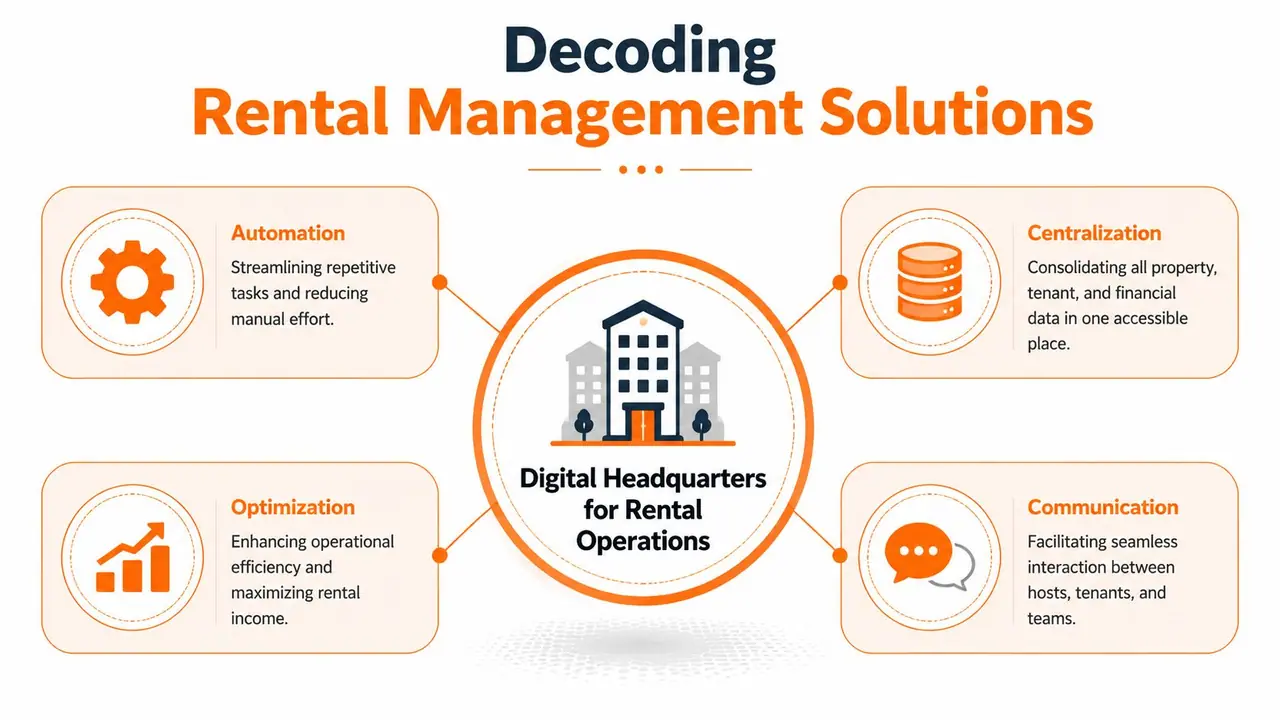
A better way to think about it is a digital headquarters. It's the control center for your rental business. One part handles reservations and calendars. Another manages guest communication. Another deals with pricing. Another routes tasks to cleaners or maintenance vendors. Sometimes one platform covers several jobs well. Sometimes it doesn't, and a smaller specialist tool does the job better.
Think like an operator, not a software shopper
The wrong buying process starts with feature lists. The right one starts with friction.
Ask where work breaks down now:
- Guest communication breaks: Messages are scattered across booking channels, text, and email.
- Calendar control breaks: Double bookings or blocked nights happen because channels aren't syncing cleanly.
- Turnover execution breaks: Cleaners don't get timely details, or maintenance issues get buried in chat threads.
- Revenue control breaks: Pricing stays static while demand changes around you.
Once you identify the operational failure points, the software picture gets clearer.
One platform versus a stack
An all-in-one platform sounds efficient, and sometimes it is. For a simple portfolio, fewer tools can mean less training, fewer logins, and cleaner reporting. The trade-off is depth. All-in-one products often handle core operations well but feel average in one area that matters a lot to you, like guest experience or revenue optimization.
A stack gives you more precision. You can pair a PMS with a dedicated pricing engine and a stronger guest communication tool. The trade-off is integration management. If your tools don't pass data cleanly, you've just built a more expensive version of the same mess.
Good rental management solutions don't just collect features. They reduce handoffs, stop duplicate work, and make the next action obvious for your team.
The best setups feel boring in the right way. Information is easy to find. Tasks fire automatically. Guests self-serve the basics. Staff knows what to do next without chasing you for answers.
The Four Pillars of Rental Management Software
When hosts feel overwhelmed by software choices, I strip the category into four pillars. That makes it easier to spot what you already have, what you're missing, and what you don't need yet.
Property management systems
A property management system, or PMS, is the operational hub. It usually handles reservations, calendar management, guest records, task coordination, and sometimes payments or reporting. If you manage more than a small handful of moving parts, the PMS becomes the spine of your setup.
For most growing operators, this is the first serious purchase because it centralizes work that otherwise lives in inboxes and spreadsheets.
Channel managers
A channel manager keeps your listings, rates, and availability aligned across platforms. If you sell nights on more than one channel, this matters quickly.
Without one, you rely on manual updates and luck. Neither scales. Channel managers don't usually improve the guest stay directly, but they protect occupancy and reduce booking errors that create operational fires.
Dynamic pricing tools
Dynamic pricing tools help operators adjust rates based on live demand conditions instead of relying on a static seasonal calendar. These are most useful when a host already has decent occupancy and wants to improve revenue decisions consistently.
They're not magic. If your photos, reviews, or listing quality are weak, pricing software can't fix that. But once your basics are strong, these tools help you avoid underpricing high-demand dates and overpricing weak ones.
Guest experience platforms
This is the category many hosts underestimate. Guest experience platforms sit closer to the stay itself. They handle communication, digital guides, check-in instructions, upsells, and on-property information access.
These tools don't just reduce admin work. They shape the guest's perception of how organized and professional your operation feels. They also matter because the most profitable improvements often come from reducing repetitive support and making add-on purchases easier.
For a broader overview of how operators compare categories and tools, Northpoint Construction's vacation rental management software guide is a useful companion read.
Rental software categories compared
| Software Category | Core Function | Ideal For |
|---|---|---|
| Property Management System | Centralizes reservations, calendars, tasks, and operational records | Hosts and managers who need one operational hub |
| Channel Manager | Syncs availability, rates, and listing data across booking channels | Anyone listing on multiple platforms |
| Dynamic Pricing Tool | Adjusts nightly rates based on demand conditions | Operators focused on revenue optimization |
| Guest Experience Platform | Delivers guest information, communication flows, and upsell opportunities | Hosts who want fewer repetitive questions and smoother stays |
What tends to work best
A single-property host may only need a lightweight PMS and a better guest communication layer. A manager with several units often benefits from all four pillars, even if some functions live inside the same platform.
What doesn't work is buying enterprise-grade software before the business needs it. Complex tools create their own workload. If the team won't use the features, they don't count.
Essential Features That Boost Your Bottom Line
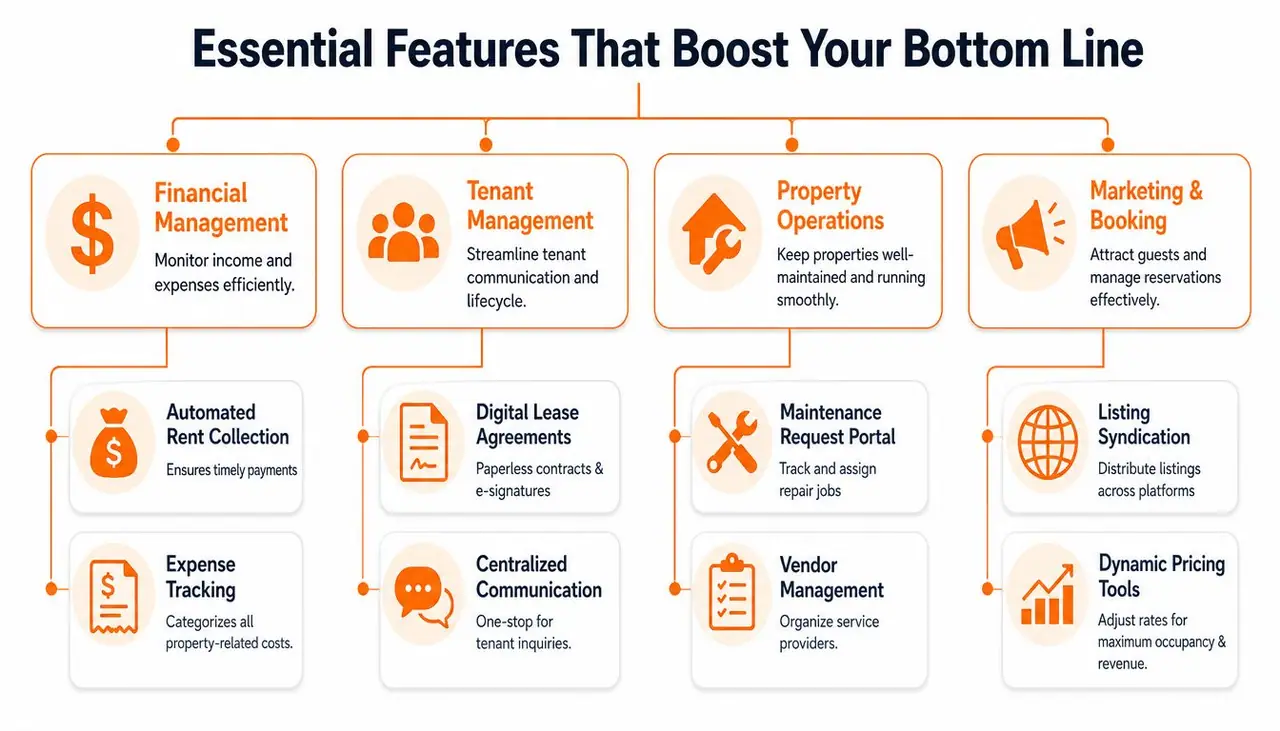
Feature lists get bloated fast. Most demos show everything. Most operators only need a short set of functions that either save time every week or create cleaner revenue capture.
Start with the features that directly change daily workload.
Unified inbox and guest communication
If guest messages live in multiple places, response quality drops. A unified inbox matters because it gives you one queue, one history, and one place to train staff. It also exposes which questions repeat most often, which is where process improvements usually begin.
Digital guest guides are especially useful here. According to TenantCloud's write-up on modern rental management solutions, replacing paper binders with mobile-first digital welcome guides can reduce host support message volume by 30 to 45% and free 2 to 4 hours per property weekly.
That result makes sense in practice. When guests can scan once and find Wi‑Fi, check-in steps, house rules, and local info on their phone, they stop messaging for routine basics.
Task automation for turnovers and maintenance
The second high-value feature is task automation. Every turnover has steps. Every maintenance issue has a handoff. If those actions depend on someone remembering to text the cleaner, notify the next shift, or update a spreadsheet, they'll fail at the worst time.
Strong workflows usually include:
- Automatic task assignment: Cleaning or inspection tasks trigger from bookings, not manual reminders.
- Property-specific instructions: Staff sees the right notes for the right unit, not a generic checklist.
- Issue routing: Maintenance problems move to the correct person without sitting in a guest chat thread.
A lot of wasted time in rentals comes from asking, “Who's handling this?” Good software answers that before the question gets asked.
Direct bookings, payments, and reporting
A direct booking engine can help protect margin, but only if the stay experience and trust signals are already strong. Otherwise, most guests will stay on the channel where they found you.
Integrated payment processing matters for a simpler reason. It reduces reconciliation headaches and gives you cleaner records for owner reporting, refunds, and extras. If add-ons are part of your strategy, the payment step should be easy enough that guests can complete it without back-and-forth messages.
To sharpen reporting decisions, it helps to understand which metrics influence occupancy, guest behavior, and operational bottlenecks. This overview of vacation rental analytics is a practical reference.
A quick visual helps frame what matters most in a complete system:
The best feature isn't the one that looks impressive in a demo. It's the one your team uses every day without workarounds.
How Successful Hosts Use These Solutions
The most useful way to judge rental management solutions is to look at how different operators utilize them. The right setup for one unit isn't the right setup for a growing portfolio.

The solo host who needs breathing room
A newer host usually doesn't need a heavyweight system. They need fewer interruptions. The practical setup is simple: calendar sync, scheduled pre-arrival messaging, a clean check-in flow, and one place guests can find property details.
This host wins by removing avoidable questions. They don't need ten dashboards. They need their evenings back.
The multi-property manager who needs consistency
Once a manager handles several properties, inconsistency becomes the enemy. One unit has great instructions. Another has outdated checkout info. One cleaner gets full details. Another gets a rushed text. The result is uneven reviews and daily friction.
This operator usually needs a stronger PMS, clearer task routing, and standardized guest-facing information across every property. Cleaning systems matter more here too. If you're tightening turnover processes, these cleaning checklists for rental hosts are a practical model for making expectations repeatable.
The agency focused on guest experience and extras
Professional agencies think beyond message reduction. They use guest communication as a profit center. A smooth digital guide can surface late checkout, transport, early check-in, local partnerships, or rental add-ons at the right moment in the stay.
That approach lines up with guest behavior. 68% of short-term rental guests prefer contactless, mobile-first information over paper binders, yet only 22% of hosts use QR-based welcome solutions with one-tap upsells, based on 2025 short-term rental guest preference data.
That gap matters. It means many hosts still treat guest information like a static document when it can function as both a support tool and a revenue surface.
What top operators do differently
They don't chase complexity for its own sake. They standardize what should be standard, automate what repeats, and stay personally involved only where judgment matters.
A few habits show up again and again:
- They centralize guest-facing information: No scattered PDFs, message templates, and handwritten notes.
- They separate routine questions from real service issues: Staff time goes to exceptions, not Wi‑Fi texts.
- They treat add-ons as part of operations: Upsells are built into the stay flow, not improvised in chat.
The difference between average hosts and strong operators often isn't hospitality style. It's operational design.
A Practical Checklist for Choosing Your Tech Stack
Most software mistakes happen before the trial even starts. Operators buy tools to solve general frustration instead of a specific bottleneck. Then they end up with overlapping apps, weak adoption, and another monthly bill.
A better approach is to build your stack in the same order your business runs.
Audit the work before you audit the tools
Start with a normal booking from inquiry to checkout. Write down every manual touchpoint. Include guest messages, calendar updates, payment collection, cleaning coordination, maintenance follow-up, and review requests.
That exercise usually exposes the underlying problem quickly.
- Too many guest questions: Your information delivery is weak.
- Missed operational handoffs: Your tasks and ownership aren't clear.
- Revenue leakage: Your pricing or upsell flow is underbuilt.
- Reporting confusion: Your financial or reservation data is split across systems.
If a tool doesn't fix one of those concrete issues, it's probably not a priority.
Separate must-haves from nice-to-haves
A short-term rental operator can get distracted by flashy features fast. White-label portals, advanced automation branches, and custom owner dashboards all sound great. But if your cleaners still rely on screenshots from guest chats, you've skipped the basics.
I'd rank buying criteria in this order:
- Core reliability: Calendars, reservations, and communication have to work every day.
- Ease of training: If staff can't use it quickly, adoption will stall.
- Integration fit: The tool needs to connect cleanly to the rest of your stack.
- Scalability: It should still make sense when you add properties or team members.
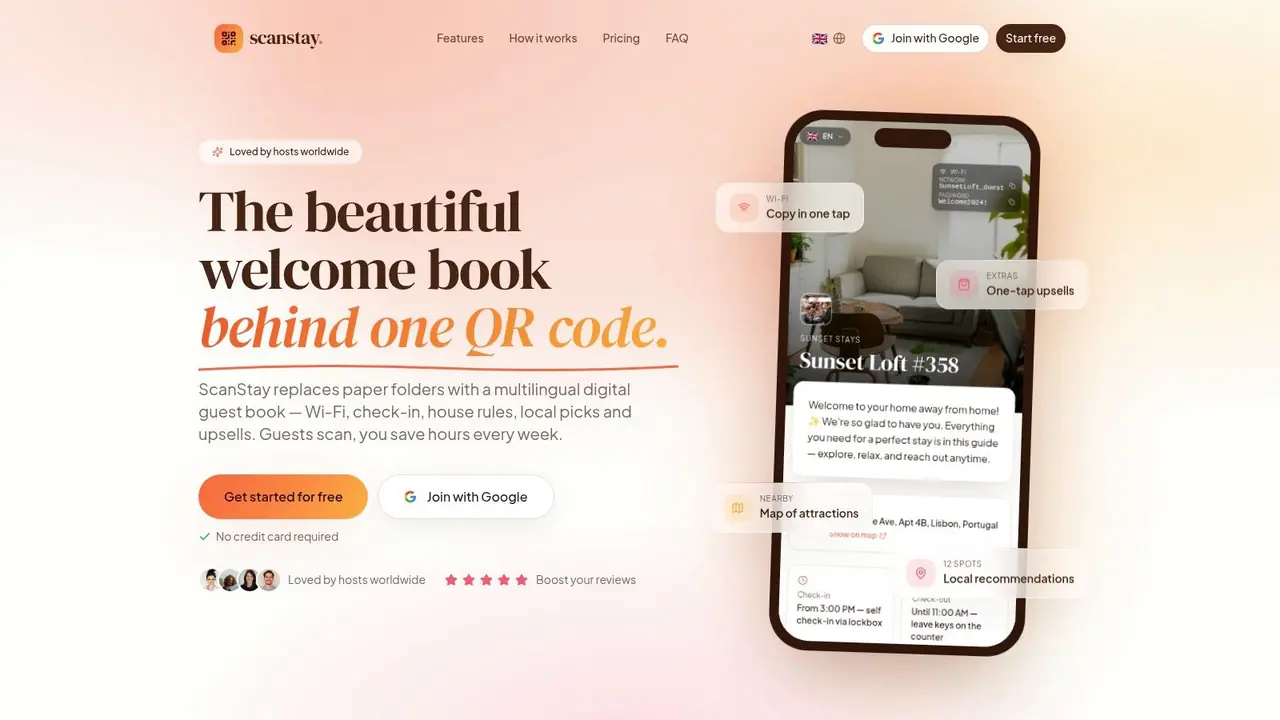
Here's the screenshot cue many hosts look for when evaluating digital guest communication tools:
Check scalability where portfolios usually break
International or multilingual operations expose weak systems fast. If content has to be recreated manually per property or per language, the workload compounds.
That's why centralized communication matters for larger portfolios. 54% of hosts with multi-country portfolios report guest communication fatigue as a top operational challenge, yet only 15% use centralized digital welcome platforms that auto-translate content and track scan engagement across properties, according to this summary of the 2025 Global Short-Term Rental Report.
That's a useful test case even for domestic operators. If the system can't scale content reuse, visibility, and guest communication across complexity, it won't age well as your business grows.
Field note: The cheaper tool often gets expensive when you start adding manual fixes around it.
Budget for the real operating model
Pricing pages don't tell the whole story. Some tools charge per property. Others charge based on transaction flow or feature tiers. Ultimately, the question is whether the tool removes enough manual work or captures enough extra revenue to justify its place in the stack.
That's also why a stack often makes more sense than chasing one giant platform. A core PMS can run reservations and operations, while a specialist communication tool handles the guest-facing layer better than a generic module inside the PMS ever will.
If you're comparing lower-cost options before committing to a broader platform, this guide to affordable property management software helps frame the trade-offs.
Use this short decision filter
Before you buy, confirm five things:
- It solves one painful workflow clearly: Not vaguely. Clearly.
- Your team can learn it fast: Training friction kills rollout.
- It fits your current size and next stage: Don't buy only for today.
- It reduces messages, handoffs, or missed revenue: Prefer tools with direct operational impact.
- It doesn't duplicate what you already pay for: Stacks work best when each tool has a defined job.
A clean tech stack should feel lighter after setup, not heavier.
From Manual Work to Smart Automation
Hosts don't need more software for the sake of software. They need fewer repeated tasks, fewer preventable mistakes, and a cleaner path from booking to checkout.
That's the value of rental management solutions. A good setup centralizes your operation, gives your team clearer handoffs, and helps guests find answers without waiting on you. The effect isn't just efficiency. It's control.
The strongest operators usually make the same shift. They stop treating every booking like a one-off event and start running a repeatable system. A PMS holds the operation together. Channel tools protect distribution. Pricing tools support revenue decisions. Guest experience tools reduce noise and open new earning opportunities inside the stay.
You don't have to overhaul everything at once. Start where the pain is loudest. If guest questions eat your evenings, fix communication first. If turnovers create chaos, fix task routing. If your rates feel arbitrary, fix pricing discipline.
What matters is that the business stops depending on memory, heroics, and late-night replies.
If you want a simpler way to replace paper binders, cut repetitive guest questions, and present upsells through a mobile-friendly digital guide, take a look at ScanStay. It's built for short-term rental hosts who want clearer guest communication without adding more friction to the stay.