B and B Software
B and b software - Find the best B&B software to automate bookings, manage guests, & save time. Our guide covers features, pricing, & how to choose the perfect
You're probably dealing with some version of this already. A wall calendar at the desk. OTA notifications on your phone. A handwritten note with check-in details. Guests texting for the Wi-Fi password after dinner service. A card payment that still needs to be reconciled. None of that feels dramatic on its own. Together, it turns a small B&B into a job that never stops tapping you on the shoulder.
That's why B&B software matters for small operators. Not because you need to run your guesthouse like a chain hotel, but because you need fewer moving parts, fewer avoidable mistakes, and fewer repetitive tasks. The right setup works like a quiet front-desk assistant. It keeps reservations organized, updates availability where you sell rooms, and makes it easier for guests to help themselves when the answer should already be available.
Table of Contents
- Why Your B&B Needs More Than a Spreadsheet
- Understanding the Core of B&B Software
- Features That Give You Your Time Back
- A Checklist for Evaluating B&B Software
- B&B Software in Action A Modern Workflow
- Making the Switch Smoothly
Why Your B&B Needs More Than a Spreadsheet
A spreadsheet works fine right up until it doesn't. It works when you have one room type, one booking source, and plenty of time to cross-check everything manually. It breaks down when a guest books on one channel while you're replying to another inquiry, or when check-in details live in three different places and none of them are the version you meant to send.
That's the trap many new owners fall into. They think software is something larger hotels buy because they have scale. In practice, small B&Bs often feel operational pain sooner because the owner is also the receptionist, the bookkeeper, and the guest contact.
A useful analogy is a neighborhood café moving from a cash box and paper tickets to a basic point-of-sale system. The café owner didn't become a big chain overnight. They just stopped relying on memory and handwritten notes for every transaction. B and B software does the same job for lodging. It replaces manual coordination with a system that remembers things for you.
Practical rule: If you repeat the same task every booking, software should probably handle it.
This isn't some fringe shift. The global business software and services market was estimated at USD 584.03 billion in 2024 and is projected to reach USD 1,153.75 billion by 2030, a gain of more than USD 569 billion, with a 12.1% CAGR from 2025 to 2030. Grand View Research also reports that North America held 31.76% of global revenue in 2024, which shows how mainstream business software adoption already is in a major commercial region while the category keeps expanding worldwide (Grand View Research on business software market growth).
For a B&B owner, that matters for one reason. Buying software is no longer an unusual move. It's standard operating behavior for serious small businesses.
If you're still in the early setup phase, it helps to pair software decisions with the bigger operating plan. This guide on how to start a bed and breakfast is a useful companion because your systems, pricing, and guest flow should fit together from day one.
The real return is operational calm
The biggest payoff usually isn't “advanced technology.” It's getting your evenings back.
When reservations sync automatically, payment links go out on time, and guest instructions don't depend on you being awake, the business becomes easier to run. You stop being the glue holding every tiny process together. That's the point. Good hospitality should feel personal to the guest, not manual behind the scenes.
Understanding the Core of B&B Software
Most owners hear “B&B software” and picture one giant platform that does everything. Sometimes that exists. More often, what you're really buying is a small connected stack with one system at the center.
It operates like a command center. One screen should tell you who's arriving, which room is blocked, what has been paid, and what still needs to go out before check-in.
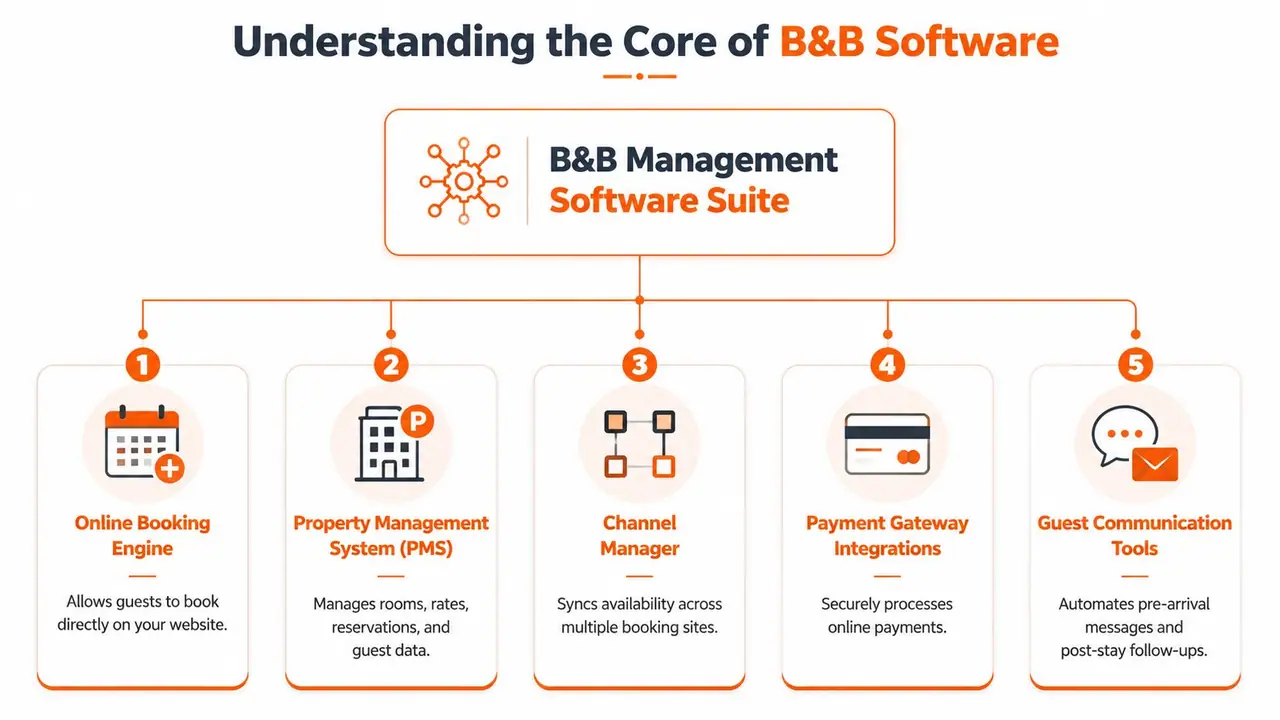
Hotel Tech Report notes that the highest-impact B&B software stacks are typically built around a property management system, channel manager, booking engine, guest messaging, and payment processing because these functions centralize reservations, reduce double-booking risk, and automate guest communication and check-in. It also notes that B&B software should support flexible room inventory, contactless check-in, and mobile-friendly payment flows (Hotel Tech Report on bed and breakfast software).
The PMS is the operating system
The property management system, or PMS, is the brain of the setup. It stores reservation details, room assignments, rates, guest profiles, and usually your housekeeping or arrival status too.
If your B&B were a small kitchen, the PMS would be the prep station. Everything passes through it. When the PMS is clean and current, service stays smooth. When it's messy, every other task gets slower.
A usable PMS for a small B&B should help you answer these questions fast:
- Who is arriving today: You should see arrivals without digging through inboxes.
- What room is available: Inventory needs to be clear, especially if room types vary.
- Has the guest paid: Payment status should sit close to the booking, not in a separate mental checklist.
- What does the guest need before arrival: Check-in notes, special requests, and communication status should be visible.
The other two pillars keep sales clean
The channel manager is the traffic controller. If you sell rooms on Airbnb, Booking.com, or other channels, this tool pushes availability updates across them so one booking closes the same dates elsewhere. Without it, you're manually policing calendars. That's where overbookings happen.
The booking engine is your direct reservation tool on your own website. It gives guests a clean path to book without sending them to a marketplace first. Even for a very small property, this matters because direct bookings are easier to own, easier to brand, and easier to support.
When these three pieces talk to each other properly, your B&B stops feeling like a collection of tabs and starts feeling like one system.
What doesn't work well is a patchwork setup where one calendar is updated by hand, another gets forgotten, and guest data lives in old emails. That kind of stack always looks cheap at first. It becomes expensive the moment you lose time fixing avoidable errors.
Features That Give You Your Time Back
A feature list on a vendor website doesn't tell you much. What matters is whether the feature removes repeat work, cuts error risk, or improves the guest's stay without adding admin.
The fastest way to judge B and B software is to ask one blunt question. What problem disappears if I turn this on?
The features that remove repeat work
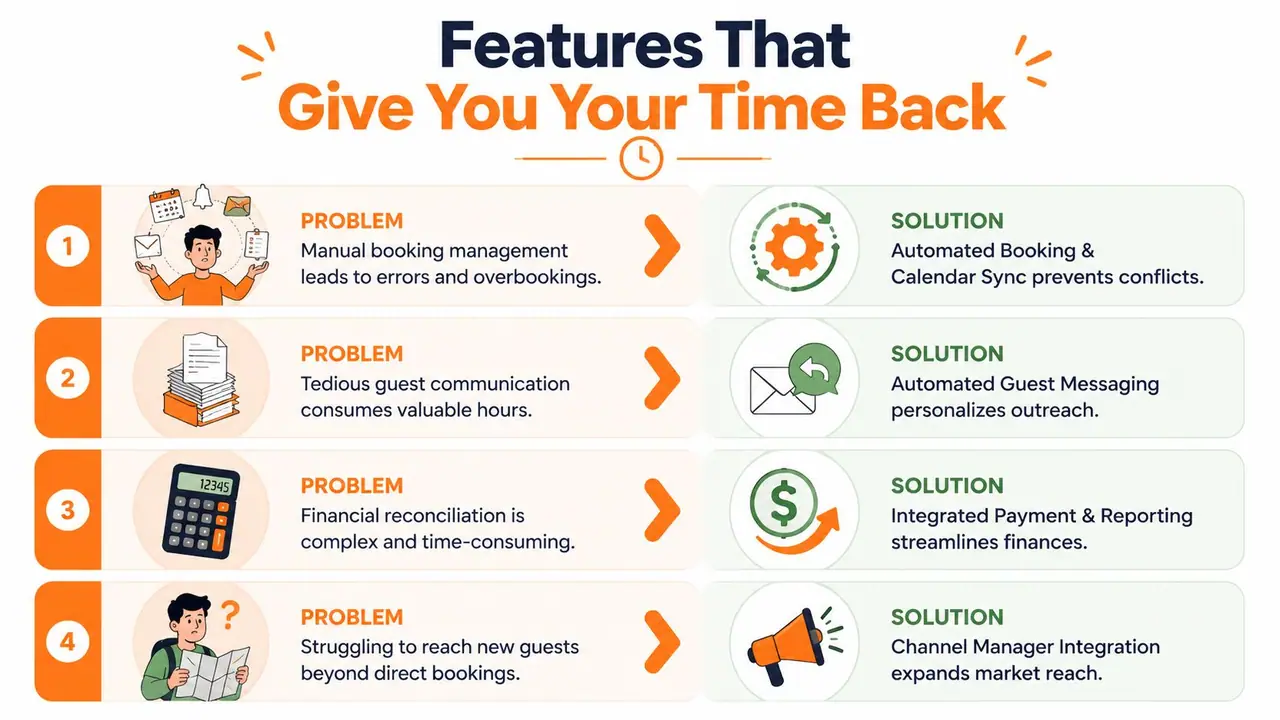
Automated guest messaging is usually the first clear win. Instead of manually sending arrival instructions, parking details, breakfast hours, and Wi-Fi information, the system sends the right message at the right stage of the stay. You still write the content once. You just stop retyping it every week.
Integrated payments remove another common headache. If the booking, payment request, and payment status sit inside one workflow, you spend less time chasing balances and less time matching transactions later. Guests also get a smoother path because they can pay on mobile without awkward back-and-forth.
A short explainer is worth watching if you want to see how automation fits into day-to-day property operations:
Other features matter too, but their value depends on your setup:
- Calendar sync: Best for operators listing on multiple channels and tired of checking each one manually.
- Contactless check-in tools: Useful when arrivals happen outside fixed front-desk hours.
- Basic reporting: Helpful if you want a cleaner view of bookings, payment status, and booking sources.
- Mobile-friendly booking flow: Important because many guests will complete payment or reservation steps on their phone.
What usually wastes time instead of saving it
Not every feature helps a small property.
Some systems bury simple tasks inside enterprise-style menus. Others add “all-in-one” modules you'll never touch, but still have to learn around. For a five-room B&B, that's like buying a commercial kitchen when you mostly need a better prep table and a reliable oven.
I'm cautious with software that looks impressive in demos but interrupts normal work. If staff or owners have to click through pop-ups, extra steps, or clunky workflows just to send a confirmation email, the system is working against the property.
Quiet software wins in hospitality. Guests need clear information. Owners need fewer interruptions.
A lean stack usually beats a bloated one. Start with the workflows that drain time first. Reservation handling, channel sync, payments, and guest communication are almost always higher value than fancy extras. Once those are stable, then it makes sense to layer on guest-facing tools that improve the stay.
A Checklist for Evaluating B&B Software
Once you start comparing platforms, demos can blur together. Every vendor says they save time. Most promise simplicity. The useful differences show up when you ask concrete questions and force each tool through the same filter.
NN/g recommends evaluating B2B software across five technical specification areas: resource footprint, core components, system requirements and integrations, performance, and tolerances and durability. For a software buyer, that means looking beyond feature lists and checking measurable runtime demands plus how the system connects with the other tools you rely on (NN/g on B2B software specifications).
Questions worth asking on every demo
Start with everyday use, not edge cases.
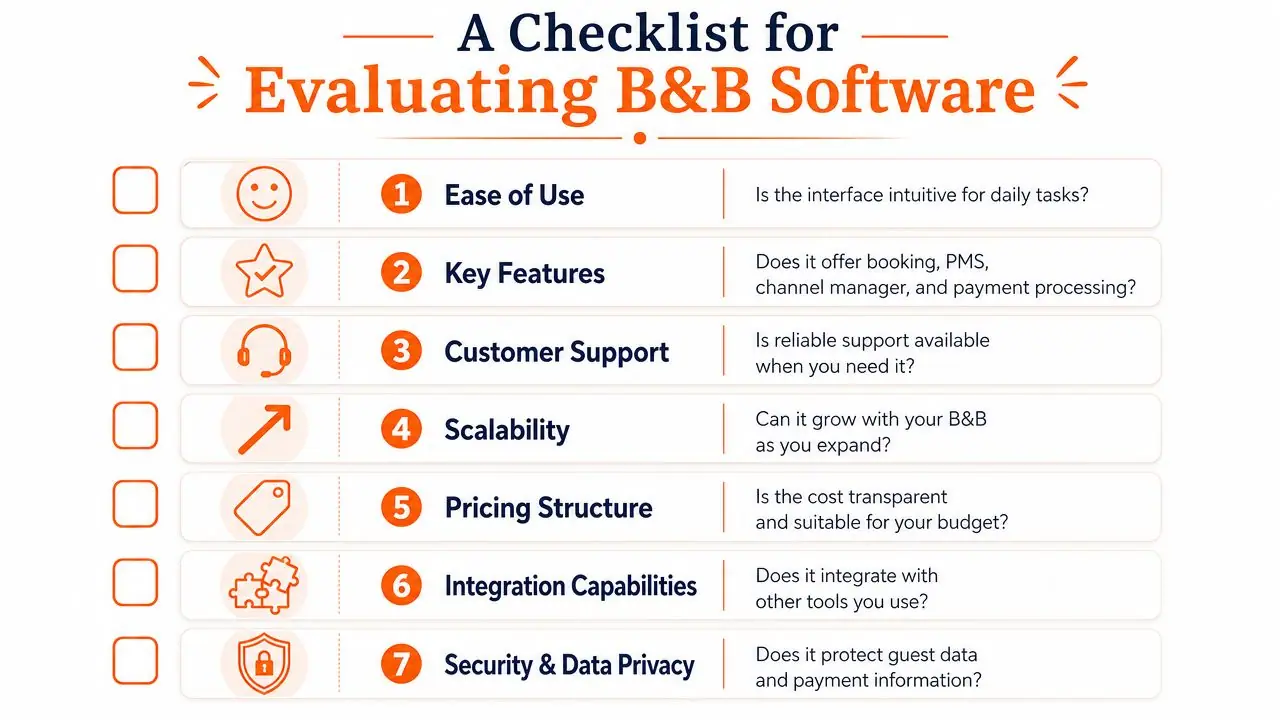
- Can I learn the main workflow quickly: Open a reservation, move dates, take payment, and send check-in information during the demo. If that feels awkward now, it won't feel better during peak season.
- What does it connect to: Ask whether it integrates with your website, payment processor, smart locks, accounting tools, and any guest communication tools you already use.
- How does channel syncing behave: Don't settle for “yes, we support channels.” Ask how quickly updates push and what happens when a booking is modified or canceled.
- What happens when something breaks: Support quality matters more in hospitality than in many other industries because booking errors affect real arrivals, not just internal workflows.
- What is included in onboarding: Some systems are easy to buy and hard to implement. Ask who imports data, who sets up templates, and what training is available.
If budget matters, compare software the same way you'd compare utilities. Don't just ask what it costs. Ask how predictable the bill is as bookings change. This overview of affordable property management software can help frame what “affordable” should mean for a small operator.
A simple comparison frame
A short table keeps emotions out of the decision.
| Area | What to check | What often goes wrong |
|---|---|---|
| Ease of use | Daily tasks should be obvious | Owners buy power they never use |
| Integrations | Payments, website, guest tools, channels | Data gets trapped in silos |
| Channel support | Your actual booking sources, not generic claims | One important channel works poorly |
| Guest experience | Clear confirmations, mobile payments, useful pre-arrival flow | Guests still have to message for basics |
| Support | Fast help during live operations | Tickets sit while arrivals pile up |
One more practical point. Don't buy for the property you dream about in five years if it makes the current business harder to run. Small operators usually need software that is simple first, scalable second.
B&B Software in Action A Modern Workflow
The cleanest way to understand software value is to follow one booking all the way through.
A guest finds your website and books a room directly through your booking engine. The reservation appears inside the PMS. Availability updates across your connected channels so the same dates don't remain open elsewhere. No one has to remember to block them manually.
That simple chain matters because many small operators still sit in the underserved middle. They aren't big enough for enterprise complexity, but they've outgrown spreadsheets, paper binders, and constant copy-paste messaging. The gap is especially clear for non-technical hospitality operators who need simple, affordable tools built around their actual needs rather than broad industry labels (analysis of underserved SaaS niches for small hospitality operators).
From booking to arrival
Once the booking is confirmed, the PMS can trigger a pre-arrival message. That message might include arrival time guidance, parking instructions, breakfast details, and a payment reminder if needed. The guest gets useful information before they ask for it.
When the guest arrives on site, the next layer of the stack takes over. Instead of a paper binder in the room or a string of saved text messages, a digital welcome book gives them one place to find the essentials.
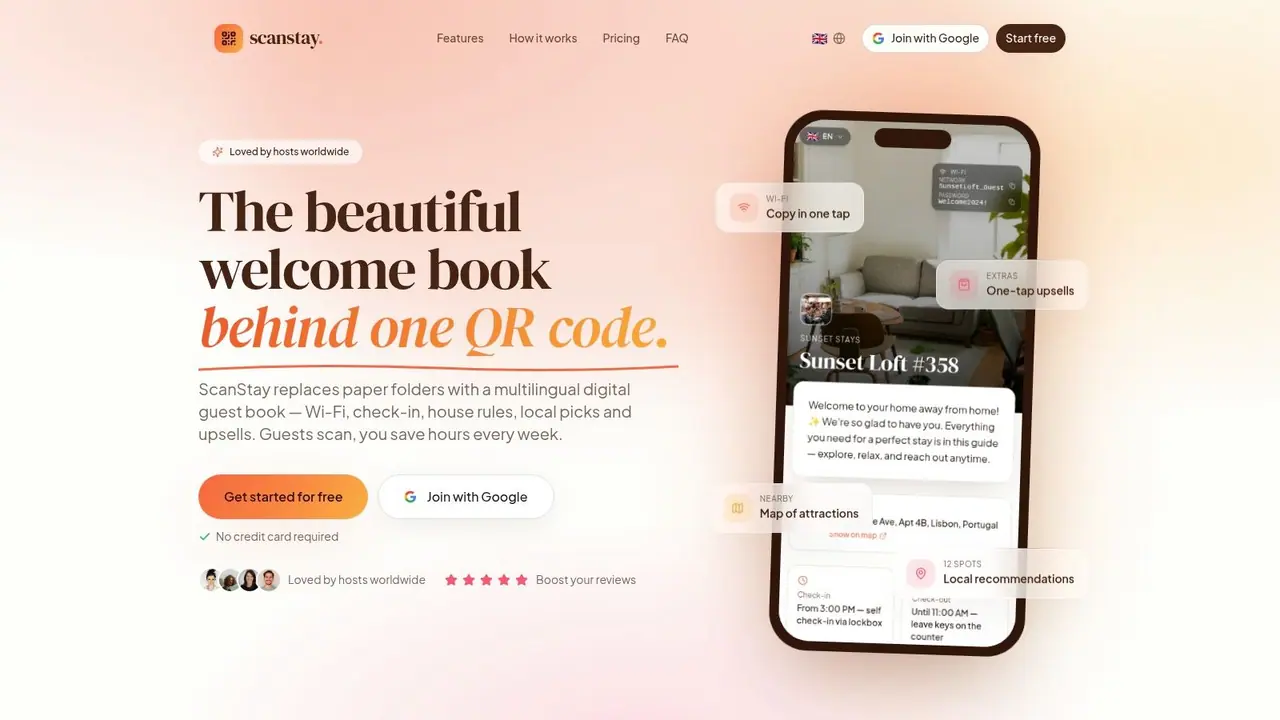
A tool like vacation property management software guidance from ScanStay shows the role that guest-facing tools can play here. ScanStay itself is a digital welcome book platform that lets hosts share Wi-Fi details, check-in and check-out instructions, house rules, local recommendations, and video how-tos through a single QR code in the guest's mobile browser.
Where the lean stack pays off
Small B&Bs often get the biggest improvement in guest experience. Not from adding more systems, but from connecting a few useful ones in the right order.
A lean workflow might look like this:
- Booking engine captures the reservation on your site.
- PMS stores the guest and stay data in one place.
- Channel manager syncs inventory so dates stay accurate elsewhere.
- Automated messaging sends pre-arrival information without manual follow-up.
- Digital welcome book handles on-site questions like Wi-Fi, appliance use, and local tips.
The guest experiences this as competence. They don't see the stack. They just notice that everything they need is easy to find.
A small property feels professional when guests don't have to ask the same practical questions over and over.
What doesn't work is forcing one platform to do every job badly. A PMS is rarely the best place to present local recommendations or appliance how-to videos. A digital guidebook isn't the right place to manage inventory across channels. The better approach is to keep the core system lean, then add one or two guest-facing tools that remove friction without adding enterprise complexity.
Making the Switch Smoothly
Switching systems feels bigger than it usually is. The primary risk isn't the software itself. It's trying to migrate everything at once while the property is busy.
A calmer approach works better. Move during a slower period if you can. Gather your room data, policies, rates, guest message templates, and channel login details before setup starts. That prep work saves more frustration than any feature comparison ever will.
Use a staged rollout.
- Start with the core system: Get the PMS configured first so reservations and room data are correct.
- Add one booking channel next: Confirm syncing works before expanding to every channel you use.
- Load your guest messages early: Arrival instructions, parking, breakfast details, and checkout notes should be ready before the first live booking.
- Test like a guest: Make a sample booking, open the emails on a phone, and check whether the experience feels clear.
- Keep the stack lean: If a tool doesn't solve a recurring problem, leave it out for now.
Owners often assume they need to master every advanced setting before going live. They don't. You need the daily workflow to work. Reservations should come in cleanly. Availability should stay accurate. Guests should get the right information without having to chase you for it.
That's enough to make the switch worth it.
If you want to add a guest-facing layer without handing guests another app to download, ScanStay is one practical option. It gives B&Bs a mobile-friendly digital welcome book that can replace paper binders and repetitive messages with a single QR code, which fits well alongside a lean PMS-centered software stack.