QR Code Check-In System: A Complete Guide for Hosts
Learn how a QR code check-in system can streamline your rental. This guide covers benefits, features, security, and setup for Airbnb & hotel hosts in 2026.
It's late. A guest has landed, the door code worked, and you think the day is done. Then the messages start. What's the Wi-Fi password? How does the thermostat work? Which bin is for recycling? Is late checkout possible? None of these questions are difficult, but answering them again and again drains time you don't have.
That's where a good QR code check-in system earns its place. Not because it looks modern, and not because “contactless” sounds good in a listing, but because it turns scattered guest information into one simple path. Scan once, get what you need, move on with your stay. For hosts, that means fewer repetitive messages and fewer avoidable mistakes during arrival.
Table of Contents
- The End of Repetitive Guest Questions
- What Exactly Is a QR Code Check-In System
- Key Benefits for Hosts and Small Hotels
- Essential Features to Look for in a System
- Your Step-by-Step Implementation Guide
- Navigating Security Risks and Common Pitfalls
- Measuring Success and Example Workflows
The End of Repetitive Guest Questions
Most hosts don't struggle with one big operational disaster. They struggle with dozens of small interruptions.
A guest arrives after a delayed train and can't find the lockbox. Another wants the Wi-Fi details even though you already sent them. Someone else asks where to park, then asks again the next morning where to leave trash. By themselves, these messages are manageable. Across a full calendar, they become the job.
A QR code check-in system fixes that by putting the answers where guests need them, at the moment they need them. Instead of searching old messages or opening a long PDF, they scan a code in the entryway, on a printed card, or inside the room and get directions, house rules, appliance instructions, and checkout steps in one place.
Why the old system keeps failing
Email gets buried. Text messages get lost. Paper binders go out of date. Guests rarely read everything in advance, especially when they're traveling, tired, or arriving late.
That's why the best setup isn't just “send more information.” It's reducing the effort required to find the right information. A scan is easier than a search.
Guests don't want more messages. They want fewer decisions during the first few minutes of arrival.
A digital guide also solves the version-control problem. When parking instructions change or the router is replaced, you update the content once instead of rewriting saved replies and reprinting pages. If you're still relying on binders, it's worth seeing how a vacation rental welcome book can move that information into a format guests use.
What hosts get back
The immediate win is fewer routine messages. The better win is consistency.
Every guest gets the same arrival flow. Every property follows the same standard. Your co-host, cleaner, or front desk team doesn't have to remember which instructions were sent manually for which stay. That's what makes a QR code check-in system useful in practice. It removes repeat work without making the guest feel like they've been handed off to a machine.
What Exactly Is a QR Code Check-In System
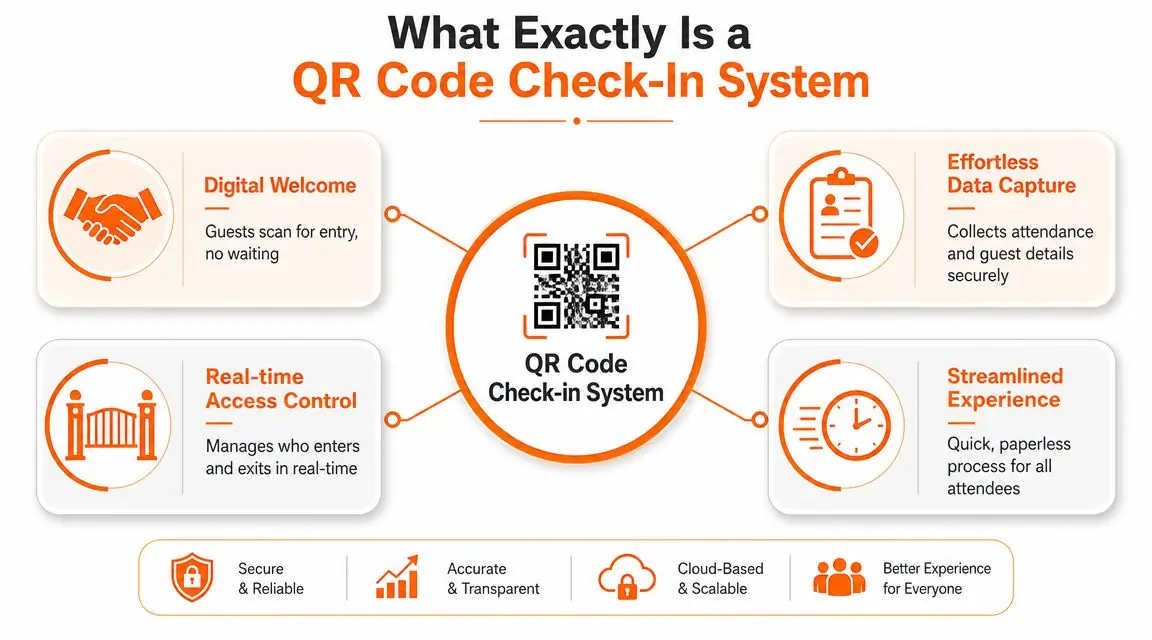
A QR code check-in system is best understood as a digital front door. The code itself is only the trigger. The primary value is the mobile experience it opens.
When a guest scans the code, they shouldn't land on a clunky desktop page or a forgotten PDF. They should land on a clean mobile page that answers the practical questions that come up during arrival and throughout the stay. That can include entry instructions, Wi-Fi details, property rules, local recommendations, and service options.
QR technology isn't new or experimental. QR codes were invented in 1994 by Denso Wave engineer Masahiro Hara to store more information than traditional barcodes and be readable from multiple angles. Their mainstream adoption came much later, with usage booming during the 2020 pandemic, as noted in Microsoft's brief history of QR codes.
It's more than a barcode on the wall
Many hosts make the mistake of treating the QR code as the product. It isn't. The code is only as good as the destination behind it.
A useful system does three things well:
- Guides arrival: It helps guests get in, connect to Wi-Fi, and understand the basics without messaging you.
- Organizes stay information: It replaces scattered instructions with one reliable mobile reference point.
- Stays easy to update: It lets you change content without reprinting a full binder or resending every template.
What good implementation looks like
The strongest setups feel simple from the guest side. Scan, tap, done.
Behind that simplicity, there's usually structure. Content is grouped logically. The page loads fast on a phone. The most common questions appear first. Optional items like local tips or extras come after the essentials, not before them.
Practical rule: If a tired guest can't find the door instructions, Wi-Fi password, and checkout steps in seconds, the system is organized for the host, not the guest.
That's the difference between a novelty and an operational tool. A real QR code check-in system reduces friction because it connects a physical point in the property to a living, mobile-first guide that's easy to maintain.
Key Benefits for Hosts and Small Hotels
The biggest mistake hosts make is thinking the benefit is just speed. Speed matters, but it's only the first layer. The primary benefit is smoother arrivals, fewer support interruptions, and a more consistent guest experience across every booking.
In event deployments, Micepad describes 15 to 30 seconds for self-service kiosk check-in with badge printing compared with 4 to 6 minutes at a manual paper desk in its QR code event check-in overview. Hospitality isn't identical to events, but the lesson carries over. When guests can self-serve the basic orientation process, staff and hosts spend far less time repeating instructions.
Better guest experience without more staff time
Guests judge the stay fast. Arrival is where they decide whether the place feels easy or chaotic.
If entry instructions, Wi-Fi, parking, and house basics are available through one simple scan, the property feels organized. If those same details are scattered across email, chat, and a paper folder, even a nice unit feels harder to use than it should.
A good QR code check-in system helps with:
- Late arrivals: Guests can access the essentials without waiting for a reply.
- Short stays: Weekend guests don't want to read a long manual.
- International bookings: Mobile-first instructions are easier to follow than long message threads.
Operational gains that compound
For a single unit, the time savings show up as fewer nightly interruptions. For a small hotel or multi-property operator, they show up as process control.
Front desk staff stop answering the same orientation questions. Co-hosts don't have to maintain multiple versions of check-in instructions. House rules, appliance guides, and local recommendations can stay consistent across rooms or units while still allowing property-specific details.
Here's the practical difference:
| Stage | Manual Process (Email/Text/Binder) | QR Code System Process |
|---|---|---|
| Before arrival | Guest receives long messages or PDFs | Guest receives simple scan prompt and clear expectations |
| At entry | Guest searches messages for instructions | Guest scans and sees access steps on mobile |
| Wi-Fi access | Guest asks for password or checks binder | Guest opens Wi-Fi details instantly |
| House basics | Guest flips through printed pages | Guest taps to view rules, trash, parking, and appliance help |
| During stay | Host answers repeat questions individually | Guest self-serves common answers |
| Add-on services | Upsells require manual outreach | Extras can be presented inside the guest flow |
A cleaner handoff between service and sales
Hosts often leave money on the table. Guests don't mind seeing options like late checkout, airport transfer, or equipment rental when those offers appear at the right time and in the right context. They do mind when those offers arrive as random messages.
The QR flow creates a natural place for those options. Not pushy. Just visible.
The best systems reduce effort first. Revenue comes second.
For small hotels and guesthouses, that same structure helps standardize the brand experience. Every room can have the same quality of information delivery, even when staff shifts change or arrivals come in after hours.
Essential Features to Look for in a System
Not every QR setup deserves to be called a system. Some are just static codes pointing to a document. That may be enough for a hobby host with one room, but it usually breaks down once you manage multiple properties, multiple cleaners, or multiple guest types.
The right choice starts with the essential requirements.
Must-haves that prevent guest friction
First, it needs a mobile-first destination. Guests scan with phones, so the experience has to be designed for phones. If the page is cramped, slow, or desktop-formatted, the scan saves no time.
Second, the editor has to be easy enough that you'll keep it updated. If changing checkout instructions requires technical help, the content will drift out of date.
Third, look for content reuse. Portfolio operators shouldn't rebuild the same parking note, Wi-Fi section, or appliance instructions unit by unit. They should duplicate and adapt.
A practical shortlist:
- Mobile-first pages: The guest should be able to use the full guide from a phone without pinching or zooming.
- Simple editing: You want a visual editor, not a setup that feels like website development.
- Reusable templates: Shared content should carry across units while preserving property-specific details.
- Print-ready assets: The platform should make it easy to generate a clean in-room code display.
- Clear organization: Tabs, sections, or categories matter more than fancy design.
Features that become more valuable as you grow
Once the basics are solid, the next tier is about maximizing impact.
Multi-language support matters if you host international travelers. One-tap upsells matter if you offer late checkout, transport, breakfast, or add-ons. Analytics matter if you want to know whether guests are using the guide or still defaulting to direct messages.
Hardware also matters more than people think. If you're pairing your guest information flow with access control, it helps to understand how your content system works alongside lock hardware. This guide to the best smart lock for Airbnb is useful if you're building the arrival flow end to end.
What to avoid
Some products look polished in a demo but create work later.
Avoid systems that depend on an app download for the guest. Avoid tools that make every unit a separate build from scratch. Avoid anything that buries key information under marketing fluff, oversized images, or too many taps.
If a platform is easier for your team to admire than for a guest to use at the door, it's the wrong platform.
The best QR code check-in system isn't the one with the longest feature list. It's the one that stays usable during a real arrival, after a delayed flight, with luggage in hand.
Your Step-by-Step Implementation Guide
A QR code check-in system works best when you build it like an arrival process, not like a design project. Start with the guest's first ten minutes on site. That's where confusion costs time and reviews.
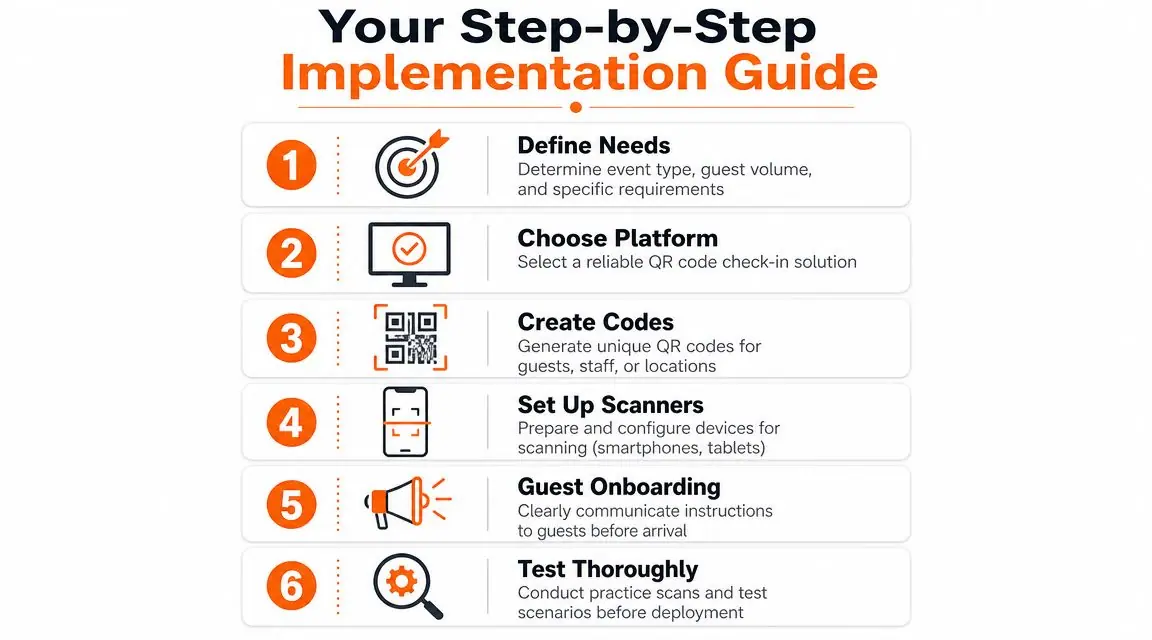
Step 1 and Step 2
Begin by consolidating your core information. Pull it out of old messages, saved replies, PDFs, and printed binders. You want one master list for entry instructions, Wi-Fi, parking, house rules, appliance guidance, local essentials, and checkout.
Then choose the platform that will hold that information. Don't evaluate it on looks alone. Open it on your own phone and try to use it one-handed. If it feels clumsy for you, it will feel worse for a guest.
Step 3 and Step 4
Build the mobile guide around guest priorities. Put the urgent items first. Door access. Internet. Heating or cooling. Parking. Checkout. Save local recommendations and upsells for lower on the page unless they're time-sensitive.
The physical QR display matters just as much as the digital page behind it. Nielsen Norman Group recommends a minimum QR code size of 2 cm × 2 cm (0.8 in × 0.8 in) and advises increasing size with viewing distance in its guidance on QR code usability. It also notes that a non-mobile destination can wipe out the time saved by the scan.
Use that advice in practice:
- Keep strong contrast: Dark code on a light background scans more reliably than decorative low-contrast layouts.
- Print at a practical size: Don't shrink the code to fit branding preferences.
- Leave quiet space around it: Crowded posters make scanning harder.
- Test from real standing distance: Scan from where a guest will be, not with your face next to the sign.
A short video can help if you're planning your guest-facing setup:
Step 5 and Step 6
Placement changes results. Put the code where the question happens.
Near the entrance, it should answer access and orientation questions. In the living area, it can support house basics and recommendations. In a boutique hotel room, it may belong on the desk, bedside table, or welcome card. One code in the wrong place is less useful than two codes placed thoughtfully.
Before going live, test failure scenarios:
- Scan on different phones: Try newer and older devices.
- Check page load speed: Use mobile data, not only strong Wi-Fi.
- Review every link: Broken links kill trust immediately.
- Ask a non-team member to try it: They'll spot confusion faster than you will.
A host should never be the only person who tests the flow. You already know where everything is.
Finally, tell guests about it before arrival. A QR system works better when guests expect it. Mention that a simple scan in the property will give them the information they need, and keep the instruction short enough that they'll read it fully.
Navigating Security Risks and Common Pitfalls
Hosts often talk about QR as if the only question is convenience. It isn't. A QR code check-in system is also a guest-facing access point, a data collection point, and a trust point. If you treat it like a poster and not like part of your operation, you create avoidable risk.

Security problems hosts tend to miss
One issue is code tampering. If someone replaces a printed code in a shared entrance or common area, a guest could be redirected somewhere malicious. The broader QR threat is real enough that the FBI and other agencies have warned about malicious QR codes redirecting users to phishing and payment diversion pages, as discussed in this overview of what to look for in a QR code check-in system.
The other issue is data governance. If your check-in flow collects guest names, arrival details, contact information, or behavioral data, you need clarity on who controls that data, how long it's retained, and why it's being collected in the first place. Too many hosts adopt a tool first and ask those questions later.
Use a simple review checklist:
- Data minimization: Only collect what you need.
- Retention rules: Decide how long guest data should remain accessible.
- Vendor clarity: Know where the data lives and who can access it.
- Physical poster checks: Inspect printed codes periodically, especially in shared spaces.
The guest's phone is the weak point
Most check-in failures don't come from the QR graphic. They come from the device environment around it.
An independent summary notes that 10% of UK homes had no internet access, and that smartphone access remains uneven globally. Its practical point is the one hosts should care about most. A QR-only flow can fail for guests with low battery, no data, roaming issues, older phones, or limited confidence with scanning. That's why a fallback plan matters.
What reliable fallback looks like
Don't build a system that works only when the guest's technology is perfect.
A resilient setup usually includes:
- A staffed backup path: Even if self-check-in is the default, someone should be reachable when the flow breaks.
- Printed essentials: Keep core details available in a low-tech format. Entry basics, Wi-Fi, and emergency contacts matter most.
- Short manual alternatives: A short URL or clearly written backup instruction can rescue the arrival.
- Simple wording: Guests under stress don't read long troubleshooting text.
- Accessibility awareness: Large text, clear labeling, and logical layout help more people than you think.
You also need to think about compliance. If your property is in a jurisdiction with guest registration requirements, your digital check-in flow shouldn't drift away from those obligations. This overview of registration of guests is a useful reminder that convenience doesn't remove record-keeping responsibilities.
The strongest QR process isn't the one with no human backup. It's the one that still works when the guest arrives tired, offline, and frustrated.
That's the standard worth building to.
Measuring Success and Example Workflows
Once the system is live, don't judge it by whether it looks polished. Judge it by whether it changes the work.
If guest messages about Wi-Fi, parking, lock access, and checkout start dropping, that's a meaningful operational signal. If reviews begin mentioning an easy arrival or clear instructions, the system is improving the stay, not just digitizing it. If guests use add-ons presented in the guide, then the QR flow is helping revenue as well as support.
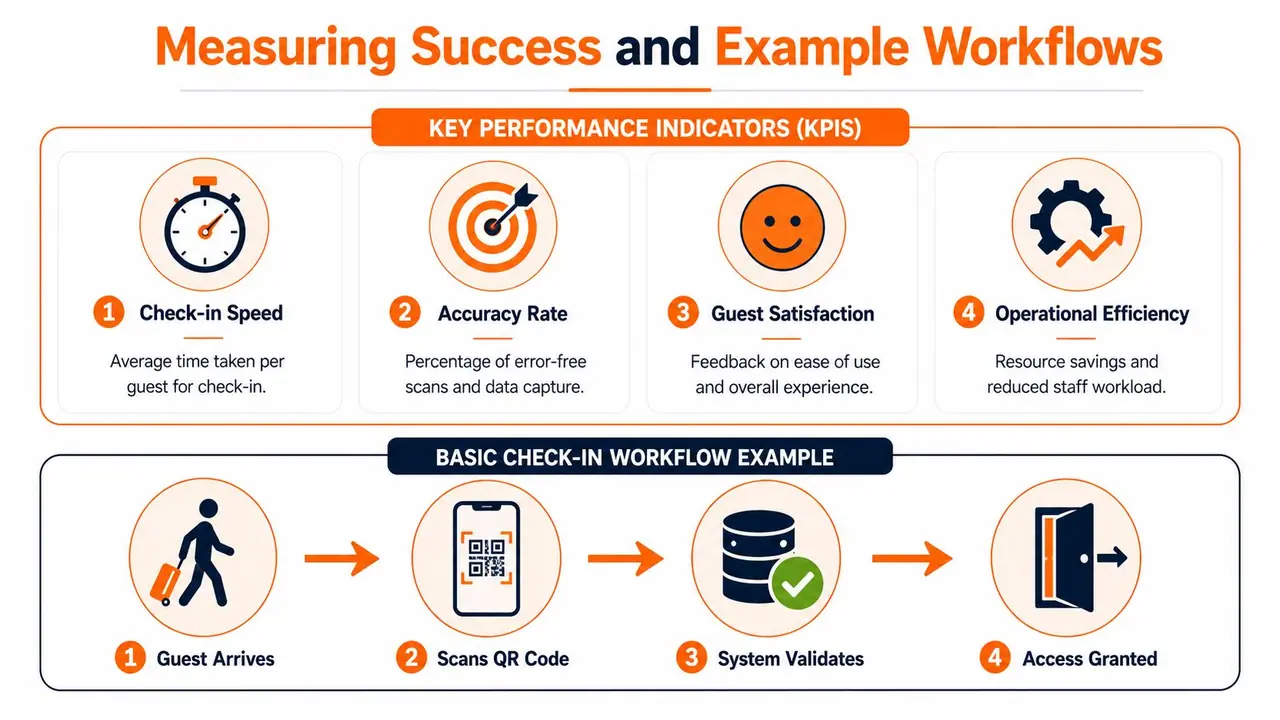
KPIs worth tracking
Keep the list short enough that you'll review it.
- Message reduction: Track how often guests still ask routine arrival questions.
- Check-in smoothness: Note when arrivals require intervention and why.
- Review language: Look for repeated mentions of convenience, clarity, or easy self-check-in.
- Upsell usage: Measure which extras guests tap and buy.
Two practical workflows
A solo Airbnb host usually needs one thing most: fewer interruptions. In that setup, the guest receives arrival instructions before check-in, scans a code in the unit, gets Wi-Fi and house basics instantly, then uses the same guide for local food spots and checkout. The host stops answering the same questions every stay and only steps in for exceptions.
A small boutique hotel needs consistency across rooms and shifts. In that workflow, every room has the same QR entry point, but the content can support room-specific details, dining information, late checkout requests, and service booking. Staff no longer rely on verbal handoff quality alone. The guest experience becomes more repeatable.
Track behavior, not assumptions. If guests still message for the same answer, the information may exist, but it isn't easy enough to find.
That's the key test of a QR code check-in system. It should reduce friction for guests and reduce noise for the team at the same time.
If you want to replace paper binders and repetitive guest messages with a mobile-first welcome flow, ScanStay is built for exactly that. It helps hosts and property managers give guests one QR code for Wi-Fi, check-in and checkout details, house rules, local recommendations, and upsells, all in the browser with no app required. For operators managing one property or a full portfolio, it's a practical way to make arrivals smoother and your evenings quieter.