Self Check in Made Simple: A Host Setup Guide
Set up self check in for your rental with this host guide. Covers hardware, software, guest instructions, security, automation, and revenue tips.

You know the moment. It's late, the guest message says “I'm here,” and the door code hasn't been checked since yesterday. Or the traveler is standing outside, phone in hand, trying to figure out which entrance matches the photos you sent three weeks ago. That's when self check in stops being a nice feature and starts being the difference between a calm turnover and a night full of repetitive messages.
The mistake most hosts make is treating self check in like a lock purchase. It's not. The lock is only one part of a staged arrival journey that starts before the guest gets there and ends after they've settled in. The properties that feel effortless are usually the ones where instructions, access, support, and checkout are sequenced on purpose, not stitched together after the fact.
A good reference point is the kind of guest experience you'd want at a high-end stay, like the arrival flow for private pool villas in Algarve, where the guest needs clarity before they ever reach the door. When the handoff is designed well, the guest barely notices the system. When it isn't, every small omission turns into a message, a delay, or a lockout.
Table of Contents
- The Moment Self Check In Actually Solves
- Choosing the Right Self Check In Method
- Setting Up Hardware and Software That Work
- Writing Guest Instructions That Get Followed
- Security, Legal, and Accessibility Guardrails
- Messaging and Automation Templates That Save Your Evenings
- Testing, Troubleshooting, and Measuring Real Results
The Moment Self Check In Actually Solves
A problem usually shows up at the worst possible time. A guest arrives after dark, misses the last message, and stands at the wrong door. A host finishes dinner only to answer the same three arrival questions again. Or a front desk, if there is one, gets clogged with people who all need the same basic thing, fast access.
Self check in solves that moment when arrival depends on a person being available. It shifts the burden away from a single handoff and into a planned sequence that can run with less friction. That's why the best setups don't feel like “technology,” they feel like the guest already knew what would happen next.
Think in stages, not gadgets
The staged model matters because each part of the arrival can fail in a different way. Pre-arrival messages handle identity, timing, and expectations. Access activation handles the actual door moment. In-stay support handles the questions that would otherwise bounce around by text. Checkout handoff handles the exit without forcing a final conversation.
A strong operational flow looks like this:
- Pre-arrival instructions give the guest the exact path before they travel.
- Access activation on arrival turns the code, key, or link live at the right time.
- In-stay support answers the repeat questions without requiring a host to be awake.
- Checkout handoff closes the loop with no awkward last-minute confusion.
Practical rule: if guests still ask where to go, what to tap, or which entrance to use, the system is not finished, even if the lock works.
That's the point where the technology and the communication either reinforce each other or fall apart. The better the sequence, the less the guest notices the mechanics behind it.
What adoption signals tell you
The broader travel market has already moved in this direction. In one global passenger survey cited by aviation research, 51% of passengers preferred using a smartphone or device for check-in, up 4 percentage points from 2018, and another survey found 70% of travelers had already checked in online or by mobile, while only 23% still used a staffed desk, which shows how normal digital self-service has become in high-volume travel environments (aviation research summary). The lesson for hosts is straightforward, guests already understand self-service when the sequence is clear.
That doesn't mean every property should copy airport logic. It does mean the expectation is there. Guests increasingly want speed, clarity, and the ability to solve the first few steps without waiting for a human reply.
Choosing the Right Self Check In Method
The first decision is the physical access method, and the wrong one is expensive in a quiet, annoying way. A tool can look polished in a demo and still be a headache in turnover because batteries fail, codes don't sync, or the guest can't tell which lock is theirs. The right choice depends on how often you turn the unit, how many properties you manage, and how much failure risk you can tolerate.
Match the method to the property
A keypad lock is usually the simplest starting point. It's familiar to guests, easy to explain, and doesn't require them to install anything. A lockbox with a numeric code can work well for single-property hosts who want a low-cost setup, especially when turnover is occasional and someone can still intervene if needed.
A smart lock tied to a property management system makes more sense when you need time-bound access and cleaner turnover between reservations. It reduces manual code handling and lets you connect entry more directly to booking windows. Remote or app-based access can be powerful, but only if you're comfortable with guest devices becoming part of the check-in process.
Here's the short version.
| Method | Good fit | Main trade-off |
|---|---|---|
| Lockbox | One property, simpler operations | More manual handling |
| Keypad lock | Small portfolio, frequent arrivals | Battery and code management |
| Smart lock with PMS | Multi-property hosts | Setup complexity |
| App-based access | Tech-comfortable guest base | Highest dependency on phone and connectivity |
Reliability beats novelty
The flashiest option is rarely the one that saves the most time. If Wi-Fi drops, the app won't help. If the battery dies, the keypad is just a dead panel. If the code lifecycle isn't tied to the booking, you end up chasing access issues at exactly the time you wanted to stop doing that.
That's why the operational question matters more than the feature list. The guest doesn't care whether the lock is “smart,” they care whether the door opens on the first try.
The best method is the one your least technical guest can use without texting you twice.
A practical decision rule helps. A single host with one property and infrequent turnover can start with a lockbox or keypad. Multi-property hosts usually benefit from time-bound codes tied to a PMS, because code control and turnover automation become more valuable as the portfolio grows.
Setting Up Hardware and Software That Work
The setup that works in real life is rarely the one that looks neat on paper. Self check in works as a chain, the hardware at the door, the network behind it, the code or app flow, and the messages that tell the guest what to do next. If one piece is off, the guest is still outside, and the problem lands on your phone.
Start at the door, then work outward
Begin with the access device itself, then check the space around it. A smart lock or lockbox should sit where a guest can reach it quickly, not where it looks tidy in listing photos. If the signal is weak at the entrance, fix that before launch. A poor connection at the door makes the whole system feel unreliable.
What usually matters on site is straightforward:
- The lock or lockbox needs to be mounted where guests can find it fast.
- The router or Wi-Fi access point needs to cover the entry point, not just the living room.
- Backup power matters for smart locks and any part of the setup that runs on batteries.
- A printed QR poster gives guests one clear path to the instructions.
The cleanest setup I've seen still failed at the door because the code was hard to read in dim light. That kind of miss is small in the office and annoying in practice, especially when a guest is carrying luggage and trying not to block the hallway. Test the entry path with a fresh phone and no saved login before the first live booking. Use that same test to check whether a tired guest can see the code, scan the QR code, and understand what to do without asking for help.
Make the software follow the booking, not the other way around
Hardware only works if the software tells it what to do. In practice, that means a property management system, a messaging automation tool, and a digital welcome book that keeps arrival instructions in one place. If you want one branded page for Wi-Fi, house rules, and access details, ScanStay is one option hosts use to keep the check-in flow inside the guest's browser instead of scattering it across messages.
The main issue is not the brand name. It is whether the booking window, the message timing, and the access window all line up. The PMS needs the reservation dates, the messaging tool needs to send the right note at the right time, and the access system needs to open only during the stay. A setup can look polished and still fail if the code arrives too early, stays active too long, or does not match the reservation.
For hosts comparing lock options against real turnover work, the guide on the best smart lock for Airbnb is a useful place to start. It helps narrow the choice between lock types without pretending every property needs the same hardware.
Build in the human handoff before you need it
The part that many setup guides skip is the fallback. A guest may have a dead phone, a weak connection, a locked app, or trouble reading the instructions at the door. Accessibility matters here too. A setup that assumes everyone can scan a QR code, install an app, or stand in bright daylight to read a keypad is a setup that leaves some guests stuck.
That is why I always want one backup path ready before launch. If the first method fails, the guest should know exactly who to message, what number to call, and what information to send so you can help quickly. That handoff should be written into the workflow, not left as an afterthought. It saves more time than adding another device, because it stops the late-night scramble when the hardware is fine but the guest cannot complete the last step.
Writing Guest Instructions That Get Followed
A guest at the door is not reading like a planner. They are juggling bags, maybe a child, maybe bad weather, and they want the one path that gets them inside without guesswork. Write for that moment, then layer in the rest of the stay after access is solved.
Start with the arrival path, not the property tour
Lead with the entrance photo, then the lock photo, then the code or app step that opens the door. House rules, parking notes, and local tips can sit lower in the message or welcome book. If the guest cannot find the entry point, none of the other details matter yet.
A practical welcome book usually includes:
- Arrival logistics with clear photos of the correct entrance and lock.
- Wi-Fi credentials near the top so guests can connect without hunting.
- Check-in and check-out times in plain language.
- House rules written cleanly and without extra wording.
- Quick guides for appliances that tend to confuse first-time users.
- Local recommendations placed on a simple map for easy reference.
- An escalation path that tells them what to do if the door will not open.
That order keeps the guest focused on the first task instead of digging through a long message for the one detail they need. It also makes the property feel managed, because the workflow matches how people arrive.
Keep the access details in one place
A QR-based welcome book helps because it gives guests one clean entry point instead of scattered reminders across email, SMS, and chat threads. If the link opens well on a phone, guests are far more likely to use it than if they need to search through old messages at the curb. A simple setup guide on QR code generation can help you package the check-in steps into something a guest can scan and follow without hunting.
Placement matters as much as the format. Put the QR poster where guests naturally pause, near the entrance, inside the mailbox area, or on the first surface they see after arrival. Keep it visible, but do not turn the doorway into a wall of signs.
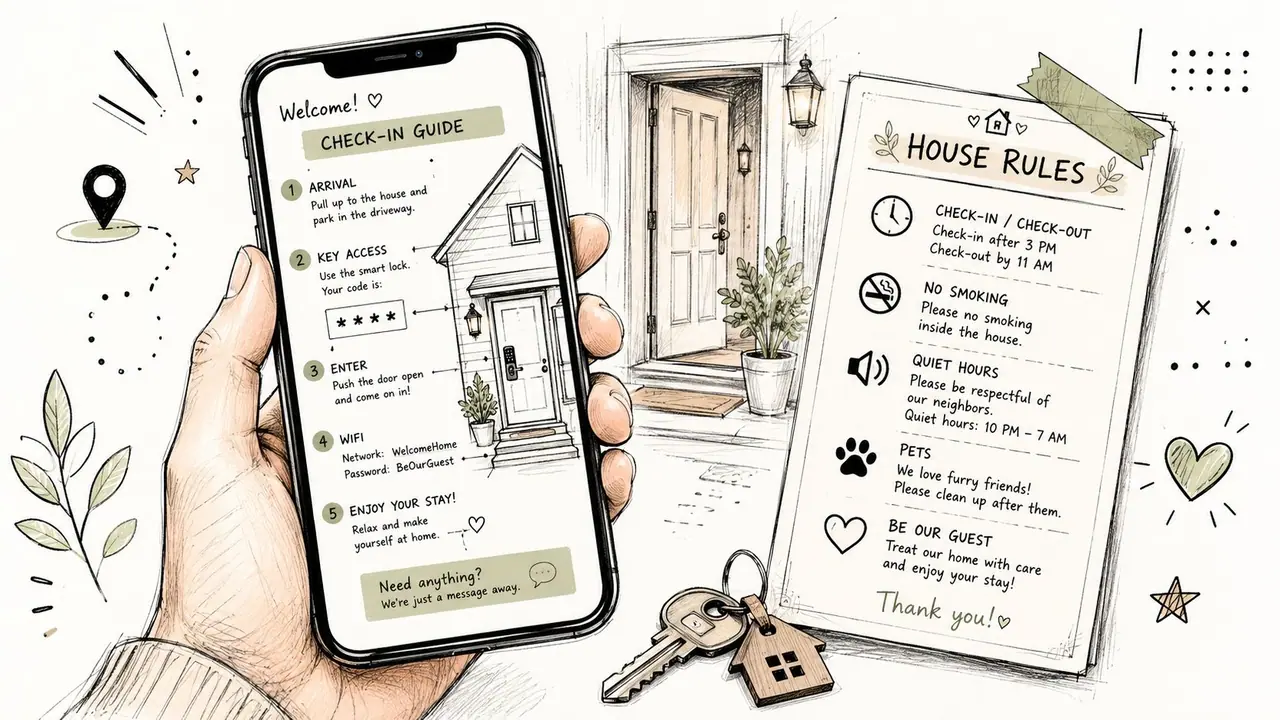
The win is fewer moments where the guest has to guess. A clean flow cuts confusion before it becomes a late-night message.
Write for the guest who is already stuck
The strongest instructions are the ones that still work when a phone is nearly dead, the connection is poor, or the guest is standing in the dark trying to read the keypad. Accessibility belongs in the first draft, not as an edit after complaints start coming in. If someone cannot scan a code, enlarge the text, or follow a screen-based flow, the instructions have already failed that guest.
I also make sure there is a human handoff written into the process before launch. If the first step fails, the guest should know exactly who to contact, what number to call, and what details to send so support can move quickly. That handoff is part of the operating system, not a separate favor. For hosts who need a more structured identity check in that fallback path, some use tools built for volunteer background checks because the basic discipline is the same, confirm who is asking before you grant access.
Security, Legal, and Accessibility Guardrails
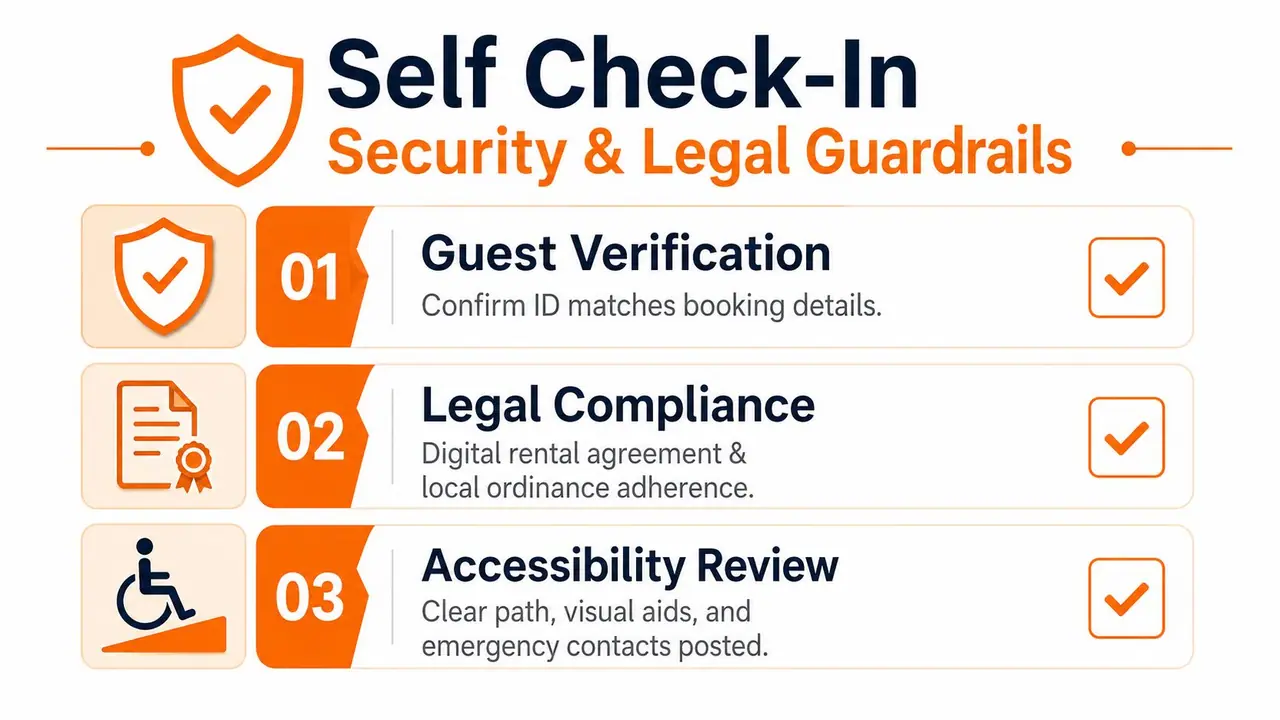
A self check in flow that ignores security, legal duties, or accessibility can create more risk than it removes. The cleanest access process in the world still fails if the wrong person gets in, the local registration is incomplete, or a guest with limited mobility can't use the path you designed. Responsible hosts build guardrails before the first guest ever arrives.
Lock down access and keep records
Use guest verification through the booking platform or your own documented process, then issue unique time-bound codes that expire at checkout. That keeps access tied to the reservation instead of leaving a permanent door credential floating around. Keep a simple log of who has access, when the code was activated, and when it expired.
You also need a fallback for lockouts. A secondary method, a lockbox backup, or a clear escalation tree prevents a simple battery failure from becoming a stranded guest problem. If you ever need a human handoff, the guest should know exactly how to reach it.
For screening or access-control workflows that require more structured identity checks, some hosts look at tools designed for volunteer background checks because the basic principle is the same, confirm that the person in front of you is the person you expect before you grant access. The tool choice may differ, but the discipline is identical.
Treat accessibility as part of the design
Most self check in writeups focus on speed. They skip whether the guest can use the flow if they have a disability, low digital literacy, privacy concerns, or limited device access. That gap matters. In healthcare, implementation guidance stresses wheelchair space, privacy, reliable internet, and integration because a check-in system fails when the environment doesn't fit the user. The same principle applies here, the path has to work for diverse guests, not just the tech-comfortable majority.
BBC reporting on self-service kiosks also highlighted a different side effect, replacing human checkout staff can worsen loneliness in rural communities. That's a useful reminder for hospitality. A self check in setup should still include a human fallback, because some guests don't just need access, they need reassurance.
Don't skip the legal side
Short-term rental registration, tax obligations, insurance requirements, and data handling rules vary by location. If you store guest details in a PMS or welcome book, you're handling personal information and should be deliberate about who can see it and how long it stays there. The safer approach is simple, collect only what you need, document it clearly, and make sure your process matches local rules.
The strongest self check in systems feel private to the guest and controlled to the host. That balance is the point.
Messaging and Automation Templates That Save Your Evenings
The access flow only works if the messages around it do too. A host can install solid hardware and still lose half the evening answering “Where do I park?” or “Which code do I use?” The aim is simple, cut repetitive questions without making the guest feel stranded.
A staged self check in process needs staged messaging. The guest should get the right detail at the right moment, not one long block of instructions dumped into their inbox.
Start before arrival, then adjust by situation
The first message should confirm the booking, thank the guest, and tell them that access details will follow later. That sets expectations without creating confusion before they need the code.
The next note goes out closer to arrival. Send it before check-in with the access timing, property location, and the welcome book link, matching the staged approach used in the government guide on hotel self-check-in implementation. A day-of-arrival message can then repeat the access step, point to the QR code for the welcome book, and add a short line on what to do if they get stuck at the door.
Checkout deserves its own message too. Keep it direct, with departure time, any trash or key steps, and a simple invitation to leave a review. This part saves time because it reduces the last-night back-and-forth that usually turns into one more round of manual replies.
Short messages get read. Travel days are busy, and guests scan for action items, not a full explanation of your workflow.
Automate the routine, keep people in the loop
Automation should cover the predictable stuff and stop there. A booking confirmation, a reminder, or a thank-you note can be sent automatically, which is where automate Airbnb messages helps reduce repeat work across properties. A lockout, payment problem, or guest who cannot find the entrance should go to a person fast.
That handoff matters more than it looks in a demo. Guests do not just need the right code, they need to know someone will answer when the code fails, the battery dies, or the access page does not load. Tools that help automate hotel customer support can take the first wave of routine questions, but they should still route real problems to a human without delay.
Keep the welcome book link stable through the whole sequence. Guests should land on one branded page, not a trail of copied notes and different URLs. If the same link appears in every message, the handoff feels calmer and the guest has one clear place to return to.
Testing, Troubleshooting, and Measuring Real Results
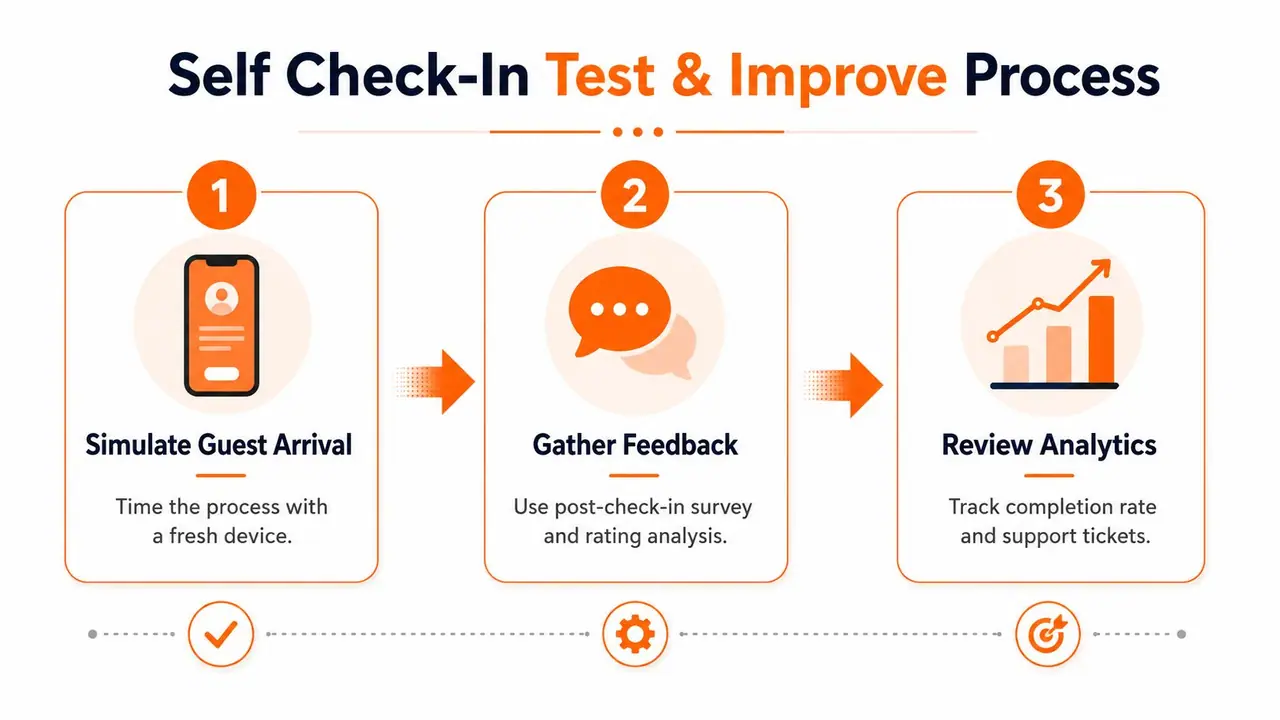
A self check in system is only finished after a guest can use it without help. Before launch, test it like a stranger would, not like the person who installed it. Fresh eyes catch the gaps you've already stopped seeing.
Run a guest simulation
Use a phone that has never opened the property before. Walk the exact route from the street to the door. Time the steps, check whether the code works in the booking window, and make sure the welcome book loads on a weaker connection.
Then test the ugly scenarios. Try it in low light. Try it when the battery indicator is low. Try it after changing the door code. If the QR poster won't scan or the access page fails after a domain change, you want that problem to appear during testing, not at midnight.
Fix the common failure points
Most failures are predictable.
- Dead batteries on a smart lock need scheduled replacement, not emergency discovery.
- Codes outside the booking window usually mean the PMS and access system aren't synced correctly.
- QR posters that don't scan well often need better placement or larger print.
- Broken welcome book links usually come from sloppy domain changes or copied URLs.
Measure what matters
Don't judge the rollout only by how much less you feel interrupted. Track whether guests are engaging with the system, how many repetitive messages disappear, and whether support tickets drop. If you use ScanStay's scan analytics, you can see when guests open the welcome book, which helps reveal whether your instructions are being used or ignored.
The best measures are practical, not vanity metrics. Review quality, repeated questions, and upsell take-up for late checkout or transfers tell you more about whether self check in is working than a vague sense that the inbox looks quieter. A setup that saves time but confuses guests is not a win.
If you want a simpler, more reliable arrival flow, build it around one QR code, one clear welcome book, and one automation layer that supports the guest without burying them in text. ScanStay gives hosts a way to package arrival details, house rules, and upsells in one mobile-friendly flow, so the check-in process feels structured instead of scattered. Visit it if you want to turn self check in into something your guests can follow and your team can maintain.