Registration of Guests: A Complete Host's Guide (2026)
Learn the complete process for registration of guests. This guide covers legal requirements, contactless QR-code setup, and how to automate for 100% compliance.

A guest checks in tonight. You still don't have the full names for everyone in the group, one person is asking for parking instructions, another wants the Wi-Fi code, and the booker says their cousin will arrive first. That's the moment weak registration systems fall apart.
Most hosts treat registration of guests like admin. It isn't. It's the control point that decides whether arrival feels smooth or chaotic, whether you're chasing documents in your inbox, and whether your property runs like a business or a group chat.
The hosts who handle this well usually do one thing differently. They stop thinking about registration as a form to fill out and start treating it as an operating system for check-in, house rules, access, support, and extras. Done right, it reduces repetitive messages, makes compliance easier, and creates cleaner opportunities to offer late checkout, parking, transfers, or add-on services without feeling pushy.
Table of Contents
Why Guest Registration is More Than Just Paperwork
The best check-ins feel effortless to the guest because the host did the hard work earlier. Names are confirmed, arrival details are clear, rules are acknowledged, and nobody is scrolling through old messages to find the door code.
That's a big shift from how the industry started. The practice of registering hotel guests dates back to at least the 1920s in the United States, with preserved guest registries from resorts like French Lick Springs Hotel documenting thousands of guest arrivals, names, and charges, marking the move from informal hospitality to systematic record-keeping, as noted in the French Lick resort archive.

What changed is the medium, not the job. Paper ledgers became guest cards, then PDFs, then portal links, then mobile-first flows. But the purpose stayed the same: know who is staying, capture what matters, and give guests the information they need without friction.
Registration shapes the guest experience
A bad registration flow creates problems that look unrelated. Guests ask basic questions because arrival instructions were buried. Hosts miss upsell opportunities because they have no clean handoff between booking and stay. Teams waste time because data lives in four places.
A good one fixes all of that.
Registration of guests is the first operational promise you make. If the process is clear, guests assume the stay will be clear too.
For short-term rentals, that often means replacing scattered messages with one structured path. A digital guide such as a vacation rental welcome book can support that handoff by putting arrival details, house rules, and property basics in one place instead of spreading them across Airbnb, WhatsApp, email, and a paper binder.
What works and what doesn't
A manual process can still work for a single property with low turnover. It usually breaks when you add more listings, self-check-in, co-hosts, or same-day turnovers.
Here's the trade-off in plain terms:
| Approach | What works | What fails |
|---|---|---|
| Paper forms | Familiar, simple for in-person check-in | Hard to search, easy to lose, awkward for contactless stays |
| Message-based registration | Flexible for one-off cases | Inconsistent, slow, poor audit trail |
| Static online form | Better record-keeping | Collects too much from some guests and too little from others |
| Structured digital workflow | Cleaner data, smoother arrival, less back-and-forth | Requires setup and clear rules |
Hosts don't need a complicated system. They need one that guests can complete quickly, staff can follow consistently, and regulators would understand if asked.
The Essential Guest Information Checklist
Collecting more information doesn't make registration better. Collecting the right information does. Every field should have a clear reason tied to compliance, security, operations, or communication.
Collect only what has a purpose
The easiest way to build a form is to ask, “What decision does this field help me make?” If the answer is vague, remove it. Guests notice bloated forms, and completion drops when the process feels nosy or unnecessary.
Practical rule: If you can't explain why you need a field, don't ask for it.
Some hosts copy hotel registration cards and end up collecting data they never use. Others go too lean and can't verify who is arriving, can't manage vehicle access, and can't contact the right person when something changes. The right checklist sits in the middle.
A practical checklist that works
Use this as a working template for registration of guests in short-term rentals, guesthouses, and boutique stays.
Lead guest full legal name
This is the anchor for the reservation. It should match the booking and the identification you'll review if your local rules or house policy require that.Additional guest names
Don't stop at “2 guests” or “4 guests.” Ask for the names of everyone staying. This matters for occupancy control, building access, and basic accountability if neighbors or security teams need to confirm who belongs on site.
Key data point: Full names for all overnight guests are more useful than a headcount by itself.
Date of birth when relevant
If your property has age restrictions, alcohol-related amenities, or local registration rules that require identity details, date of birth can help verify eligibility. If you don't have a real use for it, skip it.Permanent address
This can be useful for records, tax reporting in some jurisdictions, or follow-up if there's damage or a legal dispute. For many hosts, city, state, and country may be enough unless local rules require the full address.Email address and mobile number
You need one reliable contact path before arrival and another during the stay. Don't assume the booking platform chat is enough if the guest is driving, flying, or arriving late.Government-issued ID details or secure ID capture
If your operation requires identity verification, collect only what you need and store it securely. In many cases, a secure upload or verification workflow is better than asking guests to text photos.
Important: If you request ID, tell guests why you need it, who can access it, and how long you retain it.
Vehicle information Ask for plate number, car model, or parking needs only if your property uses them. This field matters in gated communities, permit zones, and buildings with assigned spaces. It's clutter everywhere else.
Arrival window
This isn't just a convenience field. It helps housekeeping timing, access control, lighting, and host availability. Even self-check-in properties benefit from a narrow arrival estimate.Special requests or stay notes
Keep this field open-text and optional. It catches useful details such as a cot request, accessibility need, or late arrival note.Acknowledgment of house rules
Guests don't need a legal novella before check-in. They do need to actively confirm the rules that matter most: occupancy, noise, smoking, pets, parties, parking, and checkout expectations.
A simple way to pressure-test your form is to review each field against these four questions:
Does this support compliance?
Does this reduce risk?
Does this help operations run smoother?
Will I use this information?
If a field doesn't pass one of those tests, it's probably noise.
Navigating Legal, Privacy, and Security Requirements
Most hosts don't struggle with registration because the concept is difficult. They struggle because local rules, privacy concerns, and security checks all collide at the same moment. The fix is to separate those jobs and build one repeatable process around them.

Compliance starts with local rules
The legal side is location-specific. Some places require guest details for tourism reporting, building access, or law enforcement registration. Others don't. A host with one apartment in a city center and a manager with ten rural cottages may face completely different obligations.
That's why the first rule is boring but necessary: check municipal, regional, and platform-specific requirements before you build your form. Don't copy another host's process unless they operate in the same place under the same type of license.
A good compliance setup usually includes:
A required-data list based on your jurisdiction, not internet advice
A retention policy that states what you store and when you delete it
A consistent method for collecting signatures, acknowledgments, or ID where needed
A fallback procedure for late arrivals, non-cooperative guests, and third-party bookings
If you use a digital workflow, guests should also be able to understand how their information is handled. A plain-language privacy notice matters more than legal-sounding fluff. Hosts who publish a clear guest data privacy policy tend to avoid the confusion that starts with “Why are you asking for this?”
Privacy and storage need clear limits
The biggest mistake I see is over-collection paired with weak storage. Hosts ask for passport photos, addresses, birthdays, and signatures, then leave them in email threads, messaging apps, or shared drives with no deletion habit.
That's not a paperwork issue. That's a risk issue.
Use these standards as your baseline:
| Area | Good practice | Bad practice |
|---|---|---|
| Collection | Ask only for needed data | Asking “just in case” |
| Storage | Keep records in one controlled system | Saving files across inboxes and phones |
| Access | Limit access to people who need it | Letting cleaners, co-hosts, and owners all see everything |
| Deletion | Remove data after your required retention period | Keeping guest records forever |
If a guest asks why you need information, answer directly. “We use this to verify the reservation, manage arrival, and meet any local reporting obligations” is stronger than “It's standard policy.”
Accessibility can't be an afterthought
Digital registration is only better if guests can use it. In the United States, ADA rules under 28 CFR Part 36 prohibit surcharges for service animals and require accessible public accommodations. For hosts using digital registration, the practical takeaway is broader: your forms and check-in instructions should be easy to use, readable, and compatible with assistive tools.
That means:
Use clear labels instead of vague placeholders
Make links descriptive so screen readers can identify them
Avoid image-only instructions for access steps
Keep the mobile flow simple with large tap targets and logical field order
Offer an alternative path if a guest can't complete the digital process independently
Accessible registration isn't a luxury feature. It's part of basic hospitality.
Security needs proportion, not theatrics
Hosts often swing between two extremes. Either they verify nothing and hope for the best, or they create a hostile check-in flow that treats every guest like a suspect.
The better approach is proportional verification. Match the level of checking to the risk of the booking. A one-night local reservation with same-day booking may need closer review than a family staying a week with a clear platform history. A staffed boutique property can use one process. A remote self-check-in unit may need another.
What doesn't work is improvising. If someone refuses to provide required information, the team needs a script and a decision tree before that happens.
How to Implement Contactless Guest Registration
Contactless registration works best when it feels shorter than the old way. If it feels like a digital version of paperwork, guests will delay it, half-complete it, or send messages instead.
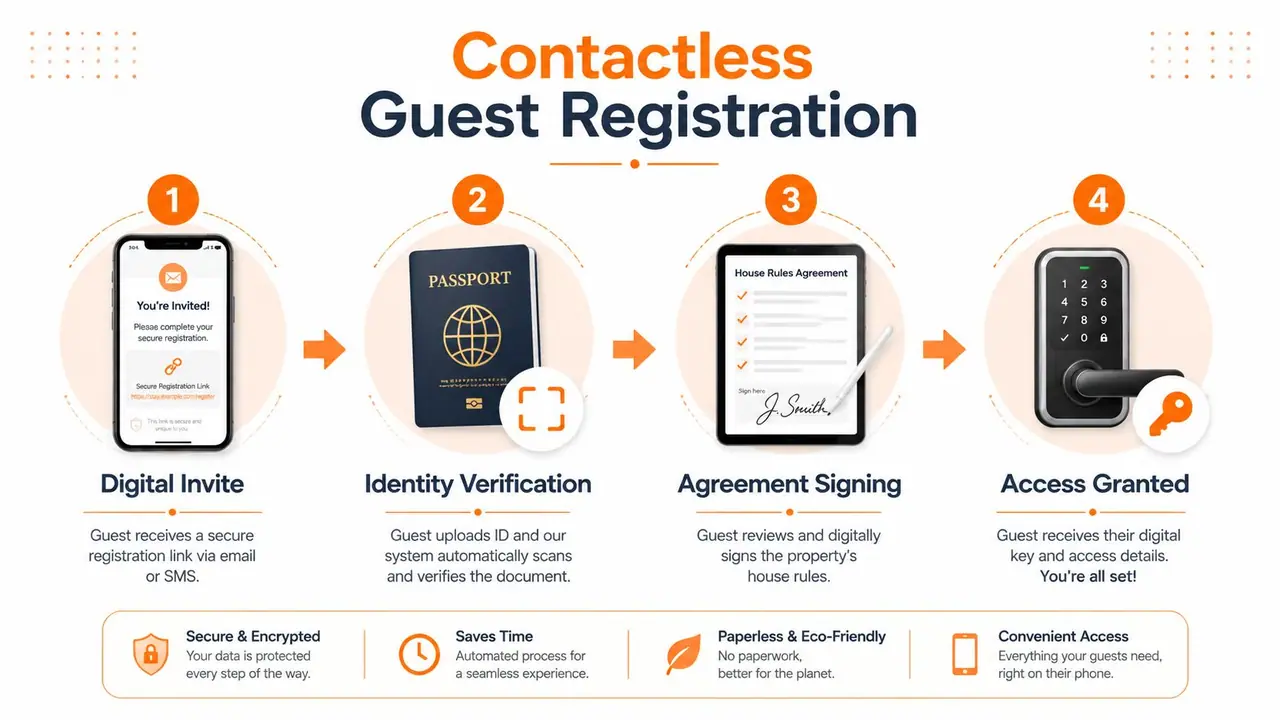
Build the flow before choosing the tool
Hosts usually start with software. Start with sequence instead.
Write down the order you want the guest to experience:
Booking confirmed
Pre-arrival registration request sent
Guest submits missing details
Rules acknowledged
Arrival instructions provided or sent
Support questions routed to one place
That sequence keeps registration tied to operations. It also stops the common problem where a host sends access details before collecting the information they need.
Use conditional logic to remove friction
Not every guest should see the same fields. A guest arriving by train doesn't need parking fields. A repeat guest may not need to re-enter details you already have. A solo traveler doesn't need a long section for additional occupants.
That's where conditional forms matter. Digital registration systems that adapt fields based on booking type can increase completion rates by as much as 160%, and guests who pre-register online experience 40 to 60% faster physical check-in times, according to the Whova registration workflow analysis.
The practical lesson isn't “add complexity.” It's the opposite. Show less.
The fastest form is the one that hides anything the guest doesn't need to answer.
A strong contactless form usually does three things well:
Pre-fills known details from the booking whenever possible
Branches intelligently based on guest answers
Ends with one clean confirmation instead of several follow-up messages
The simplest workflow for most properties
For most short-term rental hosts, this setup is enough:
| Stage | Guest sees | Host gets |
|---|---|---|
| Pre-arrival message | One link to registration | A single collection point |
| Mobile-friendly form | Only relevant questions | Cleaner, more complete data |
| Digital rules acknowledgment | Short summary plus confirmation | Record of acceptance |
| Arrival instructions | Access info after completion | Fewer “how do I get in?” messages |
You can deliver the form through Airbnb scheduled messages, Booking.com templates, email, or SMS. The delivery method matters less than consistency. Guests should receive the request at the same stage every time, with the same instructions and deadline.
A few implementation details matter more than people think:
Use one page if possible
Multiple steps can work, but every extra screen is a chance to abandon the form.Design for phones first
Most guests complete registration on mobile. Long text blocks and tiny fields kill completion.Set a clear deadline
“Please complete this before arrival” is weak. “Complete this by the morning of check-in” is easier to act on.Keep the confirmation message useful
After submission, tell the guest what happens next. Don't leave them guessing whether access details are coming.
One final operational note. Contactless doesn't mean human-free. It means the human touch appears where it helps, not where the system failed.
Automating Registration with Tools like ScanStay
Automation matters when your registration process needs to do more than collect names. It needs to deliver instructions, reduce repetitive support, and create a clean path from booking to stay.
Registration should answer questions before they're asked
Most hosts know the pattern. Guests ask for the Wi-Fi code after you already sent it. They ask where to park, how to use the lock, whether early check-in is possible, and what the quiet hours are. Those messages don't happen because guests are difficult. They happen because the information is fragmented.
A digital welcome flow can fix that by tying registration to the information guests need on arrival. Instead of collecting data in one place and sending instructions somewhere else, the guest gets one mobile-friendly destination that handles both.
That matters because scan analytics in digital welcome books show that 65% of guests look for Wi-Fi or house rules first, and using a QR-based platform that proactively surfaces that information can reduce support queries by 40% and increase 5-star reviews by 14%, according to the cited data in this guest application page reference.
That's the practical difference between automation that sounds nice and automation that changes your day. Fewer repetitive questions means less inbox drag, less chance of missed messages, and a calmer arrival window.
Teams managing multiple homes see another benefit. When the same digital structure is reused across properties, staff stop reinventing check-in every time. That consistency is one of the quietest operational wins in property management.
For operators who want a broader system around guest communication and property workflows, a guide on vacation property management can help frame where registration fits inside the larger operation.
Analytics turn guest intent into action
The most useful automation doesn't stop at information delivery. It shows what guests cared about.
If guests repeatedly open parking details, your arrival instructions may need to put parking higher. If guests often view checkout information late in the stay, that's the moment to offer late checkout. If local recommendations get strong engagement, you can package transport, equipment rental, or curated add-ons more intelligently.
Here's where the workflow gets more valuable:
High-interest topics tell you what to feature earlier
Repeated question themes tell you what to rewrite
Viewed extras tell you what guests may buy
Low-engagement sections tell you what can be shortened or removed
A short demo helps make that real:
The trade-off is straightforward. Automation takes setup work upfront. But once the flow is built, every future booking benefits from the same structure. That's better than solving the same arrival problems manually every week.
Good automation doesn't replace hospitality. It removes preventable friction so hospitality has room to show up.
Handling Registration Edge Cases and Common Scenarios
Even a strong registration system gets tested by unusual bookings. The answer isn't to improvise. It's to decide in advance what you'll accept, what you'll escalate, and what you'll decline.
Third-party bookings
A guest books, then says someone else will stay. This is common with assistants, relatives, and business travel.
Treat this as a verification issue, not a customer service annoyance. Ask for the staying guest's full details, require registration from the actual occupant, and make it clear that access instructions go only to the registered guest unless your platform policy says otherwise.
A useful script is simple:
“Thanks for the update. For security and check-in purposes, we need the staying guest to complete registration before arrival.”
If the platform prohibits third-party bookings in that situation, direct the guest back to the platform to correct it rather than patching it manually.
Guests who refuse ID
Hosts often lose confidence at this stage and begin negotiating against themselves.
If ID is part of your stated process, don't turn it into an optional request at the last minute. Explain the requirement calmly, restate the purpose, and offer a secure submission method if the guest is worried about privacy. If they still refuse, follow your written policy.
The key is consistency. If some guests can bypass verification by pushing back, your process isn't a process anymore.
Large groups with staggered arrival
Group bookings get messy when one person books and six people arrive at different times. A weak system leaves cleaners, neighbors, or staff trying to guess who belongs there.
Use one lead guest for responsibility, but collect the names of all overnight guests in advance. Then decide access rules clearly:
Single access holder if you want tighter control
Shared arrival instructions only after all required details are complete
Manual handoff for high-risk or event-period stays
This approach keeps accountability with the booker while still making the actual occupants visible.
Last-minute bookings
Same-day reservations expose every weak point in registration of guests. The timeline is compressed, the guest is often in transit, and the temptation is to skip steps just to get them in.
Don't skip. Compress.
For last-minute stays, use the shortest version of your required flow: essential guest details, rules acknowledgment, arrival instructions, and a clear deadline tied to access release. If the guest can't complete the minimum required steps in time, it's safer to delay access than to hand over the property blind.
A practical internal rule helps here: decide what is mandatory for access and what can wait until later. If you haven't made that distinction before the booking arrives, your team will make inconsistent decisions under pressure.
If you want one place to deliver guest information, cut repetitive pre-arrival messages, and create upsell opportunities from the same guest-facing flow, ScanStay is built for exactly that. It gives hosts a single QR-based welcome experience for Wi-Fi, check-in details, house rules, local recommendations, and extras, without forcing guests to download an app.