Property Management Systems: A Host's Guide for 2026
Discover how property management systems can save time and boost bookings. Our guide covers features, selection criteria, and implementation for Airbnb hosts.
By the time most hosts start looking at property management systems, they're already feeling the strain. One listing is manageable with spreadsheets, OTA apps, saved replies, and a decent memory. Five listings gets messy. Ten listings means your phone never really leaves your hand. Somewhere in that range, the work stops feeling like hosting and starts feeling like traffic control.
The usual pattern is easy to recognize. Airbnb messages live in one app. Booking.com updates show up somewhere else. A direct booking site adds another login. Cleaners text instead of using the calendar. Guests ask for the Wi-Fi password even though you sent it yesterday. You answer the same arrival question three times because one guest used Airbnb, another emailed, and the third sent a text. The core problem isn't volume alone. It's fragmentation.
That's why property management systems matter. They're no longer a niche back-office tool. One market estimate valued the global property management software market at $1.73 billion in 2022 and projects $2.71 billion by 2030 (Strategic Market Research). That shift reflects something hosts already know from experience. Centralized operations aren't a luxury anymore. They're the only sane way to run a growing rental business.
Table of Contents
- Are You Drowning in Bookings and Messages
- What Is a Property Management System Really
- Core Features That Give You Your Time Back
- How to Choose the Right PMS for Your Rentals
- Your PMS Implementation and Migration Checklist
- Supercharge Your PMS to Perfect the Guest Experience
- The Future of Property Management Is Automated
Are You Drowning in Bookings and Messages
If you manage a handful of short-term rentals, you've probably had a day like this. A Booking.com reservation lands while you're replying to an Airbnb guest asking for early check-in. Your cleaner wants to know whether the departing guest left. A direct booking inquiry asks if the pet policy is flexible. At the same time, you're checking whether tonight's rate updated everywhere after changing it on one channel.
Nothing is technically broken. But everything depends on you noticing, remembering, and manually pushing information from one place to another.
The real bottleneck is context switching
Hosts often assume the pain comes from “too many bookings.” Usually it comes from too many systems. You're switching between OTA dashboards, message threads, calendars, lock apps, payment records, and cleaner chats. Each switch looks small. Over a week, it drains attention and creates mistakes.
The most expensive errors aren't dramatic. They're the quiet ones:
- Missed updates: A blocked date doesn't carry across fast enough.
- Split conversations: A guest asks the same question in two places and gets two different answers.
- Manual re-entry: You copy booking details into a cleaner calendar, then into a spreadsheet, then into your accounting notes.
- Delayed decisions: You can't tell at a glance which property needs attention first.
You can run a small portfolio without a PMS. You usually can't run it calmly.
For hosts managing 1 to 50 properties, that's the point where a PMS stops being “software for big operators” and becomes basic infrastructure. It gives you one place to see reservations, guest details, availability, and operational tasks. Beyond that, it gives the rest of your stack a place to connect.
Professional hosting starts with one source of truth
A good PMS doesn't just organize your calendar. It becomes the place where your business decides what's true. Which booking is confirmed. Which message template should go out. Which rate is active. Which guest record belongs to which stay.
That sounds simple, but it changes how you work. Instead of checking three platforms to confirm one reservation, you verify it once and move on. Instead of reacting to pings all day, you manage workflows.
That's the upgrade. You're not buying convenience. You're buying control.
What Is a Property Management System Really
A host with three listings can still get away with duct-taping the business together. A host with twelve usually can't. Once bookings, cleaner schedules, guest messages, pricing rules, and owner reporting all start moving at once, the job changes. The PMS becomes the system that holds the operation together.
That is why calling a PMS "reservation software" misses the point. Reservations are only one record inside it. A good PMS acts as the central brain for your rental tech stack. It stores the core facts about each property and stay, then passes those facts to the other tools that need them.
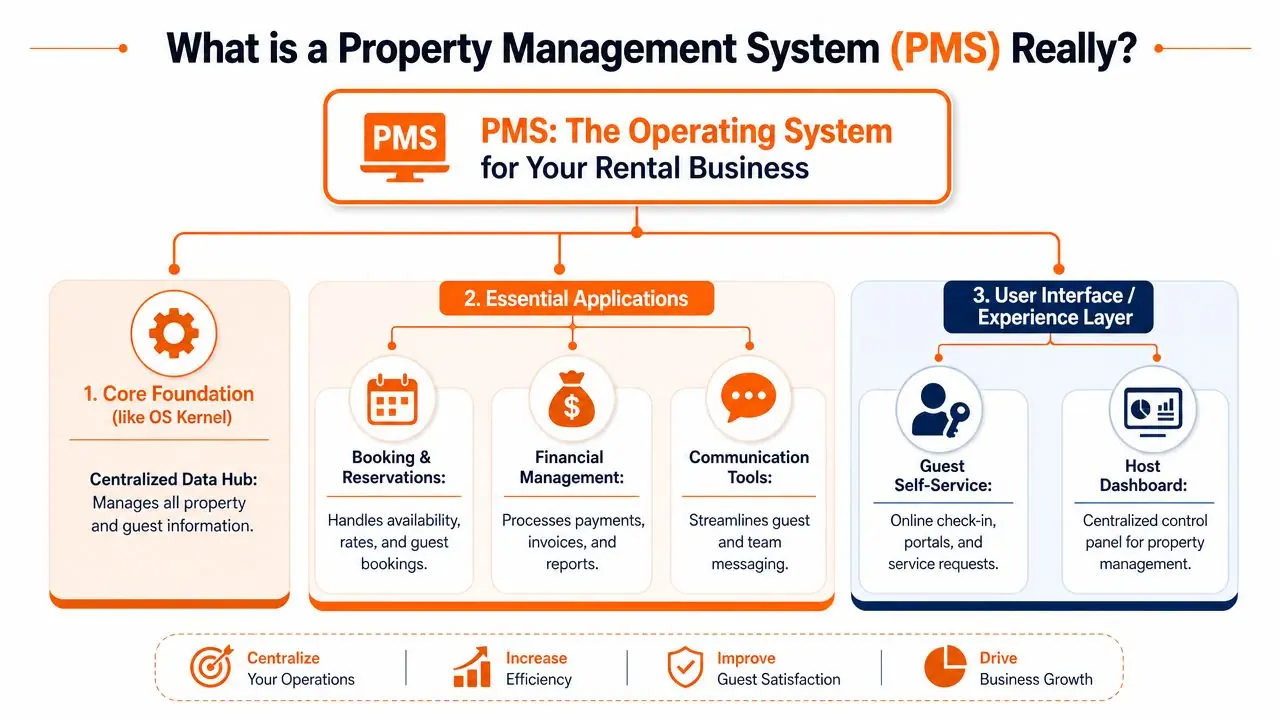
The PMS sits in the middle
In practice, the PMS is where your business answers basic operational questions once instead of five times. Is this reservation confirmed? Which rate applies? Has the guest signed the rental agreement? Did the cleaner get assigned? If that information lives in separate apps with separate records, your team starts reconciling conflicting versions by hand.
That is where hosts lose time. More importantly, it is where they make avoidable mistakes.
The strongest systems keep these records connected: properties, reservations, guest profiles, rates, availability rules, tasks, payments, and sometimes owner statements. Then the rest of the stack reads from that source. Your pricing tool updates rates. OTA connections pull availability. Your smart lock tool checks arrival and departure dates. A guest experience layer such as ScanStay can use booking details from the PMS to deliver the right guide, instructions, or upsell at the right point in the stay.
A PMS enables the guest experience. It does not complete it by itself.
What sits around the PMS
Most hosts managing 1 to 50 properties end up building around the same set of connected tools:
| Layer | What it does | Why it matters |
|---|---|---|
| Channel management | Syncs rates and availability across OTAs | Reduces conflicting calendars and stale inventory |
| Messaging | Pulls guest communication into one workflow | Cuts app switching and inconsistent replies |
| Pricing | Applies rules or dynamic rate logic | Keeps rate changes from becoming manual nightly work |
| Payments and reporting | Tracks money in and out | Makes reconciliation and performance reviews faster |
| Operations | Assigns cleans, inspections, and tasks | Keeps turnover work visible and accountable |
If you want to judge whether a PMS is helping, do not stop at the booking calendar. Look at what happens before arrival, during the stay, and after checkout. Reporting also matters here. Good systems make it easier to spot workload, revenue patterns, and channel performance. Pairing PMS data with stronger vacation rental analytics reporting gives hosts a clearer view of where the business is leaking time or margin.
Why integrations matter more than feature lists
Vendors love long feature lists. I care more about how cleanly the PMS passes data to the next system.
An API works like a front desk clerk handing the right note to the right department. Housekeeping needs checkout status and turnover timing. Accounting needs charges and payouts. A smart lock platform needs arrival windows. If the note is clear and arrives on time, operations stay smooth. If it is late, incomplete, or formatted badly, your team starts doing manual patchwork.
That trade-off shows up fast in real operations. Some PMS platforms offer a huge menu of built-in tools but weaker connections outside their own ecosystem. Others integrate well with specialized tools but need more setup and testing. For a small host, the right answer depends on complexity. For a growing operator, weak integrations usually become expensive before the subscription bill does.
If your business also touches acquisitions, ownership handoffs, or long-cycle transaction work, it helps to understand how adjacent systems are evolving too. This overview of real estate deal management shows the same broader shift toward centralized operational control instead of scattered admin tools.
Core Features That Give You Your Time Back
The best PMS features don't impress me because they're clever. They matter because they remove repetitive decisions and repetitive clicks. If a feature looks great in a demo but still leaves your team chasing information in Slack, email, and text, it's decoration.
The features that matter most day to day
The first feature I look at is the channel manager. If you list on Airbnb, Booking.com, and a direct site, availability has to move cleanly between them. This is one of those functions you stop noticing when it works and obsess over when it doesn't.
The second is the unified inbox. Not because every message must live inside the PMS forever, but because the host or co-host needs one place to see active guest communication. Fragmented messaging creates tone problems, missed requests, and duplicate replies.
Then there's automation. It often leads hosts to either save real time or create a robotic mess.
- Scheduled guest messaging: Arrival instructions, checkout reminders, and mid-stay check-ins should trigger from booking events.
- Task assignment: Cleans, inspections, and maintenance follow-ups should attach to reservations automatically where possible.
- Payment and accounting workflows: In stronger systems, reconciliation and routing happen with less manual handling.
- Basic reporting: You need fast visibility into occupancy, revenue patterns, and upcoming operational load.
Industry software guidance notes that advanced PMS platforms are expected to integrate a central reservation system, channel manager, booking engine, revenue manager, and CRM layer because pricing and distribution become interdependent at scale. The same guidance says AI-enabled implementations have reported 40–60% operational cost reductions, about 2× faster issue resolution, and roughly 60% accounting workload reduction through automated workflows (Svitla on PMS development).
Practical rule: Automate messages with stable answers. Don't automate nuanced conversations that need judgment.
What saves time versus what just looks good in a demo
A lot of hosts get distracted by feature count. In real operations, the question is narrower: does the feature reduce handoffs?
A smart feature saves time when it does one of these:
- Eliminates duplicate entry
- Prevents a predictable mistake
- Pulls the next task forward automatically
- Lets one person oversee more stays without quality dropping
A weak feature often does the opposite. It adds another dashboard, requires manual triggering, or stores useful information where nobody checks it.
Here's a simple way to evaluate core PMS functionality:
| Feature | What good looks like | What weak looks like |
|---|---|---|
| Calendar sync | Fast, reliable updates tied to booking changes | Lag, manual refresh habits, uncertainty |
| Inbox | All active guest threads visible with booking context | Messages aggregated but hard to act on |
| Automation | Trigger-based, editable, property-specific | Rigid templates you end up bypassing |
| Reporting | Clear operational and financial snapshots | Data export heavy, hard to interpret |
If you want better visibility after setup, pairing the PMS with disciplined reporting helps. A lot of hosts don't need more dashboards. They need better questions. This guide to vacation rental analytics is useful for deciding what to track once your systems start centralizing the data.
One more point from the operator side. Good PMS software gives time back unevenly. It doesn't magically shorten every task. It removes the ugly middle layer between tasks, the chasing, copying, checking, and confirming that fills a host's evening.
How to Choose the Right PMS for Your Rentals
Choosing a PMS gets easier when you stop asking “Which platform has the most features?” and start asking “Which platform fits the way we operate?” A host with two urban apartments has different needs from a manager with twenty cabins, owner statements, rotating vendors, and a direct booking strategy.
Start with your operating model, not the sales deck.
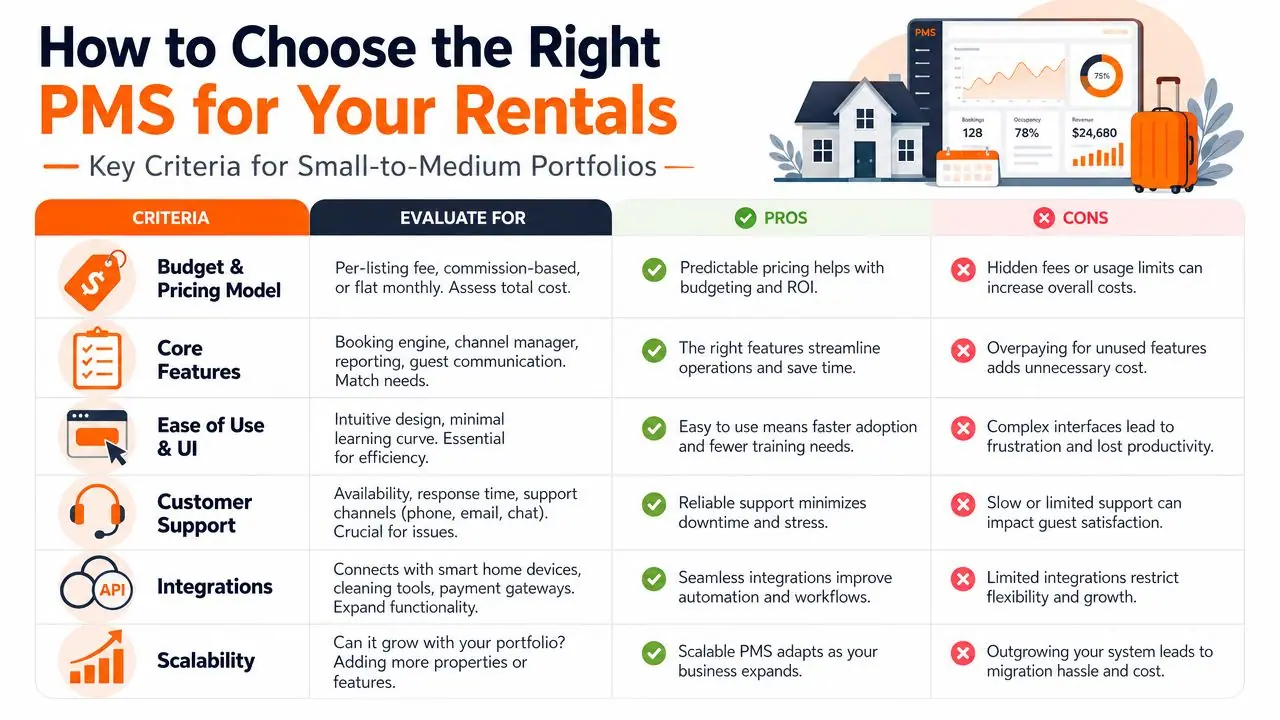
The strongest systems centralize reservations, guest information, price control, and availability. That centralization is where the savings show up. One survey cited by MRI Software found 53% of property managers reported reduced operating costs after adopting a PMS (MRI Software on PMS advantages).
API versus iCal in plain English
This is one of the most important distinctions in the whole buying process.
An iCal sync is like mailing a postcard with your calendar status. It can be useful. It's simple. But it's limited. It usually handles basic availability sharing and not much else.
An API integration is more like a live phone call between systems. The tools can exchange richer information, update more directly, and support deeper workflows.
Here's the practical comparison:
| Integration type | Best for | Trade-off |
|---|---|---|
| iCal | Very small setups with simple calendar syncing needs | Limited data, weaker automation, less control |
| API | Serious multi-channel operations and growth | More setup complexity, but much stronger long-term fit |
If you manage one property and mainly want to avoid obvious calendar conflicts, iCal may feel acceptable at first. If you're trying to run a portfolio, automate messaging, connect pricing tools, sync check-in details, and scale cleanly, API connections are the standard you want.
A useful benchmark during research is to compare current options against your growth path, not just today's pain. This roundup of affordable property management software helps frame the cost question without ignoring long-term operational fit.
Later in your evaluation, watch a full platform walkthrough instead of relying only on screenshots.
Questions worth asking on every demo
Most demos are polished. Your job is to make them specific.
Ask things like:
- Show me a real booking modification: What happens when a guest changes dates on one channel?
- Walk through a turnover: How does the cleaner get notified, and where is completion tracked?
- Show the inbox with context: Can the support agent see reservation details without opening three tabs?
- Explain pricing edits: If I change a rule, where does that update appear?
- Show support paths: What happens when a sync breaks on a Friday evening?
Don't buy the smoothest demo. Buy the clearest operational fit.
The wrong PMS usually reveals itself in one of two ways. Either it's too shallow and forces you back into spreadsheets, or it's too heavy and your team avoids using half of it. The right one feels boring in the best way. It makes normal days easier.
Your PMS Implementation and Migration Checklist
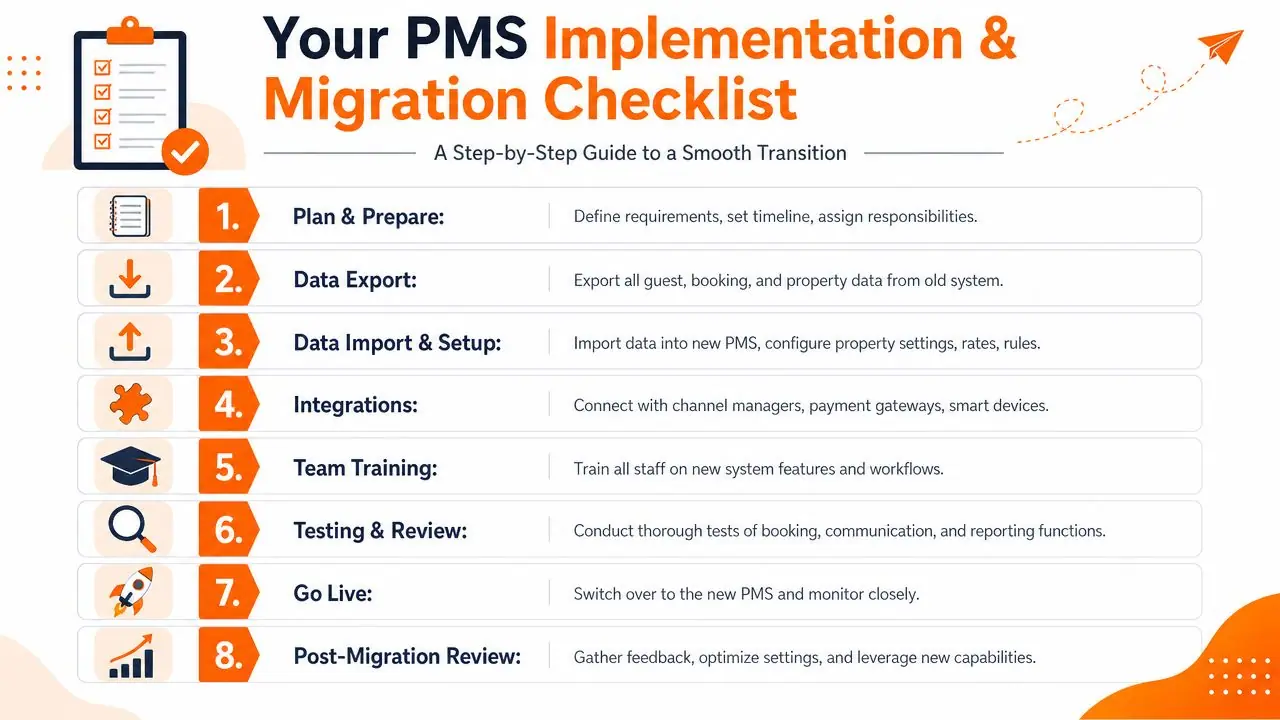
A PMS migration usually goes wrong in a very ordinary way. A booking imports to the wrong unit. A cleaner misses an auto-created task. A guest gets the checkout message before they have even arrived. The system is live, the calendar looks full, and your team starts fixing avoidable mistakes by hand.
That is why the PMS should be treated like the brain of your rental stack during migration. If the brain gets bad inputs or sends the wrong signals, every connected tool follows along. Your locks, pricing rules, messaging, cleaning workflows, and guest-facing systems can only work as well as the setup underneath them.
Before you move anything
Start with process, not import files.
A PMS can only mirror the operation you already run. If your current setup lives partly in your head, partly in Airbnb notes, and partly in a cleaner WhatsApp thread, migration will expose that fast. The best implementations begin with a simple question: what needs to happen from booking to checkout, and who owns each step?
Prepare these items before import:
- Property data: Names, addresses, check-in windows, bedroom counts, amenities, and house rules.
- Reservation rules: Minimum stays, booking buffers, occupancy limits, fees, and cancellation settings.
- Message templates: Confirmation, pre-arrival, check-in, mid-stay, checkout, and exception messages.
- Operational workflows: Turnover timing, cleaner assignment, inspection steps, and maintenance escalation.
- Access details: Lock codes, key backups, parking instructions, and emergency contacts.
Message templates deserve extra attention. A weak template library creates support volume on day one. If you want a good starting point, review practical examples for automating Airbnb guest messages before you switch the automations on.
What to test before you go live
Once the data is inside the new PMS, test the operation like a real booking just came in.
APIs work like couriers between systems. Your PMS sends instructions out to channels, lock software, payment tools, and guest messaging apps. If one courier drops the package, the failure often shows up later and somewhere else. That is why surface-level checks are not enough.
Use a short launch checklist:
- Create a test reservation: Confirm availability, messages, task creation, and guest records behave correctly.
- Review imported bookings: Check future reservations against the right property, dates, guest counts, and notes.
- Check OTA mappings: Make sure each listing points to the intended unit, pricing setup, and restrictions.
- Test payments: Verify scheduled charges, deposits, balance reminders, and payout settings if you use them.
- Confirm permissions: Cleaners, co-hosts, owners, and admins should see only the data they need.
- Trigger edge cases: Date changes, cancellations, late check-ins, and same-day turns are where setup errors usually show up.
Quiet failures are the expensive ones.
A broken sync is obvious. A checkout message firing six hours early is harder to catch, but it creates guest confusion, extra replies, and less trust in your automation.
Go-live rules that save headaches
Do not migrate everything on your busiest week. Do not switch pricing logic, messaging, team permissions, and lock integrations all at once unless you have no choice. For portfolios in the 1 to 50 property range, a phased rollout is usually easier to control. Move the core records first. Then verify channels. Then activate automations. Then layer on guest-experience tools that depend on clean PMS data.
For the first few days, watch the system closely. Read outbound messages. Check task timing. Open a few bookings from each channel. Follow one reservation all the way from confirmation to turnover as if you were the guest, the cleaner, and the manager.
The smoothest migrations usually come from operators who document the current workflow before they touch the software. The PMS can centralize the stack. It cannot guess how your business operates.
Supercharge Your PMS to Perfect the Guest Experience
A PMS can manage the booking brilliantly and still leave the guest experience feeling fragmented. That's the gap many hosts discover after they've cleaned up calendars, rates, and automations. The operation is more organized, but guests still ask the same repetitive questions after check-in.
That isn't surprising. Many PMS platforms can log requests, but they often fall short on the full execution side of maintenance, including coordinating vendors, schedules, and follow-through across the work order lifecycle (Property Meld on where PMS platforms fall short). The same pattern shows up in guest experience. Intake exists. Resolution and delivery are weaker.
Where most PMS platforms stop short
Most systems are good at storing information. Fewer are good at presenting the right information to the guest exactly when it's needed.
Think about the messages hosts answer repeatedly during a stay:
- Arrival basics: parking, lock instructions, Wi-Fi, thermostat
- House use questions: coffee machine, hot tub, trash day, TV login
- Local questions: grocery store, breakfast spots, late checkout options
- Service requests: extra towels, lost key help, maintenance follow-up
A PMS may record the stay details, trigger a message, or create a note. But that doesn't always create a smooth self-service experience for the guest on-site.
The guest layer that sits on top
A separate guest-facing layer provides a logical solution. For example, automating Airbnb messages solves part of the communication problem before arrival, but hosts still need a clean way to answer on-property questions without sending manual replies all day.
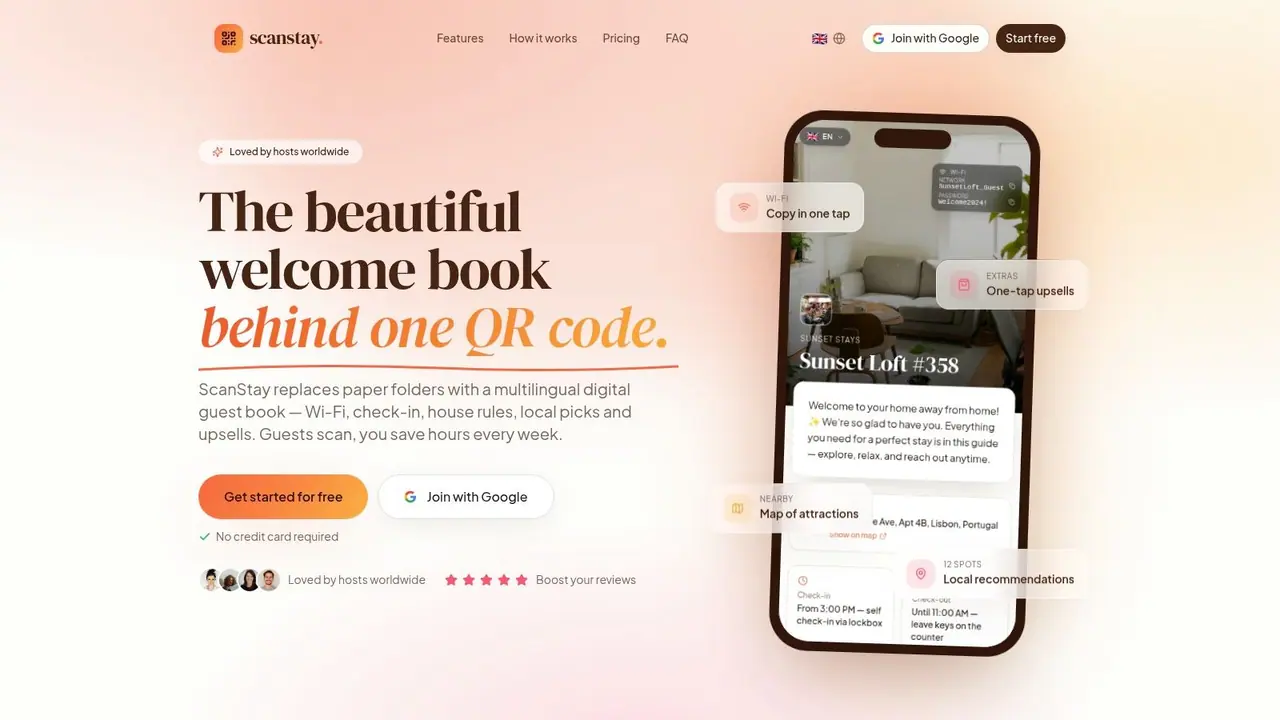
A tool like ScanStay works in that layer. It gives guests a mobile-friendly digital guide they can open from a QR code, with check-in instructions, Wi-Fi details, house rules, local recommendations, and service information in one place. That doesn't replace the PMS. It extends it.
That distinction matters. The PMS remains the operational brain. The guest guide becomes part of the delivery experience.
Used together, the setup is cleaner:
| System layer | Main job |
|---|---|
| PMS | Reservation control, rates, availability, operational records |
| Guest guide layer | On-site information, self-service answers, stay instructions |
| Service workflows | Maintenance coordination, vendor follow-through, escalations |
This is usually where hosts feel the business becoming more professional. Not because they bought more software, but because each tool now has a clear role.
The Future of Property Management Is Automated
A host with three listings can still hold the operation together with inbox rules, saved replies, and a few spreadsheets. At 15 or 20 properties, that setup starts breaking in expensive ways. A channel update lags, a cleaner misses a same-day turn, a guest gets the wrong door code, and the owner still expects a clean monthly report.
That is why automation matters.
The long-term shift is not about adding software for the sake of it. It is about putting one system in charge of the operational truth, then letting the rest of the stack read from it and act on it. The PMS fills that role. It works like the central brain for reservations, rates, task triggers, guest records, and reporting. APIs are the nervous system. They pass instructions between tools so your pricing software, smart locks, messaging, and accounting are not all working from different versions of the same booking.
For hosts managing 1 to 50 properties, the practical advantage is straightforward. Fewer manual handoffs mean fewer small errors that pile up across the week. You spend less time checking whether systems agree with each other and more time fixing the problems guests notice.
Automation also has limits. A PMS can send a check-in message, sync availability, and trigger a cleaning task. It does not automatically create a better stay. Guests still need clear directions, house information, and answers once they are on the property. That is why the best setup is usually a stack with clear roles, not one platform trying to do everything badly.
I have seen the difference firsthand. The operators who scale cleanly usually use the PMS as the source of truth, then connect specialized tools around it for pricing, access, communication, and on-site guest support. The operators who struggle are usually forcing the PMS to handle jobs it was never built to do, or patching gaps manually every day.
ScanStay fits into that second layer. If your PMS already controls the booking and operational side, ScanStay adds a digital welcome book that helps guests self-serve on property without replacing the PMS itself. That setup makes sense for hosts who want the business to run with less admin and fewer repeat questions.