Your 2026 Guide to Airbnb: Master Hosting & Scale Your
Our guide to Airbnb helps hosts create standout listings, set prices, & scale their business. Includes tools like digital welcome books for 2026 success.

You're probably looking at Airbnb from one of two positions right now. You either have a property and want to know if hosting is worth the effort, or you already have a listing and you're tired of learning everything the hard way. In both cases, most advice you'll find is too shallow. It tells you to take better photos, lower your price, and answer messages quickly. That helps, but it doesn't tell you how to build a hosting operation that still works when you're busy, offline, or managing more than one stay at a time.
That's the key shift in any useful guide to Airbnb today. Hosting isn't just about getting booked. It's about building repeatable systems for communication, turnover, pricing, guest support, safety, and reviews so the business stays profitable without turning your phone into a permanent help desk.
Table of Contents
- Your Essential Guide to Starting an Airbnb in 2026
- Building Your Listing Foundation for a Crowded Market
- Mastering Pricing Bookings and Key Performance Metrics
- Designing a Seamless 5-Star Guest Experience
- Managing Risk Reputation and Guest Reviews
- Scaling Your Business with Upsells and Automation
- Streamline Everything with a Digital Welcome Book
Your Essential Guide to Starting an Airbnb in 2026
The biggest mistake new hosts make is treating Airbnb like a listing project instead of a hospitality business. They spend weeks choosing decor, then improvise the parts that shape guest satisfaction. Check-in instructions live in one message thread. Wi-Fi details are taped to the fridge. House rules sit in the listing but nowhere obvious inside the property. Local recommendations exist only if the guest asks.
That approach falls apart fast at scale. Business of Apps reports Airbnb generated $11.1 billion in revenue in 2024, with gross booking volume reaching $81.8 billion across 491 million bookings, alongside 8.1 million listings and five million hosts. On a platform that large, operational consistency isn't optional. It's part of the job.
If you're starting from scratch, think in layers:
- Listing layer: how you attract the right guest
- Revenue layer: how you price and track performance
- Operations layer: how you handle turnovers, support, and supplies
- Experience layer: how guests get information without chasing you
- Protection layer: how you manage compliance, safety, and reputation
Most beginner content spends too much time on the first layer and almost none on the rest. That's why many first-time hosts feel prepared right up until the first late-night message asking where the parking spot is, how to open the door, or why the TV won't connect.
Practical rule: If guests keep asking the same question, you don't have a guest problem. You have a system problem.
A good guide to Airbnb should help you build something that works on a calm Tuesday and on a fully booked weekend. That matters whether you own property or you're exploring other models like starting an Airbnb without owning property.
The hosts who last usually do one thing early. They stop asking, “How do I get listed?” and start asking, “How do I run this cleanly every single stay?” That mindset changes every decision that follows.
Building Your Listing Foundation for a Crowded Market
Airbnb started in 2008 as a way to rent out air mattresses, but it evolved into a public company operating in over 200 countries. That shift matters because hosting has become more professionalized, and casual listing habits no longer hold up in a crowded market, as outlined in Airbnb's history and growth.

A strong listing doesn't try to appeal to everyone. It filters. That's what new hosts often miss. A broad, generic listing may get clicks, but it also attracts guests who aren't a good fit for the property, the location, or the house rules.
Stop writing for everyone
Start with the guest you want.
A city studio near restaurants and transit should read differently from a family house near hiking trails. A remote cabin should attract guests who value quiet, scenery, and self-sufficiency. A compact apartment should appeal to short-stay travelers who care about location, simplicity, and ease.
Use that target guest to shape the whole listing:
| Listing element | What weak hosts do | What strong hosts do |
|---|---|---|
| Title | Stuff in generic features | Lead with the clearest differentiator |
| Photos | Upload rooms in random order | Tell the story of the stay |
| Description | Describe furniture | Describe how the guest will use the space |
| Amenities | List everything equally | Highlight the amenities that matter most to the target guest |
| Rules | Hide them until after booking | Signal expectations early |
The photo order matters more than most hosts realize. Guests don't browse methodically. They skim. Put your strongest conversion image first, then show the spaces in the order a guest would experience them: exterior or entry, living space, bedroom, kitchen, bathroom, workspace, outdoor area, neighborhood context.
Guests don't book square footage. They book confidence.
Build a listing that pre-qualifies guests
Your description should answer practical questions before they're asked. Don't just say “fully equipped kitchen.” Say whether it's suitable for full meals or basic breakfasts. Don't just say “close to downtown.” Explain the kind of access guests can expect. Don't just say “great for families.” Mention the layout details that make that true or false.
Focus on these points:
- Lead with fit: Say who the place is ideal for.
- Be honest about limits: If there are stairs, street noise, compact bathrooms, or limited parking, say so.
- Write around routines: Explain sleep setup, morning coffee, work setup, laundry, and arrival.
- Use rules as positioning: Quiet hours and occupancy limits don't only protect you. They also discourage bad-fit bookings.
A well-built listing does two jobs at once. It improves conversion with the right guests and reduces friction with the wrong ones. That second part is just as valuable. Fewer mismatched expectations usually means fewer complaints, fewer edge-case requests, and cleaner reviews.
Mastering Pricing Bookings and Key Performance Metrics
Many hosts look at occupancy first because it's easy to understand. Calendar full, good. Calendar empty, bad. But that logic causes a lot of underpricing. A full calendar can still mean weak performance if you sold too cheaply, accepted poor-fit bookings, or blocked high-demand dates with low-value reservations.
The more useful view is broader. Successful hosts track occupancy rate, ADR, and RevPAR together, because that combination separates demand from pricing power and gives a clearer read on whether a property is underpriced or overpriced, as explained in Hostaway's Airbnb analytics overview.
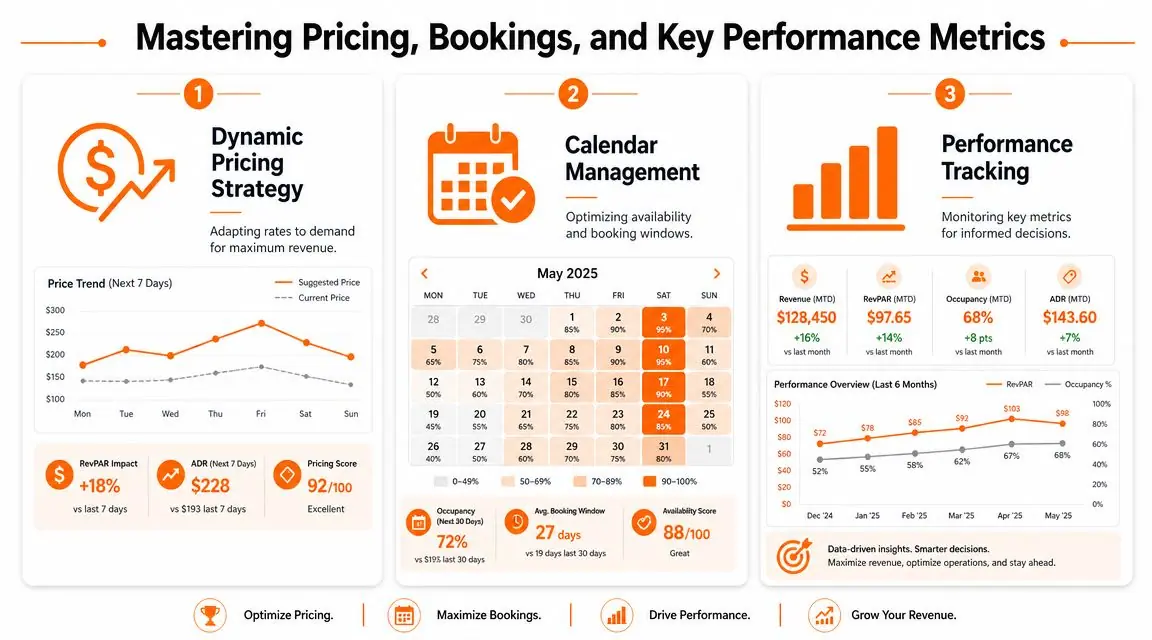
What the core metrics actually tell you
Think of the three metrics as different camera angles on the same business.
- Occupancy rate tells you how often nights are sold.
- ADR tells you what guests paid per booked night on average.
- RevPAR tells you how efficiently the calendar produced revenue across available nights.
If occupancy is high but ADR is soft, you may be filling nights too cheaply. If ADR is high but occupancy is weak, you may be pricing beyond what the market will bear for that property and season. RevPAR helps expose both problems because it blends pricing and booked availability into one efficiency view.
Here's a practical way to read them:
| Pattern | Likely issue | Common response |
|---|---|---|
| High occupancy, low ADR | Underpricing | Test higher rates on peak nights |
| Low occupancy, high ADR | Overpricing or weak conversion | Improve value proposition or reduce rate selectively |
| Middling occupancy, stable ADR, weak RevPAR | Calendar inefficiency | Review minimum stays, blocked dates, and lead times |
| Strong RevPAR with controlled occupancy | Healthy pricing discipline | Protect rate and avoid discounting too quickly |
For deeper tracking workflows, it helps to review dedicated vacation rental analytics benchmarks and methods alongside your own booking data.
A simple pricing review routine
Hosts get into trouble when pricing is static. They set rates once, then let the calendar drift. Better operators review pricing repeatedly with context.
Use a routine like this:
- Check pace, not just price. Are weekends booking too fast while weekdays sit? That usually means your weekend pricing has room to move.
- Review local demand signals. Holidays, school breaks, events, and weather patterns all affect demand, even if the platform's suggested price doesn't fully capture them.
- Adjust minimum stays deliberately. A two-night minimum can help fill more gaps. A longer minimum can protect high-demand dates from fragmented bookings.
- Watch booking window behavior. Some properties book early. Others fill closer to arrival. Price changes should reflect that rhythm.
- Protect premium dates. Don't let a low-value booking consume your best nights too early.
Pricing should follow your strategy, not your anxiety.
The goal isn't to maximize occupancy. It's to maximize useful revenue while keeping the guest mix healthy and the operation manageable.
Designing a Seamless 5-Star Guest Experience
The guest experience usually breaks in small places. Not dramatic places. A guest can forgive a compact bathroom or a basic kitchen if the stay feels smooth. They become frustrated when arrival is confusing, instructions are buried, and simple questions require sending messages back and forth.
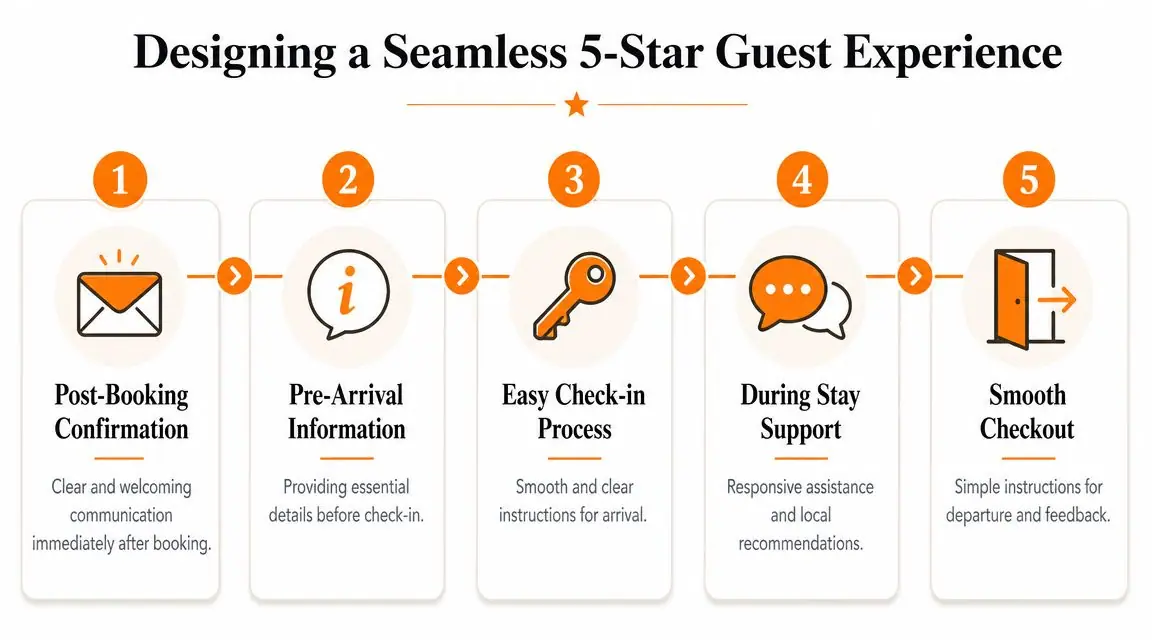
A guest's internal checklist starts before they enter the property. How do I get in? Where do I park? What if I arrive late? Is the code correct? Once inside, the questions shift. What's the Wi-Fi password? How does the heating work? Which rules matter? Where should we eat nearby? If your answers are spread across old messages, a paper binder, and memory, the experience feels disjointed even if the home itself is lovely.
The stay starts before arrival
The strongest guest journey is proactive.
Send one clear post-booking confirmation. Then send one pre-arrival message that covers only what guests need to get inside confidently. Not ten messages. Not a wall of text. Just the essentials in clean order.
Good pre-arrival information usually includes:
- Arrival instructions: parking, entry steps, timing, and what to do if plans change
- Access details: codes, lock instructions, or building entry notes
- First-hour essentials: Wi-Fi, heating or cooling basics, and where key items are located
- Expectation setting: occupancy rules, noise limits, smoking policy, and check-out basics
A short video walkthrough can reduce confusion for harder arrivals, especially in apartment buildings, gated communities, or properties with multi-step self-check-in.
Later in the stay, visual guidance helps more than long explanations. This is a useful example of how guests consume information on mobile:
What guests need during the stay
The old assumption is that better hosting means being constantly available. In practice, better hosting means guests can solve common needs quickly without waiting for you.
The most frequent friction points are predictable:
- Appliances: induction cooktops, smart TVs, washing machines, coffee machines
- Comfort settings: thermostat, fans, extra bedding, hot water timing
- House logic: trash day, quiet hours, checkout routine, pet rules
- Local guidance: nearest grocery store, pharmacy, breakfast spot, transport options
A five-star stay often feels quiet on the host side because the guest never had to ask.
Paper binders struggle here. They go out of date. They disappear. Guests don't read them until they already have a problem. A stronger setup gives guests one central place to find what they need from booking through checkout. Once that exists, your message volume usually drops because the stay is easier to manage.
Managing Risk Reputation and Guest Reviews
The hosts who last treat risk management as part of the guest experience. Guests rarely praise compliance directly, but they notice the results. Clear house rules, safe access, working detectors, documented procedures, and calm issue handling all shape whether a stay feels trustworthy.
Professional hosting starts with control points
You need a repeatable checklist before every property goes live and before every guest arrives.
Use a control-point approach:
- Regulations: confirm local short-term rental rules, licensing requirements, and building restrictions before listing
- Insurance: make sure your policy fits short-term rental activity rather than assuming ordinary homeowner coverage is enough
- Safety equipment: check smoke detection, fire extinguishers, emergency lighting if relevant, and any property-specific safety instructions
- Access security: rotate codes, confirm locks work, and avoid ad hoc entry methods
- Documentation: keep one current version of house rules, emergency contacts, and appliance guidance
A lot of hosts create these once and then stop reviewing them. That's risky. Codes change. Appliances get replaced. Rules evolve. Staff or cleaners develop their own shortcuts. What worked three months ago may now be inaccurate.
A simple review table helps:
| Area | What to verify regularly |
|---|---|
| Entry | Door code, lock battery, backup access plan |
| Safety | Detector status, extinguisher placement, emergency instructions |
| Property info | Wi-Fi accuracy, appliance instructions, current house rules |
| Vendors | Cleaner availability, handyman contact, emergency trades |
| Compliance | Permits, building rules, occupancy limits |
Reviews are an operations output
Hosts often treat reviews like a separate marketing task. They aren't. Reviews are the visible result of pricing discipline, expectation setting, cleaning quality, and communication systems.
The easiest way to improve reviews is to remove avoidable uncertainty. Guests are generous when they feel informed, respected, and supported. They become critical when they feel surprised, ignored, or forced to ask for basics.
Use a professional review routine:
- Set accurate expectations in the listing.
- Deliver a clean arrival with no missing essentials.
- Check in after arrival without hovering.
- Handle issues directly and document what happened.
- Ask for feedback after checkout in a polite, simple message.
When negative feedback comes in, don't argue in public. Clarify facts where needed, acknowledge the guest's experience, and show future guests that you respond like an operator, not a hobbyist.
Scaling Your Business with Upsells and Automation
A lot of hosts think scaling means adding more properties. Sometimes it does. But many operators should scale their systems and revenue per stay first. If one property is still chaotic, a second one only doubles the chaos.
Upsells that fit the stay
The best upsells feel helpful, not pushy. They solve real guest needs that already exist around the stay.
Common examples include:
- Late checkout: useful for guests with evening flights or slow travel days
- Early check-in: valuable when your turnover schedule allows it
- Mid-stay cleaning: helpful for longer bookings
- Equipment or service add-ons: luggage storage, grocery setup, bike rentals, local transport coordination
The key is timing and presentation. Offer them after booking and before arrival, not buried in the listing description. Keep the language transactional and clear. Guests should understand what's included, when it's available, and what constraints apply.
Many host-focused resources mention upsells like late checkout, luggage storage, groceries, and bike rentals, but they often treat them as isolated tactics rather than part of a centralized workflow, as discussed in Mashvisor's host guidance.
Automation should remove repeat work
Good automation doesn't replace hospitality. It removes repetitive admin so you can focus on exceptions.
Start with the tasks that repeat every stay:
- Message templates for booking confirmation, pre-arrival, first-night check-in, and checkout
- Cleaning workflows with property-specific checklists
- Maintenance reporting so cleaners can flag issues before guests do
- Content reuse for Wi-Fi, appliance guidance, parking instructions, and local tips
- Upsell delivery through one consistent channel rather than custom texting every guest
The test is simple. If the same information gets rewritten every week, automate the delivery. If the same problem keeps appearing, redesign the process. That's what makes one property manageable and several properties realistic.
Streamline Everything with a Digital Welcome Book
Most hosts don't have a communication problem because they aren't responsive enough. They have a communication problem because the information itself is fragmented. Some of it lives in Airbnb messages. Some sits in a paper binder on the counter. Some gets sent only when a guest asks. Some exists only in the host's head.
That's why the old setup stops working long before a portfolio gets large.
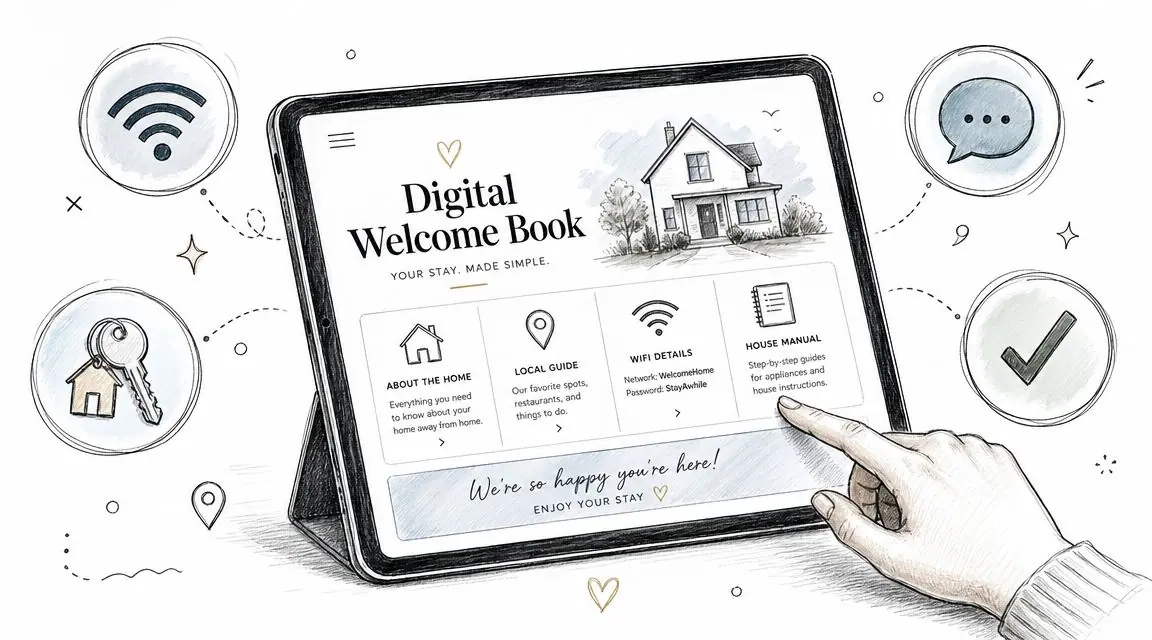
Paper binders break at the exact moment guests need clarity
Paper binders look useful when you're assembling the property. In practice, they create maintenance work. Pages go missing. Instructions become outdated. Guests don't want to flip through plastic sleeves after a long trip. And none of it helps before arrival, when a large share of anxiety already happens.
A stronger guide to Airbnb in 2026 has to account for how guests behave. They use their phones. They scan for answers. They want immediate access to entry steps, Wi-Fi, appliance instructions, and local recommendations without downloading another app or waiting for a response.
That's why information quality often matters more than another physical amenity. Rankbreeze notes that successful hosting in 2026 often depends more on the quality of information and service, and that a digital guide with multilingual instructions and a frictionless self-serve experience can be a stronger differentiator than another amenity.
What a digital welcome book should include
A useful digital welcome book acts as the central source of truth for the stay.
At minimum, it should include:
- Arrival and entry details: directions, parking, door codes, and check-in steps
- House essentials: Wi-Fi, thermostat, trash instructions, appliance how-tos, and check-out steps
- Rules and boundaries: quiet hours, occupancy rules, pet policy, smoking policy
- Local recommendations: restaurants, groceries, transport, and neighborhood tips
- Optional extras: late checkout, additional cleaning, transport help, or equipment rentals
A QR-based setup works well because guests can access it on arrival without searching old messages. A digital tool like ScanStay's vacation rental welcome book is one example of this model. It gives hosts a QR-accessed guest guide with Wi-Fi, check-in information, house rules, recommendations, and upsell options in a mobile browser.
The best guest guide is the one your guest can use in ten seconds while standing at the door.
The operational payoff
The host-side benefit is bigger than convenience. A digital welcome book standardizes delivery. That means fewer repeated questions, less inconsistency between properties, cleaner handoffs with co-hosts or staff, and easier updates when something changes.
It also helps with two hosting problems that basic Airbnb advice often ignores:
| Problem | Weak approach | Better system |
|---|---|---|
| Repetitive questions | Answer each one manually | Put common answers in one mobile-friendly guide |
| Multi-property inconsistency | Customize messages from memory | Reuse a standardized guest information structure |
| International guests | Rely on simplified English only | Use multilingual, easy-to-scan content |
| Upsells | Offer them ad hoc | Present them in one organized place |
This doesn't remove the human side of hosting. It protects it. You spend less time sending the Wi-Fi password and more time handling the moments where judgment is needed.
If you want your guide to Airbnb to produce a business rather than a burden, build around systems first. The listing gets the booking. The operating system earns the review, protects your time, and makes growth possible.
If you want a simpler way to organize guest communication, ScanStay gives hosts one QR-based welcome book for check-in details, Wi-Fi, house rules, local recommendations, and optional upsells, all in a mobile browser without a guest app. It's a practical fit for hosts who want to replace paper binders and reduce repetitive messages across one property or a larger portfolio.