Vacation Rental Welcome Book Template: Boost Reviews in 2026
Create the perfect vacation rental welcome book template with our guide. Learn to structure, design, digitize, and monetize your book to earn 5-star reviews.

You're probably creating your welcome book because the same guest questions keep landing at the worst possible moment. The door code message comes while you're at dinner. The Wi‑Fi question arrives after midnight. The “how do I turn on the heat?” text appears even though you already explained it in the check-in note.
That pattern usually means the issue isn't the guest. It's the format.
A good vacation rental welcome book template doesn't just collect information. It delivers the right answer fast, in the moment a guest needs it. Done well, it cuts repetitive messaging, makes the property feel more professional, and gives guests confidence from arrival to checkout. Done badly, it becomes a cluttered binder nobody opens.
Table of Contents
- Beyond the Binder The Modern Welcome Book
- Anatomy of a Perfect Welcome Book Structure
- Writing Content That Connects and Clarifies
- Designing Your Template Print vs Digital
- Implement a Digital Welcome Book with a QR Code
- Unlock Revenue Accessibility and Engagement
- Welcome Book Template FAQs
Beyond the Binder The Modern Welcome Book
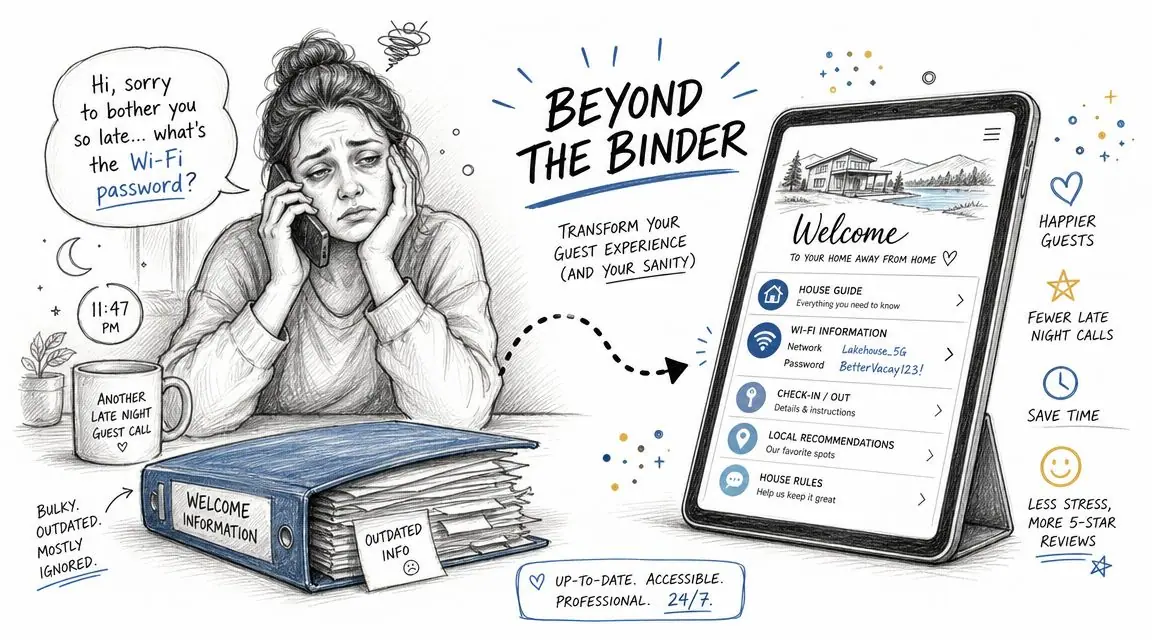
The old version of a welcome book was easy to recognize. It sat on the coffee table in a plastic sleeve binder, full of printed pages, random restaurant flyers, and appliance instructions that were already out of date. Guests flipped through it only if they were stuck.
That approach still exists, but it's not how most strong operators think anymore. The modern welcome book has evolved from a printed binder into a digital guest manual as short-term rentals scaled in the 2010s and 2020s. Its core job is to gather the most-requested guest information in one place, including check-in and check-out instructions, Wi‑Fi details, house rules, emergency contacts, and local recommendations, so hosts can reduce repetitive messaging and improve the stay experience, as noted in Lodgify's guide to vacation rental welcome books.
The real shift is operational
Hosts often think of the welcome book as guest-facing decor. It's more useful to treat it as an operations document.
If the guide is built well, it handles routine questions before they become interruptions. It also creates consistency. That matters even more if you manage multiple units, work with a co-host, or rely on cleaners and support staff to communicate the same standards every time.
Practical rule: If guests have to message you for information that should have been obvious, your welcome book isn't finished.
The best welcome books solve small but costly points of friction:
- Arrival confusion: parking, lock access, building entry, and Wi‑Fi
- During-stay uncertainty: thermostat controls, trash rules, TV setup, appliance instructions
- Neighborhood questions: where to eat, where to shop, how to get around
- Departure mistakes: checkout steps, key return, laundry expectations, bin placement
Why the binder model breaks down
Printed binders aren't useless. They're just fragile as a primary system.
Restaurant hours change. Door codes rotate. House manuals get moved. Pages go missing. Guests don't read long blocks of text after travel, especially on the first night. A static book also makes it hard to separate must-know instructions from nice-to-know recommendations.
A modern vacation rental welcome book template works better when it's structured for speed. Guests should be able to scan it, tap to what they need, and move on. That means short sections, obvious labels, and a clear table of contents instead of a host diary disguised as a manual.
When hosts make that shift, the welcome book stops being an afterthought. It becomes one of the main tools that protects your time and shapes the guest experience before review day.
Anatomy of a Perfect Welcome Book Structure
Most templates fail for one simple reason. They're organized around what the host wants to say, not what the guest needs at each stage of the stay.
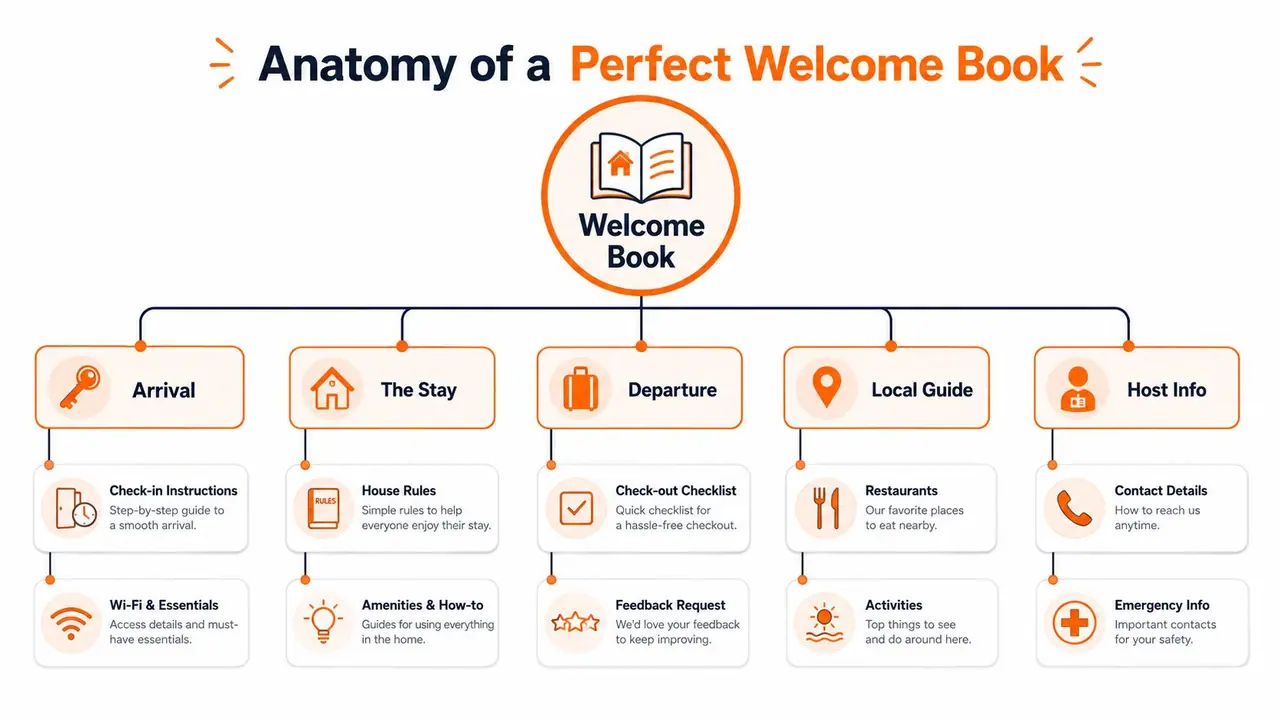
A strong vacation rental welcome book template follows the guest journey. If your structure mirrors the actual flow of arrival, settling in, using the space, exploring the area, and leaving, guests can find answers without scrolling through unrelated details.
Start with arrival friction
The first screen or first page should answer the questions guests have in the first few minutes on site.
That usually means:
- Access details: gate code, door code, key safe steps, or front desk instructions
- Wi‑Fi first: network name and password near the top, not buried later
- Parking guidance: exact space, nearby lot, street rules, and any permits
- Fast contact route: who to message for urgent issues and what counts as urgent
Don't make guests hunt for these basics. If your check-in relies on a smart lock, pair that section with simple backup steps. If you're comparing hardware options, this roundup of the best smart lock for Airbnb helps hosts choose devices that are easier to explain and support.
A good opening section also includes a brief welcome note, but keep it short. Guests need orientation more than sentiment in the first hour.
Organize the stay around real guest behavior
Once guests are inside, they move from “How do I get in?” to “How does this place work?”
Many welcome books become bloated. Instead of listing every item in the home, group information into practical categories.
House basics
Use short sections for the things guests ask about repeatedly:
- Heating and cooling: thermostat location, ideal settings, any quirks
- Kitchen use: coffee machine, dishwasher, induction hob, filtered water
- Entertainment: TV remote logic, streaming setup, speaker instructions
- Laundry: washer, dryer, detergent policy, drying rack location
Rules and expectations
Write rules where they matter. Quiet hours belong near information about the building or neighborhood. Trash rules belong near kitchen or departure guidance. Pool rules belong in the amenities section.
This avoids the common mistake of dumping all restrictions into one long “rules” page that nobody absorbs.
Guests follow instructions more often when they can understand the reason behind them.
Local guide
This part should feel curated, not copied from Google Maps. Include only places you'd be comfortable recommending without apology.
Useful categories include:
- Food nearby: breakfast, casual dinner, late-night option
- Essentials: pharmacy, grocery store, ATM, petrol station
- Experiences: walks, beaches, kid-friendly stops, rainy-day backups
- Transport: nearest station, rideshare pickup notes, airport transfer tips
End with a clean departure flow
Checkout instructions should be simple enough to complete while guests are packing.
Use a short checklist:
- What to do with keys or access cards
- Whether to start dishes or strip beds
- Where rubbish and recycling go
- What to do with heating, AC, or lights
- How to message you when they leave
A feedback request can sit here too, but keep it light. The stay comes first.
The overall structure should feel like a well-run front desk. Guests don't need every possible detail. They need the right detail at the right moment.
Writing Content That Connects and Clarifies
The same information can either calm guests down or irritate them. The difference is usually tone, length, and formatting.
A welcome book isn't legal copy. It's hospitality copy. You're guiding people through an unfamiliar place, often after a long trip, on a small phone screen, while they're distracted.
Write like a calm host not a rule enforcer
New hosts often overcorrect. They worry about damage, parties, late checkout, and noise complaints, then write their guide in a defensive tone. Guests feel that immediately.
Compare these:
“NO PARTIES. NO EXTRA GUESTS. NO NOISE AFTER 10.”
Versus:
“This is a quiet residential building, so please keep noise low in the evening and only registered guests on site.”
Both communicate limits. Only one sounds like a professional host.
Use this approach for the most sensitive areas:
- House rules: explain expectations in plain language
- Shared spaces: clarify access and etiquette without sounding suspicious
- Damage prevention: tell guests how to use things correctly instead of warning them what not to break
- Checkout: give a short list, not a lecture about cleaning
When rules exist because of neighbors, building management, septic systems, or local regulations, say so briefly. Guests are more cooperative when the rule feels grounded in reality.
Format for scanning not reading
Most guests won't sit down and read your entire welcome book front to back. They'll scan for answers. Write for that behavior.
That means:
- Use clear headings: “Wi‑Fi,” “Parking,” “Hot Water,” “Checkout”
- Keep paragraphs short: one idea at a time
- Prefer bullets for instructions: especially for appliances and access
- Put the answer first: don't hide the key detail in the last sentence
- Avoid internal jargon: guests don't know your cleaner's shorthand or building nicknames
Here's a cleaner way to write appliance guidance:
Bad The dishwasher is generally very simple to use and should not present any issues for most guests, but please ensure that larger items are placed carefully and that the proper cycle is selected depending on load size.
Better Dishwasher
- Add one tablet
- Use the normal cycle for most loads
- Don't place wooden items inside
- Leave the door cracked open when finished
That's easier to follow when someone is standing in the kitchen holding a dirty mug.
Add personality where it helps
Warmth matters, but only in places where it improves the experience.
Good places for personality:
- your opening welcome note
- local recommendations
- a short note about a favorite coffee shop or sunset spot
- a sentence explaining a unique feature of the property
Bad places for too much personality:
- emergency instructions
- lock entry steps
- checkout checklist
- troubleshooting guidance
A useful test is simple. If a guest is stressed, tired, or in a hurry, will your wording help them act faster?
If not, cut it.
Designing Your Template Print vs Digital
The format changes how useful your welcome book is. A lot of hosts start with a PDF or binder because it feels familiar. That's fine at the beginning. It becomes limiting once the property information changes often or you manage more than one listing.
Choose the format based on update frequency
If your guide rarely changes, print can work. If your guide changes with seasons, local recommendations, access methods, or upsells, digital is usually the better operational choice.
Here's the practical comparison.
| Feature | Print Welcome Book | Digital Welcome Book (e.g., ScanStay) |
|---|---|---|
| Speed to update | Requires reprinting or replacing pages | Can be edited quickly |
| Guest access | Available in the home only | Available before arrival and during stay |
| Scannability | Depends on layout and print quality | Easier to structure for mobile use |
| Visual clutter risk | High if pages accumulate over time | Lower if sections are organized well |
| Video support | Not possible in the document itself | Can include video how-tos |
| Map integration | Static directions only | Can link to live maps |
| Brand consistency across properties | Harder to maintain manually | Easier to standardize |
| Backup value | Strong for guests who prefer paper | Strong for guests using phones |
Print still has a role. A slim in-home summary card or a short printed backup sheet can be useful, especially in properties with poor signal or guests who prefer physical reference.
Use simple design rules that survive real use
Hosts often spend too much time choosing colors and not enough time on readability. A welcome book is a working document. Design it like one.
Focus on these basics:
- Choose legible fonts: clean sans-serif fonts usually perform better than decorative styles
- Use strong contrast: dark text on a light background wins
- Limit brand colors: one accent color is enough for headings, icons, or callouts
- Use real property photos carefully: only where they help orientation
- Leave white space: crowded layouts get ignored
If you're building a printable version, tools like Canva or Google Docs are enough for most hosts. The goal isn't to produce a luxury magazine. The goal is to make information obvious.
A practical layout that works
For print:
- front page
- one-page quick start
- table of contents
- short sections with tabs or dividers
For digital:
- landing page with top actions
- expandable sections
- short cards for directions, amenities, and recommendations
- one-tap contact options
One mistake shows up constantly in both formats. Hosts try to include everything. Don't. A welcome book should answer frequent questions and support the stay. It shouldn't become a storage dump for every policy, vendor note, and operating detail behind the scenes.
Implement a Digital Welcome Book with a QR Code
A QR-based guide is the cleanest way to make your welcome book easy to access. Guests don't need to install an app, search old messages, or flip through a thick binder. They scan once and get what they need.
Build the guide before you build the sign
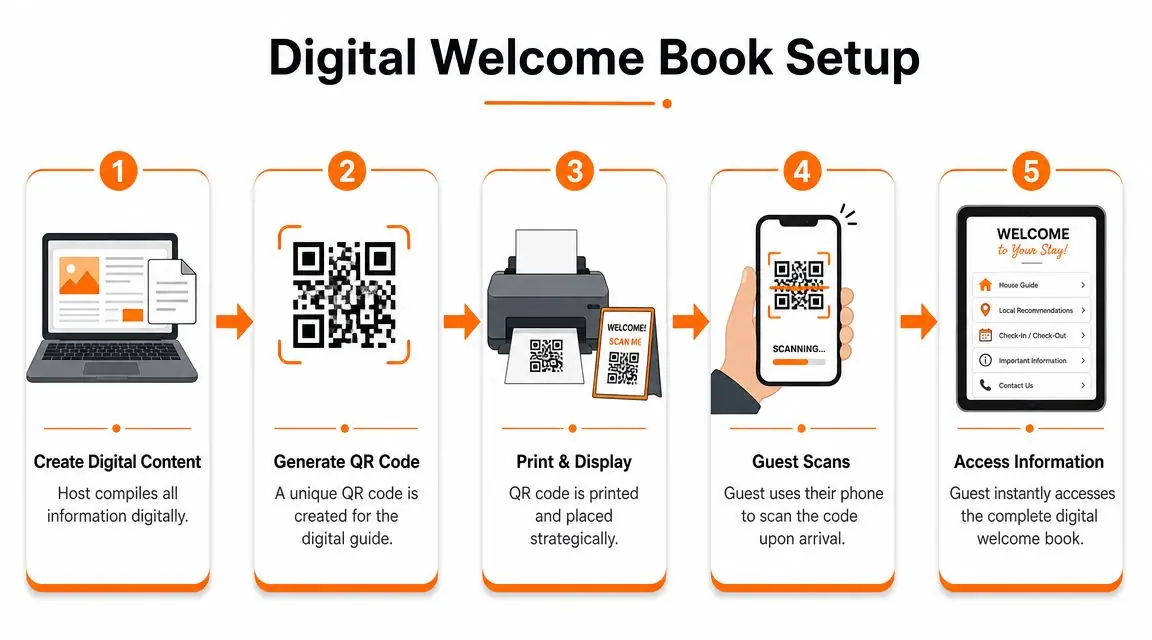
The QR code is just the delivery method. The essential work is the content and structure behind it.
Start in this order:
Gather your essentials Pull together check-in steps, Wi‑Fi, house rules, emergency contacts, appliance instructions, and local recommendations.
Remove duplication If the same instruction appears in your OTA messages, your house manual, and a printed sheet, choose one primary version and make that the source of truth.
Break long sections apart “House information” is too broad. Split it into heating, kitchen, laundry, parking, and checkout.
Write for mobile Test every section on your own phone. If it takes effort to scan, guests won't use it.
A digital guide also pairs well with guest identity and arrival processes. If you handle pre-arrival workflows digitally, this overview of guest registration for short-term rentals is worth reviewing so your check-in experience feels connected rather than fragmented.
Place the QR code where guests actually pause
Don't hide the code in a welcome basket or frame it in tiny print beside decorative items. Put it where guests naturally stop:
- near the entrance
- on the kitchen counter
- beside the Wi‑Fi card
- in the living room near the TV
- in the printed welcome sheet
Keep the prompt simple. “Scan for Wi‑Fi, house info, and local tips” is better than “Access our guest experience portal.”
This walkthrough shows the setup flow visually:
Use digital features print can't handle well
Digital only becomes better than print when you use its strengths.
That includes:
- Instant edits: update a restaurant, code, or checkout note without reprinting
- How-to videos: show the hot tub cover, oven controls, or lock operation
- Tap-to-map recommendations: send guests directly to restaurants, shops, and attractions
- Reusable content: duplicate standard sections across multiple properties and customize only the unit-specific parts
A QR guide works best when it replaces scattered answers, not when it becomes another place guests have to check.
For hosts managing multiple listings, centralizing this content matters. It keeps every property guide consistent while still allowing custom notes for each unit. That's where digital starts saving real time, not just looking modern.
Unlock Revenue Accessibility and Engagement
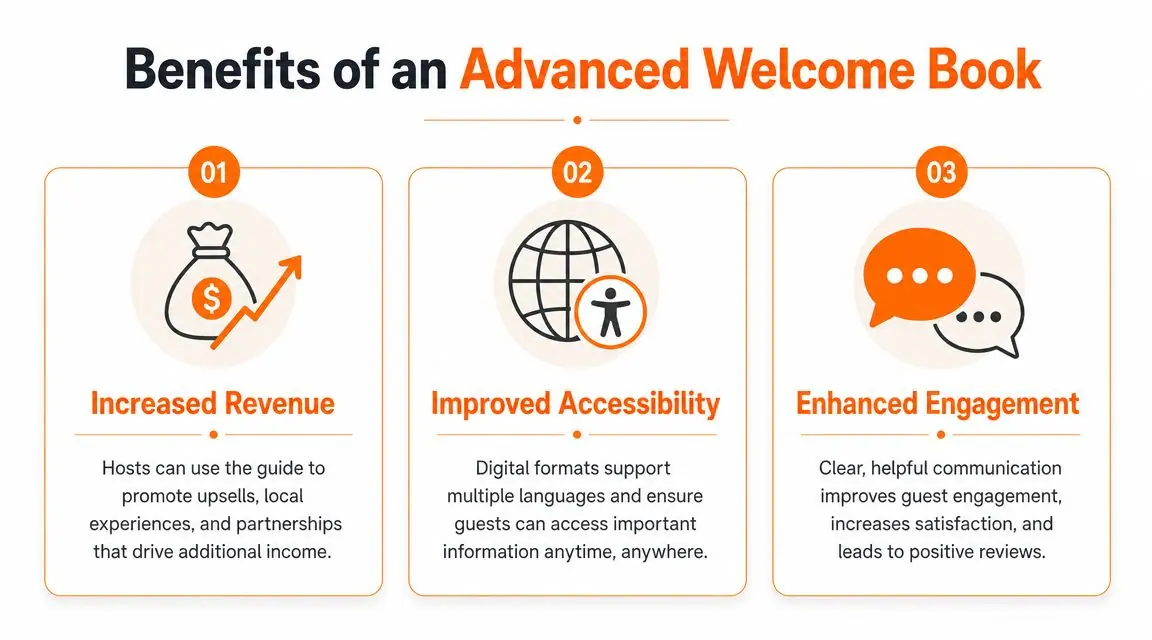
A basic welcome book informs. A strong one also supports margin, accessibility, and guest interaction without adding pressure to the stay.
Many templates fall short, as existing template content often tells hosts what to include, but not how a welcome book can drive revenue or reduce support costs. Industry guidance recommends covering practical information, yet it rarely explains how to use the guidebook to offer late checkout, transfers, equipment rentals, or local experiences, even though operators are under pressure to improve margins and digital guest communication tools are being adopted to reduce repetitive questions, as discussed in Evolve's welcome book guidance.
Turn the guide into a service channel
The easiest monetization mistake is being too aggressive. Guests don't want to open a welcome book and feel like they've entered a sales funnel.
What works better is selective, context-based offers:
- Before arrival: airport transfer, early check-in request, fridge stocking
- During the stay: equipment rentals, local experiences, housekeeping add-ons
- Before departure: late checkout, luggage hold options, return transfer
Placement matters. A late checkout option belongs near checkout information, not on the first screen. A bike rental offer works near local activity recommendations. Context makes the offer feel useful instead of intrusive.
Fix the accessibility gap most templates ignore
Accessibility is still under-addressed in most welcome book content. That's a problem for both guest experience and usability.
A major underserved angle is accessibility and multilingual usability. Many template articles rarely address guests who can't easily read long text, use small print, or find their way around a property in a second language. That matters because the WHO estimates that about 1.3 billion people worldwide live with a significant disability, and template advice often stops at vague formatting tips instead of practical accessibility guidance, as highlighted in PriceLabs' article on Airbnb welcome books.
Practical fixes include:
- Shorter text blocks: easier for everyone, especially mobile users
- Larger font sizing in print: don't force guests to squint at laminated cards
- Clear icons with labels: useful for laundry, trash, parking, and safety
- Multilingual versions: especially for check-in, house rules, and emergency basics
- Screen-friendly formatting: headings, simple navigation, and readable contrast
This isn't just about compliance language. It's about reducing friction for real guests.
Use engagement data to improve the stay
Digital guides can also show you what guests care about. That's useful operationally.
If guests constantly open the parking section, your arrival instructions may be unclear. If nobody clicks your restaurant picks, your recommendations may be too generic. If guests repeatedly revisit hot tub instructions, the setup probably needs clearer wording or a quick video.
For hosts who want to go deeper on that side, this guide to vacation rental analytics gives a solid overview of what to track and how to use it.
The point isn't surveillance. It's refinement. A welcome book should get better every time a guest uses it.
Welcome Book Template FAQs
How often should I update my welcome book
Review it any time operational details change. That includes door access, Wi‑Fi credentials, parking instructions, appliance changes, local recommendations, and checkout procedures.
Even if nothing obvious has changed, do a quick audit regularly. The most common issue isn't missing information. It's outdated information.
What's the best way to manage welcome books across multiple properties
Don't build each one from scratch. Create a master template with shared sections like house rules structure, emergency guidance format, and local guide categories. Then customize only the unit-specific details.
This is also where accessibility and multilingual usability matter more. If you host guests across different markets, keeping layouts readable and easy to translate is far more scalable than rewriting every guide manually. That matters because many template resources still overlook guests who struggle with long text, small print, or second-language navigation, even though the WHO estimates about 1.3 billion people worldwide live with a significant disability.
What's the biggest mistake hosts make
They write for completeness instead of usability.
A welcome book packed with every possible note feels thorough to the host and exhausting to the guest. The better approach is to prioritize fast answers, clean structure, and clear wording. If a guest can find Wi‑Fi, enter the property, use key amenities, understand the rules, and check out smoothly, the guide is doing its job.
If you want to replace paper binders and scattered guest messages with one simple digital guide, ScanStay is built for exactly that. It gives hosts a single QR code guests can scan to access Wi‑Fi details, check-in instructions, house rules, local recommendations, multilingual content, and service upsells in one place, without requiring an app. For solo hosts and multi-property operators alike, it's a practical way to make your vacation rental welcome book template easier to manage and far more useful on arrival day.