Best Smart Lock for Airbnb: Top Rated 2026 Picks
Discover the best smart lock for airbnb in 2026. Our expert guide compares top-rated security, guest access features, and easy management for hosts.
Your guest's flight lands after midnight. They're tired, your cleaner already left, and the old plan was “message me when you're close and I'll tell you where the spare key is.” Then the guest's phone battery is low, the porch light is dim, and a simple check-in turns into a support issue.
That's the moment most hosts stop thinking about locks as hardware and start thinking about them as operations. The best smart lock for airbnb use isn't the one with the flashiest app. It's the one that removes friction at arrival, fits your turnover routine, and still gives you a backup path when something goes wrong.
A good lock changes the tone of hosting. Guests arrive on their own schedule. Cleaners get access without you texting a new code every time. Co-hosts stop asking who still has the spare key. If you're trying to run one listing well, or several listings without constant interruptions, the right setup matters more than the brand hype.
Hosts who want tighter guest communication alongside access instructions often pair their lock workflow with a digital hosting system that cuts repetitive guest messaging. That combination is what usually turns self check-in from “available” into actually reliable.
Table of Contents
- The End of Late-Night Key Handoffs
- Why Smart Locks Are a Core Hosting Tool
- Understanding Smart Lock Technologies
- Key Features Every Airbnb Smart Lock Needs
- Planning Your Installation and Maintenance
- Your Smart Lock Failsafe and Security Plan
- Choosing a Lock for One Property vs a Portfolio
The End of Late-Night Key Handoffs
The old hosting routine breaks down at the edges. It works when guests arrive on time, read every message, and don't need help finding the key safe in the dark. It fails when a flight is delayed, a family shows up exhausted, or your co-host forgets to reset the handoff plan after the last stay.
That's why self check-in now feels less like a perk and more like the baseline. Guests want to arrive when they arrive. Hosts want a process that doesn't depend on perfect coordination. A smart lock solves the specific problem that causes some of the most annoying check-in friction: access that depends on another human being being available at exactly the right moment.
What changes on day one
With a solid smart lock setup, the front door stops being a live issue every check-in day. The guest gets a code. The code works during the right stay window. You're not waiting for “we're 15 minutes away” messages. Your cleaner can enter without borrowing a key from anyone.
Late-night check-in problems usually aren't hospitality problems. They're access-system problems.
Many new hosts make the wrong comparison at this stage. They compare a smart lock to a standard deadbolt and ask whether the extra features are worth it. The better comparison is between a smart lock and the hidden labor of coordinating every arrival, every cleaner visit, and every “where is the key” message.
What doesn't work anymore
A loose spare key under a mat doesn't scale. A lockbox with a static code can work, but it creates its own management issues if you never rotate access. In-person handoffs can feel personal, but they also tie your evenings and weekends to guest travel delays.
The best smart lock for airbnb hosting gives you structure. It turns access into a repeatable workflow instead of a recurring interruption.
Why Smart Locks Are a Core Hosting Tool
A smart lock changes more than the front door. It changes how the property runs on check-in day, during turnovers, and when something goes wrong at 10:30 p.m.
Hosts usually notice the value after a few stays. A guest arrives early. A cleaner needs to get in before you can answer your phone. A handyman shows up between bookings. With a standard key setup, each of those moments becomes a coordination task. With the right lock setup, access becomes a controlled process with clear time windows and fewer moving parts.
Better access control
Physical keys create long-tail problems in short-term rentals. Copies get made. Spare sets go missing. Staff changes, but old keys may still be out there. A smart lock gives you a cleaner system because access is tied to active codes, not to a piece of metal that may still be floating around town.
That matters in day-to-day operations.
You can issue one code for a guest stay, another for housekeeping, and a separate one for maintenance or a co-host. If a cleaner stops working with you, access can be removed without a rekey. If a guest reports trouble at the door, you have a record of whether a code was used and when. That kind of visibility is much more useful than guessing who last had the spare key.
For one property, this saves hassle. Across several properties, it saves hours every week.
A better arrival experience
Guests judge the stay fast. The first real test is whether they can get through the door without confusion, a dead phone call, or a scavenger hunt for a lockbox.
The practical win here is consistency. A keypad code is easy to explain in pre-arrival messages, easy for guests to use after a long trip, and usually easier than an app-based process. Hosts sometimes focus too much on smart-home features and not enough on the fact that tired guests want the shortest path from curb to couch.
A smooth check-in also reduces support messages. Fewer “we can't find the key” texts means fewer avoidable interruptions for you.
Less operational drag
This is the part many review roundups miss. A smart lock is not just door hardware. It is an access workflow.
A good setup helps with:
- Guest turnover: New access for each stay without chasing key returns
- Cleaning coordination: Entry that fits the turnover window instead of sharing a permanent code
- Vendor control: Temporary access for maintenance, inspectors, or deliveries
- Remote problem-solving: Basic entry issues can often be checked from your phone instead of with a drive across town
The trade-off is that convenience only helps if the system is reliable and simple enough for real guests to use. A lock with too many app steps can create its own support burden. A cheap keypad with weak battery management can fail at the worst time. That is why experienced hosts do not choose based on specs alone. They choose based on how the lock fits the actual workflow of one unit, or ten, and what the backup plan looks like when the primary method fails.
That is what makes smart locks a core hosting tool. They reduce routine friction, tighten access control, and give hosts a process that holds up under normal turnover pressure.
Understanding Smart Lock Technologies
A guest pulls up after a delayed flight, it is raining, their phone is at 8 percent, and your cleaner is due back in two hours. That is the moment a lock stops being a gadget and becomes an operating decision.
Different smart lock types create different support burdens. Some reduce check-in friction for one nearby unit. Others make remote access control much easier across several properties. The right choice comes down to how guests get in, how you issue and revoke access, and what still works when Wi-Fi, batteries, or apps cause trouble.
Standalone keypad locks
Standalone keypad locks are the most familiar option for guests. They enter a code on the door and walk in. No app install, no account setup, no lesson at the curb.
That simplicity matters. Hosts who manage one property nearby can often do fine with a keypad-first setup, especially if the lock is reliable and the code process is easy to update between stays. The downside is administrative work. Some keypad locks still require manual programming at the door or a clunky process for changing codes. That may be tolerable for one unit. It becomes tedious fast when you are coordinating multiple turnovers in different locations.
A keypad is often the right baseline because it asks the least from the guest.
Bluetooth locks
Bluetooth locks work at short range and usually depend on the guest using a phone. In owner-occupied buildings or lower-volume rentals, that can be acceptable.
For short-term rentals, Bluetooth often adds avoidable friction. Guests may deny permissions, keep Bluetooth off, or arrive with a dead battery and no interest in troubleshooting settings on the doorstep. Hosts sometimes like Bluetooth because local control can be stable without relying on the property's internet. Guests care about whether the door opens on the first try.
That difference in priorities is why many hosts avoid making Bluetooth the primary check-in method.
A lock that feels polished during setup can still create support messages if the guest needs an app, permissions, and enough battery life just to open the front door.
Wi-Fi locks
Wi-Fi locks are usually the most practical option for remote hosting because they let you manage codes and check lock status without being on site. For a host handling back-to-back stays, that saves time and cuts down on access mistakes.
The appeal is straightforward. Built-in Wi-Fi removes the need for a separate bridge or hub, which means fewer parts to install and fewer points of failure. That is one reason the Schlage Encode Plus is a popular choice in many Airbnb buying guides. In this Property Investment Project review of Airbnb smart locks, it is described as a premium option with built-in Wi-Fi, Apple Home Key support, and a physical key override.
The trade-off is network dependence. If the Wi-Fi signal is weak at the door, remote updates and status checks can become inconsistent. In practice, hosts should treat door-side signal strength as part of lock selection, not as an afterthought.
Hub-based Z-Wave and Zigbee locks
Z-Wave and Zigbee locks connect through a hub rather than directly to Wi-Fi. This setup can work very well in a standardized smart home system, especially across a larger portfolio where the same devices, automations, and support steps are repeated at every property.
The cost of that control is complexity. You are not just installing a lock. You are maintaining a lock, a hub, and the rules connecting them. If the hub goes offline, access workflows and automations can break even if the lock hardware itself is fine. For experienced operators with a consistent stack, that may be a fair trade. For a new host, it often creates more troubleshooting than it saves.
Smart Lock Technology Comparison for Airbnb Hosts
| Lock Type | How It Works | Best For | Key Tradeoff |
|---|---|---|---|
| Keypad | Guest enters a code directly on the lock | Simple self check-in and broad guest usability | May offer limited remote management depending on model |
| Bluetooth | Phone connects to the lock at close range | Hosts nearby or properties with local control needs | Guests may struggle with app setup and phone permissions |
| Wi-Fi | Lock connects through the property's internet for remote access | Remote hosts and routine code management | Depends on stable Wi-Fi at the door |
| Z-Wave / Zigbee hub | Lock connects through a smart home hub | Operators with standardized automation systems | More components mean more setup and troubleshooting |
How to decide quickly
For most Airbnb hosts, the safest starting point is a keypad lock with remote code management and a backup entry method. That combination works well for guests and keeps operations manageable.
Single-property hosts can sometimes accept a little more manual work if the lock is dependable and they live nearby. Portfolio hosts usually benefit from standardizing around Wi-Fi or hub-based systems that support repeatable code management, staff access, and troubleshooting. The more units you manage, the more expensive a fussy lock becomes.
Key Features Every Airbnb Smart Lock Needs
A lock earns its keep on arrival day. A guest lands late, the cleaner ran behind, and you need entry to work on the first try without a call, a reset, or a trip to the property. That is the standard to use when you compare features.
Start with access control, not app polish
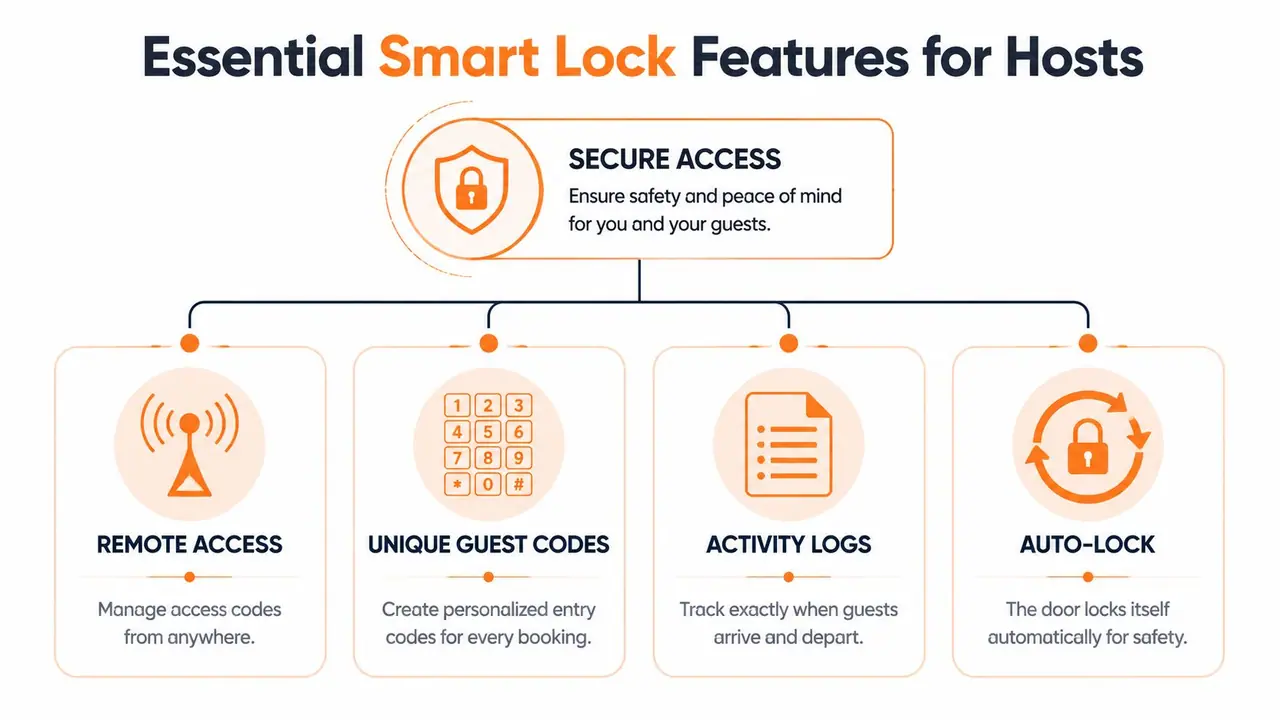
For hosting, the feature that matters most is clean access management. Good locks let you create a separate code for each reservation, set start and end times for that code, and give cleaners or contractors their own limited access. That reduces guest confusion, cuts down on reused PINs, and makes it much easier to see who should be entering and when.
For a single property, this may feel like a convenience feature. For a portfolio, it becomes daily infrastructure. Shared codes, manual edits, and unclear staff access create small problems that pile up fast.
A host-friendly lock should let you:
- Create unique guest codes: One stay, one code is easier to track and safer than recycling the same number.
- Set time windows for staff: Cleaners, inspectors, and maintenance techs need access that matches the job, not permanent entry.
- Change permissions remotely: Early check-in, a canceled stay, or a lockout request should not require someone to drive over.
Prioritize the features that prevent support issues
The best smart lock features are the ones guests barely notice because nothing goes wrong.
Look for these first:
- A keypad that works well in real use: Guests understand keypads immediately. That matters more than a flashy app flow after a delayed flight.
- A physical key override: Electronics fail. Batteries die. A backup key path gives you one more way to recover quickly.
- Clear low-battery alerts: You need warning early enough to replace batteries during turnover, not after a guest is standing outside.
- Adjustable auto-lock timing: Shorter is not always better. Guests unloading luggage or wrangling kids often need a little time before the door relocks.
- Access logs: Basic entry history helps you confirm whether a cleaner arrived, whether a code was used, or whether a guest is at the wrong door.
- Remote code updates: If a reservation changes, your access settings should change with it.
Auto-lock is a good example of why operational context matters. At an urban studio, a shorter relock time may be fine. At a house where guests carry in coolers, skis, or beach gear, an aggressive auto-lock setting creates avoidable lockouts.
Features that are nice to have, but often overrated
Fingerprint access can be useful for owners or repeat staff. It usually adds little for short-term guests, who already have enough to process at check-in. App-only entry has a similar problem. It can work, but it asks more from the guest: downloading an app, allowing permissions, turning on Bluetooth, or sorting out account issues in the driveway.
That trade-off is not worth it for many hosts. A keypad-first setup usually creates fewer arrival problems.
One feature outside the lock itself can also reduce support volume. A clear digital welcome book for vacation rentals gives guests one place to find arrival steps, Wi-Fi details, parking instructions, and house rules, instead of hunting through old messages for the code and check-in details.
Choose features that hold up under pressure. If a lock looks impressive in a demo but creates more guest questions, more staff work, or more failure points, it is the wrong lock for an Airbnb operation.
Planning Your Installation and Maintenance
A lock can be excellent on paper and frustrating on the door. Most hosting problems with smart locks don't start with code generation. They start with bad fit, weak alignment, poor signal, or skipped maintenance.
Before you install anything
Review the fundamental basics before you buy. Door type matters. So does the condition of the frame. A lock installed on a sticky, misaligned door will feel unreliable even if the electronics are fine.
Use this quick checklist:
- Check the deadbolt action: If the bolt drags or sticks, fix that first.
- Test signal strength at the entry door: Remote features depend on the lock connecting where it's installed.
- Confirm who's installing it: Straightforward swaps are often manageable, but warped doors or unusual hardware may justify a locksmith.
- Decide how guests will enter: Keypad-first is usually easier than app-first.
Hosts often underestimate how much door alignment affects performance. If the deadbolt doesn't throw smoothly by hand before installation, adding a motorized lock won't fix the mechanical issue.
Install the lock on a well-working door. Don't install it hoping the lock will solve a bad door.
Maintenance that prevents guest problems
Smart locks need light but regular upkeep. Ignore them for too long and they fail at the worst time, usually during turnover or late arrival.
Build a simple routine:
- Replace batteries on a schedule. Don't wait for the final warning.
- Test guest entry after major updates. If you change apps, Wi-Fi, or lock settings, run a full check-in test.
- Inspect the keypad and strike area. Weather, dirt, and door movement can affect operation.
- Keep one documented backup procedure. Your co-host, cleaner, or emergency contact should know it too.
A written guest guide helps here. Hosts who keep lock instructions, arrival steps, and fallback details in one vacation rental welcome book guests can access on their phones usually create fewer avoidable check-in questions than hosts who scatter that information across old messages.
Good lock ownership isn't complicated. It's just disciplined.
Your Smart Lock Failsafe and Security Plan
A smart lock is not a complete access plan by itself. It's one layer. Hosts who treat it as foolproof are usually the ones scrambling when batteries die, Wi-Fi drops, or a guest can't get the code to work outside the front door.
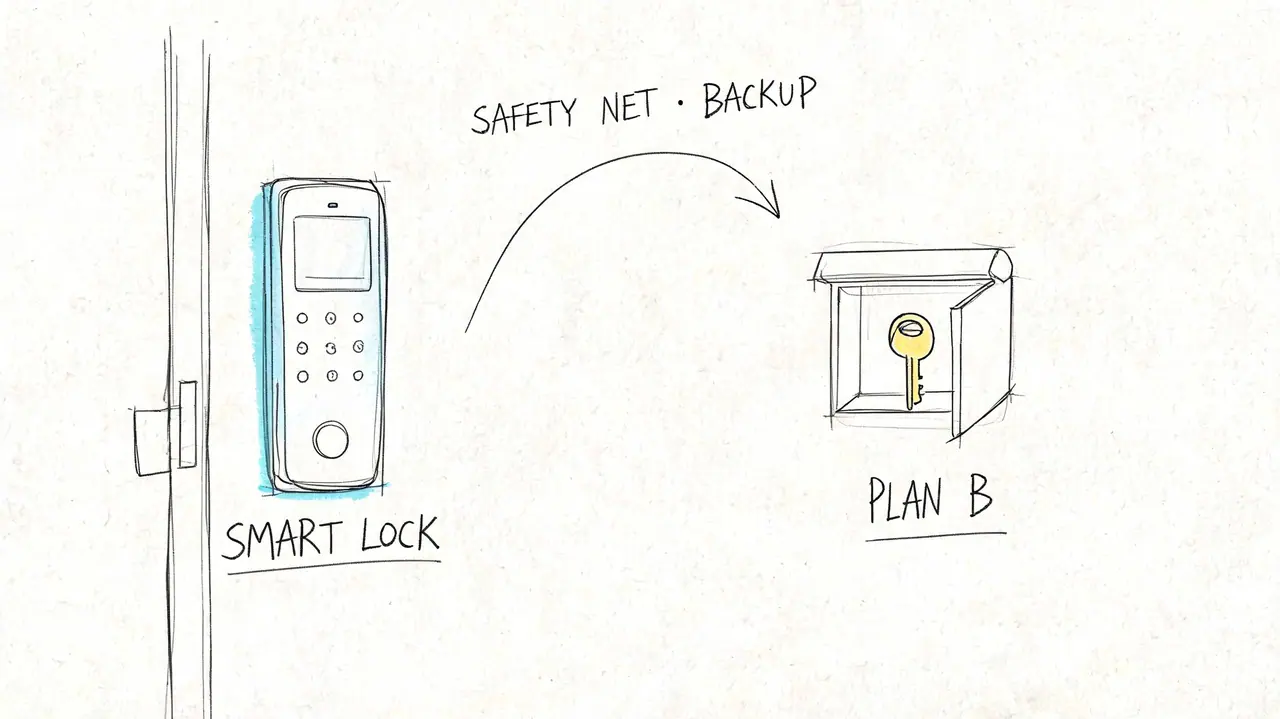
Experienced hosts increasingly treat lock failure as an expected operational risk. Many now promote a backup lockbox approach as standard procedure to ensure guest access, especially for late-night arrivals, as discussed in this host video about backup lockbox planning.
The lockbox is part of the system
Some hosts resist this because they think a backup key makes the smart lock feel less advanced. That's backwards. A backup key means you understand hospitality operations.
If the internet goes down, if batteries fail sooner than expected, or if a code doesn't sync properly, the guest still needs a path inside. A lockbox with a physical key gives you that path. It should be placed somewhere sensible, documented clearly, and used as a fallback rather than the primary check-in method.
What your backup plan should cover
Your failsafe should answer specific questions before a problem happens:
- If the lock is unresponsive, what does the guest do first?
- Where is the backup key, and who can explain access clearly?
- Who can help locally if remote troubleshooting fails?
- How will cleaners and co-hosts access the property if automation breaks?
A short visual walkthrough can also reduce panic during rare failures.
Self check-in is only as reliable as the fallback path behind it.
Security planning also means separating access types. Guests should have one code path. Staff should have another. Emergency entry should not depend on the same instructions sent in standard arrival messaging. When hosts think through failure modes early, the lock becomes much less stressful to manage.
Choosing a Lock for One Property vs a Portfolio
A lock that feels easy at one listing can turn into daily admin once you add a second, third, or tenth door. That is the part many product roundups miss. Hosts do not just buy hardware. They buy a check-in process, a staff access process, and a fallback process.
What works for a single listing
For one property, the best choice is usually the lock that asks the least of you week after week. A reliable keypad lock with remote code changes, straightforward battery management, and a physical key override covers what a solo host deals with.
The Schlage Encode Plus gets attention because it keeps the setup simple. Built-in Wi-Fi means no separate hub to troubleshoot, and the physical key override matters if the smart features ever stop cooperating. For a single listing, paying a bit more for fewer moving parts often saves time and support messages later.
The test is practical. Can guests figure it out after a long travel day? Can you change access from your phone without second-guessing whether it worked? Will this lock stay off your problem list during turnovers?
What changes when you manage multiple properties
Across a portfolio, the lock itself becomes only one part of the job. The fundamental question is whether your access system reduces repetitive work or creates more of it.
A portfolio setup has to handle guest entry, cleaner schedules, maintenance visits, owner access, and the occasional last-minute exception. If each property lives in a separate app, or each code change needs manual follow-up, the time cost adds up fast. I have seen perfectly good locks become bad operational choices because the management workflow around them was too clumsy.
For multi-property operators, these questions matter more than a polished product page:
- Can you manage access for every listing from one place?
- Can cleaners and maintenance teams get their own codes without sharing the guest path?
- Can you remove or change staff access quickly when schedules change?
- Can co-hosts follow the same process across every unit?
- Can you still get someone inside if the automation fails?
That last point matters more as you scale. One failed code at one property is an annoyance. The same issue across several arrivals in one evening becomes an operations problem.
If you are adding units, treat the lock as part of a larger vacation property management workflow for repeatable operations. Good systems cut down on manual coordination, keep staff access separate from guest access, and make exceptions easier to handle without rewriting your process every time.
If you want the setup to work well in practice, pair access automation with clear guest instructions. ScanStay gives hosts a digital welcome book they can share by QR code, so check-in details, house rules, Wi-Fi info, and backup access guidance live in one place guests can open on their phones.