Guest WiFi Management for Short-Term Rentals
Master guest wifi management for short-term rentals with secure network design, captive portals, bandwidth shaping, and QR code access via ScanStay.
The worst guest Wi-Fi message usually lands after midnight. The guest says the code doesn't work, the TV won't cast, and the “smart home thing” in the hallway is blinking again. In short-term rentals, guest Wi-Fi management isn't a utility you forget after install, it's part of the property's operating system, and when it's designed badly, guests feel it in every complaint, delay, and bad review.
Table of Contents
- Why Guest Wi-Fi Is a Security and Revenue Problem
- Designing a Segmented Network for Your Rental
- Access Control and Bandwidth Shaping for Guest Satisfaction
- Delivering Wi-Fi Credentials Through a Digital Welcome Book
- Monitoring Performance and Troubleshooting Common Failures
- Building an Ongoing Management Routine
Why Guest Wi-Fi Is a Security and Revenue Problem
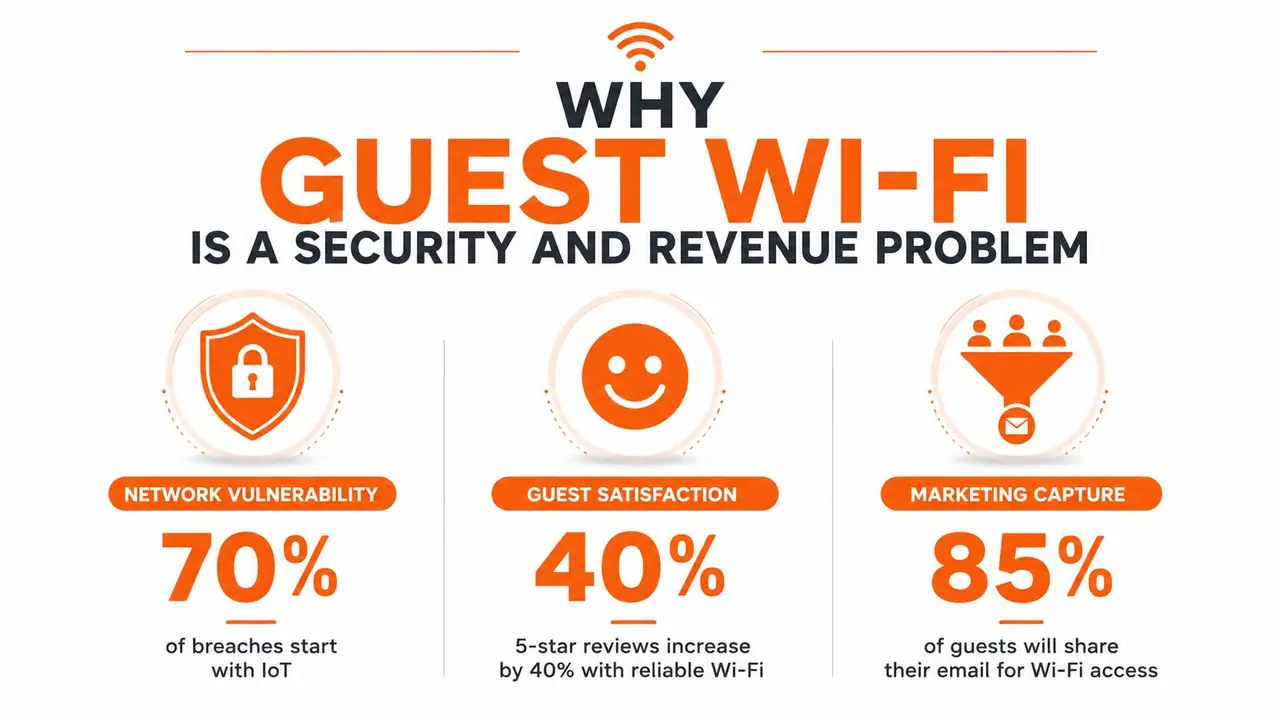
The first complaint usually sounds minor. A guest says the Wi-Fi is slow, the login is awkward, or the password slipped into the wrong message thread. Then the next complaint is harder to ignore, because the same guest has found a thermostat, a camera feed, or a printer on the same network, and the issue has shifted from inconvenience to exposure. In a high-turnover rental, a network that looks fine on checkout day can still create support tickets, weak access controls, and reviews that blame the host for lag, confusion, and device problems all at once.
That is why guest connectivity has moved from a side feature to operating infrastructure. The global managed guest Wi-Fi services market was valued at $4.2 billion in 2025 and is projected to reach $10.8 billion by 2034, with hospitality as the largest end-user segment at 42.5%, or about $1.79 billion in 2025 MarketIntelo. Those figures do not mean every small rental needs enterprise tooling. They do show that owners are treating guest connectivity as part of the business, because the network now affects security, review quality, and the amount of time spent on support.
What breaks when the network is sloppy
The failure mode is usually ordinary until it is not. One guest starts a video call and grabs all the bandwidth, another cannot load the welcome page, and the host ends up hearing that the property has "bad internet" even though the core issue is unmanaged traffic and weak separation between devices. In vacation rentals, the network has to handle short stays, multiple devices, and impatient users without exposing internal systems that were never meant for guests.
A guest network carries two jobs at the same time, it is a security boundary and a guest-experience touchpoint. If it is not isolated, it can become a path to smart home devices, staff tools, or the router admin page. If it is hard to join, the guest still remembers the frustration even when the password was technically correct, and that usually shows up in the review.
For packet-level troubleshooting, a practical guide to packet capture methods helps when you need to confirm what is happening on the wire instead of guessing from a complaint.
Practical rule: if the guest network can see business devices, the setup is incomplete, no matter how polished the login page looks.
Designing a Segmented Network for Your Rental
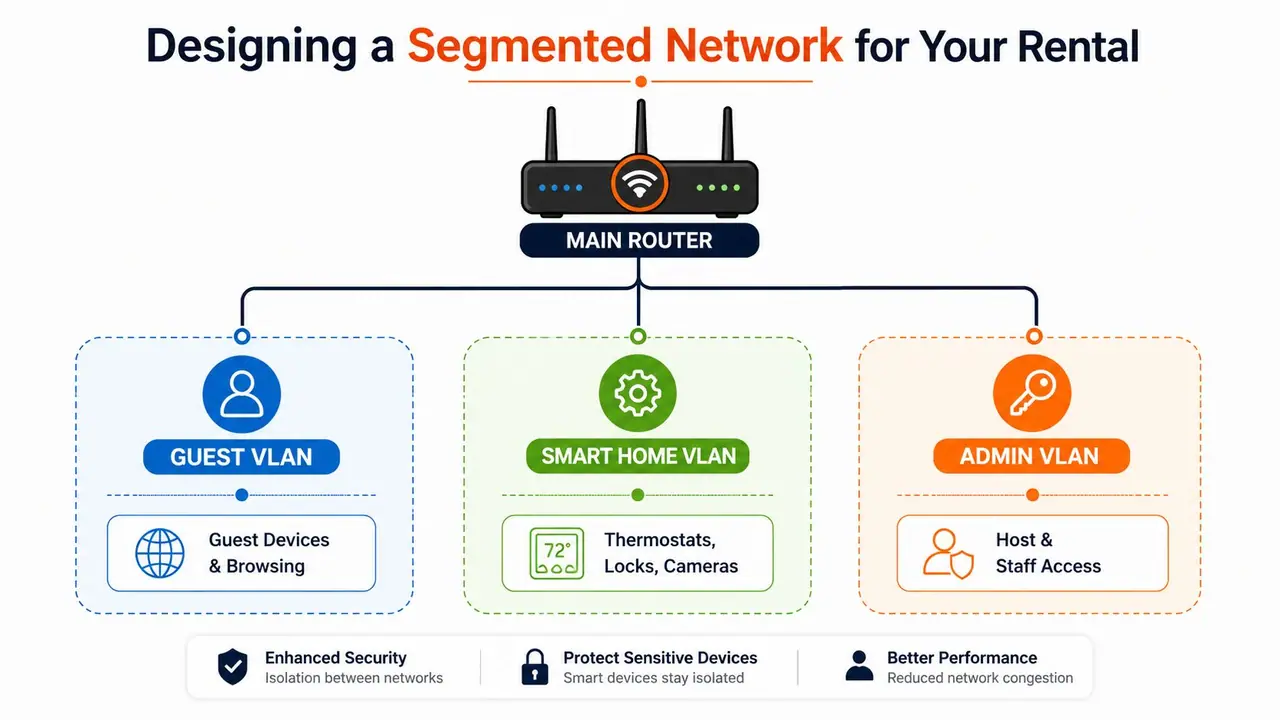
A rental network needs three things kept apart cleanly, guest traffic, smart home traffic, and host or staff access. A property with smart locks, cameras, a network printer, and streaming devices does not need a stronger password, it needs network segmentation that keeps those device classes from seeing one another in the first place. The clearest operating model is simple, guests browse the internet, smart devices talk only where they need to, and staff keep controlled admin access.
Start with separate VLANs and a guest-only SSID
The minimum viable design uses VLAN segmentation, layer-2 client isolation, and default-deny firewall rules between the guest network and everything else Purple. In plain English, that means a guest laptop can reach the internet, but it cannot discover the printer, ping the camera, or browse the router admin page. Guest Wi-Fi guidance from the Canadian Centre for Cyber Security also recommends a separate password, changing it from the default, limiting how long credentials remain valid, and restricting VLAN settings so guest devices cannot interact with the primary network Canadian Centre for Cyber Security.
For a rental, I would treat the SSID design this way. The guest SSID is internet-only, the smart home VLAN handles locks, thermostats, and cameras, and the admin VLAN stays private for the host or property manager. That separation matters because the biggest failure mode is under-segmentation, where a guest can accidentally reach internal systems or the router admin panel.
A segmented layout also gives you cleaner troubleshooting. If the living-room TV loses access, you can check whether it sits in the smart home VLAN, whether the firewall rule between segments is too tight, or whether the device was never assigned to the right SSID. The problem is usually not the password, it is the path between segments.
Use firewall rules before you rely on passwords
Passwords are not segmentation. They only control who joins the Wi-Fi, not what the device can see after joining. The firewall has to block guest traffic from reaching internal subnets, and the router should forward guest internet traffic through a route that does not expose the rest of the LAN, which matches modern enterprise architecture guidance Canadian Centre for Cyber Security.
A practical rollout sequence is straightforward. Define guest density and compliance needs, design VLAN, ACL, and firewall separation, choose the authentication method, enable layered controls, then test with real guest devices before launch Purple. That last step is the one many hosts skip. If a guest device can reach internal IPs, peer devices, or the router interface, the network is not done yet.
For a more traditional network segmentation pattern, the DMZ best practices for resellers resource is useful because it reinforces the same internet-only principle for guest access. The terminology is different, but the operational idea is the same, keep public-facing traffic in its own lane.
I have seen properties fail for small reasons, like a camera left on the guest SSID during a quick router swap or a staff tablet that still had access after turnover. Those mistakes are easy to miss until a guest finds them. A segmented design closes that gap before the first check-in.
A guest network should behave like a controlled lobby, not a hallway into the back office.
Access Control and Bandwidth Shaping for Guest Satisfaction
Guests want to join fast and keep streaming. Hosts need to know who connected, how long access should last, and whether one device is going to spoil the experience for everyone else. That trade-off shows up in every rental network I've set up, because stronger controls can improve visibility, but they can also create friction if they are too clever for a tired traveler arriving after dark.
The basic options are familiar, but the results differ a lot in a rental setting. OTP-based methods can capture more guest identities, while captive portals and voucher flows add steps at check-in MyWiFiNetworks. One practical review of guest Wi-Fi analytics and conversion behavior also shows how these choices affect sign-in behavior and repeat use MyWiFiNetworks. Those figures do not belong in every property decision, but they do explain why access design affects both retention and support volume.
Compare the method to the guest experience
| Method | Guest Friction | Security Level | Best For |
|---|---|---|---|
| Captive portal with terms acceptance | Medium | Medium | Properties that want a branded login step |
| Voucher-based login | Medium to high | Medium to high | Stays with check-in codes and tighter control |
| Time-limited session | Low to medium | Medium | Short stays where credentials should expire automatically |
| Open network with hidden segmentation | Low | Lower unless well-designed | Small setups where simplicity matters more than capture |
The mistake I see most often is relying on per-SSID bandwidth caps and assuming that solves performance. It does not. A single heavy user can still drag down the experience if shaping is not applied per user or per device, which is why current guidance favors per-user bandwidth limits and smarter shaping instead of a blunt ceiling on the whole guest network Cloudi-Fi. That matters in high-turnover rentals where one guest is streaming on a tablet, another is on a work call, and a third is trying to cast video to the TV.
A good rental setup also matches the session timeout to the stay. That keeps credentials from lingering longer than they should, and it reduces the chance that a former guest's device remains authenticated after checkout. For properties that want tighter traffic discipline, the same planning mindset used in office fit-out network planning applies, because quality of service is about who gets priority when everything is busy.
Delivering Wi-Fi Credentials Through a Digital Welcome Book
A secure network still fails if the guest can't find the password, doesn't know which SSID to use, or has to scroll through three messages to find the latest code. Paper binders and sticky notes create exactly that problem, especially in short-term rentals where turnovers are frequent and instructions get outdated fast. The better pattern is one QR code that opens a mobile-friendly welcome page with Wi-Fi details, arrival notes, house rules, and local guidance in one place.
That's where QR-based delivery becomes operationally useful. Instead of sending the same text message to every arrival, hosts can put the credentials in a digital welcome book and let guests scan once to see what they need. A platform like ScanStay fits that model because it centralizes guest information in a browser, supports Wi-Fi details alongside house content, and reduces the back-and-forth that usually starts when someone can't find the code.
Make the credential path obvious
Guests shouldn't need to ask whether the password is in the binder, the pre-arrival email, or the kitchen drawer. The fastest experience is a visible QR code at the property and a matching link in the pre-stay message. If the guest arrives late, the flow still works, because the instruction lives in one place rather than across multiple channels.
One practical detail matters more than most hosts expect, the QR should open immediately in the browser with no app install and no login gate. That keeps the process familiar for mobile-first travelers and avoids the dead-end of “I scanned it, now what?” If you want to build the code itself cleanly, the QR code generator guide is a useful reference for producing a scannable handoff without adding extra steps.
Keep the content reusable across properties
Multi-property operators need consistency more than cleverness. A central dashboard lets you reuse the same Wi-Fi instructions, then adjust the SSID, password, and house-specific notes per unit without rebuilding the whole guest book each time. That matters because guest communication is never just about the network, it's also about check-in timing, house rules, and the small questions that otherwise land in your inbox one by one.
The best Wi-Fi handoff is the one guests barely notice, because they found it before they felt stuck.
Monitoring Performance and Troubleshooting Common Failures
A rental network rarely fails in a clean, dramatic way. A portal will stall on one phone, the living room TV will connect but refuse to stream, or one bedroom will feel slow while the rest of the house looks fine. If you only watch raw connection counts, you miss the pattern, and by the time a guest complains, you are already reacting instead of preventing the issue.
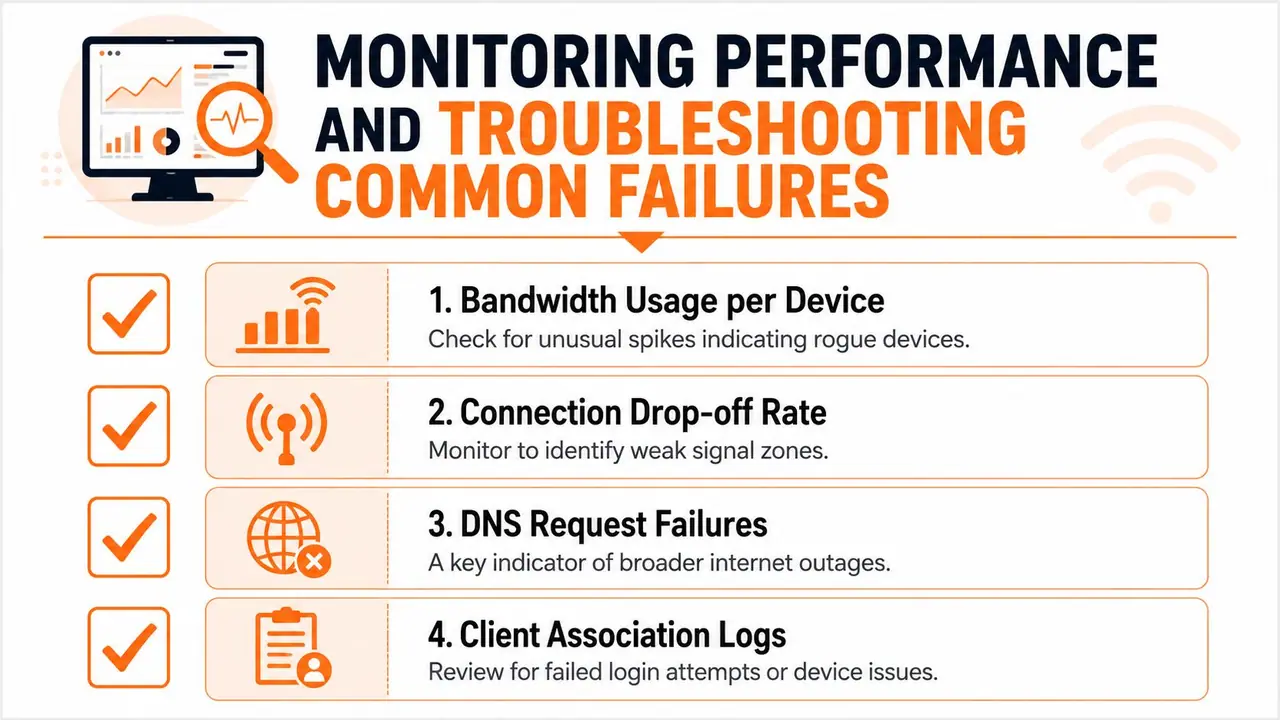
The metrics worth checking are the ones tied to guest behavior. Recent guidance points to impression-to-login rate, form abandonment, and per-device bandwidth consumption rather than only uptime or connection count. That matters because the key question is whether guests get onto the network quickly and stay on it without friction. For a broader view of what to monitor during setup and troubleshooting, this technology troubleshooting guide is a practical reference.
Diagnose from the guest side first
Start with an actual guest device, not the admin laptop sitting beside the router. Check whether that device can reach internal IPs, ping peer devices, or access router admin interfaces before a guest ever arrives, because those tests catch isolation mistakes early. If the guest device can see anything it should not, the problem is segmentation. If it cannot reach the internet at all, the issue may be authentication, DHCP, or the captive portal flow.
A common field mistake is treating a connected device as a working device. It is not. A phone can show Wi-Fi bars and still fail to load the portal, fail DNS lookups, or get stuck behind a stale session. Logs matter more than guesswork, especially in a high-turnover rental where the same complaint can come from a different cause each week.
Watch for the failure pattern, not just the symptom
When guests say the Wi-Fi is “slow,” the cause is often different from room to room. One room may have weak signal, another may be fine until peak usage, and a third may be blocked by a portal issue that looks like speed trouble. That is why bandwidth usage per device, connection drop-off, and client association logs are useful. They show whether the problem is traffic, coverage, or authentication.
A property manager needs a boring, repeatable diagnostic habit. Check the portal, check the device logs, confirm the guest can reach only the internet, then test again with a different phone or laptop. The point is to separate guest-side friction from network-side failure before you start changing settings.
Building an Ongoing Management Routine
Guest Wi-Fi stays secure only if someone keeps checking it. Devices change, firmware gets stale, passwords spread through turnover routines, and guest expectations keep shifting toward faster, simpler access. A property that felt polished in spring can feel clumsy by peak season if nobody is reviewing logs, rotating credentials, or confirming the network still behaves after a firmware change.
A practical routine starts with a separate guest password, a non-default setup, time-limited credentials, and guest access that stays away from the primary network. The Canadian Centre for Cyber Security guest Wi-Fi guidance sets out that basic approach. In day-to-day operations, that means rotating the guest password on a schedule that matches turnover, checking access logs after a support spike, and verifying the portal after firmware updates or device swaps.
Keep the routine small enough to survive real operations
A single-property host can handle this with a short monthly checklist and a quick test after maintenance. A portfolio manager needs the same habit across multiple homes, because the failure risk climbs when every property has a slightly different router, portal, or smart device mix. The point is to stop relying on memory.
Scan analytics can help here too. If you use a digital welcome book with scan tracking, the data shows whether guests are opening the Wi-Fi instructions or missing them entirely. The property management dashboard guide is useful if you are trying to standardize reporting across multiple units, because it shows how to keep network checks, guest access records, and property tasks in one place.
Practical rule: if you only notice the network when it breaks, you are managing by complaint, not by system.
A good routine also takes guest feedback seriously without overreacting to every complaint. When guests keep reporting access problems, the cause is usually a credential handoff issue, a coverage issue, or a bandwidth fairness issue, not all three at once. Fix the recurring cause, document the change, and make the next arrival simpler than the last one.