Vacation Property Management: The 2026 Profit Guide
Master vacation property management with our 2026 playbook. Automate tasks, delight guests, and boost revenue with actionable systems and legal tips.
Your phone is buzzing with another guest question. The cleaner is asking whether the early check-in is confirmed. A booking just came in on one channel, but you still need to check the others. Tonight's rate probably should change because demand moved, but you haven't touched pricing all week.
That's what vacation property management looks like for a lot of hosts right now. Not hard in theory, just relentless in practice.
The fix isn't working longer hours. It's building an operating system around the property. That matters more now because this isn't a side niche anymore. The global vacation rental market was valued at $101.69 billion in 2025 and is projected to reach $121.94 billion by 2033, growing at a CAGR of 3.7% from 2026 to 2033, according to Grand View Research's vacation rental market analysis. More competition and more guest expectations mean the casual host gets squeezed.
The hosts who keep their sanity usually do the same thing. They stop treating management as a string of tasks and start treating it as a set of repeatable systems. That's where time comes back. That's where margins improve. That's also where the guest experience stops depending on whether you happen to be looking at your phone.
Table of Contents
- The Modern Host is a Systems Builder Not Just a Landlord
- Build Your Operational Foundation Before the First Guest
- Design a 5-Star Repeatable Guest Experience
- Automate Your Pricing and Communication Workflows
- Systematize Your Cleaning and Maintenance
- Track Key Metrics for Financial Health and Growth
- Frequently Asked Questions
The Modern Host is a Systems Builder Not Just a Landlord
A landlord can get away with occasional reaction. A vacation rental operator can't. Guests expect fast answers, clean handoffs, accurate access details, easy check-in, and a stay that feels organized from the first message to checkout.
That shift changes the job. Good vacation property management isn't mostly about being available. It's about reducing the number of moments where availability is needed at all.
What changes when you think in systems
The practical mindset looks like this:
- One source of truth: Reservation data, cleaner schedules, entry instructions, and guest details need a central home, usually a PMS plus connected tools.
- Documented operations: If a cleaner or co-host gets sick, someone else should be able to step in without texting you ten questions.
- Controlled exceptions: Great managers don't eliminate surprises. They make sure surprises don't break the whole week.
Practical rule: If a task happens more than twice a month, it deserves a checklist, template, or automation.
Many hosts stay stuck because they solve each problem one at a time. A guest asks for Wi-Fi details, so they send them. A faucet leaks, so they call someone. A holiday weekend approaches, so they nudge rates manually. None of that is wrong. It just doesn't scale.
The operator mindset pays off
The best managers I've seen aren't the ones with the fanciest listing copy. They're the ones with clean handoffs, solid vendors, predictable communication, and a financial process that catches mistakes early.
That matters whether you manage one unit or many. Systems reduce decision fatigue. They also make growth less chaotic. Adding a new property to a messy operation just multiplies the mess. Adding a new property to a documented operation is work, but it's manageable.
There's a reason more hosts are investing in software and process. This business now rewards consistency as much as hustle.
Build Your Operational Foundation Before the First Guest
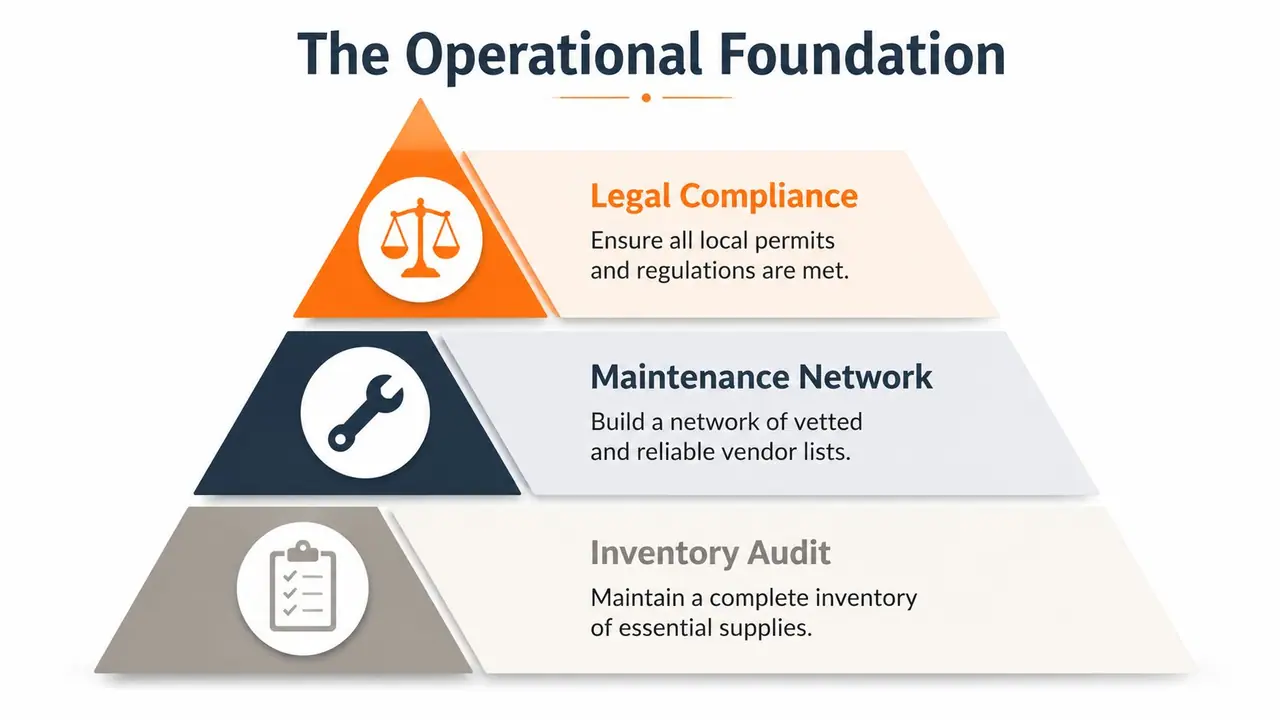
Most management problems don't start with guests. They start before launch, when the property goes live without a clean operational base. If permits are fuzzy, supplies are inconsistent, and no backup cleaner exists, the first bad week exposes everything.
Get compliant before you get busy
A lot of hosts want to perfect the decor and listing first. I'd reverse that. First confirm the property can legally operate, what permits or registrations apply locally, what tax handling is required, and whether your HOA or building rules create restrictions.
That isn't just paperwork. It protects the whole business. As of 2026, 74% of hosts use property management systems, but 42% of managers expect local or state regulations to limit their ability to meet performance targets, according to these vacation rental industry statistics. The software stack helps, but it won't save you from a compliance failure.
Build a simple compliance folder with:
- Permit records: Current registrations, renewal dates, and copies of filed documents.
- Insurance documents: Liability coverage, property coverage, emergency contacts, and claim instructions.
- House rules aligned with policy: Occupancy rules, pet rules, parking instructions, and any local quiet-hour requirements.
The cleanest operation in the world still breaks if the property isn't allowed to run the way you advertised it.
Build the property file and vendor bench
Every property needs a master file. Not a vague note app folder full of random photos. A real operating file.
Include appliance manuals, warranty records, paint colors, flooring type, filter sizes, lock codes, Wi-Fi details, trash day instructions, utility account info, and supply SKUs. If the dishwasher fails or a replacement lamp is needed, your team shouldn't be guessing.
Then build your first vendor layer before opening the calendar. At minimum, have a primary cleaner, backup cleaner, handyman, HVAC contact, plumber, and someone who can handle lock or access issues.
A practical setup looks like this:
| Area | What to document | What goes wrong if you don't |
|---|---|---|
| Cleaning | Turnover checklist, linen process, photo standard | Missed resets, poor reviews, guest refunds |
| Maintenance | Approved vendors, spending thresholds, emergency escalation | Delays, overspending, repeated repairs |
| Supplies | Restock list, reorder points, storage location | Last-minute shopping, inconsistent setup |
Launch with a setup checklist not memory
Before the first guest, walk the property like an irritated guest would. Test the lock. Sit on the sofa. Use the shower. Boil water. Turn on every remote. Plug something into bedside outlets. Check whether labels and instructions are obvious.
I also recommend creating two lists:
Guest-facing essentials
- Working lights
- Reliable internet
- Complete kitchen basics
- Clear arrival and parking instructions
Operator-facing essentials
- Spare consumables stored on-site
- Backup keys or access plan
- Vendor contacts posted privately
- Damage reporting workflow
This prep doesn't feel glamorous, but it prevents the most expensive kind of work. Emergency work.
Design a 5-Star Repeatable Guest Experience
A guest lands after a delayed flight, pulls into the wrong driveway, cannot find the lock instructions, and messages at 11:40 p.m. None of that feels dramatic on the host side. It still turns into a four-star review.
That is why guest experience needs an operating system. The goal is not more hospitality theater. The goal is fewer points of friction, fewer repetitive messages, and a guest journey that runs the same way every stay.
Turn guest information into self-service
Operators with multiple properties run into the same bottleneck fast. Guests ask simple questions at inconvenient times, and the volume adds up. This discussion of long-distance vacation rental challenges points to communication overload as a common host stressor, especially around check-in, Wi-Fi, and house rules.
The fix is to stop treating core guest information like one-to-one support.
Put everything routine into a mobile-friendly digital guide guests can open without downloading an app. If the information is buried in old messages, a PDF attachment, or a binder under a stack of menus, guests will still ask. A usable guide should answer the questions that create the most interruptions:
- Arrival: parking, entry steps, gate or lock instructions, and what to do if they arrive early
- Stay basics: Wi-Fi, thermostat, TV, hot water, trash, and quiet hours
- Property-specific quirks: tricky doors, appliance instructions, outdoor lighting, pool or hot tub rules
- Local decisions: grocery stores, coffee, pharmacies, transport, and a short list of places worth visiting nearby
Paper still has a role as a backup. It should not be the primary system. Printed binders go stale fast, especially when codes, recommendations, or checkout steps change.
Use the guide to support revenue, not just support
A strong guest guide should reduce questions and create structured opportunities to sell add-ons guests already want. That is where a tech-forward setup starts to pay for itself.
Digital welcome books can present early check-in, late checkout, mid-stay cleans, gear rentals, or local partner offers inside the same experience guests already use for check-in details. Done well, that feels organized. Done poorly, it feels like upselling in the inbox. Placement matters.
One option is ScanStay, which gives hosts a QR-based digital guide guests can open in a browser, with house information, map-pinned recommendations, and service upsells in one place. The practical advantage is operational, not cosmetic. It keeps repetitive questions out of your message thread and puts optional revenue in a controlled channel.
I like this model because it respects the actual trade-off. Every extra service can add revenue, but every extra manual message adds labor. If the add-on offer requires your team to explain it, resend it, and confirm it manually, margin disappears.
What Improves Reviews
Reviews usually move on operational basics, not decoration.
Guests remember whether arrival was easy, whether instructions matched reality, whether the rules were clear before they broke one by accident, and whether checkout took two minutes or twelve. A short list of useful local recommendations also helps, especially when it saves them from searching after arrival.
Focus on these review drivers:
- Fast, reliable access on arrival
- Instructions that match the unit exactly
- Visible rules with no surprises
- Local recommendations that are close and relevant
- Simple checkout steps guests can find quickly
Good hospitality still matters. So does tone. But consistency wins more often than charm alone.
When guests can solve routine questions themselves, your team gets to spend time on exceptions, recovery, and higher-value service. That is how you build a five-star experience that scales instead of one that depends on constant hand-holding.
Automate Your Pricing and Communication Workflows
If I had to choose only two automations in vacation property management, I'd automate pricing rules and message delivery first. Those are the two places where manual work drains both time and margin.

Set pricing rules that still allow judgment
Static pricing is comfortable, but expensive. According to this guide on common mistakes vacation rental owners make, ignoring dynamic pricing can cause a 15-25% loss in revenue, while top performers using data-driven adjustments achieve a 20-30% RevPAR uplift. The same source also warns that full automation fails in 20% of cases without human oversight.
That last part is the important trade-off. Pricing tools help, but they shouldn't be left unsupervised.
A workable pricing stack usually includes:
| Layer | What it does | Good practice |
|---|---|---|
| PMS | Syncs calendars and booking data | Keep minimum stays and restrictions current |
| Dynamic pricing tool | Adjusts rates based on demand and market conditions | Review event periods manually |
| Market data source | Gives context on comps and pace | Use as input, not command |
Good operators usually set a base rate, define floor and ceiling limits, add minimum-stay logic for peak demand, and then review exceptions weekly. Local events, road closures, weather shifts, and market-specific quirks still need human eyes.
Build a message sequence not a message habit
Most hosts think they have automated messaging because they send a booking confirmation and a check-in note. That's not a sequence. That's two messages.
A better setup maps to the guest journey:
Booking confirmation
Confirm dates, guest count, and what happens next.Pre-arrival note
Share arrival window, parking guidance, and when access details will be released.Check-in message
Send entry instructions and the link to the guest guide.Mid-stay touchpoint
Ask if anything needs attention and remind them where self-service info lives.Checkout reminder
Keep it short. Guests skim.Post-stay review request
Ask after departure, not while they're rushing to leave.
This video gives a useful overview of automation thinking in the category:
Review automation every week
The biggest automation mistake isn't setting too much up. It's assuming a setup that worked once will keep working forever.
Review these every week:
- Pricing outliers: Dates that look too cheap, too expensive, or oddly restricted
- Message timing: Notes that arrive too early, too late, or duplicate platform messages
- Template drift: Old parking details, outdated Wi-Fi, stale recommendations
- Support themes: Questions that keep appearing and should be added to the guide or templates
Automation should reduce labor, not remove management. The manager still owns the system.
Systematize Your Cleaning and Maintenance
A property can survive average listing copy. It can't survive unreliable turnovers.
Cleaning and maintenance are where trust gets won or lost because guests see the results immediately. The fix is to run your field team with process, not text messages.
Run turnovers with proof not hope
Every turnover should use a checklist that's specific to the unit, not a generic “clean kitchen and bathroom” sheet. The list needs room-by-room tasks, staging standards, supply checks, and photo confirmation for high-risk areas.
The essentials usually include:
- Reset tasks: Beds made correctly, towels placed consistently, bins emptied, kitchen cleared
- Inspection tasks: Damage check, missing items, appliance status, stains, odors
- Restock tasks: Toiletries, coffee or tea setup, paper goods, laundry supplies if applicable
A shared app, PMS task board, or even a disciplined form works better than ad hoc texting. What matters is that the cleaner can mark completion, attach photos, and flag issues before guest arrival.
A cleaner shouldn't have to ask what “ready” means. Your checklist should define it.
Treat maintenance like triage
Maintenance also needs categories. Don't let every issue enter the same queue.
Use three buckets:
Emergency Water leaks, no heat or cooling when essential, lockouts, power failure, safety concerns.
Urgent but not emergency Broken appliance with workaround, weak internet, clogged drain, damaged furniture affecting use.
Next available visit Paint touch-up, loose handle, cosmetic wear, low-priority replacements.
Then set approval rules. If your handyman needs authorization for every small repair, response time suffers. Give trusted vendors a pre-approved spending threshold and require before-and-after photos.
Build redundancy into the local team
Single points of failure hurt remote operators most. One cleaner quits, and the whole calendar is at risk. One handyman goes unavailable, and minor issues drag into reviews.
That's why I'd rather have a decent backup than chase the perfect primary. Build depth early. Keep vendor notes after each job. Track who communicates well, who documents clearly, and who needs too much follow-up.
Remote management works when local execution is boring. Boring is the goal.
Track Key Metrics for Financial Health and Growth
A busy calendar can hide a weak business. You need operating metrics to manage performance and accounting discipline to keep revenue from leaking out the back.

Watch operating metrics and owner metrics separately
At the operating level, I'd track ADR, occupancy, and RevPAR every month. Those tell you whether your pricing and calendar strategy are working.
At the ownership level, I'd track actual net performance after cleaning, maintenance, fees, and reimbursable expenses. A property can look strong on gross revenue and still underperform once costs are allocated correctly.
Use a simple split like this:
| Metric group | What to review | Why it matters |
|---|---|---|
| Revenue metrics | ADR, occupancy, RevPAR | Shows pricing and booking health |
| Cost metrics | Cleaning, maintenance, platform fees, utilities | Shows margin pressure |
| Owner reporting | Net income and reimbursement accuracy | Shows whether statements can be trusted |
If you manage for owners, monthly statements should explain results, not just export transactions.
Close the books with a real reconciliation process
Many operators lose money without even realizing it. According to Topkey's guide to vacation rental bookkeeping and financial success, poor expense tracking leads to an average loss of 5-10% of reimbursable expenses, which can equal over $20,000 annually for a 20-property portfolio.
That kind of leakage usually comes from ordinary failures. Lost receipts. Incorrect coding. Charges that never make it to owner statements. Manual reconciliation that gets delayed until details are fuzzy.
A solid monthly process looks like this:
Capture every expense immediately
Use receipt scanning and standardized categories.Match expenses to the right property and stay when relevant
Especially for guest-caused or owner-reimbursable items.Reconcile bank feeds against recorded transactions
Don't rely on memory at month-end.Review exceptions before statements go out
Flag missing invoices, unclear charges, and unusual maintenance items.Send owner statements with a plain-language summary
Owners want clarity, not accounting theater.
Good bookkeeping isn't back-office admin. It's margin protection.
The hosts who grow cleanly usually aren't just better marketers. They're better closers of the month.
Frequently Asked Questions
Should you self-manage or hire a full-service company
Self-management works when you have local coverage, solid vendor relationships, and the time to run the system consistently. Hiring a manager makes more sense when you live far away, own multiple units, or don't want to stay responsible for daily execution. The question isn't control. It's whether the operation stays reliable without your constant attention.
What should every rental agreement make clear
Keep the agreement aligned with local law, but make sure it clearly covers occupancy limits, payment terms, cancellation terms, house rules, damage handling, pet policy if relevant, and any conditions around noise, parking, or extra services. Ambiguity creates disputes you could have prevented in writing.
What's the biggest mistake new hosts make
They focus on listing launch and underbuild operations. A nice listing can get the first bookings. It won't protect reviews if your cleaner misses resets, your lock instructions are confusing, or you don't have a process for maintenance and guest questions.
How often should you update your systems
Review guest messaging, pricing rules, and cleaning checklists regularly. If the same guest question keeps showing up, the system is out of date. If a cleaner keeps missing the same issue, the checklist or training is incomplete.
If you want to cut repetitive guest questions and turn your welcome guide into a cleaner operational tool, ScanStay is worth a look. It gives hosts a QR-based digital welcome book for check-in details, Wi-Fi, house rules, local recommendations, and optional upsells, all in the guest's browser without an app.