Pre Booking Message Airbnb Example: 7 Host Templates
Find the perfect pre booking message Airbnb example for any situation. Get 7 copy-paste templates for hosts to improve communication and impress guests.
The first message a guest reads can calm the whole stay or create avoidable friction. If you've ever opened your phone to an inquiry, wondered what to say, and then sent a generic reply that felt too short or too cluttered, you're in the right place. A strong pre booking message Airbnb example does one job well, it gets the guest moving forward without burying them in logistics too early.
The best hosts treat guest messaging as a sequence, not a single template. Industry guidance now points to a five-message flow across the guest journey, with the pre-arrival instructions sent about 3 days before check-in and the checkout reminder sent near departure, while the first response stays short and focused on conversion Hostrexa. That approach lines up with practical host templates that keep the first note light, then move the details into later messages BoringHost.
What follows is a practical list of message examples you can use, adapt, and automate. The point is not to sound polished for its own sake. The point is to answer the right question at the right time, so guests feel guided, not flooded.
Table of Contents
- 2. Check-In Instructions & Access Details Message
- 2. Check-In Instructions & Access Details Message
- 4. Wi-Fi & Technology Setup Instructions Message
- 4. Wi-Fi & Technology Setup Instructions Message
- 5. Local Recommendations & Area Guide Message
- 6. Checkout & Departure Instructions Message
- 7. Upsell & Additional Services Offering Message
- 7-Point Comparison of Pre-Booking Airbnb Messages
- Automate Your Messaging, Reclaim Your Time
2. Check-In Instructions & Access Details Message
Guests open this message when they are standing at the door, so the job is to remove uncertainty fast. Keep the tone calm and direct, and organize the details so they can be scanned in seconds. Clear instructions help more than polished wording, especially when someone is juggling bags, parking, or a weak signal outside the house.
Hi Mark, here are your arrival details for tonight.
- Access code: 5847#
- Lockbox location: Right side of the front door, about 3 feet up
- Parking: Driveway or street parking in front of the house
- Backup contact: Call or text me at 555-0123 if anything feels off
If you arrive after dark, the porch light will already be on. The lockbox is the small black box beside the door, and the code opens it on the first try when entered slowly.
A clean access message cuts down on the two arrival problems hosts deal with most often, uncertainty and delay. That is why many hosts keep the fuller logistics in the pre-arrival note, then reserve the check-in-day message for only the information guests need right away. If you use a QR-based guest guide, ScanStay's guide to QR code guest check-in can hold the longer instructions, while the message stays short and focused.
Good step-by-step writing follows the same logic as Tutorial AI's tutorial writing tips, each line should do one job and lead cleanly to the next. That matters here because access details fail when they are buried inside extra commentary. A guest should be able to find the code, locate the lockbox, and confirm parking without rereading the message.
The trade-off is straightforward. A brief check-in note feels easier to use, while a longer one gives more context but risks being skimmed. In practice, the strongest version gives the guest only what they need at the door, then leaves the rest for the digital welcome book.
2. Check-In Instructions & Access Details Message
This is the message guests will come back to on arrival day, so clarity matters more than style. It should read like instructions written for someone standing outside with luggage in one hand and a dead phone battery in the other. Keep the wording direct, and make every line easy to scan.
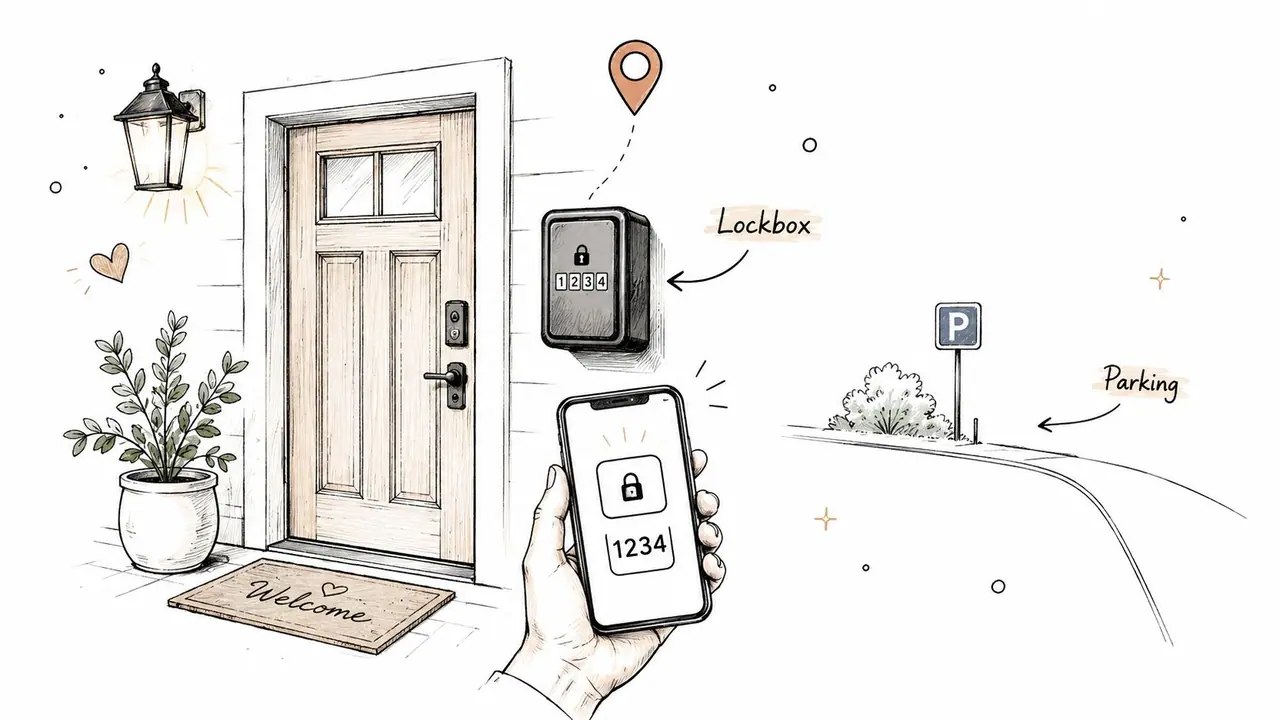
Hi Mark, here are your arrival details for tonight.
- Access code: 5847#
- Lockbox location: Right side of the front door, about 3 feet up
- Parking: Driveway or street parking in front of the house
- Backup contact: Call or text me at 555-0123 if anything feels off
If you arrive after dark, the porch light will already be on. The lockbox is the small black box beside the door, and the code opens it on the first try when entered slowly.
A clean access message reduces the two problems that create the most arrival stress, uncertainty and delay. That is why hosts often reserve the detailed logistics for the pre-arrival note sent about 3 days before arrival, while the actual check-in-day version stays narrow and practical BoringHost. A separate, security-minded check-in message also helps when you need to send Wi-Fi or parking details in a different note for privacy and clarity.
Keep your access note separate from your welcome note. Guests use them for different reasons, and separating them makes both easier to find.
For hosts who want fewer text-heavy directions, a QR-linked guide can do the heavy lifting. ScanStay's QR code guest check-in guide shows how to replace long step-by-step instructions with a visual, mobile-first experience that can include exact lockbox placement, map pins, and property photos. That is especially useful when buildings have multiple entrances, gated parking, or landmarks guests can miss in the dark.
The best access message is not the longest one. It is the one a tired guest can follow without asking you a second question.
Here's the catch. If your instructions are vague, guests will fill in the gaps themselves, and that is when they park in the wrong spot or stand at the wrong door. If your instructions are clear, concise, and visually supported, arrival feels smooth instead of improvised.
4. Wi-Fi & Technology Setup Instructions Message
Guests usually do not remember Wi-Fi details from the listing page. They remember them when they arrive, set down their bags, and want to get online right away. A separate tech message gives them one place to look, keeps the arrival flow tidy, and reduces the back-and-forth that comes from buried instructions.
Hi Josh, here's the Wi-Fi and tech setup for the house.
- Network: CoastalLiving5G
- Password: BeachHouse2024!
- Smart TV: Netflix, Hulu, and Disney+ are already loaded
- Quick fix: If the Wi-Fi drops, unplug the router for 30 seconds, then reconnect
If the connection still looks weak after that, message me and I'll help. For anything more technical, I can walk you through it.
A good tech message protects privacy and keeps troubleshooting simple. Personal passwords should stay out of guest-facing notes, and the Wi-Fi details should not sit in the same message as the access code. When a guest only needs the network name, a separate note saves time and makes the information easier to find.
The strongest version stays short on purpose. Restart the router, forget the network and reconnect, or check that the TV is on the right input. Anything beyond that belongs in a support reply, not in the pre-arrival note.
Hosts who want guests to stay connected while traveling can also point them to stay connected while traveling for a broader look at travel Wi-Fi habits and setup tips. That kind of supporting resource works well when you want the message to solve the immediate issue without turning it into a long troubleshooting guide.
A digital welcome book can carry this information better than a text thread. It gives you a clean place for network details, device instructions, and short fixes, and it keeps the guest from hunting through multiple messages when the connection blips.
4. Wi-Fi & Technology Setup Instructions Message
Guests rarely remember Wi-Fi details from the listing page. They remember them when they arrive, drop their bags, and want to connect immediately. That is why the tech message should be separate, clear, and written for fast use.
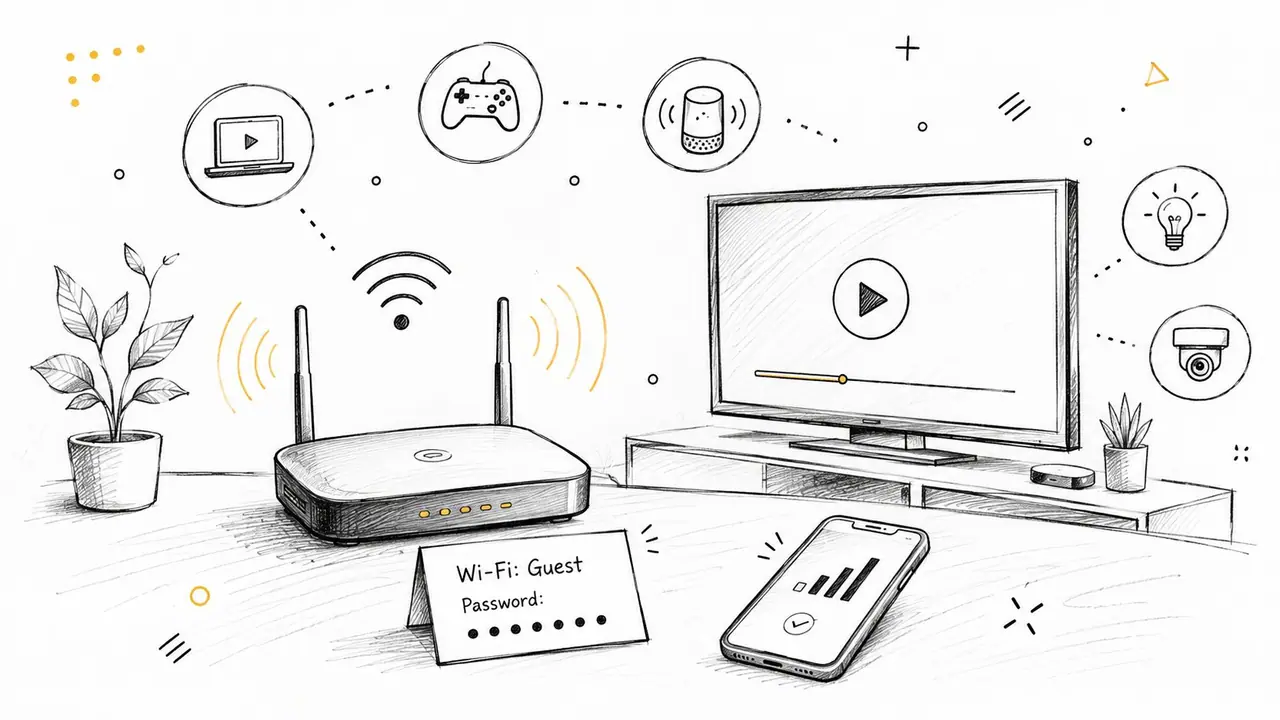
Hi Josh, here's the Wi-Fi and tech setup for the house.
- Network: CoastalLiving5G
- Password: BeachHouse2024!
- Smart TV: Netflix, Hulu, and Disney+ are already loaded
- Quick fix: If the Wi-Fi drops, unplug the router for 30 seconds, then reconnect
If the connection still looks weak after that, message me and I'll help. For anything more technical, I can walk you through it.
The strongest practice here is security. Do not use personal passwords, and do not bury the Wi-Fi details in the same note as your access code. A separate message is cleaner operationally and safer from a privacy standpoint. It also makes troubleshooting easier because guests know exactly where to look when they just want the network name.
A good tech message only needs one or two fixes. Restart the router. Forget the network and reconnect. Check whether the TV is on the right input. Anything beyond that usually belongs in a support reply, not a pre-arrival message. That keeps the note short enough to be read, which is the whole point of a pre booking message Airbnb example in the first place.
Put the password somewhere secure and reusable, not in a thread you have to search later.
For hosts who manage multiple units, storing credentials inside a digital welcome book is cleaner than scattering them across messages. ScanStay's setup supports a password-protected format, which is useful when you want guests to access the details from one mobile link instead of scrolling through old texts or email threads. That also makes seasonal password changes easier to manage, especially if you update them between stays.
The trade-off is between convenience and exposure. Text messages are quick, but they are not built for long-term organization. A digital guest guide gives you a more controlled place to keep tech details current without making every booking thread messy.
5. Local Recommendations & Area Guide Message
Guests love local recommendations, but only if the list feels curated. A message with ten random places reads like a travel dump. A tight list of a few real favorites feels useful, personal, and easy to act on.
Hi Elena, here are a few local spots I think you'll enjoy.
- Giuseppe's Pizzeria is a 2-minute walk, and it opens at 5 PM
- The farmers market runs on Saturdays and is great for fresh produce
- The downtown waterfront has strong sunset views
- Main Street bike shop rents bikes if you want to explore without driving
If you tell me what kind of trip this is, I can send a few more ideas that fit your plans.
That kind of list works because it is specific enough to be helpful without becoming overwhelming. The best version includes distance, cuisine, hours, and a short reason to go. Guests are much more likely to use recommendations when they can tell at a glance whether something fits a date night, family outing, or quick lunch.
This is also where the host's local knowledge becomes part of the experience. The more you can personalize by season or guest type, the more useful the note becomes. A couple on a weekend trip does not need the same suggestions as a family with kids or a business traveler passing through for one night.
ScanStay's approach is practical here because it lets you pin recommendations to Google Maps inside the digital welcome book. That gives guests one-tap directions instead of a text list they have to copy into another app. It also reduces the odds that a strong recommendation gets buried in a long message thread.
Here's the trade-off. Guests appreciate local insight, but they do not want a full travel essay. Keep the list tight, update it when businesses change, and save the deep dive for the guide itself. The message should point them toward the best options, not become a substitute for a city blog.
6. Checkout & Departure Instructions Message
Checkout messages do quiet work. They help guests leave on time, protect your cleaning schedule, and cut down on the back-and-forth that happens when people aren't sure what “tidy” means. The best version is brief, specific, and sent before the departure morning so the guest can plan around it.
Hi Priya, checkout is tomorrow at 11 AM.
- Please return the keys to the lockbox
- Empty trash into the bin outside
- Leave dishes in the dishwasher
- Check cabinets and closets for personal items before leaving
The place does not need to be spotless. Just leave it in a tidy condition, and we'll handle the rest. If you need a lost-and-found follow-up after departure, reply to this thread and I'll help.
That mix of clarity and reassurance matters. Guests respond better when they know what needs doing and what the cleaning team handles afterward. A separate checkout reminder also fits the broader message sequence that experienced hosts now use across the stay, rather than improvising instructions at the last minute Hostrexa.
A good checkout note should also make your timing clear. Send it on arrival day or the day before departure, not on the morning of checkout when guests are already rushing. If you have a late checkout policy or fee, state it directly and matter-of-factly so there is no confusion later.
Guests do not mind rules as much as they mind uncertainty. Tell them exactly what happens next, and most of the stress disappears.
For hosts who want fewer missed items and fewer cleaning issues, a checklist-style guide with photos works well inside a digital welcome book. ScanStay can hold those departure steps alongside visual prompts for trash placement, lockbox return, and final walkthroughs, which makes the process easier for guests who skim instead of read line by line.
The practical choice here is simple. A checkout message should feel like a helpful handoff, not a final inspection notice. When the tone is calm and the steps are clear, guests leave more smoothly and your turnover gets cleaner.
7. Upsell & Additional Services Offering Message
A strong upsell message feels like convenience, not pressure. The guest should read it and think, “That would help,” not “I'm being sold to.” Keep the offer narrow, relevant, and easy to accept.
Hi Daniel, if you'd like a little more flexibility, I can help with a few extras.
- Late checkout: Available until 5 PM for $35
- Airport transfer: $50 one-way
- Beach gear rental: Umbrella, chairs, and cooler available
If you want any of those, just reply before arrival and I'll confirm the details.
This works because it gives guests practical options tied to their trip. Late checkout helps with flights. Airport transfer helps with arrival logistics. Beach gear helps with the actual stay. The offer feels useful when it solves a problem the guest already has, and not every property should offer the same add-ons.
There is also a business case for offering extras proactively. The research brief notes that hosts increasingly ask how to qualify guests politely while keeping conversion healthy, and the broader message gap is strategy, not wording EatSleepWander. In practice, that means you should keep the upsell short, offer only a few choices, and let the guest decide without pressure.
The best upsell messages are simple to answer. One reply should be enough to confirm the service. If you need a long back-and-forth to arrange an add-on, the friction is too high. That is where one-tap booking or payment links can help, especially when a digital welcome book already holds the main stay information.
For hosts using ScanStay, the cleanest version is a service section inside the guest guide with direct booking or payment paths for late checkout, transfers, or equipment rental. That keeps the offer visible without adding clutter to the message thread, and it makes the guest's yes response easier to act on.
The trade-off is balance. Ask too little and you leave useful revenue on the table. Ask too often and the stay starts to feel commercial. A short, well-timed offer keeps the relationship professional and the guest experience intact.
7-Point Comparison of Pre-Booking Airbnb Messages
| Message Type | 🔄 Implementation Complexity | ⚡ Resource Requirements | ⭐ Expected Effectiveness | 📊 Key Outcomes | 💡 Ideal Use Cases / Tips |
|---|---|---|---|---|---|
| Welcome & Property Overview Message | Medium, craft toneful, concise intro | Medium, copywriting, photos or links | ⭐⭐⭐⭐, high for first impressions | Fewer pre-arrival questions; higher perceived value | 💡 Personalize with guest name; highlight 2–3 amenities; keep 2–3 paragraphs |
| Check-In Instructions & Access Details Message | Medium–High, must be precise and unambiguous | Medium, exact codes, photos, map pins, backup contact | ⭐⭐⭐⭐⭐, critical for successful arrival | Fewer lockout incidents; reduced support calls; on-time check-ins | 💡 Send 24 hrs prior; use bullets, photos or map pin; include backup contact |
| House Rules & Quiet Hours Policy Message | Medium, clear, balanced wording needed | Low–Medium, concise copy, optional translations | ⭐⭐⭐⭐, strong for preventing disputes | Fewer rule violations; documented expectations; better neighbor relations | 💡 Prioritize top 3–5 rules; use friendly tone and explain “why”; link to full policy |
| Wi‑Fi & Technology Setup Instructions Message | Medium, technical clarity and security focus | Medium, credentials, device guides, secure storage | ⭐⭐⭐⭐, important for guest satisfaction | Faster connectivity, fewer tech support requests | 💡 Use property‑specific passwords; send separately from codes; include simple troubleshooting |
| Local Recommendations & Area Guide Message | High, curation and frequent updates required | Medium–High, curated list, maps, photos, periodic maintenance | ⭐⭐⭐⭐, enhances guest experience and reviews | Increased guest satisfaction and local engagement; fewer “what to do” queries | 💡 Offer 5–7 hand‑picked spots with distances; update quarterly; include map links |
| Checkout & Departure Instructions Message | Medium, timing and checklist clarity | Low, checklist, photos or short videos improve compliance | ⭐⭐⭐⭐, effective for turnovers and scheduling | Fewer late checkouts and cleaning issues; smoother turnovers | 💡 Send day‑of or day‑before; include exact times, grace policy, and a checklist |
| Upsell & Additional Services Offering Message | Medium–High, pricing, booking flow, vendor coordination | Medium–High, payment links, vendor partnerships, booking UI | ⭐⭐⭐, strong revenue potential if implemented well | Increased per‑booking revenue; added guest convenience | 💡 Offer 2–4 clear options, state prices, enable one‑tap booking; partner with reliable vendors |
Automate Your Messaging, Reclaim Your Time
The strongest pre booking message Airbnb example is not the longest one. It is the one that gets the right information to the guest at the right moment, then gets out of the way. Once you separate the guest journey into a few repeatable stages, the whole process becomes easier to manage, and your replies stop feeling like last-minute improvisation.
That is where automation starts to pay off. The practical host workflow is to automate the messages that are mostly logistical, then keep a human touch where the guest's specific situation matters. The briefing data points to a five-message sequence across the journey, and it also makes clear that the pre-booking note should stay short because its job is to convert an inquiry, not deliver the whole stay guide Hostrexa. When you respect that distinction, your messaging sounds more intentional and less repetitive.
A digital welcome book makes the system easier to run. Instead of copying the same Wi-Fi details, rules, local tips, and checkout steps into every thread, you centralize them in one place and link guests to it by QR code. ScanStay is built around that model, with branded guest guides, map pins, multilingual support, and one-tap service options, so the message thread stays short while the guest still has full access to what they need.
If you're still sending every note manually, start with the messages that cause the most repetition. Move access details, rules, Wi-Fi, recommendations, and checkout steps into a reusable guest guide, then let your booking messages point there. That way, you spend less time retyping, guests get better clarity, and your communication feels like a system instead of a scramble.
For hosts managing one property or a growing portfolio, the next step is to make guest information easy to update and easy to reuse. If you want a cleaner way to handle that, visit ScanStay and see how a digital welcome book can support your Airbnb guest communication without adding more work to your day.