Host Technology Troubleshooting: A Practical Guide
Master short-term rental technology troubleshooting. This guide helps hosts fix Wi-Fi, smart locks, and more to cut support messages and boost guest reviews.
It's late. A guest has just checked in. Your phone lights up with a message that lands like a dropped plate: the Wi-Fi isn't working, the smart lock won't open, the TV only shows a blank input screen, or the QR code for house info won't scan.
Here, hosting stops feeling like hospitality and starts feeling like remote operations.
Technology troubleshooting in a short-term rental is different from office IT support. You're not helping a trained employee sitting at a company desk. You're helping a tired guest, often carrying bags, traveling with kids, standing in the dark, or trying to unwind after a long day. They don't want a technical explanation. They want the rental to work.
The good news is that most rental tech issues are predictable. They follow patterns. Once you build a repeatable response, you stop improvising every support message and start handling problems with far less stress.
Table of Contents
- The Inevitable Late-Night Tech Support Message
- Your First Response A 5-Minute Triage Protocol
- Solving the Top 6 Rental Tech Headaches
- Quick Scripts That Save Reviews
- Proactive Tech Management to Prevent Problems
- Conclusion From Firefighter to System Builder
The Inevitable Late-Night Tech Support Message
Most hosts know the exact kind of message. It usually arrives at the worst time and with the least detail.
“The code isn't working.”
“TV broken.”
“No internet.”
By the time you see it, the guest is already frustrated. They've likely tried something twice, failed twice, and now they're wondering whether the rest of the stay will feel the same way. In that moment, the issue isn't just the device. It's confidence. If guests can't enter the property or connect to the internet, they start questioning everything else.
That reaction is reasonable. A short-term rental has a compact but fragile tech stack. Internet service, router, modem, mesh points, smart lock, lock batteries, thermostat schedules, streaming apps, QR guides, doorbell cameras, upsell links, and booking-platform messages all have to work together. One weak link creates noise for both the guest and the host.
A guest rarely separates “small tech issue” from “bad arrival experience.” They remember the feeling first.
I've found that the hosts who struggle most with technology troubleshooting aren't always the least technical. They're often the ones who answer every issue from scratch. They treat each message like a one-off emergency instead of a recurring operational event.
That's what turns a manageable problem into a draining one.
A better approach is to treat guest tech support like a playbook. You need a fast first response, a way to identify whether the problem is equipment failure or user confusion, and a clean path to the fix. You also need fewer incoming messages in the first place. In rental operations, prevention matters as much as troubleshooting.
Here's the uncomfortable truth. If a guest loses access to a key amenity, they remember it even when you recover well. A 2026 guest satisfaction study found that a non-functional amenity, especially Wi-Fi or property access, is mentioned in over 60% of negative reviews, even if the issue is resolved quickly, according to this guest satisfaction technology study.
That's why speed matters. Clarity matters more. Guests can forgive a glitch. They don't forgive confusion, silence, or a host who sounds like they're guessing.
Your First Response A 5-Minute Triage Protocol
The first five minutes set the tone for the entire interaction. If your reply is calm and structured, guests usually calm down too. If your reply is vague, delayed, or overly technical, the conversation gets longer fast.
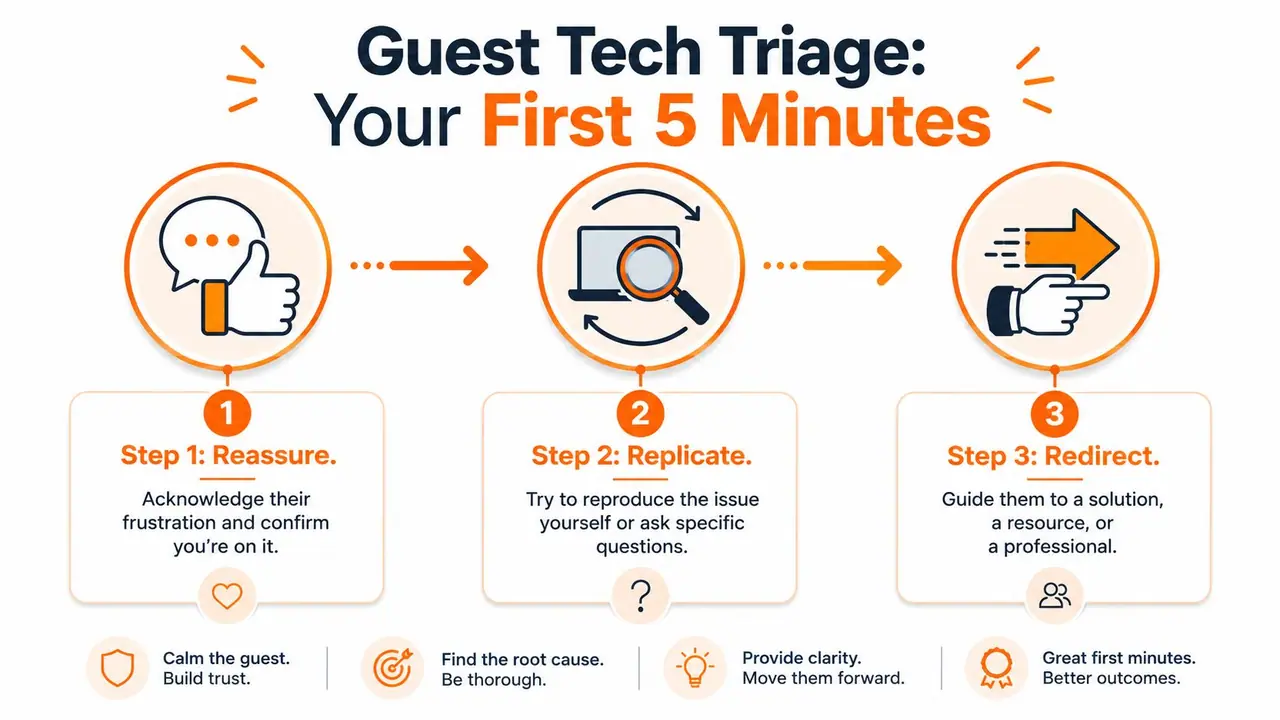
I use a simple rule for incoming tech issues: Reassure, Replicate, Redirect.
Reassure first
Your first message should do two things. Acknowledge the frustration and show that you're already moving toward a fix.
Don't open with troubleshooting questions only. That can feel clinical when a guest is locked out or trying to get kids connected to Netflix. Start with a brief acknowledgment, then set a next step.
A strong first response usually sounds like this:
- Acknowledge the disruption: “I'm sorry about that. I know that's frustrating after check-in.”
- Take ownership: “I'm checking this now.”
- Set a simple expectation: “I'm going to ask two quick questions so I can get you the fastest fix.”
That sequence matters because it lowers tension before you ask the guest to do anything. It also makes you sound organized, which is what people want during a hiccup.
Replicate before you prescribe
Most hosts waste time by prescribing a fix before they know what failed. “Try restarting it” is sometimes right, but it's also the fastest way to send a guest in circles.
Instead, narrow the issue.
For almost every problem, ask one diagnostic question that reveals whether the issue is broad, local, or user-specific. Here's a quick reference:
| Problem type | Best first question | What it tells you |
|---|---|---|
| Wi-Fi | “Do all devices fail, or just one phone/laptop?” | Whether it's network-wide or device-specific |
| Smart lock | “Do you see a red light, a low battery warning, or no response at all?” | Whether it's power, code, or hardware |
| TV | “What exactly is on screen right now?” | Whether it's input, app logout, or remote confusion |
| Thermostat | “Is it not turning on, or is it changing back by itself?” | Whether it's power or scheduling |
| QR guide | “Does the code not scan, or does the page open incorrectly?” | Whether it's camera, lighting, or link issue |
Remote tools help here. Router apps, lock dashboards, and device notifications can confirm a lot without making the guest your technician. But even with good tools, your questions should stay simple. Guests don't know the difference between a modem and a router, and they shouldn't have to.
Practical rule: Diagnose the category first. Only then give instructions.
Redirect to the shortest path
Once you know what's wrong, send the guest to the shortest reliable solution. Sometimes that's a one-line instruction. Sometimes it's a short video, a photo, or a specific how-to page in your digital guest materials.
The mistake most hosts make is overexplaining. Guests don't need a paragraph. They need the next tap, next button, or next physical action.
A clean redirect looks like this:
- State the action clearly: “Please press the Input button once.”
- Name the expected result: “You should then see HDMI 1.”
- Offer a fallback: “If that doesn't appear, send me a photo of the screen.”
If you already keep organized guest instructions, point them to the exact item, not the general guide. “Open the house guide and tap TV” works better than “Check the welcome info.”
Good technology troubleshooting is mostly decision control. You're reducing guesswork, keeping the guest out of a dead end, and limiting how many messages this issue needs to generate.
Solving the Top 6 Rental Tech Headaches
This is the part most hosts end up needing on a Saturday evening. Not theory. Just the likely cause, the fastest question, and the fix that works in a rental.
Wi-Fi and connectivity
The guest says the Wi-Fi is down. Sometimes it is. Often, only one device is failing, the guest joined the wrong network band, or the router came back after a brief outage but one mesh node did not.
Start with one question: “Is this happening on every device, or only one?”
If every device fails, check your ISP status, modem, router app, and power state first. If only one device fails, have the guest forget the network and reconnect. If the issue started after arrival, confirm they're using the exact network name and password shown on site, not a saved version from a prior stay.
The quickest field fixes are usually these:
- Power path check: Confirm the modem and router both have lights and haven't been unplugged by accident.
- Placement problem: If the signal is weak only in one room, the mesh node may be offline or obstructed.
- Captive confusion: Some guests switch between cellular and Wi-Fi and assume the login failed when the phone dropped back to mobile data.
When the issue appears to be equipment failure, have a local escalation path ready. For hardware swaps, damaged lines, or recurring connectivity faults, it helps to know where to find local telecom repair solutions instead of scrambling after the third complaint.
Smart locks
Smart locks create the most panic because they affect entry. The guest is standing outside. There's no patience for experimentation.
Ask this first: “What happens when you enter the code?”
That answer usually sorts the problem into one of four buckets:
- No response at all: likely battery or device power issue
- Beep or red flash: likely wrong code, expired code, or mistimed entry
- Lock turns but door won't open: mechanical alignment issue
- App works for you remotely but keypad doesn't: keypad or sync issue
The fastest fixes are operational, not technical. Confirm the valid code, confirm the check-in window, and ask the guest to press the keypad firmly and slowly. If the door is sticking, have them pull or push lightly on the handle while entering the code.
Battery management matters more than hosts think. Low batteries often give warning signs before failure, but only if someone is checking the dashboard between stays. If you're still choosing hardware or replacing unreliable units, this guide to the best smart lock for Airbnb is useful for comparing host-friendly options.
Smart thermostats
Thermostat complaints usually aren't true malfunctions. The common issue is schedule override. The guest changes the temperature manually, then the programmed schedule resets it later and they think the unit ignored them.
The best first question is: “Is it not responding, or is it changing back after a while?”
If it changes back, review the schedule in your thermostat app. If the thermostat is locked to a host range, make sure your allowed range is clearly shown in guest instructions so they don't keep trying settings the system won't hold.
Use this quick approach:
| Symptom | Likely cause | Fastest fix |
|---|---|---|
| Temperature changes back later | Schedule override | Adjust or pause schedule |
| Blank screen | Power or battery issue | Check HVAC power and unit status |
| “Cooling” shown but room stays warm | Delay cycle or HVAC issue | Wait briefly, then escalate if unchanged |
| Guest can't lower or raise enough | Host limits | Explain allowed range clearly |
Don't debate comfort settings by message. Confirm what the unit is doing and whether the behavior is expected.
TVs and streaming apps
TV issues feel trivial to hosts and disproportionately annoying to guests. They usually happen because the TV is on the wrong input, the soundbar changed the remote flow, or a streaming app has logged out.
Ask for a photo of the screen. That single step saves a lot of time.
Then work through the common stack:
- If the screen says “No Signal” the input is wrong.
- If the app home screen appears but nothing plays the app may be logged out or frozen.
- If the sound works but the picture doesn't the external device may be asleep or disconnected.
- If nothing responds the guest may be using the wrong remote.
If a guest says “the TV is broken,” they usually mean the setup is confusing, not that the television has failed.
Keep your instructions visual. A labeled photo of each remote beats a page of text every time. If your setup includes Roku, Apple TV, Fire TV, Chromecast, or a hotel-style universal remote, document the exact order of operations guests should use. Mixed-device TV setups create support tickets because they ask people to understand your entertainment system in a vacation context. That's rarely realistic.
Digital welcome book access
A digital guide reduces support volume only if guests can access it instantly. When they can't, the fallback matters as much as the main method.
Ask: “Does the QR code fail to scan, or does it scan but not open the right page?”
If the code won't scan, the usual reasons are glare, poor lighting, dirty print, or a guest camera issue. If it scans but loads the wrong place, the underlying link may be outdated or duplicated from another property.
Use a backup structure:
- Print the short URL below the QR code: Never rely on scan-only access.
- Send the guide in the booking message thread: The physical poster should not be the only access point.
- Keep property-specific links named clearly: Mislinked guides create the most avoidable confusion.
The host mistake here is assuming “digital” means self-explanatory. It doesn't. Guests still need a visible entry point, a backup link, and short labels like Wi-Fi, Entry, TV, Checkout, and House Rules.
Payment and upsell link failures
Late checkout, airport transfer, gear rental, and other add-ons only work when the payment path is friction-free. If the link fails, the guest doesn't always report it. They often abandon it.
Start by asking: “Does the page not open, or does it open but fail at checkout?”
That tells you whether you're dealing with a broken link, a mobile browser issue, or a payment processor problem. The first fix is to test the exact guest-facing link yourself from a phone, not just from your desktop.
Check these areas in order:
- Link destination: Confirm it routes to the right service.
- Mobile behavior: Some pages look fine on desktop and fail on phones.
- Guest identity confusion: If the guest needs to re-enter details they think you already know, they may stop.
- Fallback option: If the payment page is temporarily broken, you need a backup workflow ready.
This category matters because it affects both convenience and revenue. A working upsell flow feels polished. A broken one feels careless.
Quick Scripts That Save Reviews
When tech breaks, guests judge your words before they judge the outcome. A solid fix delivered badly can still leave a sour impression. A short delay handled well can still preserve trust.
Why phrasing matters
Guests don't want blame. They want confidence.
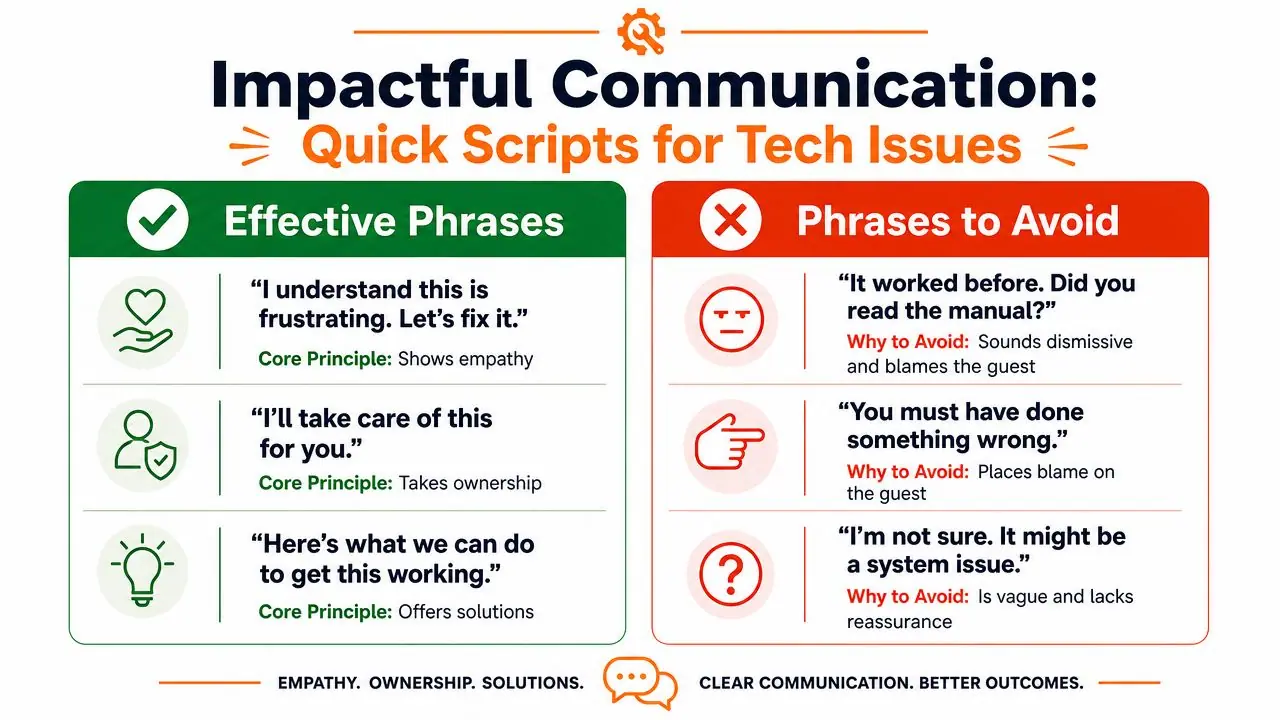
That's why certain phrases make things worse even when they're technically true. “It was working earlier” sounds defensive. “Can you reboot everything?” sounds like you're outsourcing the problem to them. “I'm not sure” might be honest, but it doesn't help a guest standing outside with luggage.
Use language that does three things:
- Shows empathy without over-apologizing
- Keeps ownership with the host
- Gives one clear next action
If you want to reduce repetitive support writing, it helps to build these into your saved replies. This approach pairs well with message workflows like the ones discussed in this guide on how to automate Airbnb messages.
Copy and paste scripts
Use these as starting points, then tailor them to your property.
“I understand this is frustrating. I'm checking it now, and I'll stay with you until we get it working.”
That opening works because it acknowledges the problem without dramatizing it.
For Wi-Fi issues:
- Initial reply: “Sorry about that. Can you tell me whether all devices are affected, or only one? That will help me get you the fastest fix.”
- Step instruction: “Please turn Wi-Fi off on your phone, wait a moment, then reconnect to the network listed in the house info.”
- Follow-up after fix: “Thanks for checking that. I'm glad it's back up. If it drops again, message me right away and I'll take the next step.”
For smart lock problems:
- Initial reply: “I'm sorry you're dealing with this at the door. Please tell me what happens when you enter the code. Red light, beep, or no response?”
- Guided action: “Please press the code slowly, then the confirm button. If the handle feels tight, pull the door toward you slightly while entering it.”
- Escalation message: “If that still doesn't work, I'm moving to the backup entry option now.”
For TV issues:
- Clarifying message: “Could you do me a favour and send a photo of what's on the screen right now? That will tell me whether it's the input or the streaming app.”
- Step-by-step reply: “Please press Input once. Select HDMI 1. You should then see the streaming home screen.”
- Resolution close: “Thanks for your patience. The TV should be set now. If another prompt appears, send me a quick photo and I'll sort it.”
A few phrases to avoid:
| Avoid | Use instead |
|---|---|
| “It worked before.” | “Thanks for flagging it. I'm checking the setup now.” |
| “Did you read the instructions?” | “Please open the guide and tap the section labeled TV.” |
| “I think this should work.” | “Please try this exact step next.” |
The best scripts are calm, brief, and specific. They don't sound robotic. They sound practiced.
Proactive Tech Management to Prevent Problems
Reactive support feels like work because it is work. Preventive systems feel boring, which is why they get skipped. But boring systems are what protect evenings, reviews, and staff time.
The strongest host operations I've seen don't rely on “better troubleshooting.” They reduce the need for troubleshooting at all.
Run a pre-check-in tech audit
Between stays, someone should test the guest-facing tech stack exactly the way a guest will use it. Not from a dashboard only. On site, by hand, in sequence.
That audit should include:
- Entry check: Test the active code on the smart lock and confirm the physical door closes and opens cleanly.
- Internet check: Join the guest Wi-Fi from a phone and confirm it connects without extra friction.
- TV check: Power on the TV, confirm the right input loads, and make sure the main streaming path is still signed in if that's part of your setup.
- Climate check: Verify the thermostat responds and that any programmed schedule still matches your current hosting rules.
- Guide access: Scan the QR code poster with a phone camera in normal room lighting and verify the backup short link works too.
- Upsell flow: Open your guest-facing add-on links on mobile and confirm the page loads properly.
This doesn't need to be complicated. It needs to be repeatable.
Hosts get into trouble when they test systems as operators, not as guests.
If you manage multiple devices across several properties, lifecycle discipline matters. Old tablets, spare routers, retired streaming sticks, and replaced lock hardware tend to pile up and create confusion. For teams formalizing how equipment is purchased, tracked, replaced, and retired, this overview of IT asset procurement to disposal is a helpful operational reference.
Build self-serve help into the stay
Guests will self-serve if the answer is easier to find than it is to message you.
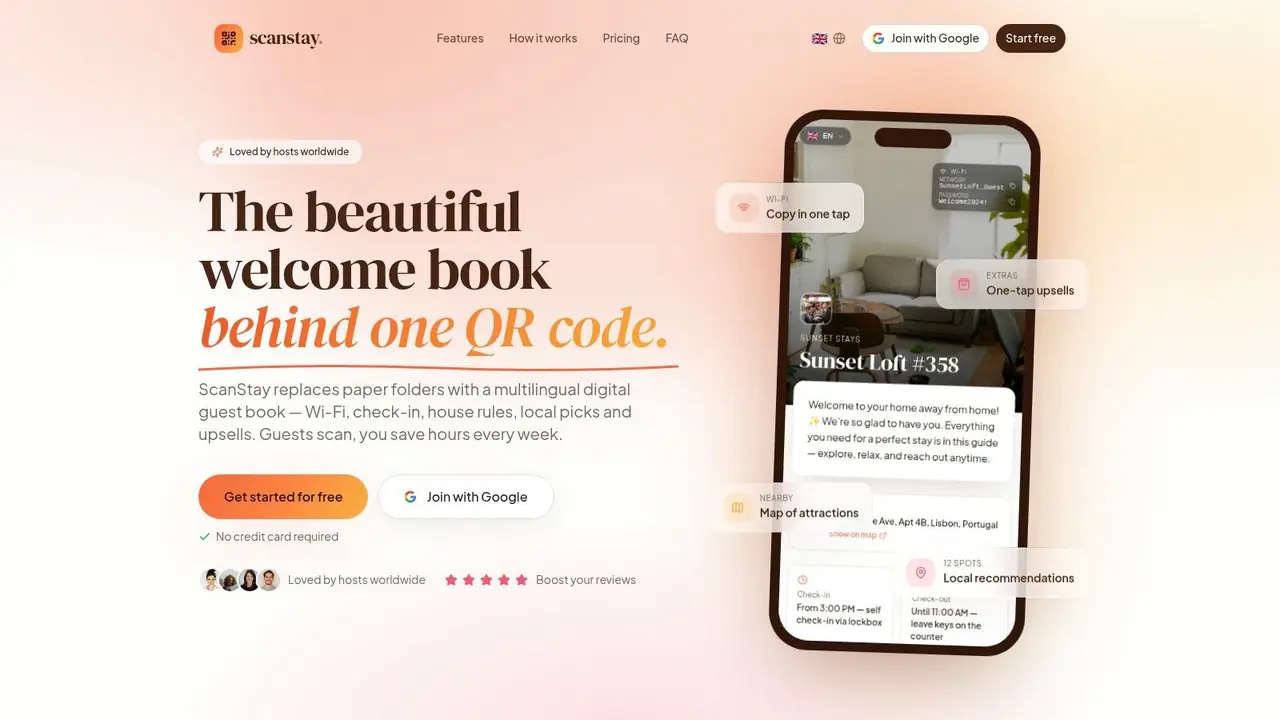
That means your house information can't just be a digital version of a binder. It needs to work like a support tool. Short labels. Clean navigation. Mobile-first formatting. Brief video clips where text usually fails.
The most useful self-serve items are usually:
- How to open the door
- How to adjust the thermostat
- How to use the TV and remotes
- How to connect to Wi-Fi
- How to request add-ons
- What to do if something stops working
Video beats text for anything involving buttons, remotes, lock timing, or appliance sequences. A simple phone recording with clear audio is often enough. Guests don't need polished production. They need to see which remote you mean and which button to press.
If you're managing at portfolio level, it also helps to standardize this process across units. The fewer unique setups you maintain, the fewer unique support problems you create. Teams thinking in those terms will find useful operational ideas in this guide to vacation property management.
Prevention is where technology troubleshooting starts paying off. You stop acting like the person who rescues every issue. You start building a stay that answers common questions before they become interruptions.
Conclusion From Firefighter to System Builder
Most hosting stress around tech doesn't come from one broken router or one lock battery. It comes from repetition. The same questions. The same late-night messages. The same feeling that every glitch pulls you back into the job when you should be off.
The fix isn't becoming an IT expert. It's building a better operating system for the property.
A strong response protocol helps you stay calm when a guest reports a problem. A short list of likely causes lets you troubleshoot faster. Better scripts keep the conversation professional and steady. Preventive checks remove avoidable failures before arrival.
That shift changes your role. You're no longer reacting like a firefighter every time a device misbehaves. You're building a property that's easier to use, easier to support, and harder to break from the guest's point of view.
That has a real operational payoff. Fewer interruptions. Smoother arrivals. Better odds that guests remember the stay for the right reasons. It also protects the moments that matter commercially, like making sure guest-facing add-on links function when someone wants late checkout or another paid extra.
Technology troubleshooting will always be part of short-term rentals. The goal isn't zero problems. The goal is fewer surprises, faster fixes, and a guest experience that still feels polished when something goes wrong.
If you want to cut repetitive guest questions and give people one mobile-friendly place for Wi-Fi details, check-in info, house rules, how-to videos, and upsells, ScanStay is built for exactly that. It replaces scattered messages and paper binders with a simple QR-based digital welcome book that helps guests self-serve and helps hosts get their evenings back.