Guest WiFi Setup for Short-Term Rentals
Master guest wifi setup for your short-term rental. Learn secure network architecture, QR code delivery, bandwidth controls, and troubleshooting tips.

You know the moment. A guest drops their bags, looks around the entryway, and asks for the Wi‑Fi password before they've even found the kettle. That question isn't small. It's the first sign they're trying to settle in, check maps, message family, stream something, or get work done, and if the answer is slow or confusing, the rest of the stay starts with friction.
For short-term rentals, guest WiFi setup is no longer a background router task. It's part security, part hospitality, and part operations. Guests actively expect free Wi‑Fi in public venues, and hospitality data shows Wi‑Fi can influence booking decisions, device support burden, and even what guests ask about when they arrive. When the network is easy to find, isolated properly, and delivered clearly, it cuts repetitive messages and makes the property feel more organised.
Table of Contents
- Why Guest WiFi Is Your Most Important Amenity
- Designing a Multi-Network Architecture
- Configuring SSID Names and Password Strategies
- Delivering WiFi Credentials to Guests
- Testing and Troubleshooting Common Issues
- Operational Best Practices for Ongoing Management
Why Guest WiFi Is Your Most Important Amenity
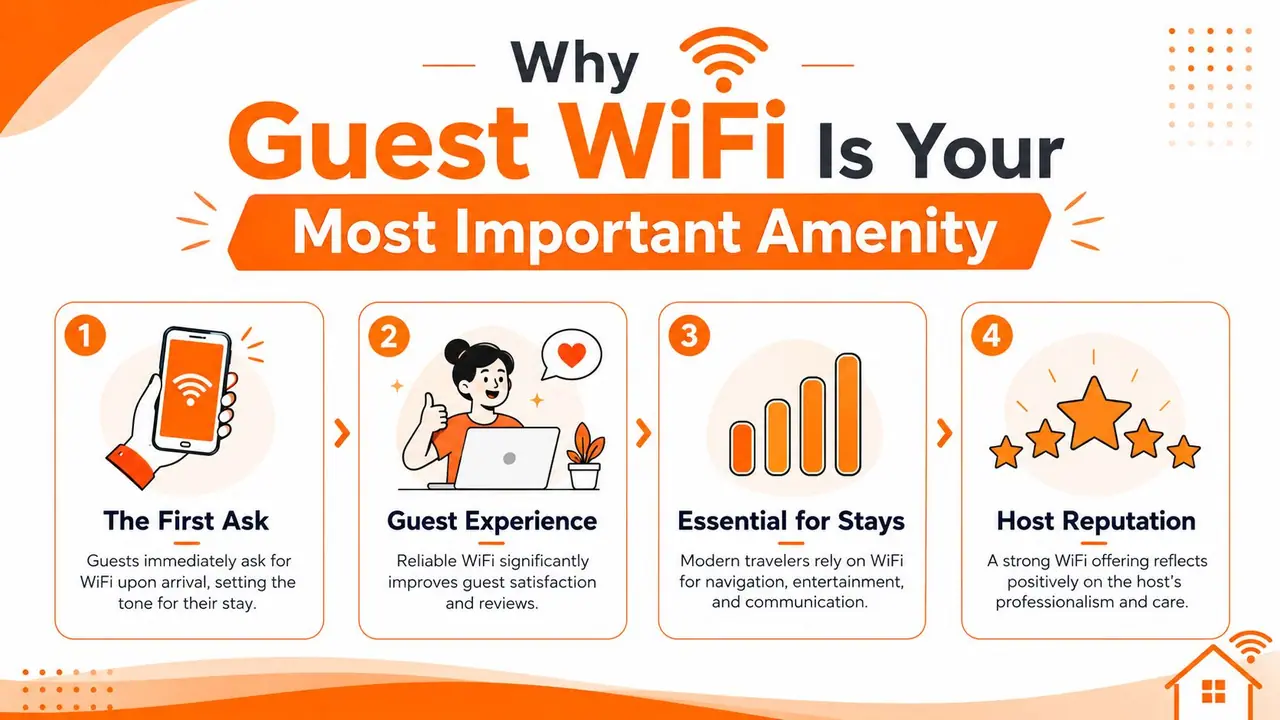
A guest who walks in and asks for the Wi‑Fi password is telling you what matters first. The network is part of the stay, not an extra. In a 2026 industry roundup, 82% of consumers actively look for free Wi‑Fi when visiting a venue, 74% are willing to share an email address for access, and the average guest Wi‑Fi session lasts 42 minutes across venue types, with connected guests spending 60% more on average than non-connected guests (MyWiFi Networks guest Wi‑Fi statistics for 2026).
Why the question arrives so early
Guests usually ask about Wi‑Fi before they ask about the TV, the thermostat, or the coffee. That timing matters because it shows what they need to feel settled. If your password is buried in an inbox thread, handwritten on a fading card, or attached to a PDF no one can find, you've already created a support task before the stay has even started.
Hospitality data backs that up. A hotel internet survey found that more than 90% of hoteliers frequently encounter guests trying to connect more than one device, a figure that had increased by 30% since 2015; the same survey found that more than 90% of guest respondents said hotel Wi‑Fi access is “very important,” while 58% said Wi‑Fi quality is highly likely to influence booking decisions (Hotel Management Network survey summary). For a host, the practical lesson is simple. If the network is hard to find or hard to join, it becomes part of the review.
What happens when the answer is missing
A 2026 analysis of 37,359 real guest conversations across 11,293 properties found that Wi‑Fi was the #1 most-asked guest question and also the #1 question most likely to return “no info in the guidebook,” with 15.2% of all guest questions unanswered when the detail was missing (Hotel Management Network guest conversation analysis). That is the hidden cost of poor guest WiFi setup. One missing credential does not just create one message, it creates the same message every time a new arrival cannot get online quickly.
Practical rule: if Wi‑Fi is the first thing guests ask for, make it the first thing they see.
A clear network name, a simple login flow, and an obvious place to find the credentials all reduce friction. The network is a utility, but it also acts as a high-frequency guest touchpoint that affects satisfaction, review tone, and how much time your team spends answering avoidable questions. For a related look at the guest-experience side of this, this guide to improving guest satisfaction fits neatly with the same approach.
Designing a Multi-Network Architecture
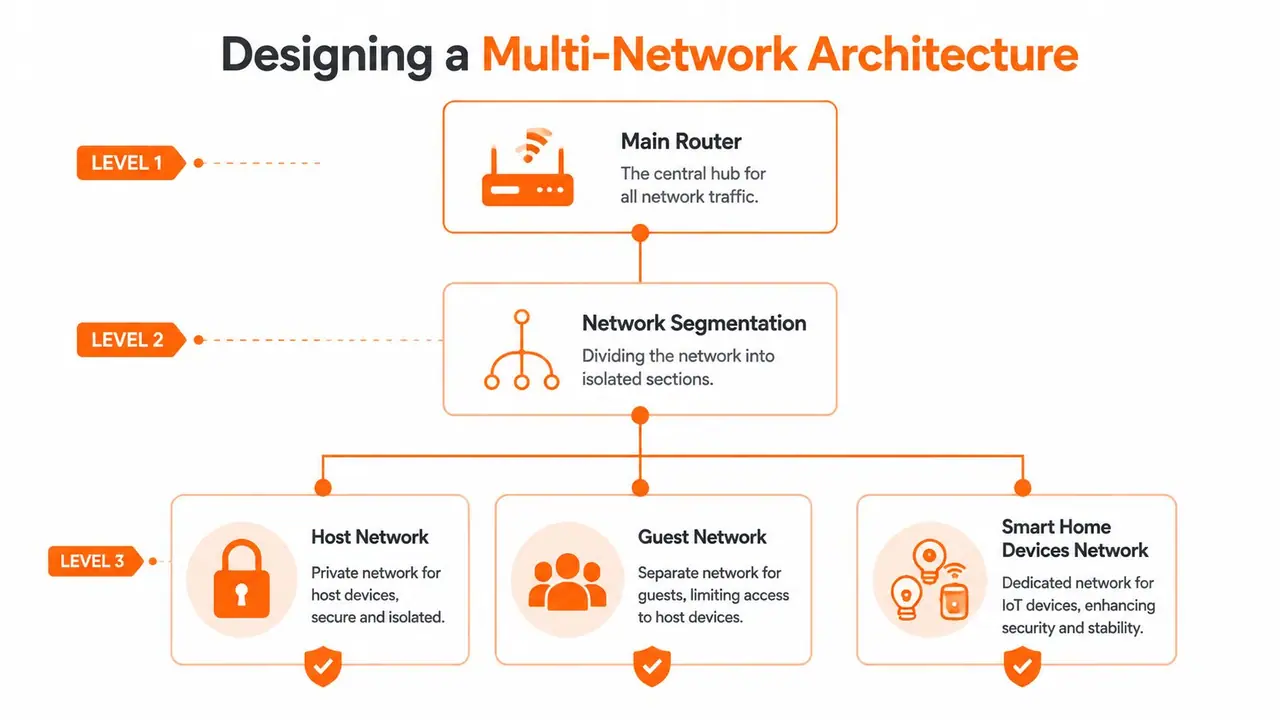
A property with smart locks, security cameras, thermostats, streaming boxes, and staff tablets needs more than a guest password. The primary challenge is keeping guest, IoT, and staff traffic in separate lanes so one device class cannot reach the others. That matters most in rentals that behave like micro-hotels, where one weak device can create noise, slowdowns, or a support call you did not need.
Start with a guest VLAN and a real firewall boundary
A practical guest network uses a dedicated guest VLAN/subnet, client isolation, and firewall rules that block all access to internal subnets while allowing only internet access (Sequentur guest Wi‑Fi setup guide). In a short-term rental, that boundary matters. A separate password alone does not stop a curious guest from seeing devices that belong to staff or building systems.
The setup is straightforward, but each step has a purpose. Create the guest VLAN, map an SSID to it, set firewall rules, turn on client isolation, apply bandwidth limits if your platform supports them, then test the connection with a live device. Sequentur notes that setup typically takes about 2–3 hours plus validation, and that validation should include a live test to confirm the isolation really works (Sequentur guest Wi‑Fi setup guide). That last check is where many hosts find out too late that traffic is still leaking between networks.
Size the network for modern devices, not old assumptions
Phones and tablets do not behave the way they used to. Purple's guest Wi‑Fi architecture guide points out that iOS 14+ and Android 10+ use MAC address randomization, which increases lease churn and makes a /22 subnet with 1,022 usable addresses a reasonable minimum for a 200-room hotel, paired with a 2–4 hour DHCP lease to reduce IP exhaustion risk (Purple secure guest Wi‑Fi architecture). Even a smaller property can feel this pressure if several guests are online at once and each person brings multiple devices.
Purple also recommends WPA3-OWE, or OWE Transition Mode for older devices, plus switch protections such as DHCP Snooping, Dynamic ARP Inspection, and IP Source Guard to reduce guest VLAN abuse and rogue-layer attacks (Purple secure guest Wi‑Fi architecture). That is enterprise language, but the practical point is plain. A guest SSID should be isolated well enough that a bad device cannot interfere with the rest of the property, and a small network should still be designed with that risk in mind.
For a broader segmentation perspective, Finchum Fixes IT networking advice is a useful reminder that VLANs exist to keep traffic classes separate, which is exactly what micro-hotel properties need.
Separate the traffic first. The network becomes easier to manage, guest issues are easier to trace, and staff devices stay out of the wrong subnet.
Properties with mesh systems, satellite broadband, or cloud-managed routers need one more discipline, operational visibility. If the property spans multiple floors or depends on unusual upstream internet, the design has to include coverage checks and remote administration, not just SSID creation. Without that, the setup may look tidy on paper and still fail when guests arrive with three devices each and expect everything to work at once.
Configuring SSID Names and Password Strategies
A lot of guest frustration starts with naming. If the network name is vague, too technical, or too similar to the neighbors', guests second-guess themselves and start messaging. A good SSID name should be easy to recognise, easy to type if needed, and obviously tied to the property without exposing too much internal structure.
Name it for recognition, not cleverness
If you've ever had a guest confuse “Home,” “Home 5G,” and “Home_EXT,” you already know the problem. In a single property, an SSID like PropertyName Guest or Stay at Oak Street Guest is usually clearer than a router default. In a multi-unit portfolio, a naming pattern like BuildingName Guest helps guests identify the right network without reading a manual first.
The advice from understanding Wi‑Fi network names is useful here because it keeps the focus on clarity, not branding tricks. The network name should answer one question immediately, “Is this the guest network for this unit?” If the answer is not obvious, guests will ask.
Pick security that fits your guests
WPA3 is the cleaner choice when your hardware and guest devices support it, but compatibility still matters in rentals with older phones, laptops, or streaming gear. That's why many hosts keep the guest network simple and stable rather than pushing the most aggressive settings available. The goal is not to impress yourself in the router app. The goal is to avoid “connected but no internet” messages at 9 p.m.
Password strategy should follow the same principle. A short, memorable password that's changed periodically is often easier for guests than a complex string nobody can retype correctly from a screenshot. If the property uses a captive portal or QR-based login flow, the password can stay out of the guest's memory entirely, which is even better for turnover.
Match the lease to the turnover pattern
The technical setting people forget most often is DHCP lease time. In high-turnover properties, short lease windows can help prevent address exhaustion, especially when guests reconnect frequently or bring multiple devices. That matters even more on networks where phones randomise their MAC addresses, because each reconnect can look like a new client to the system.
Keep the SSID simple, keep the password readable, and keep the network settings aligned with how guests actually use their devices.
If you manage more than one property, write the chosen SSID pattern and password rule into your runbook. The point is consistency. Guests shouldn't have to guess whether “Guest,” “WiFi,” or “Internet” is the right network at each unit.
Delivering WiFi Credentials to Guests
The best network in the world still fails if guests can't find the details. I've seen properties with solid isolation and reliable coverage create support tickets because the login instructions were buried under checkout reminders. Delivery is part of the setup.
Printed, digital, and QR-based options
Printed cards still work when they're placed where guests look, near the entry, on the kitchen counter, or in the arrival folder. They're simple, durable, and useful for guests who want something tangible. The weakness is obvious. Paper gets misplaced, and handwritten passwords become unreadable fast.
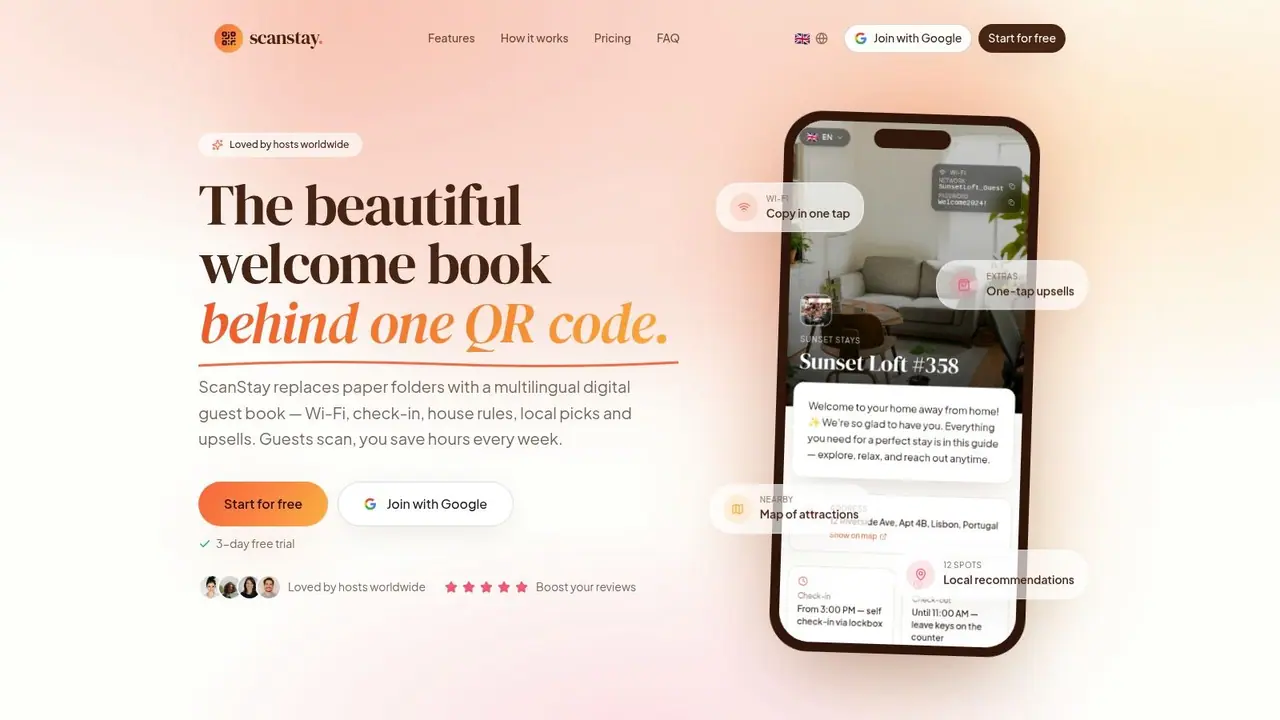
Digital welcome books solve that by putting Wi‑Fi alongside check-in info, house rules, and local tips in one place. That's where tools like ScanStay's QR code Wi‑Fi password flow fit naturally, because guests can scan once and get the details without typing them into a phone keyboard. ScanStay's guest guidebook experience can present SSID, password, security type, or captive portal information for guests, which makes it a practical option when you want the network instructions to live next to the rest of the arrival content.
Match the delivery method to the property
A boutique guesthouse can get away with a simple printed card if the arrival routine is consistent. A multi-unit portfolio usually benefits from a digital format because the credentials, check-in steps, and house rules are easier to reuse across listings. If you manage a place with seasonal turnover or different arrival instructions by unit, a digital format saves repeated edits and keeps the information current.
The old-school approach still has a place as backup. If a phone dies, a guest arrives late, or the Wi‑Fi is down temporarily, a physical copy prevents a small problem from becoming a full check-in failure. But for most properties, the strongest setup is a layered one. Put the credentials in the welcome book, display them on site, and keep a backup card in the unit.
Make the handoff feel deliberate
The delivery method should feel like part of the arrival experience, not a scavenger hunt. Put the network details where the guest first settles in, then make sure the login text is short enough to copy quickly if needed. If you're using a scannable guide, keep the Wi‑Fi information close to check-in instructions so guests don't have to bounce between multiple messages.
Guests don't want another app, another login, or another thread in their inbox. They want the details in one place, immediately.
Testing and Troubleshooting Common Issues
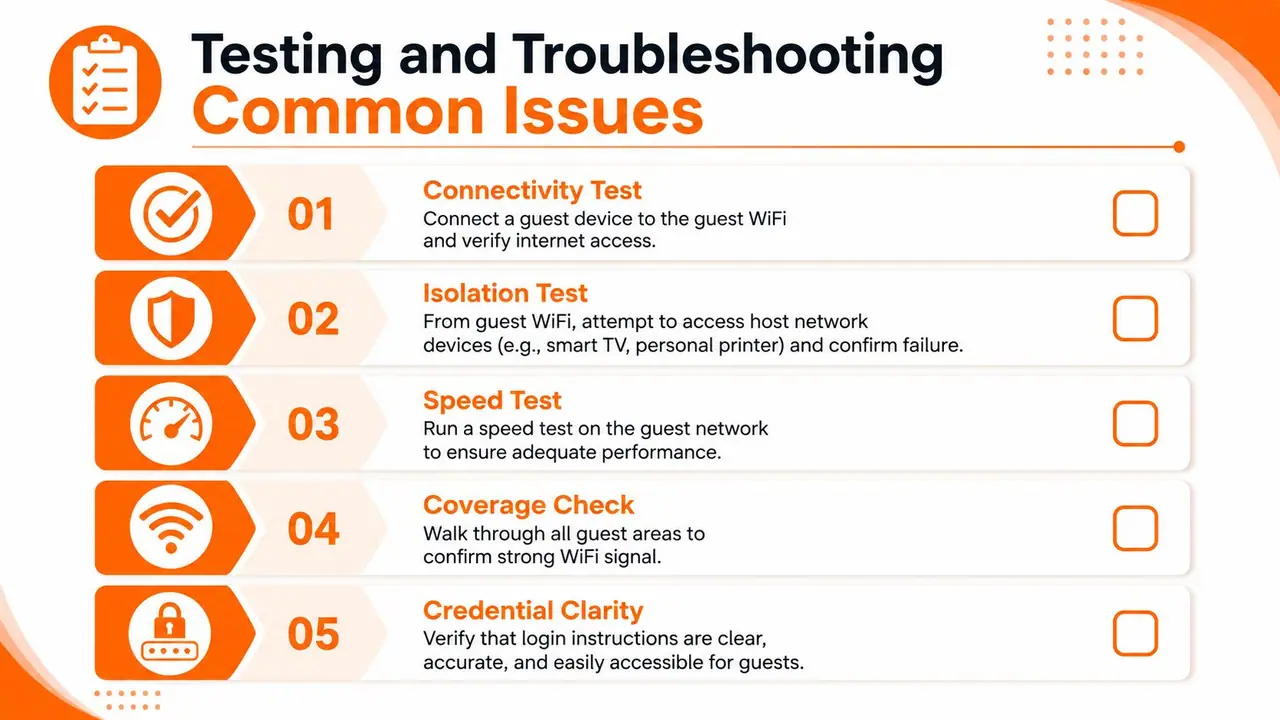
A guest Wi‑Fi network is only finished after you test it as a guest would. That means using a device, standing in the rooms, and checking the things that break most often. If you skip validation, the first test happens after check-in, which is the worst possible time.
Validate the basics before guests arrive
Start with a clean connectivity test. Join the guest network from a normal phone or laptop, confirm internet access, and make sure the device doesn't fall back to the host network by accident. Then test isolation by trying to reach a host device, such as a printer, smart TV, or management console, and confirm that access fails.
Coverage is the next check. Walk the entry, living room, bedrooms, and any outdoor or shared guest areas, and see where the signal drops or slows. If the network reaches the kitchen but not the upstairs bedroom, you don't have a Wi‑Fi problem, you have a placement problem.
Fix the failures in the order guests experience them
When guests can't connect, the fastest path is usually the simplest one. Check that the SSID is being broadcast, the password matches the display material, and the captive portal or login step isn't blocking the flow. When guests connect but the service feels slow, look at device density, weak coverage, and whether bandwidth limits are too tight for the property's actual usage.
Devices that won't stay connected usually point to lease timing, signal quality, or a roaming issue in mesh systems. If a smart device accidentally lands on the guest network, treat that as an architectural mistake, not a one-off glitch. Move it to the IoT network and verify the access rules again.
For remote administration on atypical connections like CGNAT or satellite broadband, technology troubleshooting guidance is useful because it keeps the focus on service continuity instead of just local router settings. Recent best-practice material for 2026 also calls out reverse tunnels for controllers behind CGNAT or Starlink, plus routine firmware patching, anomaly monitoring, and confirmed coverage in all guest-facing areas (Spotipo guest Wi‑Fi best practices guide for 2026). That's a reminder that some properties need a remote-access plan, not just a router password.
If the test only works from the office, it doesn't count as a guest-ready network.
Keep a short troubleshooting script
When something fails, document the exact symptom, the room, the device type, and whether the issue affects one guest or the whole property. That makes follow-up faster and helps you separate a coverage issue from a credential issue or an upstream internet problem. It also gives co-hosts and cleaners a simple way to report what they saw without guessing.
Operational Best Practices for Ongoing Management
Guest Wi‑Fi is not a one-time project. Properties change, devices get added, passwords drift, and firmware updates eventually matter. The setup stays reliable only if someone owns the routine.
Build a maintenance rhythm
Keep firmware updates on a schedule that avoids guest turnover windows. If your router, mesh nodes, or access points have cloud dashboards, use them to confirm that all guest-facing areas still have coverage after any change. When you add a new smart lock, camera, thermostat, or streaming device, place it on the correct network immediately instead of “fixing it later.”
Password and QR updates should follow the same logic. If credentials change, update the printed copy, the digital guide, and any co-host documentation at the same time. The mistake I see most often is a property with three versions of the truth, one in the router, one in a welcome PDF, and one taped to the fridge.
Document the network like an operating system
A good network runbook doesn't need to be fancy. It needs to answer which SSID belongs to which unit, which devices sit on guest, IoT, or staff networks, who can change the settings, and where to verify the current credentials. If you manage multiple listings, that documentation saves far more time than trying to remember how each property was configured months ago.
Use recurring signals to decide when the setup needs adjustment. Repeated connection complaints, weak signal in the same room, or guests asking for the password even though it's supposedly “obvious” all point to a setup problem, not a guest problem. The network should reduce questions, not create them.
Treat guest wifi setup as an operations habit
The strongest properties are the ones where the network stays boring. Guests connect, the smart devices keep their own lane, staff still have their private access, and nobody has to improvise at check-in. That only happens when guest Wi‑Fi, IoT, and staff traffic are maintained as separate parts of the property, not as one shared pile of devices.
ScanStay is one way to keep the guest-facing side organised, since it can present Wi‑Fi details inside a digital welcome book alongside arrival instructions and house rules. If you want a cleaner handoff and fewer repetitive messages, visit ScanStay and see how a single guest guide can keep Wi‑Fi credentials, check-in details, and property info in one place.