Automate Airbnb Messages: Boost Guest Experience
Automate Airbnb messages to save time, enhance guest experience, & boost reviews. Essential guide for hosts: templates, tools, best practices.
You're probably dealing with this right now. A guest books late, another asks for the Wi‑Fi code, someone else wants to know if early check-in is possible, and your evening turns into inbox management. The frustrating part isn't just the time. It's the repetition, the risk of forgetting a detail, and the fact that the same basic questions keep interrupting essential work.
That's why hosts who want to scale learn how to automate Airbnb messages early. Not to sound robotic. Not to remove hospitality. The point is to stop typing the same operational information over and over, while still replying fast, setting expectations clearly, and leaving room for real human help when a guest needs it.
Table of Contents
- Winning Back Your Time with Smart Messaging
- Mapping Your Automated Messaging Workflow
- Writing Message Templates That Don't Sound Robotic
- Choosing Your Airbnb Automation Toolkit
- Integrating a Digital Welcome Book to Streamline Links
- Testing, Monitoring, and Keeping the Personal Touch
- Frequently Asked Questions About Airbnb Message Automation
- Is it okay to automate Airbnb messages for every guest stage
- What should never be fully automated
- What's the biggest mistake hosts make
- What happens when a guest replies to an automated message
- How do I keep messages from sounding stiff
- Should I put all instructions directly in the Airbnb message thread
Winning Back Your Time with Smart Messaging
Friday night is where weak systems get exposed.
A same-day guest wants parking instructions. Another can't find the lockbox. Someone arriving tomorrow asks for restaurant recommendations. Then a guest who checked in three days ago wants the Wi‑Fi password that was already sent once. None of those messages are hard to answer. The problem is that they arrive one by one, at random, and all of them pull you back into the same admin loop.
Manual messaging also creates inconsistency. One guest gets your polished check-in note. Another gets a rushed two-line version because you're in the car or halfway through dinner. That's how hosts end up with uneven service even when they care deeply about the guest experience.
The pressure to reply quickly is real. One industry guide notes that automated responses can improve reply times within a 2–3 minute window, and that guests may move on from a listing within minutes if they don't get a quick answer, as explained in Turno's guide to sending automated messages on Airbnb.
Practical rule: If you answer the same question more than twice a month, it should become a template, a scheduled message, or a guide link.
Good automation fixes three problems at once. It shortens response time, standardizes what each guest receives, and protects your attention for the moments that require judgment. That might be a special request, a complaint, or a genuine hospitality touchpoint like helping with a birthday stay or a weather disruption.
The best hosts don't automate because they want less contact with guests. They automate because repetitive contact is the lowest-value part of hosting. Once the basics run on time, every personal reply gets better.
Mapping Your Automated Messaging Workflow
Most hosts start in the wrong place. They write messages first.
Start with the stay itself. If you map the guest journey properly, your automation becomes obvious. If you skip that step, you end up with too many messages, bad timing, and information dumped into the wrong moment.
Build the sequence before you write templates
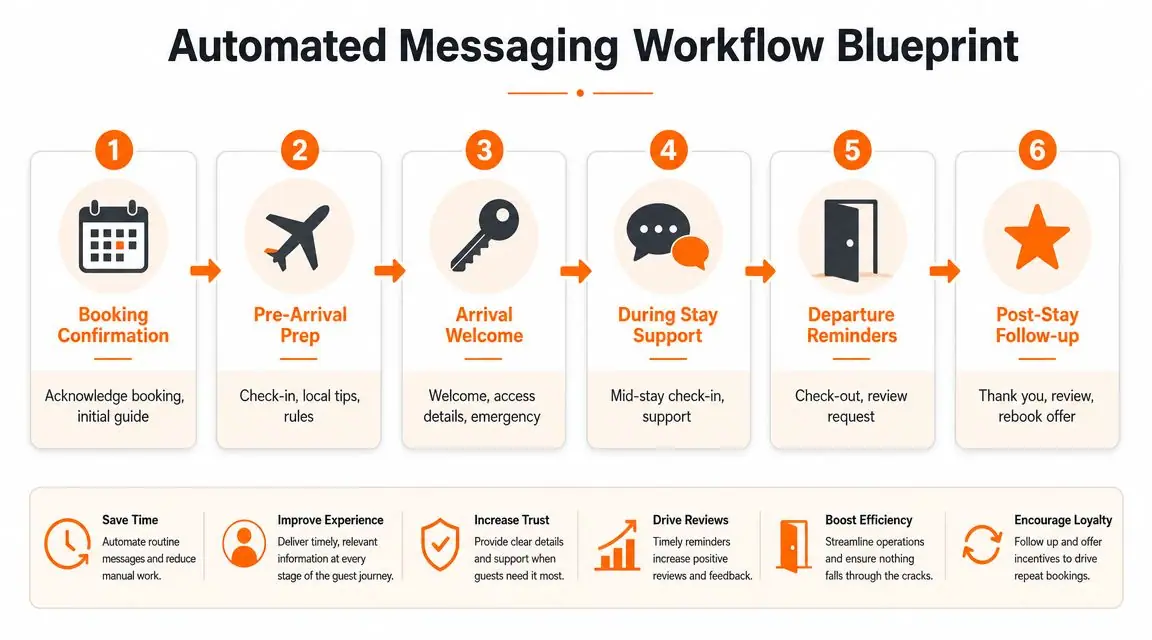
The strongest workflows cover the full guest journey. That usually means booking confirmation, pre-arrival details, arrival guidance, during-stay support, departure reminders, and post-stay follow-up. Rental Scale-Up notes that the most effective automation covers booking confirmation, pre-arrival details, at-arrival house rules, and checkout reminders, with software triggering messages at the right stage of the reservation lifecycle in their piece on how to automate Airbnb communication.
That sounds simple, but timing is where hosts either reduce friction or create it.
Send too much at booking, and guests ignore half of it. Send check-in details too late, and they panic on arrival. Send checkout reminders too early, and they forget. The workflow should match what the guest needs at that moment, not everything you want them to know eventually.
A clean blueprint usually answers four questions for each message:
- What triggered it: booking confirmed, day before arrival, check-in time reached, final night, or checkout completed.
- Why it exists: confirm, prepare, direct, remind, or request.
- What action the guest should take: save instructions, complete ID steps, review house rules, or message you if anything is unclear.
- Whether a human should review replies: important for access issues, payment-sensitive requests, or anything that could change the stay.
One useful shortcut is to pair each stage with one primary objective. Booking confirmation should reassure. Pre-arrival should prevent confusion. Arrival should reduce entry problems. Mid-stay should surface issues early. Departure should simplify turnover. Post-stay should close the loop.
If you're also tightening your arrival process, this guide to a QR code check-in system for short-term rentals is worth reviewing because it complements message timing well.
Guest Journey Messaging Planner
| Guest Stage | Trigger | Timing | Message Purpose |
|---|---|---|---|
| Booking Confirmation | Reservation confirmed | Immediately | Acknowledge booking, set expectations, invite essential questions |
| Pre-Arrival Prep | Arrival approaching | Before check-in | Share access process, arrival reminders, and what to review before travel |
| Arrival Welcome | Guest checks in | At arrival | Confirm entry details, highlight urgent property info, reduce first-hour confusion |
| During Stay Support | First part of stay completed | During stay | Check that everything works and give a clear path for help |
| Departure Reminders | Final night or departure approaching | Before checkout | Reinforce checkout steps and reduce turnover issues |
| Post-Stay Follow-up | Reservation ended | After checkout | Thank the guest, request feedback or review, encourage future return |
Keep the workflow visible. A simple one-page planner prevents duplicate messages, mistimed reminders, and missing touchpoints.
Writing Message Templates That Don't Sound Robotic
The mistake isn't automation. The mistake is bad writing.
Guests can tell when a message was written by someone trying to sound efficient instead of helpful. Long blocks of text, stiff phrasing, repeated instructions, and generic friendliness all make automation feel colder than it needs to.

Write for clarity first
A good template does three things well. It tells the guest exactly what they need to know, makes the next step obvious, and sounds like a real host wrote it.
Airbnb's messaging automation has expanded around Scheduled Messages, including pre-written messages tied to booking, check-in, and check-out events, according to Hostify's walkthrough of Airbnb automatic messages. Third-party guides also describe using dynamic guest details in those templates, which is what makes one message feel personal across many reservations.
That's useful, but the personalization tags aren't the actual fix. Tone is.
Use the guest's name when it matters. Mention the stay dates if that prevents confusion. Don't cram in every house rule just because you can. A message should answer the question the guest has at that stage, not act like your entire operations manual.
Here's what usually works better:
- Keep each message narrow. One message for confirmation. One for arrival prep. One for checkout. Don't merge unrelated instructions.
- Write short first sentences. Guests skim. Lead with the key action.
- Use natural language. “Your door code will activate at check-in” is better than “Please be advised that access credentials will become valid upon reservation commencement.”
- Leave room for replies. Automation should feel open, not final.
Short messages often perform better than “complete” ones because guests actually read them.
Templates that work in real stays
These examples are intentionally simple. They're easy to adapt, and they don't sound like a script.
Booking confirmation
Hi [Guest Name], thanks for booking with us. We're looking forward to hosting you on [Check-in Date]. I'll send your arrival details before check-in so everything is easy to follow. If you already know your arrival time or have an important question, send it over.
Why this works: it confirms, reassures, and sets the expectation that more detail is coming later.
Pre-arrival message
Hi [Guest Name], your stay starts tomorrow. Here's the main thing to review before you travel: [welcome guide link or check-in instructions]. It includes how to access the property, parking details, Wi‑Fi, and the key house notes. If anything about your arrival changes, reply here and let me know.
Why this works: it points to one source of truth and invites updates without creating a long thread.
A quick visual breakdown can help if you're refining tone across your templates:
Arrival house rules reminder
Welcome, [Guest Name]. I hope check-in went smoothly. A few quick reminders for your stay: [rule one], [rule two], and [rule three]. If something doesn't look right in the property, message me as soon as possible so I can help.
Why this works: it keeps rules short and puts support next to expectations.
Late checkout upsell or offer
Hi [Guest Name], if you need a later departure, send me a message and I'll confirm whether it's available for your checkout day. If we can accommodate it, I'll share the details with you here.
Why this works: it avoids promising availability automatically and protects your cleaning window.
Use automation for the draft, not the whole relationship
The strongest templates are the ones guests barely notice as automated.
That means removing clutter, dropping repetitive niceties, and checking your message against one standard: would you send this manually without feeling awkward? If the answer is no, rewrite it.
A practical editing test:
- Delete filler. Remove any sentence that doesn't change what the guest needs to do.
- Highlight the one action. Save the link, confirm arrival time, follow checkout steps.
- Read it out loud. Robotic wording is easy to hear.
- Check tokens carefully. A broken [Guest Name] field makes the whole system look sloppy.
Guests don't mind automation. They mind unclear communication.
Choosing Your Airbnb Automation Toolkit
A bloated tool stack creates almost as much friction as no automation at all. I see this often with hosts who add a PMS, a messaging app, a guidebook tool, and a task manager before they have a clear workflow. Then they spend more time fixing automations than answering guests.
The right setup depends on where your communication breaks.
When Airbnb native tools are enough
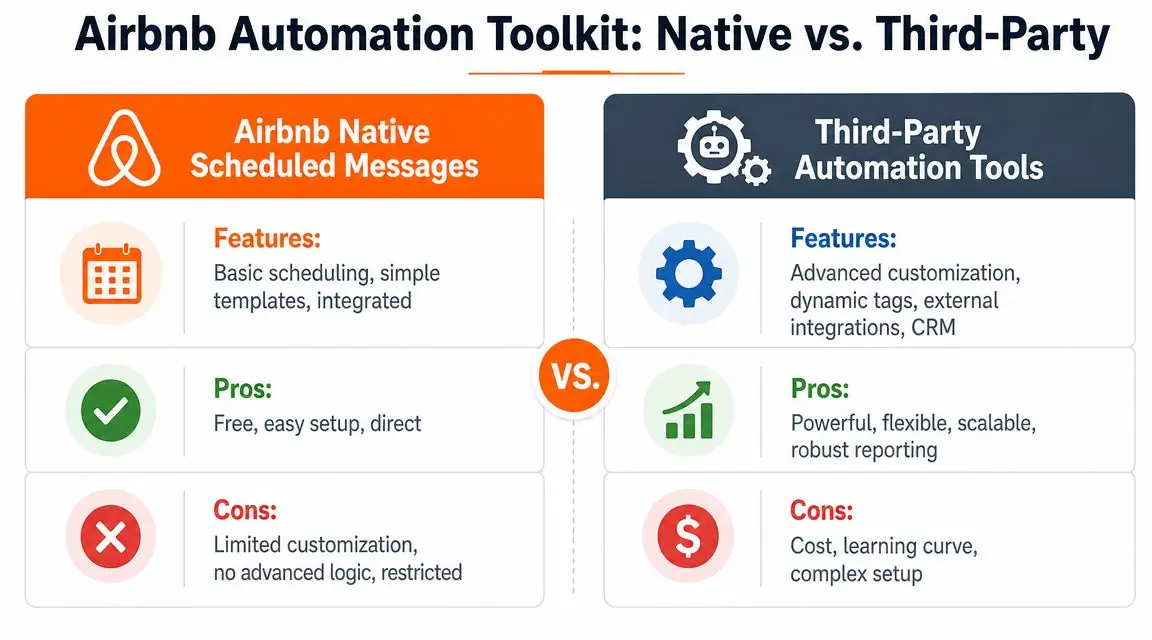
Airbnb's built-in scheduled messages handle the basics well. For one listing, or a small portfolio that gets nearly all bookings through Airbnb, they usually cover the core guest journey without adding another system to manage.
Native tools make sense when:
- Your messages follow predictable booking events like confirmation, pre-arrival, check-in, and checkout.
- You want fast setup and fewer moving parts.
- You mainly host on Airbnb and do not need one workflow across several channels.
The practical benefit is obvious. Messages stay inside the inbox guests already use, and your team has fewer places to check.
The trade-off shows up fast once your operation gets more nuanced. If different units need different instructions, if you run multiple booking channels, or if guest communication depends on conditions like stay length, pet approvals, or same-day turnover, the native setup starts to feel tight.
When third-party tools make sense
Third-party automation tools earn their keep when manual exceptions become routine. That usually happens before hosts expect it.
Look for features tied to real operational pain:
- Conditional triggers that send the right message based on booking details.
- Dynamic fields that pull reservation data into templates.
- Multi-channel messaging across Airbnb and other booking platforms.
- Shared team visibility so cleaners, co-hosts, and support staff work from the same information.
- Central template control for consistent instructions across properties.
A PMS or automation platform also helps when you want messaging tied to operations, not just dates. For example, sending parking details only for the units that need them, or holding a check-in message until the cleaning status is complete.
The tool decision most hosts miss
Scheduled messages solve timing. They do not solve information sprawl.
That gap is why strong automation usually includes a digital guide, not just better triggers. Instead of cramming Wi-Fi, parking, appliance instructions, house rules, local recommendations, and upsell offers into separate templates, hosts can point guests to one updated resource. A good vacation rental welcome book system cuts message volume further, reduces outdated instructions, and gives guests a better self-serve experience.
It also creates room for revenue. Early check-in requests, late checkout options, add-on services, and local recommendations are easier to present cleanly inside a welcome book than in a long Airbnb thread.
A simple way to choose
| Setup Need | Native Airbnb tools | Third-party tools |
|---|---|---|
| One or two listings | Strong fit | Often more than you need |
| Standard lifecycle messages | Good fit | Good fit |
| Cross-platform messaging | Limited | Better fit |
| Advanced logic and conditions | Limited | Better fit |
| Team workflows | Basic | Better fit |
| Faster setup | Better fit | Slower at first |
Choose the smallest system that handles your current complexity and one step beyond it. If your messages are still simple, keep the stack light. If your inbox stays busy because guests need links, clarifications, and exceptions, add tools that reduce those repeat questions instead of just sending more automated text.
Integrating a Digital Welcome Book to Streamline Links
Most messaging systems break down when hosts try to force too much information into the message itself.
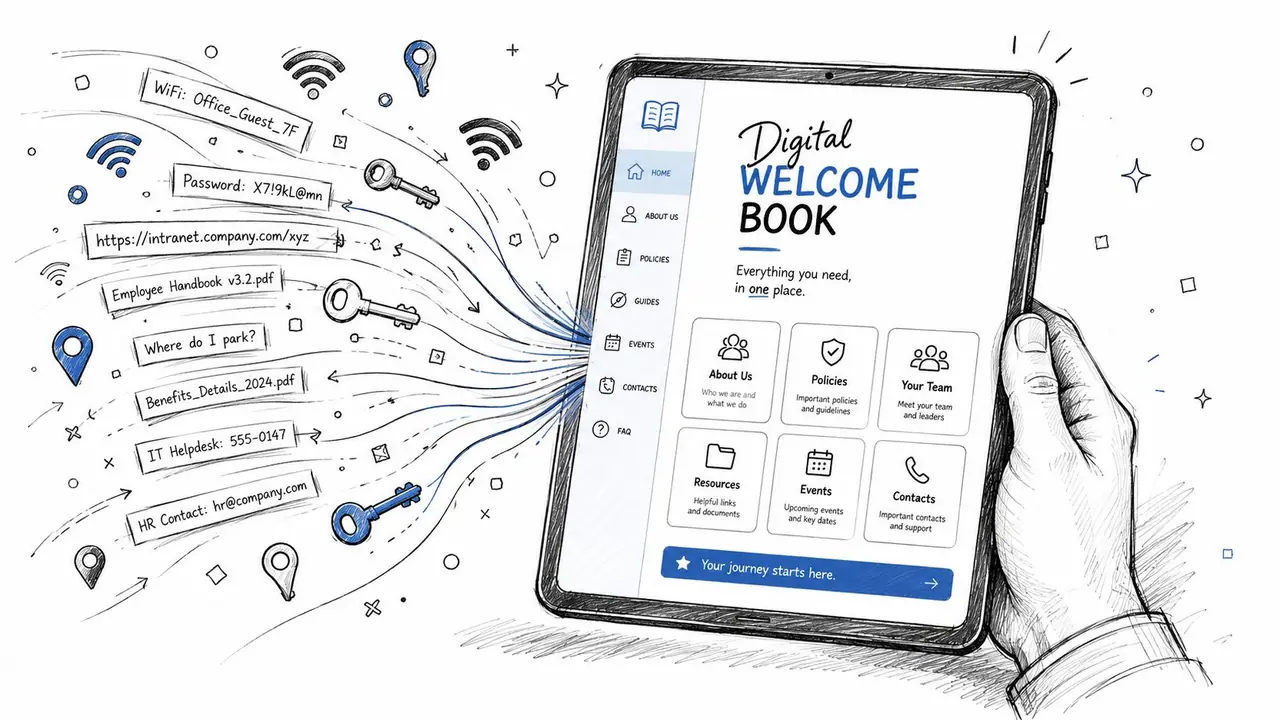
That's where a digital welcome book changes the setup. Instead of sending separate notes for parking, Wi‑Fi, appliance instructions, checkout steps, local recommendations, and upsells, you send one clean message with one link. The guest opens a central guide, and your inbox gets quieter.
Why one link beats five long messages
This is the practical leap most hosts miss when they try to automate Airbnb messages. Scheduled templates help, but static text still creates problems when details change. Door codes rotate. Parking instructions shift. Local recommendations go out of date. A message sent three days ago can already be wrong.
A welcome book solves that by moving detailed information out of the message and into a resource you can update once. Your automated message becomes stable because the link stays the same, while the content behind it stays current.
That setup also matches how guests behave. Time-sensitive channels perform well for urgent travel information. StayFi reports open rates of over 98% for automated SMS and email campaigns used for check-ins, reminders, and review requests, which makes them strong channels for sending a guide link, as noted in their article on vacation rental automation and guest messaging.
You can see the broader logic in a dedicated vacation rental welcome book guide, especially if you're trying to reduce repetitive questions without making messages longer.
Where welcome books reduce message volume
The biggest wins usually come from operational detail and repeat questions.
A good welcome book can hold:
- Arrival details like parking, entry steps, building access, and what to do if a guest arrives early.
- Property basics such as Wi‑Fi, heating, air conditioning, trash, appliances, and quiet hours.
- Stay support content including video how-tos, local rules, and troubleshooting basics.
- Monetizable extras like late checkout requests, airport transfers, equipment rentals, or local add-ons.
This matters for exceptions too. If a guest asks, “How do I use the washer?” or “Can we leave bags somewhere?” you don't need a fresh explanation every time. You can point them to one maintained resource.
A message should deliver the next action. The welcome book should hold the operating manual.
That division keeps your automations short and your information flexible. It also creates a cleaner guest experience because guests don't have to search through message history for one buried instruction.
Testing, Monitoring, and Keeping the Personal Touch
A working automation system is never finished. It's maintained.
The biggest operational gap in most advice is exception handling. Standard messages are easy. What's harder is keeping automated communication accurate when access codes change, local conditions shift, or a reservation needs a custom response. Breezeway highlights that gap in their discussion of how to automate Airbnb messages while handling dynamic details.
Test the system like a guest would
Before you trust any workflow, run it end to end.
Use a checklist:
- Check trigger timing so each message fires when the guest needs it.
- Verify dynamic fields like guest name, check-in date, and property-specific instructions.
- Open every link from a phone, because that's how many guests will read it.
- Review listing-specific details for units with different parking, locks, or appliances.
- Test changes after edits whenever you update codes, policies, or guide content.
Then monitor what still comes in manually. If guests keep asking where to park, your pre-arrival message or guide isn't clear enough. If they miss checkout steps, either timing or formatting is off.
A useful benchmark for quality isn't silence. Guests will still reply. The goal is better replies. Fewer repetitive questions. More meaningful conversations.
Know when to step in manually
Some messages should stay human or at least human-reviewed. Complaint handling, unusual requests, pricing-sensitive exceptions, and anything that could create frustration deserves direct attention.
Use automation for consistency. Use judgment for trust.
If you want a broader framework for protecting the guest experience while reducing admin, this article on how to improve guest satisfaction in short-term rentals fits well with message monitoring and follow-up decisions.
Frequently Asked Questions About Airbnb Message Automation
Is it okay to automate Airbnb messages for every guest stage
Yes, for standard communication. Booking confirmation, pre-arrival instructions, arrival reminders, and checkout notes are all good candidates. The key is to automate predictable information and keep a human eye on unusual replies.
What should never be fully automated
Anything sensitive, unclear, or likely to create friction. Complaints, refund discussions, exceptions to house rules, and complicated arrival problems should get a personal response.
What's the biggest mistake hosts make
They automate too much text instead of automating the right moments. Guests don't need longer messages. They need the right information at the right time.
What happens when a guest replies to an automated message
Treat the reply like any other conversation. Automation should start communication faster, not end it. If a guest asks a real question, answer it normally and with context.
How do I keep messages from sounding stiff
Write like you talk. Keep each message focused on one purpose, use personalization fields carefully, and remove anything that sounds like policy language instead of hospitality.
Should I put all instructions directly in the Airbnb message thread
Usually no. Short messages work better. Put detailed, changeable information in a maintained guide and use your automated message to point guests there.
If you want fewer repetitive guest questions and a cleaner way to deliver check-in info, house rules, local recommendations, and upsells, ScanStay is built for exactly that. It gives hosts one mobile-friendly welcome book link to send in automated messages, so guests get what they need quickly and you spend less time repeating yourself.