How to Improve Guest Satisfaction: Strategies for 2026
Learn how to improve guest satisfaction with actionable strategies for every stage. Boost reviews, save time, & increase revenue with our 2026 guide.

A lot of hosts are trying to improve guest satisfaction while doing the exact thing that makes it harder: answering the same questions over and over, fixing preventable confusion in real time, and relying on memory instead of a system.
The pattern is familiar. A guest arrives late, can't find the entry instructions in an old message thread, asks for the Wi-Fi password after they're already inside, then follows up about parking, heating, or checkout. None of these are big problems on their own. Together, they create friction for the guest and constant interruption for the host.
That's why I don't treat guest satisfaction as a soft skill. I treat it as an operational system. The most reliable way to improve it is to remove friction before it appears, make information easy to access during the stay, and handle issues fast when something does go wrong. Recent hospitality research summarized by eTip's review of IHG's 2025 guest behavior findings notes that many travelers would switch brands after repeated poor experiences, and that service speed and friction shape loyalty decisions.
For short-term rentals, that matters even more. There's usually no front desk, no on-site concierge, and no buffer between a small issue and a bad review. If you want to know how to improve guest satisfaction in a way that scales, start by building a process that gives guests clarity, autonomy, and fast support without pulling you into every moment of the stay.
Table of Contents
- Introduction Why Guest Satisfaction Is an Operational System Not a Feeling
- The Pre-Arrival Playbook for a Perfect Start
- Designing a Self-Service Onsite Environment
- Proactive Support and Thoughtful Personalization
- Optimizing Checkout and the Feedback Loop
- Key Metrics and Tools to Measure Success
- Conclusion Building a System for Five-Star Hospitality
Introduction Why Guest Satisfaction Is an Operational System Not a Feeling
Hosts often talk about guest satisfaction as if it comes down to personality. Be warm. Be responsive. Be helpful. That matters, but it's not enough if the operation behind the stay is messy.
A guest doesn't experience your good intentions. They experience your process. They notice whether check-in feels smooth, whether the property answers common questions without effort, and whether a problem gets resolved before it affects the whole stay. That's why the strongest properties usually aren't the ones doing the most manual work. They're the ones with the fewest preventable breakdowns.
Practical rule: If guests have to ask the same question twice across multiple stays, the problem usually isn't the guest. It's the system.
The trade-off is simple. You can run hospitality as a stream of one-off interventions, or you can design repeatable workflows that create consistency. The first approach feels personal but drains time. The second feels structured and usually produces a better guest experience.
Three operational pressure points shape most reviews:
- Arrival friction: Access confusion, parking uncertainty, and missing instructions create anxiety before the stay even starts.
- Onsite information gaps: Guests don't want to search through paper binders, long message threads, or scattered PDFs to find simple answers.
- Slow recovery: Minor maintenance issues become major memory points when nobody owns the response path.
If you want to know how to improve guest satisfaction without being on call every hour, focus on those moments first. That's where better systems outperform good intentions.
The Pre-Arrival Playbook for a Perfect Start
The easiest problem to solve is the one that never reaches the guest. Pre-arrival communication is where most of that prevention happens.
Hospitality guidance consistently notes that guests judge a stay heavily on first impressions and speed of response, and that tools like contactless check-in help remove delays at arrival, as explained in Mews' guide to guest satisfaction. For hosts, that usually means one thing: clear instructions sent early enough to be useful.
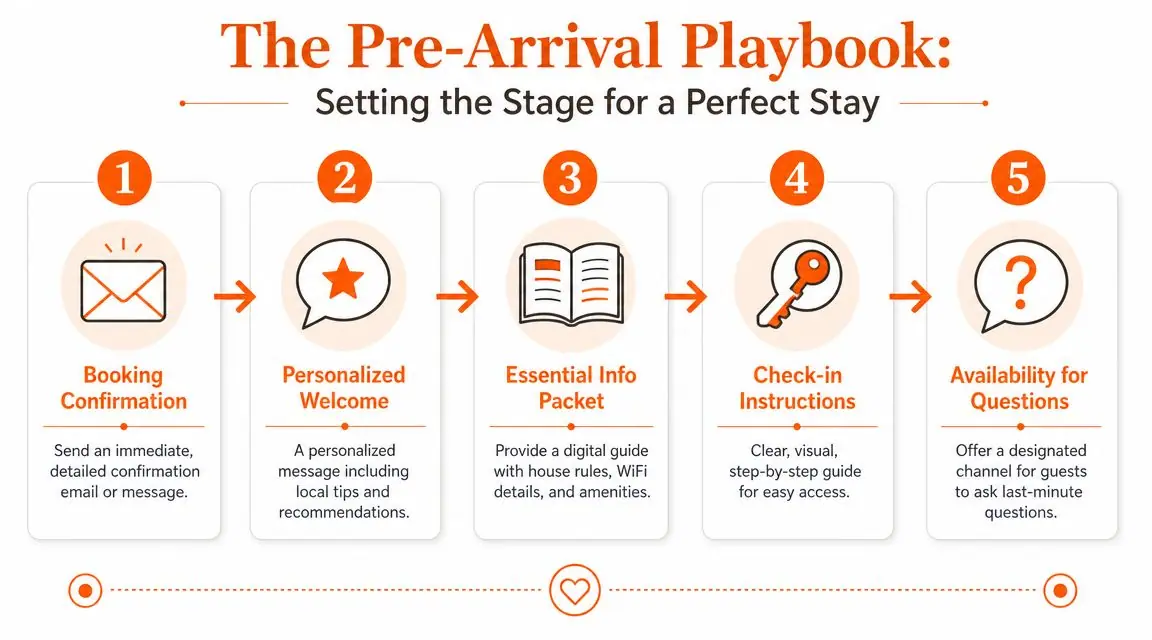
Send the right message at the right time
One long confirmation message is not a system. It's a dump of information, and guests rarely read it when they need it most. A better approach is a short sequence tied to the stay timeline.
I like to think in three moments:
Right after booking Confirm the reservation, thank the guest, and set expectations. At this point, clarify basics like check-in window, parking situation, whether stairs are involved, and anything that could affect suitability.
Several days before arrival
Send the practical planning details. This is the right point for transport tips, local arrival notes, weather-related reminders, and any guest-specific details you need them to provide.The day before arrival Deliver access instructions in the simplest possible format. Include the exact address, entry steps, where to park, how to gain entry, and who to contact if they get stuck.
The mistake many hosts make is mixing emotional welcome language with operational detail until neither is clear. Keep the tone warm, but structure the content like a checklist.
What guests actually need before arrival
Guests don't need more messages. They need the right information in a form they can use quickly.
A strong pre-arrival package usually includes:
- Access details: Exact address, entrance photo if needed, keypad or lock process, and backup instructions if the first method fails.
- Timing expectations: When entry is available, what happens if they arrive early, and what to do if travel delays push arrival late.
- Property basics: Wi-Fi access, parking rules, elevator or stair notes, and whether they should expect any quirks.
- House expectations: Quiet hours, smoking policy, pet rules, and anything that can create conflict if left unclear.
- Support channel: One obvious place to ask last-minute questions.
A lot of hosts still send this in fragments. That creates search friction. Guests end up scrolling through old booking-platform messages while standing outside with luggage.
A digital guide solves that better than a long text thread. If you're building one, this guide to a vacation rental welcome book shows the kind of content structure that works well before arrival.
Clear beats clever. The best check-in message is not beautifully written. It's impossible to misunderstand.
There's also a useful revenue angle here. Pre-arrival communication is the cleanest moment to offer relevant extras without feeling pushy. Early check-in, airport pickup, parking registration, or equipment rental fit naturally when they solve arrival stress. Random offers dropped mid-stay usually don't.
The operational standard I recommend is simple: every guest should receive the same core sequence automatically, with only a few fields customized. That gives you consistency without sounding robotic. It also means your best process isn't trapped in your memory or dependent on who happens to be on duty.
Designing a Self-Service Onsite Environment
Once guests are inside, the next challenge is reducing dependency. Good hosting doesn't mean making guests ask you for everything. It means making the stay easy for them to manage independently.
That's why the onsite experience should have one trusted source of information, not a paper binder on the counter and six different messages spread across apps.
Why binders and message chains fail on site
Paper binders look helpful until they're outdated, stained, missing pages, or written only in one language. Long message threads are not much better. Guests don't want to search for the boiler instructions in the same conversation where they got the booking confirmation three weeks earlier.
Hospitality operators are investing more in digital guidance because guests want frictionless, mobile-first access to information, and one undercovered part of guest satisfaction is multilingual self-serve communication, as described by The SSA Group's article on enhancing the guest experience. That matters in short-term rentals where clarity often matters more than luxury.
A cluttered information setup causes three predictable problems:
| Problem | What the guest feels | What the host deals with |
|---|---|---|
| Information is scattered | Uncertainty | Repetitive questions |
| Instructions are text-heavy | Confusion | More support messages |
| Content is not translated | Hesitation | Misunderstandings and rule breaches |
If you want to reduce support load without becoming less available, the answer is self-service with structure.
What to include in one trusted guest hub
The best onsite guide is narrow, not bloated. Guests don't need every possible detail. They need answers to common questions in the order those questions arise.
A strong digital welcome book should include:
- Immediate essentials: Wi-Fi, checkout time, house rules, trash instructions, and emergency contacts.
- How-to content: Heating, air conditioning, TV, hot water, blinds, coffee machine, or any appliance that regularly creates confusion.
- Property-specific quirks: Sticky door, separate hot-water switch, parking gate sequence, or recycling rules that aren't obvious.
- Local recommendations: Restaurants, grocery stores, pharmacies, transport, and late-night options.
- Optional extras: Late checkout, cleaning, equipment rental, transfers, or other useful add-ons.
One of the most effective upgrades is visual instruction. A short video often beats a paragraph of text, especially for locks, thermostats, or unusual appliances. This is also where smart access tools help. If you're comparing entry hardware, this overview of the best smart lock for Airbnb is a useful starting point.
Here's a simple example of how the setup changes the guest experience. A guest arrives after a long trip and wants to adjust the heating. In a weak setup, they message you, wait, get a text explanation, still don't understand it, and message again. In a strong setup, they scan one QR code, tap “Heating,” and watch a short guide in their language.
The second path feels faster to the guest and lighter for the host.
A practical example of how a digital guide can be presented on-site is below.
I'd also make one decision early: choose a single system and stick to it. Some hosts use PDFs, some use shared notes, and some use a dedicated tool. ScanStay is one example. It gives guests a QR-based welcome book in their mobile browser with Wi-Fi details, house rules, local recommendations, video how-tos, and multilingual content in one place. The specific tool matters less than the discipline of keeping one accurate source of truth.
Proactive Support and Thoughtful Personalization
The hosts who get the strongest reviews usually do two things well at the same time. They prevent avoidable support requests, and they still make guests feel personally looked after.
Those goals are not in conflict. In fact, they support each other.
Reactive hosting creates avoidable stress
Reactive hosting sounds attentive, but it often means the guest has already hit a problem. By then, even a polite response can feel late.
A better pattern is a short in-stay check-in after arrival. Not a generic “Hope all is well” sent automatically with no context. A useful message. Ask whether access was smooth, whether they found everything they needed, and whether anything in the property needs attention. This gives guests permission to surface a problem before it turns into review language.
Guests rarely remember that a small problem happened. They remember whether solving it felt easy or annoying.
Service recovery also works better when you separate urgent issues from non-urgent ones. No host should treat a lock problem, no-heating issue, and extra-towel request as if they belong in the same queue. The fastest teams route by urgency, not by arrival order.
A lightweight service-recovery workflow can look like this:
- Urgent: Access failure, heating or cooling outage, water issue, safety concern.
- Soon: Appliance confusion, missing amenity, parking question.
- Later: Local recommendations, extension requests, non-essential extras.
That sort of triage is what keeps one broken detail from dominating the whole stay.
Personalization that feels useful not forced
Personalization has become one of the clearest drivers of satisfaction when it's based on context rather than guesswork. Hospitality guidance notes that understanding why a guest is staying and using prior interactions to tailor communication can materially improve the experience, as outlined in Les Roches' professional guide to enhancing guest satisfaction.
In practice, that means paying attention to simple clues:
- A couple visiting for an anniversary doesn't need the same recommendations as a remote worker.
- A family arriving late with children needs a different check-in message than a solo business traveler.
- A repeat guest should never get the same generic instructions word for word if you already know their preferences.
Useful personalization is usually small and operational:
- Mention the nearest grocery store for late arrivals.
- Share quiet breakfast options for business travelers.
- Send beach or hiking recommendations when the stay purpose suggests leisure.
- Offer late checkout only when the calendar allows it.
What doesn't work is fake personalization. Guests can tell when a message only inserts their first name into a template.
There's also a revenue side to thoughtful support. Once the core stay is running smoothly, your service channel can carry relevant upsells without hurting trust. Mid-stay cleaning, equipment rental, airport transfer, or late checkout all work better when they're presented as optional convenience. They should feel like solutions, not sales interruptions.
The line is easy to remember. First remove friction. Then offer enhancements.
Optimizing Checkout and the Feedback Loop
Checkout is where many hosts get sloppy. The stay has gone well, the guest is leaving, and the assumption is that the hard part is over. But departure friction can still pull down the final impression.
The best checkout process feels light. Guests shouldn't need a complicated list of chores, but they do need clarity.
Make departure easy to follow
Your checkout instructions should answer three questions:
- What time do I need to leave?
- What exactly do I need to do before I go?
- What happens if I need flexibility?
If any of that is vague, guests either ignore the instructions or worry they're doing something wrong.
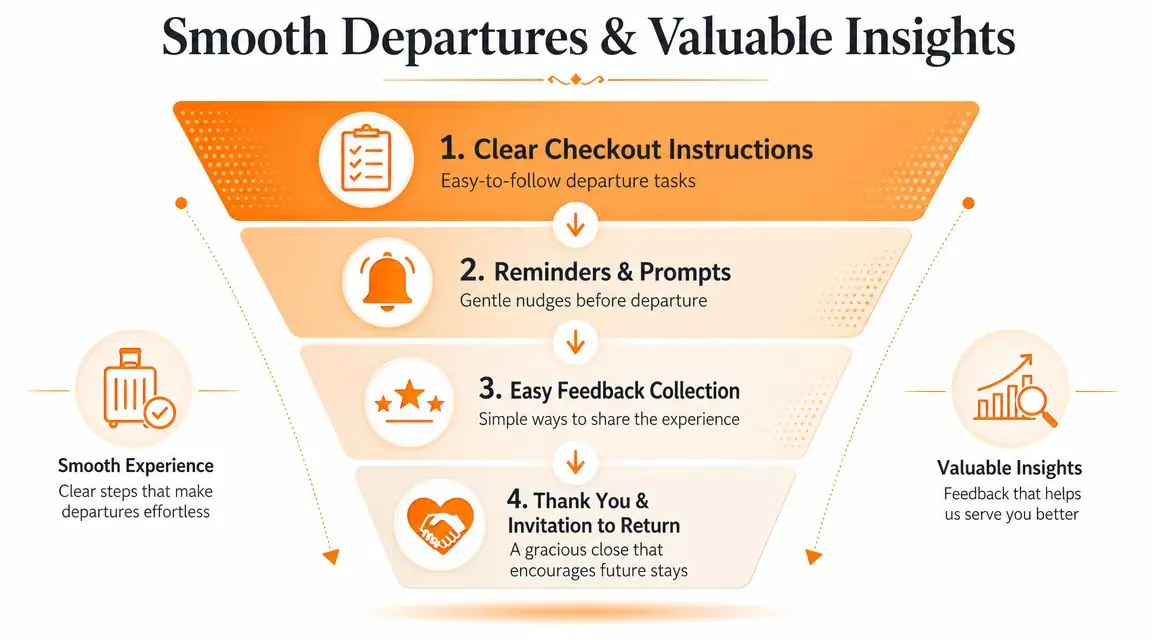
A clean checkout message usually includes:
- Departure time: Stated clearly, with no hidden conditions.
- Simple tasks: Lock the door, return keys if relevant, switch off a few essentials, and note any damage.
- Waste guidance: Only if it's necessary, and written plainly.
- Support option: A contact path for late departures or questions.
- Thank-you note: Short, genuine, and not overly scripted.
Keep the task list realistic. If it reads like a cleaning checklist for your turnover team, you're shifting operational work onto the guest. That usually hurts more than it helps.
Turn comments into operational fixes
Post-stay feedback matters most when it changes the operation. A short survey is enough if you use it properly. One practical method is to calculate CSAT by counting positive answers, dividing by total responses, and multiplying by 100, as described in Chekin's explanation of guest satisfaction score workflows.
The formula is useful, but the bigger value is what you do next.
I recommend tagging feedback into recurring categories such as:
| Feedback category | Example complaint | Operational fix |
|---|---|---|
| Arrival | Couldn't find the entrance | Add a clearer access photo |
| Clarity | Shower controls were confusing | Add a short how-to video |
| Comfort | Room felt too warm | Improve thermostat instructions |
| Support | Didn't know who to contact | Make support channel more visible |
The most impactful move is to look for repeat friction, not isolated emotion. If several guests mention unclear parking, that's not a communications issue in the abstract. It's a specific process failure that can be fixed once and removed from future stays.
One useful habit: Review feedback monthly by theme, not just by star rating. Ratings tell you how guests felt. Themes tell you what to change.
You should also ask for reviews in a way that respects timing. Send the request after checkout while the stay is still fresh, keep it brief, and avoid writing a needy message. If the guest raised a problem during the stay, make sure that issue was handled before asking for public feedback. Otherwise the review request feels tone-deaf.
Key Metrics and Tools to Measure Success
Most hosts know when a stay felt smooth. Fewer can point to the numbers or patterns that prove where satisfaction is rising or slipping.
You don't need an enterprise dashboard to manage this well. You need a short list of metrics that connect guest experience to operational decisions.
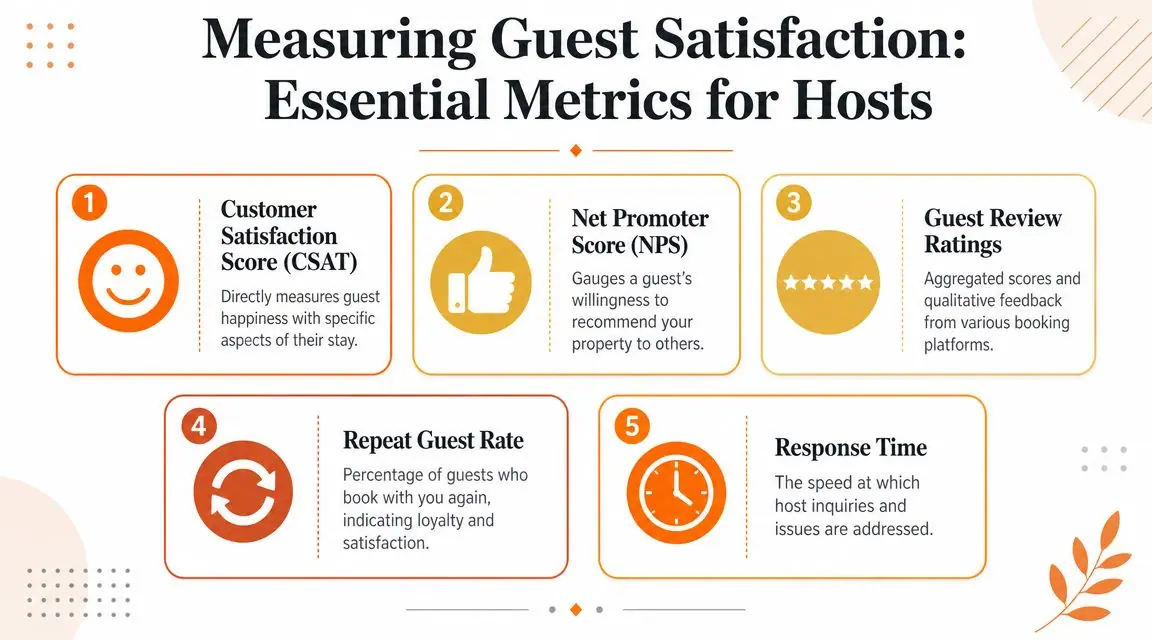
Track a small set of metrics consistently
I'd focus on four measures first:
- CSAT: Use a short survey and calculate it with the positive responses divided by total responses, multiplied by 100. This gives you a simple directional view of satisfaction.
- Review content: Don't just log the rating. Tag the written comments by issue type so patterns are visible.
- Response time: Track how quickly guest questions and issues get handled across your main channels.
- Booking-to-review conversion: Watch whether happy guests are leaving public feedback.
The infographic includes NPS and repeat guest rate as broader hospitality metrics, and they can be useful in some operations. But for most short-term rental hosts, the highest-value starting point is still operational friction: what guests asked, when they asked it, and what kept coming up.
Use tools that reduce guesswork
Digital systems are helpful. Not because they look modern, but because they make guest behavior visible.
A good guest guide platform, messaging setup, or analytics workflow should help you answer questions like:
- Which pages or instructions do guests open most often?
- Which upsells are being viewed or requested?
- Which properties generate the most repetitive support questions?
- Which message templates are still creating confusion?
If you want a deeper view into what to track, this guide to vacation rental analytics is a useful reference for turning guest interactions into decisions.
The main trade-off with tools is complexity. If your software stack creates more admin work than it removes, it's the wrong stack. The right setup shortens response time, centralizes information, and gives you just enough data to act. Not a maze of dashboards nobody checks.
A simple rule works here too. Track only the metrics that lead to a clear change in behavior. If a metric doesn't change how you communicate, support, price, or present the property, it's probably noise.
Conclusion Building a System for Five-Star Hospitality
The most effective answer to how to improve guest satisfaction isn't “try harder.” It's build a better operating system for the stay.
That system starts before arrival with clear, well-timed communication. It continues on site with one reliable place for guests to find answers on their own. It gets stronger when support is proactive, personalization is grounded in real context, and feedback gets turned into practical fixes instead of being skimmed and forgotten.
When hosts make that shift, guest satisfaction stops being fragile. Reviews get more consistent, support gets lighter, and upsells fit more naturally because the stay already feels organized and trustworthy.
The win is not just better ratings. It's a hosting business that runs with less chaos.
If you want a practical way to centralize check-in details, Wi-Fi info, house rules, local recommendations, video how-tos, and service upsells in one guest-facing link, ScanStay is built for that workflow. It replaces paper binders and scattered messages with a QR-based digital welcome book, which can help reduce repetitive questions while giving guests a clearer self-serve experience.