How Does Airbnb Work for Hosts: The Complete 2026 Guide
Learn how does Airbnb work for hosts in 2026. From listing setup and pricing to payouts, fees, and guest management, this guide covers everything you need.

You're standing in a guest-ready space, the photos are uploaded, and the first booking request lands. Then the work starts. Airbnb for hosts isn't just a place to post a listing, it's a booking, payment, messaging, and operations system that keeps running after the calendar fills.
At a practical level, the platform ties together discovery, pricing, reservations, payouts, and performance tracking. Airbnb's host tools surface occupancy rate, average nightly rate, average length of stay, and cancellation rate in the dashboard, which means hosts are managing a live business, not just waiting for inquiries to arrive, as Airbnb explains in its host help documentation. That's why successful hosting looks less like passive income and more like a steady sequence of decisions about pricing, readiness, guest communication, and turnover.
Table of Contents
- Understanding the Airbnb Host Experience
- Creating Your Listing and Setting Up for Success
- Airbnb Fees and Host Payout Mechanics
- Booking Types and Calendar Management
- The Day-to-Day Reality of Hosting
- Optimizing Occupancy and Reducing Support Load
- Reviews, Legal Considerations, and Long-Term Success
Understanding the Airbnb Host Experience
The first week usually feels simple. A new host uploads photos, writes a description, turns on the calendar, and assumes the platform will do most of the rest. Then the messages start, one guest asks about parking, another wants an early check-in, and the listing needs a pricing adjustment before the next weekend.
What actually happens after you go live
Airbnb works as the front door for a short-term rental business. Guests find a listing, review the photos and rules, and either send a request or book instantly if the host allows it. From there, the platform carries the conversation, reservation confirmation, and payment flow, while the host handles the physical property and the guest experience.
That split is why hosting feels different from traditional leasing. Airbnb's own host-side tools show hosts how efficiently a listing turns available nights into booked nights, because the platform tracks occupied nights, revenue, and cancellations, not just interest. In other words, you're not only trying to attract attention, you're trying to convert that attention into clean, reliable stays, as Airbnb outlines in its host metrics help article.
Practical rule: if a task touches the guest, the calendar, or the payout, assume it belongs to the hosting system.
The misconception that causes trouble
Beginner guides often make hosting sound passive. That story falls apart fast when a same-day turnover runs late, a guest can't find the lockbox code, or the cleaner reports a stained duvet thirty minutes before arrival. Airbnb itself frames hosting as more than publishing a listing, and that's the right mental model for operators.
The hidden difference between a decent listing and a durable one is consistency. The host has to keep the calendar accurate, the space ready, the house rules clear, and the communication fast enough that guests don't feel stranded. Those details don't sit on the surface of the platform, but they shape every review and every repeat booking.
A good host learns quickly that the app is only half of the job. The other half is the property, and the property doesn't care whether the booking came through a polished interface or a rushed guest message. It still needs cleaning, stocking, access, and a functioning process behind it.
Creating Your Listing and Setting Up for Success
A listing that converts usually does three things well. It shows the space clearly, answers obvious buyer questions before they're asked, and makes the booking decision feel low risk. The strongest hosts treat the setup phase like merchandising, not admin.
Build the listing around the guest's decision
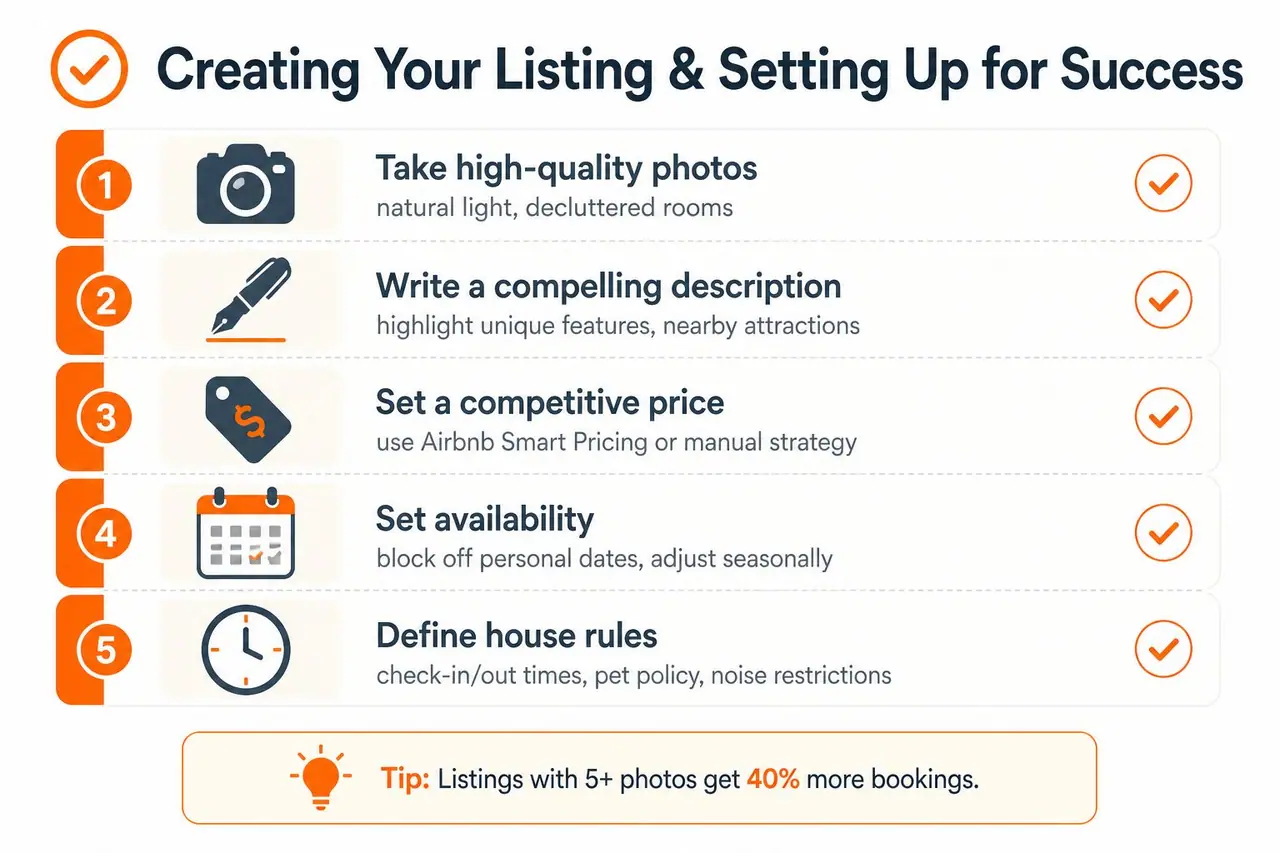
Start with the property type and room configuration, then write for the traveler who's most likely to book it. A couple booking a weekend trip wants different proof than a family planning a longer stay, and business travelers care about different details again. The title, description, and amenity selection should make the right guest feel like the listing was built for them.
Photos do most of the early convincing. Use natural light, open every blind, remove clutter, and show the rooms in the order a guest would mentally walk through them. Don't bury the practical shots, either, because travelers want to see the bathroom, kitchen, bed setup, and entry path before they commit.
Price for conversion, not just for pride
Pricing is where many hosts stall. A base rate that feels emotionally right can still underperform if it ignores day-of-week demand, lead time, or seasonality. Airbnb's own host tools let you monitor results, and the pricing choice should be tied to those metrics instead of gut feel alone, with performance data available in Insights for professional hosting tools.
Use Airbnb's Smart Pricing only if you're comfortable with automation making the call, or keep manual control if your market needs tighter steering. Either way, make sure the calendar reflects reality. If your personal dates aren't blocked, your pricing can be perfect and the guest experience can still break down.
House rules should be written before the first booking, not after the first issue. Clear check-in times, pet rules, noise limits, and guest count boundaries save time later because they reduce back-and-forth before arrival.
A listing converts best when it removes uncertainty. The guest should know what they're getting, how to arrive, and what's expected before they ever message you.
For a practical add-on, some hosts use a digital guest book like ScanStay to centralize arrival instructions, Wi‑Fi, house rules, and local recommendations in one mobile link. That doesn't replace a strong listing, but it does reduce repetitive questions after booking.
Airbnb Fees and Host Payout Mechanics
The money side of Airbnb is straightforward on the surface and easy to misread in practice. Fees come off the booking, then the payout arrives later, and that timing matters more than most new hosts expect.
The two fee models hosts run into
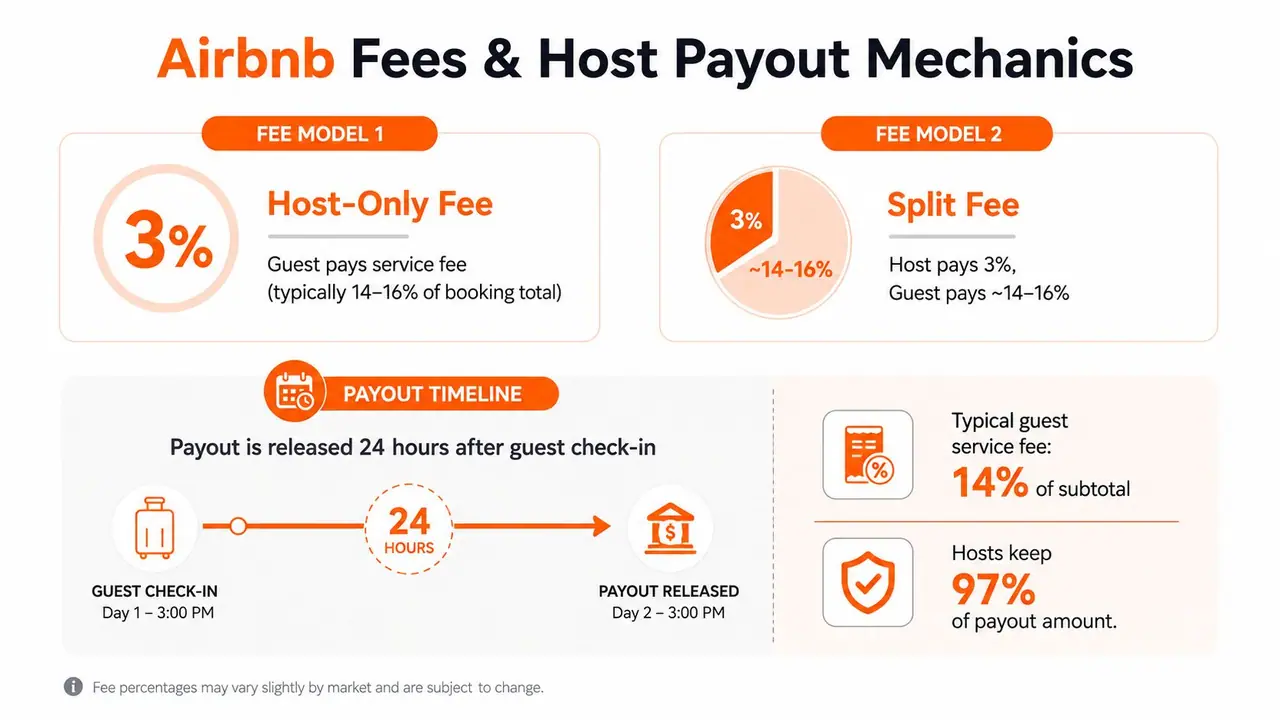
The traditional split-fee model charges hosts about 3%, while guest service fees can run from 14.1% to 16.5% of the booking subtotal, according to Investopedia's breakdown of Airbnb's fee structure. Some hosts instead use a host-only fee model, which shifts more of the platform cost to the host side, and more recent industry reporting says many professional or software-connected hosts pay a 15.5% host-only fee, with 16% in Brazil. Airbnb's scale also matters here, because its official newsroom announced a community milestone of 5 million hosts, which shows just how standardized this pricing and payout system has become. Investopedia's Airbnb fee overview
That structure changes how you think about nightly pricing. A rate that looks healthy before fees can feel tight after cleaning, consumables, turnover labor, and taxes. Hosts who don't model the fee layer often end up underpricing the stay without realizing it.
Why payout timing affects operations
Airbnb typically releases payout about 24 hours after check-in, and funds can take 1 to 7 business days to reach the bank depending on the country and payout rail, according to the same industry reporting. GuestReady's guide on how Airbnb works notes the same 24-hour post check-in release pattern and explains that this creates a real cash-flow delay for hosts, because cleaning, stocking, and maintenance costs usually happen before cash settles. That's the part many beginners miss.
You're financing the stay before the payout lands. If margins are thin, that delay can be the difference between smooth operations and constant scrambling.
This is also why hosts need buffers. The platform handles collection and payout mechanics, but it doesn't advance money for pre-arrival work. If a last-minute repair or deep clean lands in the same week as a new reservation, the host still needs cash available to absorb the gap.
For hosts comparing extra charges and fee structures around guest services, this breakdown on what an amenity fee means helps separate platform fees from optional add-ons.
Airbnb also supports Instant Book, which changes the booking flow by confirming eligible reservations automatically, while request-based reservations leave the host with more control. That trade-off matters because faster confirmation can lift conversion, but tighter control can protect against bad-fit stays.
Booking Types and Calendar Management
The decision between Instant Book and request-based bookings isn't just a preference setting. It changes how often you check the app, how tightly you need your systems to run, and how much friction guests feel before they reserve.
Instant Book and the speed trade-off
Instant Book auto-confirms eligible reservations, which reduces back-and-forth and keeps the booking path short. That's useful when the market is competitive or when the property is set up for low-touch turnover. The downside is simple, fewer checkpoints before confirmation, so the rest of your process needs to be tighter.
That means stronger house rules, more reliable calendar sync, and clearer pre-arrival messaging. If the listing is also on other platforms, calendar hygiene becomes essential. A practical guide on sharing availability and avoiding double bookings is worth reading if you're managing more than one booking channel.
Request-based bookings and the control trade-off
Request-based bookings give the host a 24-hour window to review the guest and accept or decline. That extra time can help when the property has strict house rules, unusual access instructions, or a setting where guest fit matters more than raw volume.
The trade-off is conversion friction. Guests often want a fast answer, and if a host is slow to approve a request, the reservation can cool off before it starts. That's why request-based bookings work best when the host is monitoring the inbox and making decisions quickly.
Calendar settings carry the same operational weight as booking type. Minimum stay length can protect you from high-turnover, low-margin nights. Maximum stay length can prevent long blocks that crowd out higher-value reservations. Advance notice rules help you avoid same-day chaos if the property needs real prep time.
A strong calendar isn't just “open” or “blocked.” It reflects cleaning schedules, maintenance windows, personal use, and realistic arrival timing. If those pieces don't match the calendar, the guest experience absorbs the mistake.
The Day-to-Day Reality of Hosting
A single good booking can still create three separate jobs. There's the guest message, the turnover, and the inevitable little issue that doesn't fit neatly into either category. That's the part hosts often don't see when they first ask how Airbnb works for hosts.
A normal turnover day
A typical morning starts with messages. One guest wants checkout instructions, another asks whether they can drop luggage early, and the cleaner needs to know if a late departure changed the schedule. The host is translating between people, timing, and property readiness all at once.
By midday, the unit needs eyes on it. Sheets get swapped, supplies get checked, trash gets removed, and any maintenance issue has to be handled before the next arrival. If a lock stops responding or a shower drain backs up, the clock suddenly matters a lot more than the listing copy ever did.
For hosts who want to cut down on repetitive arrival questions, a self-check-in workflow can save a lot of friction. This guide on self-check-in setup is relevant because it reduces one of the most common arrival bottlenecks.
One property versus a portfolio
A single property can usually be run with a few solid routines and a reliable cleaner. A multi-property portfolio needs coordination, written checklists, backup vendors, and better visibility into who owns what. The workload doesn't just grow linearly, it gets messier because every property introduces different access methods, linen counts, and guest expectations.
The best operators don't try to remember everything. They build repeatable handoffs so the house can be managed even when they're not watching the inbox every minute.
That's also where delegation starts to matter. Some hosts keep guest messaging in-house and outsource cleaning. Others split duties further by using remote coordination for scheduling, supply tracking, and guest follow-up. If the portfolio is larger or the host is balancing another job, a property management virtual assistant based in Latin America can be one way to offload repetitive admin without giving up control of the brand voice.
The goal is not doing everything yourself. It's building a system where the guest sees calm, even when the host is moving between messages, turnovers, and repairs behind the scenes.
Optimizing Occupancy and Reducing Support Load
Airbnb gives hosts useful operational data, but the numbers only help if you use them to change something. Occupancy rate tells you how efficiently the calendar is being converted into booked nights, average nightly rate shows what each booked night is bringing in, and cancellation rate flags friction or instability in the booking process, as defined in Airbnb's host documentation.
Read the metrics like an operator
If occupancy is weak, the first question isn't always price. It can be photos, minimum stay rules, calendar gaps, or a mismatch between the property and the guest it's attracting. If average nightly rate is slipping, the issue may be discounting too early or letting the market dictate pricing without a clear floor.
Cancellation rate deserves attention because it often points to avoidable operational problems. Confusing house rules, slow responses, weak guest screening, and poor listing clarity all create cancel risk. Those aren't abstract marketing issues, they're operational leaks.
Cut repetitive messages before they start
A lot of support volume comes from the same five questions. Guests ask about Wi‑Fi, check-in, parking, trash, and checkout because those details are either buried in the listing or scattered across messages. A digital welcome book solves that by putting the essentials in one place, and hosts can also use an internal system to keep pricing decisions visible, such as this guide on Airbnb Smart Pricing.
That's where host tools earn their keep. If a guest can self-serve the basics, the host gets time back for the issues that need judgment. ScanStay is one option in that category, since it centralizes guest instructions, local recommendations, and FAQs behind a QR code or link.
For larger operations, the same logic applies to staffing. Some hosts build a lean process around a cleaner and a co-host, while others use a broader support team to handle messaging, supply tracking, and reservation follow-up. The common thread is the same, reduce avoidable questions so the host can focus on the high-value decisions.
Reviews, Legal Considerations, and Long-Term Success
A host can run a good operational system and still struggle if reviews, regulations, or taxes are ignored. Long-term success depends on treating the listing like a small business with obligations outside the platform, not just a marketing page with a calendar.
Reviews and reputation
Airbnb's review system creates a public record of how the stay went, so every detail before checkout matters. Hosts who want steady five-star feedback tend to make the arrival smooth, resolve problems quickly, and leave clear instructions before the guest ever has to ask.
The simplest habit is often the strongest. A clean space, fast replies, and a thoughtful welcome note reduce tension before it starts. That matters because guests review the stay as a whole, not just the bed or the decor.
Regulations and taxes
Local short-term rental rules vary, and hosts need to check registration, permit, tax, and zoning requirements in their own city or county. Some places limit the number of days a property can be rented, while others require specific filings before hosting can begin.
The tax side deserves its own routine. A monthly block on the calendar for tracking income, cleaning invoices, and supply purchases keeps the end of the year from turning into a paperwork scramble. If you need help interpreting business obligations, an AI legal assistant for business owners can be a practical starting point before you speak with a local professional.
Building a business that lasts
Scaling from one property to a portfolio usually requires systems before it requires more listings. When the inbox gets crowded, when turnover timing gets tight, or when guest experience starts depending on memory instead of process, it's time to standardize.
The hosts who last don't just chase bookings. They build repeatable responses, clear handoffs, and a guest journey that works even when the calendar is full. That's the difference between a side project that wears you out and a business that keeps paying without consuming every evening.
If you want to make hosting easier without losing control of the guest experience, ScanStay gives you a digital welcome book you can share by QR code or link, so guests can find check-in details, house rules, Wi‑Fi, and local recommendations without extra messages. Visit ScanStay to see how it fits into a short-term rental workflow and decide whether it makes sense for your property.