Property Management Automation: A Host's Guide for 2026
Discover property management automation for short-term rentals. Our 2026 guide explains key workflows, ROI, and tools to save time and boost revenue.
Your phone buzzes at 8:17 p.m. You're halfway through dinner, and the message is the same one you answered last week, and the week before that. “What's the Wi-Fi password?” Ten minutes later, another guest wants check-in instructions that were already sent. Then someone asks whether late checkout is possible.
None of these messages are hard. That's the problem. They're simple, repetitive, and constant. They break your focus, drag you back into host mode, and turn evenings into a low-level support shift.
That's where property management automation earns its keep. Not by sounding impressive in a demo, but by taking predictable tasks off your plate so you can spend your time on exceptions, not repetition. The hosts who get the most value from automation aren't always the most technical. They're usually the ones who got tired of doing the same work manually and decided to build systems once instead of solving the same issue every day.
Most advice on this topic stops at rent collection, calendars, or cleaner scheduling. Those matter. But for short-term rental hosts, two areas stay under-automated for far too long: guest experience and guest upsells. That's where support load drops fast, and where new revenue can show up without adding more back-and-forth.
Table of Contents
- Giving You Your Evenings Back
- What Is Property Management Automation Really
- Core Automated Workflows That Boost Efficiency and Revenue
- Calculating the Real ROI of Automation
- Your 4-Step Automation Implementation Roadmap
- Common Pitfalls and the Future of Smart Hosting
Giving You Your Evenings Back
The clearest sign you need property management automation isn't a spreadsheet problem. It's attention fatigue.
A host with one property can still get buried if every check-in detail, house rule, parking note, and appliance question requires a manual reply. Add multiple listings, co-hosting clients, or a small team, and the day gets chopped into tiny interruptions. You aren't doing deep work. You're reacting.
I've seen the same pattern across small portfolios. The host thinks they need “better messaging,” but the underlying problem is that the business relies on them as the delivery mechanism for routine information. If guests need you to provide basic stay details, your setup is fragile.
The real cost of repetitive support
The obvious cost is time. The less obvious cost is context-switching.
When you stop mid-task to answer “How do I get in?” you lose more than the minute it takes to type. You lose momentum on pricing updates, owner reporting, cleaner coordination, or whatever needed your attention. That's why manual hosting feels heavier than the task list suggests.
Practical rule: If a guest asks the same question more than once across stays, that answer should live in a system, not in your thumbs.
Good automation handles the predictable. It sends the check-in note on time, surfaces the Wi-Fi details instantly, nudges a cleaner when a departure hits, and keeps your calendar from drifting out of sync. It doesn't remove hospitality. It protects your energy so you can show up when a guest has a genuine problem.
What hosts usually automate first, and what they miss
Most hosts start in the back office. That makes sense. Payments, calendars, and turnover tasks are easy to identify because they're operational pain points. But short-term rentals create a second layer of work that long-term property managers don't carry in the same way: constant guest communication around low-complexity questions.
That's why some hosts buy software and still feel busy. They automated the admin side but left the guest side manual.
The biggest gains often come when both sides work together. Your systems shouldn't just run the property. They should guide the guest through the stay without needing you as the middleman every time.
What Is Property Management Automation Really
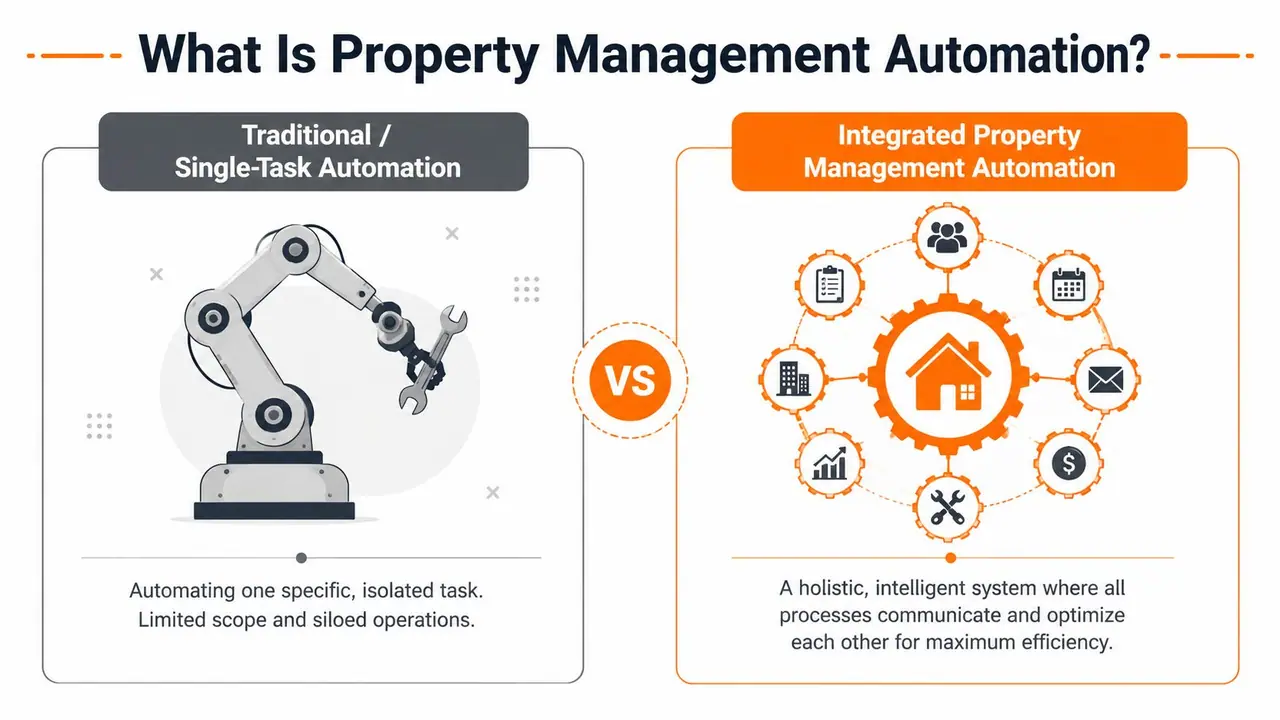
Property management automation isn't one feature, one app, or one dashboard. It's a working system that moves information to the right person, or the right tool, at the right time without manual intervention.
Think of the difference this way. A single-task automation is like hiring one person only to send reminders. Useful, but narrow. An integrated setup acts more like a digital operations manager. It connects bookings, guest messaging, cleaning, payments, and service tasks so one action triggers the next.
Two systems, one business
Most hosts should think about automation in two buckets.
| Area | What it handles | What success looks like |
|---|---|---|
| Back-end operations | calendars, booking sync, cleaner tasks, invoicing, payment reminders, maintenance routing | fewer missed steps, fewer manual follow-ups, cleaner handoffs |
| Front-end guest experience | check-in instructions, Wi-Fi access, house rules, local recommendations, service requests, upsells | fewer repetitive messages, faster guest answers, smoother stays |
A lot of software does the first bucket reasonably well. Far fewer setups handle the second bucket with the same discipline.
That gap matters because a short-term rental is both an operations business and a guest communication business. If your automations only manage the property but not the stay experience, your phone still becomes the help desk.
What a solid automation stack needs
The best setups share a few traits.
- Connected triggers: A confirmed booking should trigger messages, access prep, cleaning tasks, and internal notifications without copy-pasting.
- Clear guest delivery: Information has to be easy to access. If guests need to download an app, many won't bother.
- Editable templates: You want reusable messaging, but you also need the flexibility to adjust for one property, one reservation, or one issue.
- Human fallback: Automation should escalate edge cases to a person instead of pretending every situation fits a template.
- Integration range: Tools that talk to each other age better than tools that trap data in silos.
If you're comparing options, it helps to look at how operators connect different tools through workflow platforms. For example, Hen Hideaways Zapier capabilities show the kind of integration layer that lets hosts move booking and guest data between systems instead of managing each app separately.
A good automation stack doesn't replace judgment. It preserves judgment for the moments that actually need it.
That's the part vendors often gloss over. Automation works best when you use it to remove repeatable work, not when you try to script every human interaction. Guests still want responsiveness and clarity. They just don't need you manually typing the same answer every day.
Core Automated Workflows That Boost Efficiency and Revenue
Hosts usually feel automation first through workflow relief. Fewer handoffs get missed. Fewer guests ask for basics. Fewer admin tasks pile up after checkout.
The most practical way to assess your setup is to compare every workflow in two states: before automation and after automation.
Guest communication and self-serve stays
Before automation, guest communication looks manageable on paper and exhausting in practice. Most questions are low-complexity. Wi-Fi. Parking. Door codes. Trash day. Check-out steps. Appliance instructions. Local recommendations.
That's why the guest-facing side matters so much. There's a documented gap between workflow automation and guest experience automation in short-term rentals. Automating rent and maintenance can reduce operational costs by 70%, and 61% of renters already pay online, but hosts still get flooded with repetitive guest questions because many setups don't solve the front-end communication burden according to Kolena's property management automation analysis.
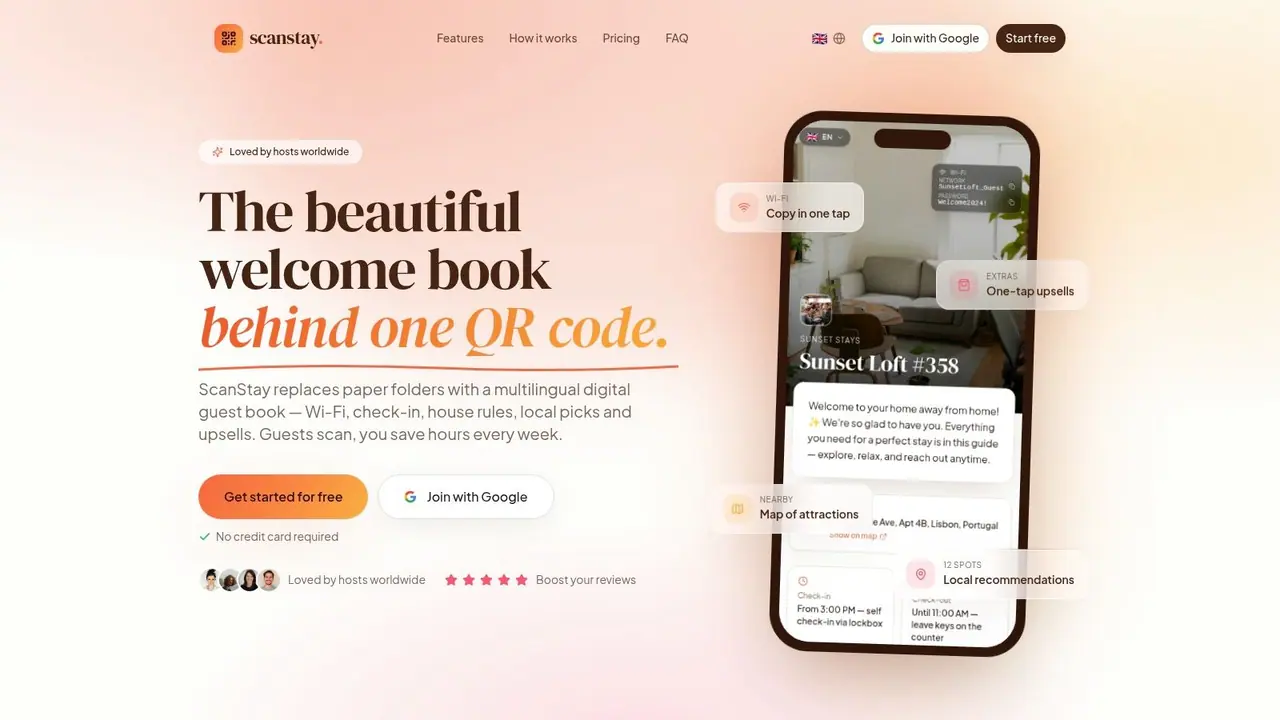
What works is self-serve delivery in the guest's browser. No binder to update. No app friction. No digging through old messages.
A simple decision rule helps here:
- If guests ask it before arrival, automate it into pre-stay messaging.
- If guests ask it on-site, place it in a mobile-accessible guide.
- If guests ask it during checkout, trigger it automatically based on departure timing.
For hosts refining this layer, guides on automating Airbnb messages are useful because they force you to separate messages guests must receive from messages you only send because your system is incomplete.
Booking and channel management
Before automation, channel management breaks in quiet ways. A calendar update doesn't sync fast enough. Minimum stay rules differ by platform. One listing gets the new check-in wording, another doesn't.
After automation, the booking stack becomes your control center. A PMS, channel manager, or booking platform should push reservation data downstream to the tools that need it. If your cleaner, guest comms tool, and revenue setup all rely on manual exports, you're still operating on brittle infrastructure.
The biggest win here isn't glamour. It's consistency.
Dynamic pricing and stay rules
Pricing automation isn't about surrendering rate control to software. It's about removing lag.
Manual pricing usually falls behind reality. Hosts update rates after demand changes instead of before. They forget to adjust gap nights, length-of-stay rules, or special-event periods. Automated pricing tools help because they keep inventory responsive without requiring daily hand edits.
What doesn't work is blind trust. Hosts who set pricing once and never review it often end up with mismatched strategy. The tool still needs guardrails. Minimum rates, preferred stay lengths, blocked dates, and brand positioning should come from you.
Housekeeping and turnover coordination
Turnovers are where simple automation often pays for itself in reduced chaos.
Before automation, someone checks the calendar, texts the cleaner, confirms linen needs, follows up about supplies, and then checks again when the guest departs. After automation, departure data triggers the turnover task, checklists get assigned automatically, and status updates flow back into one place.
A lean process usually includes:
- Departure trigger: Checkout automatically creates a cleaning task.
- Property-specific checklist: Each unit carries its own reset steps, not a generic list.
- Exception flagging: Damage, missing stock, or early-arrival conflicts surface immediately.
- Completion confirmation: The host sees status without chasing messages.
Maintenance triage and vendor dispatch
Maintenance automation isn't only for large residential portfolios. It matters for STRs because the same small issues return constantly: a lock battery, Wi-Fi hiccup, hot water confusion, appliance misuse, or wear-and-tear after back-to-back stays.
The mistake is treating every issue as equal. Good systems triage. They separate urgent faults from guest education issues and route each one differently. Some problems need a vendor. Others need clearer instructions.
The fastest way to reduce maintenance noise is to stop calling guest confusion a maintenance problem.
When expense approvals are part of your workflow, it's also worth evaluating AP automation options so invoice handling, approvals, and vendor payment steps don't become a second manual bottleneck after the work order is closed.
Payments, invoicing, and approval flows
Payments are one of the clearest examples of automation producing measurable operational outcomes. Automated rent reminders and autopay functionality reduce late payments by 30% to 35%, according to DoorLoop's review of automated property management systems.
For STR hosts, the exact workflow differs from long-term rent collection, but the lesson still holds. Friction kills compliance. The easier it is for guests or clients to pay, approve, confirm, or authorize, the fewer manual chases you'll run.
That applies to owner invoices, extra charges, damage claims, and service add-ons too.
A video walkthrough helps show how this operational layer connects to the guest side in practice:
Automating upsells inside the guest journey
Most hosts often leave potential revenue untapped.
Many automation setups focus on cost reduction. Fewer messages, fewer errors, less admin. Useful, but incomplete. The stronger model turns routine guest touchpoints into revenue opportunities when the timing makes sense.
Industry coverage often discusses rent collection, maintenance, and lease workflows, but rarely explains how to automate guest upsells like late checkout, airport transfers, or equipment rentals from the same interaction point. That gap is called out in ButterflyMX's look at property management automation.
The mistake is presenting upsells as a separate campaign. In practice, they work better when they appear naturally inside the stay flow:
- Pre-arrival: transport, grocery setup, crib hire
- During stay: equipment rental, cleaning refresh, local add-ons
- Pre-departure: late checkout or luggage options
If the guest has to message you, wait for a reply, and then figure out payment, the conversion chance drops. If the offer is clear and available where they already look for stay info, it becomes much easier to sell without adding labor.
Calculating the Real ROI of Automation
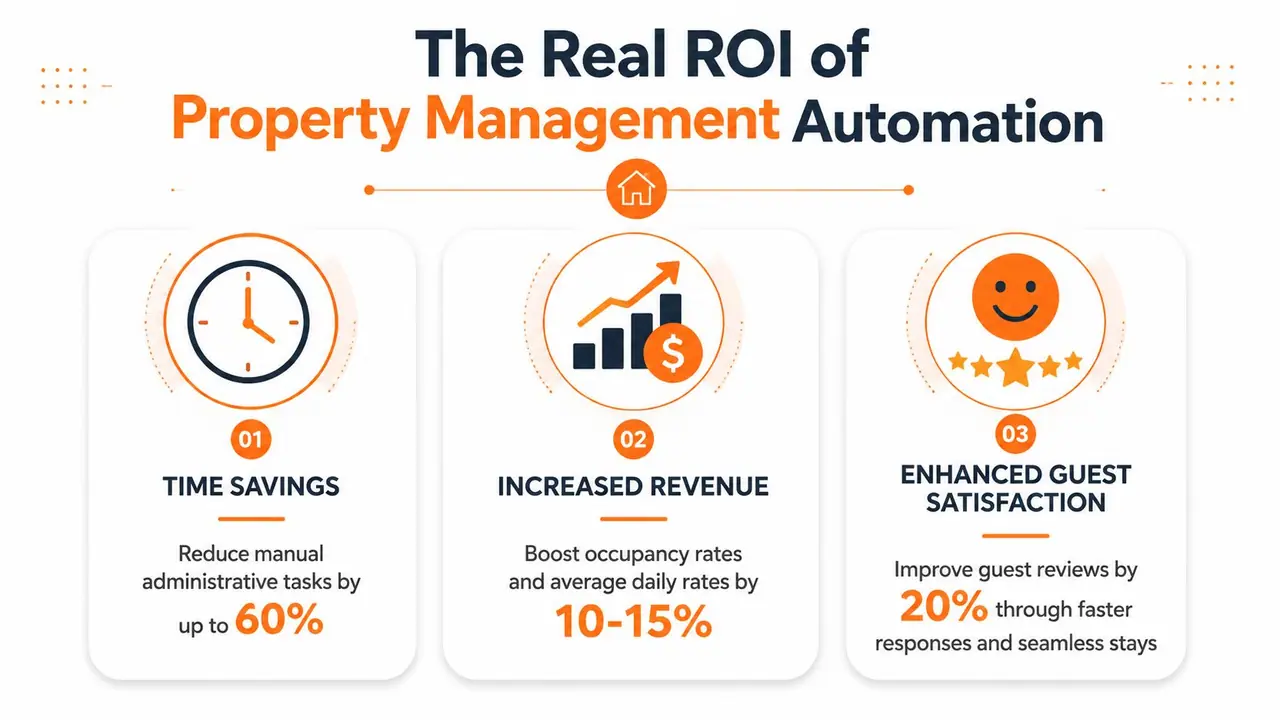
Most hosts buy software for time savings, then judge it only on subscription cost. That's too narrow. The better question is whether the system removes enough labor, enough friction, and enough leakage to improve the business as a whole.
Time you stop spending
The first return is operational. Every repeated task you automate is time you stop donating to the business.
Look at your actual week, not the software brochure. How often do you resend check-in details, follow up on cleaner status, approve routine invoices, or answer the same property questions? If automation removes those loops, your gain isn't abstract. It shows up as fewer interruptions, fewer late-night replies, and fewer dropped tasks when occupancy rises.
A useful way to evaluate this is to track three things for a month:
- Messages that repeat
- Tasks that require manual handoff
- Approvals that stall because someone forgot to chase them
If a tool doesn't reduce one of those categories, it may be automating the wrong problem.
Revenue that comes from cleaner systems
Revenue gains from automation are often indirect at first. Faster response flow improves the stay. Better stay clarity reduces friction. Cleaner operations create more reliable turnovers and fewer avoidable guest issues. Then revenue shows up through stronger occupancy management, smoother add-on sales, and less operational leakage.
Cash flow discipline matters too. As covered earlier, automated collection workflows can improve collection rates and NOI because they reduce payment friction and manual lag. The same principle applies beyond rent. If a process makes payment or authorization easier, more charges get handled promptly and with less dispute risk.
For hosts who want to get more rigorous about measuring performance, using a simple dashboard or reviewing vacation rental analytics benchmarks and tracking ideas helps connect operational changes to booking outcomes, guest support volume, and ancillary revenue.
Don't measure automation by whether it feels modern. Measure whether it removes repeat work and makes income easier to capture.
Why the market trend matters
There's also a strategic reason to invest. The software ecosystem around hosting is getting larger and more specialized. The global property management software market is projected to grow from USD 26.49 billion in 2024 to USD 42.78 billion by 2030 at a CAGR of 8.3%, with North America projected to hold 33.8% of the market in 2025, and app-based platforms expected to post the highest growth according to MarketsandMarkets research on property management software.
That projection matters because it signals where operator expectations are heading. More tools will exist. More guests will expect smooth, mobile-first interactions. More managers will run their businesses through connected systems rather than patched-together manual processes.
Waiting too long creates a different kind of cost. You don't just stay manual. You fall behind hosts whose systems are easier to run and easier to scale.
Your 4-Step Automation Implementation Roadmap
The fastest way to waste money on automation is to buy tools before defining the problem. The second fastest is to automate a broken process and lock the mess in place.
A better rollout starts with friction, not features.
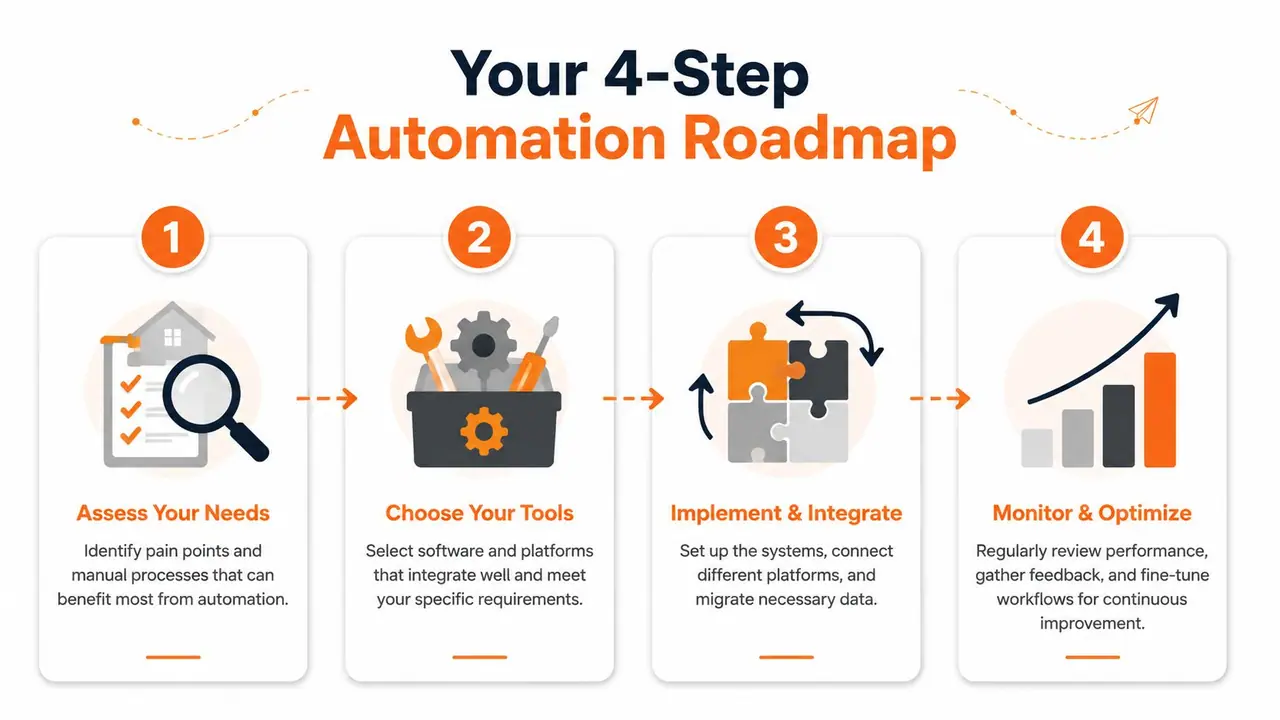
Step 1 assess your friction points
Start with a plain audit. For one week, capture every repetitive task you or your team touches.
Don't organize it yet. Just log it. Guest questions, cleaner chases, invoice approvals, maintenance follow-ups, lock code resends, extra service requests, and owner updates all count. Once you have the list, highlight the tasks that are both frequent and predictable.
Those are the first automation candidates.
A simple filter helps:
- High frequency, low judgment: automate first
- Low frequency, high judgment: keep human
- High frequency, high judgment: standardize, then partially automate
- Low frequency, low impact: ignore for now
Step 2 choose tools that connect
Once you know the pain points, choose the fewest tools that solve them cleanly. Hosts often overbuy because every vendor promises to be the central platform.
The better stack is usually narrower and better connected. You may need a PMS, a guest communication layer, a pricing tool, a payment or invoicing process, and a maintenance workflow. But every tool should earn its place.
Use these criteria when comparing options:
| Criteria | What to check |
|---|---|
| Integration fit | Does it connect to your booking and messaging flow without manual exports? |
| Guest usability | Can guests access what they need quickly, ideally without app friction? |
| Operational clarity | Can your cleaner, co-host, or VA understand it in one pass? |
| Scalability | Will this still work when you add properties or staff? |
| Revenue support | Can it help deliver add-ons, not just reduce admin? |
That last point is easy to miss. Many tools automate cost-reducing tasks but ignore revenue-generating guest interactions. Industry reporting has highlighted that common automation advice focuses on rent, maintenance, and renewals, while upsells like late checkout, transfers, or equipment rental often remain outside the automated guest flow. If you're comparing platforms for a small or growing portfolio, guides on affordable property management software options can help you weigh cost against integration depth and guest-facing capability.
Step 3 implement with a guest-first test
Most automation failures happen during rollout, not purchase.
Hosts build the workflow from the operator's viewpoint and forget the guest experience. Then they wonder why guests still message for help. Every automated sequence should be tested from the outside in. Book a test reservation. Open every message on your phone. Try to find the lock code, parking note, check-out steps, and any extra service options as if you were arriving late and tired.
If something feels buried, it is.
A clean rollout usually looks like this:
- Build templates for common guest stages and internal tasks.
- Assign triggers based on booking, arrival, stay, and departure events.
- Test edge cases like early check-in requests, date changes, and same-day turnovers.
- Keep fallback paths so a person can step in fast when the workflow hits an exception.
Start with one property if you can. A stable small rollout beats a messy portfolio-wide launch.
Step 4 measure what changed
After launch, most hosts stop measuring and move on. That's a mistake. Automation drifts if you don't review it.
Track operational and guest-facing metrics side by side. You want to know whether the new system reduced work and improved the stay.
Use a checklist like this:
- Support load: Are repetitive guest messages declining?
- Task reliability: Are cleaner and maintenance steps being completed without manual chasing?
- Response quality: Are guests getting the right info at the right moment?
- Upsell flow: Are guests seeing and using optional services naturally?
- Exception rate: Where does the automation still break or confuse people?
Then tighten the weak spots. Rewrite unclear instructions. Remove duplicate messages. Move high-value offers to better moments in the guest journey. Property management automation works best as a living system, not a one-time setup.
Common Pitfalls and the Future of Smart Hosting
Automation helps, but it can also create new problems when hosts deploy it carelessly.
Where hosts go wrong
The first mistake is over-automating the guest voice. If every message sounds robotic, guests feel managed instead of hosted. Templates should sound clear and human, and they should leave room for personal replies when something unusual happens.
The second mistake is stacking disconnected tools. A host adds one app for bookings, another for messaging, another for maintenance, and a fourth for extras. None of them sync properly, so the team starts maintaining the automation instead of benefiting from it.
The third mistake is ignoring property infrastructure. Smart hosting isn't only software. Operational visibility matters too. For example, resources explaining the benefits of smart water meters are useful because leak detection and usage monitoring can reduce emergency maintenance surprises that no messaging workflow can solve on its own.
What smart hosting looks like next
The next shift is AI moving from admin support into daily operations. The share of property management companies using AI for automation rose from 20% to 58% in the last year, according to the Tricape state of the property management industry report.
That doesn't mean every host needs an AI-heavy stack tomorrow. It does mean guest-facing automation will keep getting smarter. Better translation, stronger message drafting, improved categorization of guest issues, and faster routing of routine requests are all becoming more practical.
The hosts who benefit most won't be the ones who chase every new feature. They'll be the ones who build a clean system now, keep the human touch where it matters, and let software handle the repetitive work.
If you want a simple way to reduce repetitive guest questions and turn stay information into a cleaner, revenue-friendly experience, ScanStay is built for that job. It gives guests one QR-based place to find Wi-Fi, check-in details, house rules, local recommendations, and optional add-ons in their mobile browser, without forcing an app download.