Airbnb Host Fees Explained for 2026
Learn how Airbnb host fees work in 2026, what gets deducted, and how pricing, upsells, and bookkeeping can protect your rental revenue.

You've just finished a busy weekend. The calendar was full, the guests checked out, and the reservation appeared to be worth about $1,200. Then the Airbnb deposit arrives, and the amount is closer to $900. Your first thought is probably that Airbnb took more than expected, but the difference may include several unrelated items: the platform service fee, cleaning costs, taxes, refunds, co-host payments, or expenses charged outside Airbnb.
That confusion is common because gross booking value isn't the same as host income. The guest's checkout total can include taxes and guest-facing charges that never belong to you, while your payout can include host-set fees that you'll later spend on turnover. Once you follow one reservation from checkout to bank deposit, Airbnb host fees become easier to classify and manage.
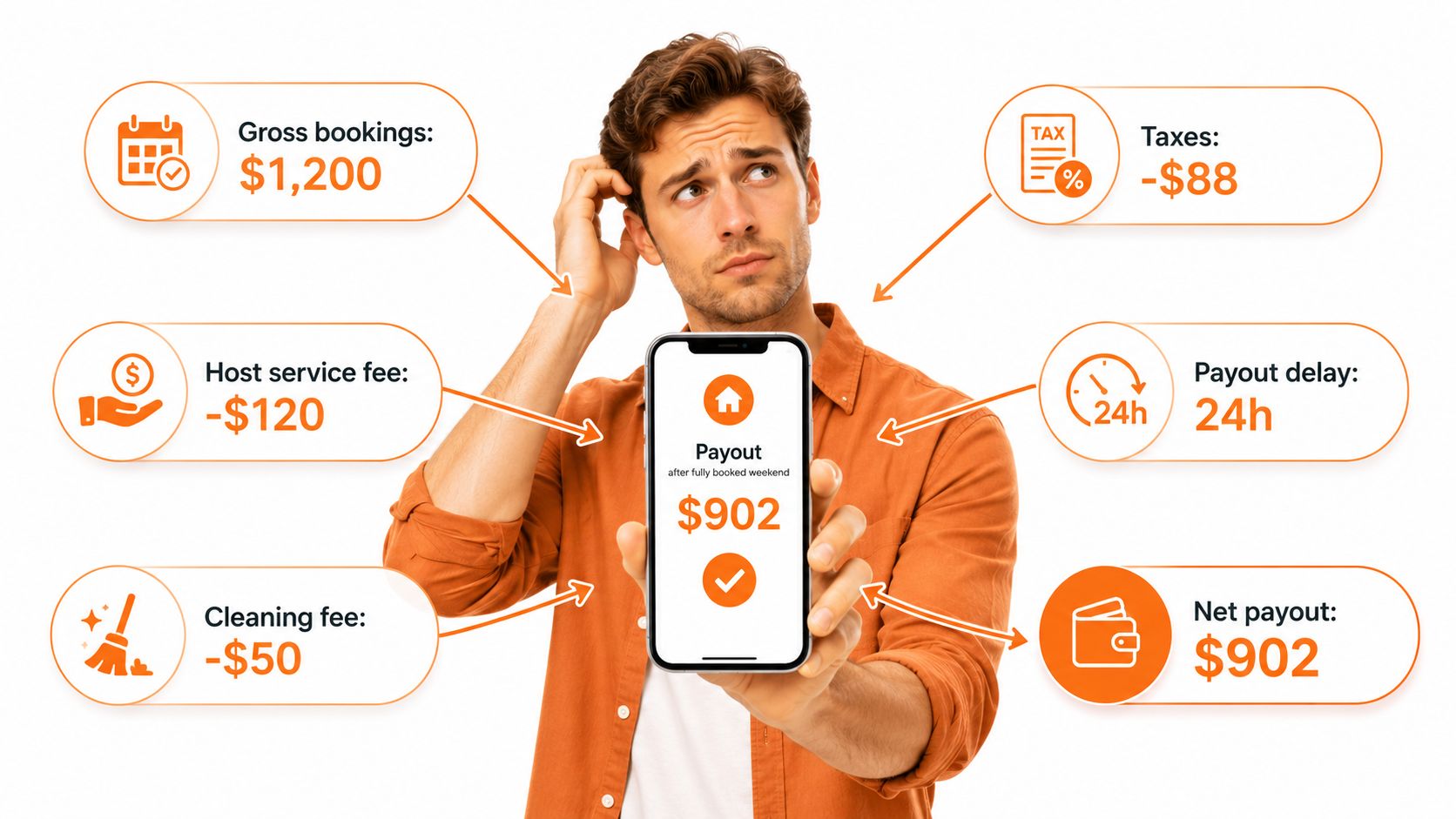
The practical question isn't, “What percentage does Airbnb charge?” It's, “Which money is revenue, which money is a pass-through, which amount is deducted by Airbnb, and which cost arrives in a separate invoice?” That distinction helps you price accurately, explain payouts, and keep clean records. For timing and deposit details, hosts can also review this guide to when Airbnb hosts get paid.
Table of Contents
- Why Airbnb Host Payouts Feel Lower Than Expected
- How Airbnb Host Service Fees Work
- Other Charges That Reduce or Affect Host Revenue
- Worked Airbnb Host Fee Examples
- Pricing and Fee Strategies to Protect Revenue
- Common Airbnb Host Fee Mistakes
- Bookkeeping and Monthly Reconciliation
- Airbnb Host Fees FAQ
Why Airbnb Host Payouts Feel Lower Than Expected
A reservation can show a guest-facing total of $1,200, yet the deposit may be much lower. The gap does not automatically mean Airbnb kept the difference. It may include the platform service fee, taxes, refunds, co-host payments, cleaning costs, or expenses billed outside Airbnb.
Begin with the reservation's gross booking value, the amount connected to the booking before separating platform deductions, taxes, operating expenses, and adjustments. It may include nightly charges, a cleaning fee, and host-added extras. None of those items, by itself, proves that the reservation produced profit.
The host payout is the amount Airbnb sends after applicable deductions. The host service fee is deducted automatically and generally applies to the nightly price plus host-charged fees, while taxes and guest service fees are excluded according to Airbnb's fee explanation. A payout report can therefore combine money you earned with money collected to cover a particular cost.
Follow one reservation from checkout to deposit
That $1,200 guest total might contain:
- Accommodation revenue, calculated from the nightly rate.
- A host-set cleaning fee, collected to help pay for turnover.
- Occupancy or tourism taxes, which may be collected and remitted separately.
- A guest-facing Airbnb service fee, under a fee structure where one applies.
- Refunds or adjustments, if the reservation changed after booking.
- The host service fee, deducted from the amount used to calculate your payout.
A cleaning fee can raise both the booking total and the payout, but it is not automatically available income. You may spend it on a cleaner, linens, supplies, or maintenance after the guest leaves. A tax can appear at checkout without becoming operating revenue.
Practical rule: Treat every payout as a reconciliation exercise, not a profit statement.
Why the same listing can produce different results
Airbnb's fee structure may vary by listing, market, and connection method, and it has changed over time. Your dashboard is the appropriate place to confirm the rate and calculation for a specific reservation. Regional settings, currency conversion, co-host arrangements, damage-related adjustments, and external software can also change the amount reaching your bank account.
Your own pricing settings matter too. A reservation with a cleaning fee, pet fee, extra-guest charge, or optional service has a different composition from one based only on the nightly rate. If you add upsells, record each amount separately so repricing decisions reflect actual revenue rather than the checkout total.
Download the reservation details and assign every line to revenue, pass-through, deduction, or separate operating expense. This four-part classification also makes monthly bookkeeping easier. For deposit timing and payment records, review the guide to when Airbnb hosts get paid. Once each reservation follows the same path from checkout to payout, a lower deposit becomes explainable rather than mysterious.
How Airbnb Host Service Fees Work
A four-night booking totals $1,000 before taxes and guest charges. Under an older split model, a host might have kept $970 after a 3% host fee. Under the host-only structure, a 15.5% deduction on the same commissionable subtotal leaves $845. The reservation looks similar at checkout, but the host payout changes substantially.
Airbnb's host service fee is the platform commission deducted before payout. Airbnb describes 15.5% as the rate for most hosts under its current host-only structure, while other hosts generally fall within the 14% to 16% range. Its published guidance lists 16% for hosts in Brazil and Mexico service-fee guidance.
Earlier, most hosts generally paid a 3% host fee, while guests paid a separate service fee. The older host fee was 4% in Brazil and Mexico. Industry reporting described the earlier guest-side charge as roughly 14.1% to 16.5%, before Airbnb shifted most hosts to a single 15.5% host-only fee in coverage of the fee change.
The calculation base matters
The percentage is only half of the calculation. The base is the other half. Airbnb generally applies the host fee to the nightly price and host-charged amounts, such as a cleaning fee, while excluding taxes and guest service fees. The exact reservation breakdown remains the practical reference for each listing.
Suppose the commissionable subtotal is $1,000. A 3% fee removes $30, leaving $970 before other adjustments. A 15.5% fee removes $155, leaving $845 before taxes, refunds, or other items.
Cleaning fees, pet fees, and extra-guest charges can therefore affect the deduction as well as the guest's total. Record each component separately. That makes repricing, upsell decisions, and monthly reconciliation more accurate than using the checkout total alone.
Fee model comparison
| Fee Model | Who Pays | Typical Rate | Calculation Base | Notes |
|---|---|---|---|---|
| Earlier split fee | Host and guest | Host generally 3%, guest generally 14.1% to 16.5% | Host fee generally applied to the booking subtotal | The guest saw a separate service fee |
| Host-only fee | Host | Most hosts 15.5% | Nightly price plus applicable host-charged fees, excluding taxes and guest service fees | Airbnb deducts the fee from the host payout |
| Regional variation | Host | Brazil and Mexico may be 16% under Airbnb's published structure | Confirm the applicable reservation base | Rules can differ by listing and market |
The fee supports Airbnb's distribution, payment handling, customer support, and reservation systems. Whether that cost works for your property depends on occupancy, direct-booking mix, operating workload, and the revenue left after expenses. Set prices from the desired payout backward, then confirm the actual deduction in the reservation record.
Other Charges That Reduce or Affect Host Revenue
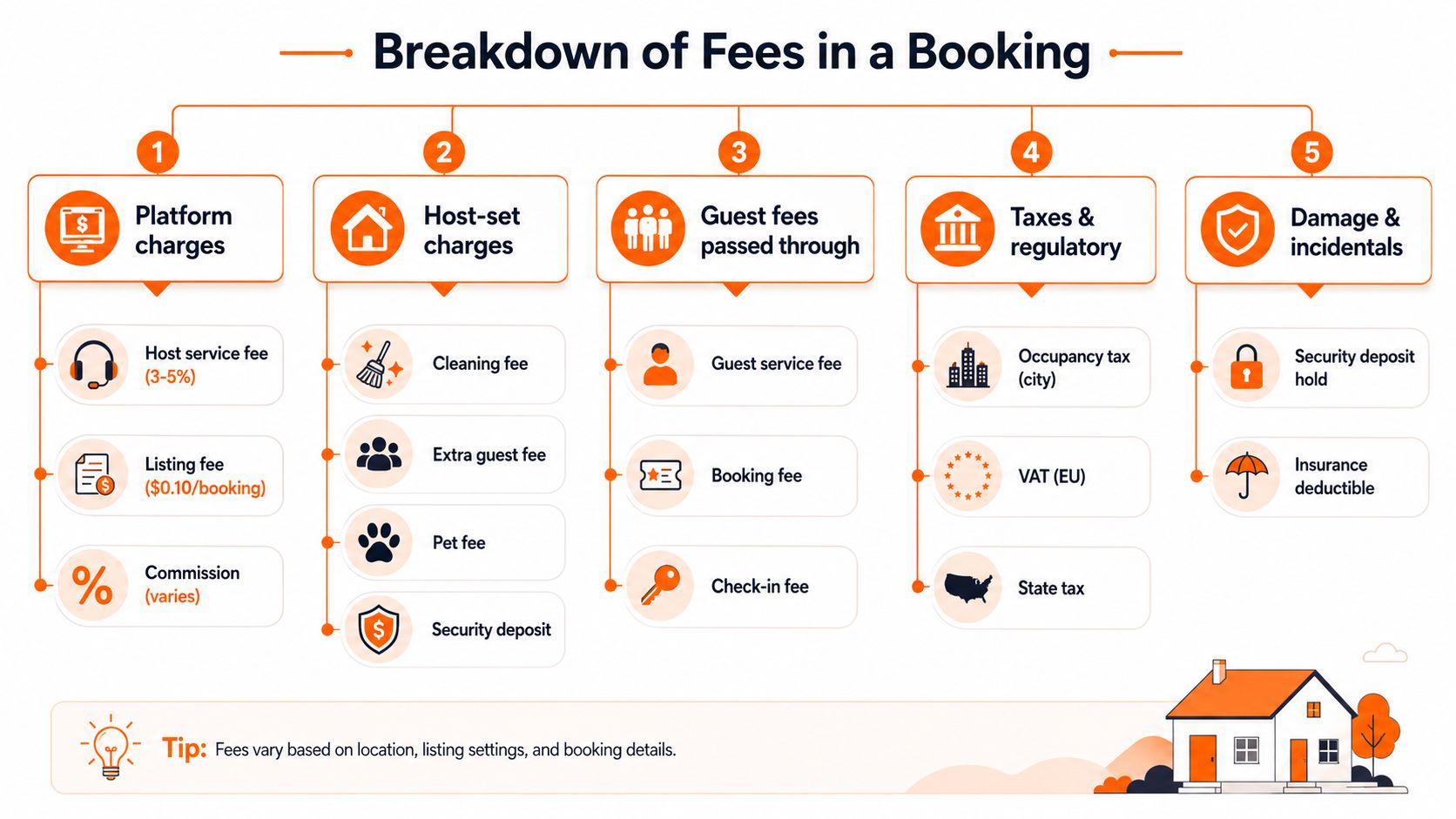
A reservation can show a healthy guest total while producing a smaller host payout. Follow the money in order: platform deductions, host-set charges, taxes, incident adjustments, and expenses paid to other vendors. Each belongs in a different category.
Platform deductions
The host service fee is deducted before Airbnb sends the payout. Its calculation base depends on the fee structure attached to the listing. Refunds, reservation changes, and payment adjustments can change the deposit too, so identify each transaction instead of grouping every reduction under “commission.”
A guest-facing service fee follows a different path. Under a split structure, the guest pays that amount to Airbnb. It is not host revenue and does not replace the host service fee.
Host-set charges
Cleaning fees, pet fees, and extra-guest charges are configured in the listing. They can raise the guest's checkout total and may enter the base used to calculate the host service fee. They also create work or obligations that must be tracked separately.
A cleaning fee works like a recovery account, not automatic profit. Match it with the cleaner's invoice, laundry, consumables, and replacement supplies. For amenity-related pricing, review what an amenity fee means, then confirm that the charge is disclosed clearly and allowed under the applicable Airbnb rules.
Taxes and regulatory collections
Occupancy taxes, tourism taxes, sales taxes, and similar charges may appear in the guest's checkout details. Airbnb may collect and remit some taxes, while the host remains responsible for others depending on the market and listing settings.
Ask whether the money belongs to the business. A tax collected for a government authority is generally recorded as a liability or pass-through under the accounting method agreed with your accountant, rather than as accommodation revenue.
Damage and incidentals
Security-related holds, damage claims, reimbursements, and AirCover-related adjustments do not behave like recurring service fees. A claim may create a later adjustment instead of changing the original payout, while repair costs may be paid directly to a contractor or insurer.
Read the transaction detail before labeling an amount a fee. A repair is an operating cost. A reimbursement is a recovery. Combining them can make one reservation look more profitable than it was.
External operating expenses
Co-host commissions, property-management payments, dynamic-pricing subscriptions, accounting software, payment tools, and digital guest-information products are usually paid outside Airbnb's payout system. A digital welcome book such as ScanStay can support guest instructions and reduce repeated service questions, but its cost remains a separate business expense.
For monthly reconciliation, use a resource on how to manage business expenses to create categories for platform deductions, taxes, cleaning, management, technology, and guest service. This separation shows the payout first, then the operating cost, so repricing and upsell decisions rely on the property's actual margin rather than the checkout total.
Worked Airbnb Host Fee Examples
A reservation can look profitable at checkout and produce a smaller payout than expected. Follow one booking from guest payment to host deposit, and the fee model becomes easier to audit. The calculations below are illustrative, not universal Airbnb quotes. Taxes, fee eligibility, and regional settings must be checked in the reservation breakdown.
Assume the applicable host-only fee is 15.5%. The fee applies here to the nightly accommodation and host-set charges, while the sample taxes remain separate. Use the fee base shown in your own transaction details.
Three reservations side by side
| Line Item | 2-Night Studio | 4-Night Family Home | 7-Night Luxury Stay |
|---|---|---|---|
| Nightly accommodation | $360 | $1,200 | $3,500 |
| Host-set cleaning fee | $80 | $180 | $300 |
| Host-added extras | None | $75 pet fee | $250 airport transport |
| Commissionable subtotal | $440 | $1,455 | $4,050 |
| Host service fee at 15.5% | -$68.20 | -$225.53 | -$627.75 |
| Taxes collected separately in this example | $44 | $145 | $405 |
| Guest-facing total before other adjustments | $484 | $1,600 | $4,455 |
| Host payout before separate operating expenses | $371.80 | $1,229.47 | $3,422.25 |
The studio starts with $360 in accommodation and an $80 cleaning charge, creating a $440 commissionable subtotal. A 15.5% deduction equals $68.20, leaving a $371.80 payout before cleaning labor, supplies, and other operating costs. The $44 sample tax appears in the guest-facing total, but it is not treated as host revenue in this example.
The family booking shows why every host-set charge needs its own row. The $75 pet fee raises the commissionable subtotal to $1,455 and the service-fee deduction to $225.53. Compare that added income with pet cleaning, inspection time, and extra wear before deciding whether the fee covers the work.
The luxury booking includes $250 airport transport. If a third-party provider performs the ride, the host may receive the charge through the reservation while paying the provider separately. The $3,422.25 payout therefore does not equal the reservation's profit. Record the transport cost independently, and avoid treating the full add-on as margin.
A payout calculation answers “what did Airbnb send?” It does not answer “what did the reservation earn?”
Use the table as a bookkeeping template. Reconcile the reservation against refunds, cancellation adjustments, co-host payments, currency conversion, cleaning invoices, and applicable taxes. The same record also helps with repricing and upsells: test whether a cleaning fee or extra service still works after the platform deduction, then record the guest-facing amount, payout, and outside expense separately.
Pricing and Fee Strategies to Protect Revenue
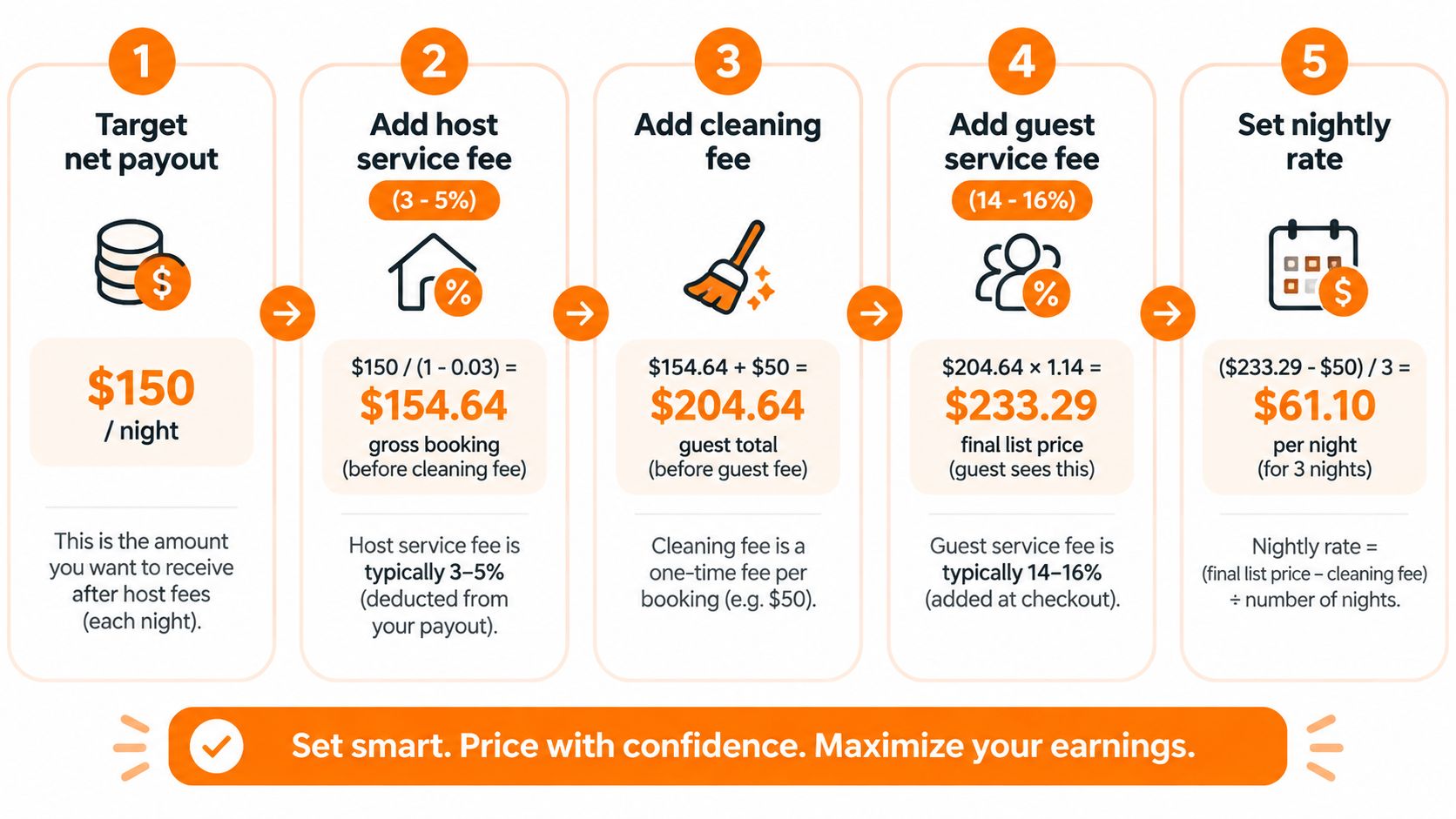
A profitable nightly rate starts with the net amount you need to keep, not the number you want to display. If you need a specific payout after Airbnb's host service fee, cleaning labor, supplies, utilities, and software, calculate backward from that target.
For a commissionable subtotal, the basic formula is:
Required subtotal = target payout ÷ (1 − host service fee rate)
For example, if your target payout is $150 and the applicable fee is 15.5%, the required commissionable subtotal is approximately $177.51 before separate operating expenses. The math is $150 divided by 0.845. If your host fee is different, replace the rate with the percentage shown in your dashboard.
Build the price in layers
Set the target net. Decide what the reservation must contribute after the host service fee, not just what the guest should see as a nightly rate.
Add reservation-level costs. Include cleaning labor, laundry, consumables, and any turnover expense that rises with each stay. A cleaning fee can recover these costs, but it should be transparent and proportionate to the service provided.
Separate optional services. Airport transfers, equipment rentals, late checkout, and similar extras should have clear descriptions and prices. Don't hide mandatory costs in an unrelated fee or imply that guests can avoid a charge when they can't.
Model the guest-facing total. Guest service fees and taxes can change the checkout price even when they don't become your revenue. Review the guest preview and compare the total with similar properties in your market.
Test one change at a time. Track booking pace, cancellations, and net payout after changing the nightly rate or a host-set fee. A higher listed rate can protect margin but may affect conversion, while a lower rate can fill dates without covering the work required.
Use tools without outsourcing judgment
A spreadsheet is enough for a small portfolio. A dynamic-pricing system can help adjust rates for demand, lead time, seasonality, and local events, but you still need to check whether the suggested rate covers the host fee and your actual operating costs. Hosts evaluating automated pricing can read about Airbnb smart pricing, then validate the result against their own payout data.
A digital welcome book can support optional revenue opportunities when it clearly presents services guests can choose to purchase. ScanStay provides a QR-based mobile welcome book with property instructions, local recommendations, and one-tap offers for services such as late checkout or airport transfers. Treat those offers as separate revenue and expense lines, not as a way to disguise a mandatory platform charge.
Review your pricing model whenever Airbnb changes the applicable fee structure, your tax obligations shift, or a supplier raises costs. A quarterly review is a useful operating habit, but the correct timing depends on your market and portfolio.
Common Airbnb Host Fee Mistakes
A reservation shows a guest payment of $1,000, yet the bank deposit is lower. That difference may include Airbnb's host service fee, taxes, refunds, and operating costs. Reading only the gross booking total can make an unprofitable stay look successful.
Mistake one, treating gross revenue as profit
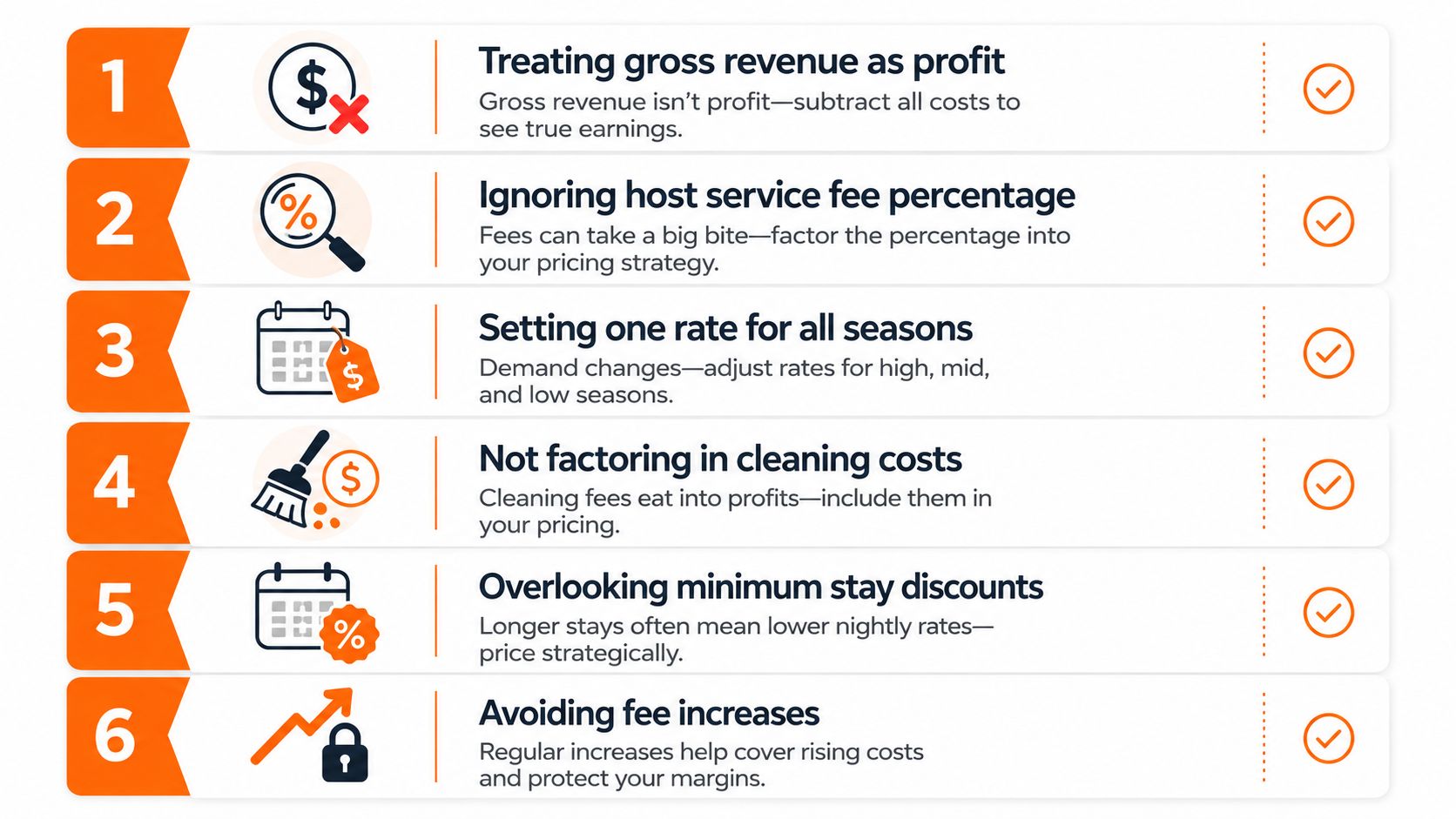
Gross revenue is the top line, not the money you keep. Deduct Airbnb's host service fee, cleaning and linen costs, supplies, utilities, insurance, taxes you owe, co-host payments, maintenance, and software. Only then can you judge the reservation's contribution.
Mistake two, using one inflated nightly rate
Putting every cost into the nightly rate can make short stays appear expensive beside comparable listings. A clearly disclosed cleaning fee can match the work created by each turnover, while the nightly rate represents the accommodation itself. Review the guest-facing total as well, because guests compare the complete checkout price.
Mistake three, removing every host-set charge
Removing a legitimate cleaning or pet fee does not remove the expense. It shifts that expense into your margin. Keep a host-set charge only when it is clearly disclosed, allowed by the applicable Airbnb policy, and tied to a real service or cost.
Mistake four, ignoring the applicable fee structure
A listing may be repriced using an old split-fee assumption after its settings or applicable structure changes. Airbnb's published guidance describes a newer host-only structure in which most hosts pay 15.5%, while the earlier model generally charged most hosts 3% in Airbnb's Resource Center explanation. Confirm the structure shown in your dashboard before changing rates.
Mistake five, failing to separate taxes
Tax collected for a government authority is not lodging revenue. Record the amount according to your local filing requirements and accounting method, or your sales reports may overstate income while understating liabilities.
Mistake six, avoiding every price increase
Refusing to raise prices can leave you funding each reservation as labor, supplies, and other costs increase. Compare net payout, guest-facing total, occupancy, and workload. A price change should protect the reservation's contribution, not just make the nightly rate look competitive. Keep the decision visible in your records so later repricing reflects actual results.
Bookkeeping and Monthly Reconciliation
Your monthly books should explain the path from reservation value to bank deposit. Start with Airbnb's transaction CSV or payout report, then match each payout to the corresponding bank entry. Don't use the bank deposit as the only source of truth, because it usually combines the final result of several underlying lines.
A repeatable reconciliation routine
- Export the transaction detail. Save the reservation, payout, refund, adjustment, and fee information for the month.
- Match deposits. Tie each Airbnb deposit to the report, allowing for payout timing and adjustments that may appear separately.
- Record platform deductions. Post the host service fee as a commission or platform expense, using the rate and base shown for that reservation.
- Separate host-set charges. Track cleaning, pet, extra-guest, and similar amounts so you can compare them with the costs they're meant to recover.
- Exclude or hold taxes correctly. Record collected taxes according to your accountant's method and local filing obligations.
- Enter direct expenses. Add cleaner invoices, laundry, supplies, utilities, maintenance, co-host commissions, dynamic-pricing subscriptions, and insurance-related costs.
- Review extras. If a guest buys a late checkout, transfer, rental, or another optional service, record the income and the related fulfillment expense separately.
Investigate differences instead of forcing a match
A reservation may change after booking, a guest may receive a refund, or Airbnb may adjust the payout after a dispute. Currency conversion can also create a difference between the amount shown in the reservation currency and the amount deposited in your bank currency.
Create a reconciliation note for every unexplained variance. Identify the reservation, date, original amount, adjustment, and final deposit. If a co-host receives a split outside Airbnb, record it as a separate payable or operating expense rather than reducing the accommodation revenue without documentation.
A clean chart of accounts should distinguish accommodation revenue, cleaning recovery, optional-service revenue, platform fees, taxes payable, refunds, and operating expenses. That structure lets you see whether a price change improved the property's margin or merely increased the guest-facing total.
Airbnb Host Fees FAQ
Where can I see the full fee breakdown?
Open the reservation and payout details in your Airbnb host dashboard. Review the commissionable subtotal, host service fee, taxes, refunds, and adjustments before relying on the deposit amount.
Can the host service fee vary?
Yes. Airbnb's published structure identifies regional and listing-related differences, and policy rollouts can change how fees are applied. Confirm the rate shown for your listing before repricing.
Is a cleaning fee refundable after cancellation?
That depends on the reservation's cancellation terms and Airbnb's applicable policy. Check the cancellation calculation for the specific booking rather than assuming the cleaning fee is always retained or always returned.
Why is the deposited currency amount different?
Currency conversion, exchange rates, and payment adjustments can create a difference between the reservation currency and your bank deposit. Record the report amount and bank amount separately, then reconcile the variance.
When do co-host splits appear?
They may appear as an Airbnb adjustment or as a separate payment arranged between you and the co-host. Keep the agreement and match the payment to the reservation period.
Can limiting checkout options reduce fees?
Not necessarily. Checkout methods, payment handling, and platform deductions depend on Airbnb's systems and the applicable listing setup. Review the final payout rather than assuming one option is cheaper.
ScanStay can replace paper binders and repetitive guest messages with a QR-based digital welcome book containing Wi-Fi details, check-in instructions, house rules, local recommendations, and optional service offers. Visit ScanStay to see how a clearer guest-information process can help you organize operations and track add-on revenue separately from Airbnb host fees.