10 Airbnb Suggestions for Hosts in 2026
Master your rental with these 10 Airbnb suggestions for hosts. Actionable tips on automation, upsells, and digital welcome books to boost reviews and revenue.
A guest arrives after dark, stands at the gate with luggage, and sends three messages in five minutes. The Wi-Fi code is buried in an old note. Parking instructions live in a saved reply. Early bag drop depends on whether you see the message in time. That is how a decent listing turns into a messy operation.
The bottleneck starts after the booking.
Airbnb runs at massive scale, with more than 8 million active listings worldwide, over 5 million hosts, and activity across more than 220 countries and around 150,000 cities and towns. It also recorded 491 million bookings in 2024 alone, according to this Airbnb statistics roundup. In a market that crowded, hosts do not gain an edge by answering the same questions faster. They gain it by building a system guests can use without needing them for every small step.
That is the shift this article focuses on. Strong hosting is not a pile of isolated tips. It is a tighter operating model built around one digital guest guide that handles arrival, house rules, local recommendations, add-ons, and common questions in one place. A tool like ScanStay helps turn that into a repeatable process instead of a thread of messages and saved notes.
I have seen the same pattern across single-property hosts and larger portfolios. Once the guest experience runs through one clear system, support messages drop, check-in mistakes fall, and extra services become easier to sell. If you want a practical starting point, begin with a digital welcome book for vacation rentals that guests are able to use on the move.
Table of Contents
- 1. Create a Comprehensive Digital Welcome Guide
- 2. Optimize Check-In and Check-Out Procedures
- 3. Monetize Premium Services and Upsells
- 4. Curate Personalized Local Recommendations
- 5. Reduce Support Messages with Comprehensive FAQs
- 6. Implement Multi-Language Support for International Guests
- 7. Leverage Video Content for Engagement and Clarity
- 8. Track Analytics and Guest Behavior Insights
- 9. Maintain Consistency Across Multiple Properties
- 10. Build Social Proof and Review Amplification
- 10-Point Comparison: Airbnb Host Suggestions
- Your Blueprint for a Smarter Hosting Business
1. Create a Comprehensive Digital Welcome Guide
A guest lands late, gets to the property tired, and starts hunting for the Wi‑Fi password, parking instructions, and the right door code. If that information lives in five messages, a printed binder, and your memory, small mistakes pile up fast. A single digital guide fixes that operational mess.
The strongest setup is one mobile-friendly hub guests can open in seconds from a QR code or link. Put the stay information in one place and keep it updated centrally. Tools like ScanStay help hosts run this like an actual system instead of a stack of one-off notes. That saves time, cuts repeated questions, and gives guests a better first impression.
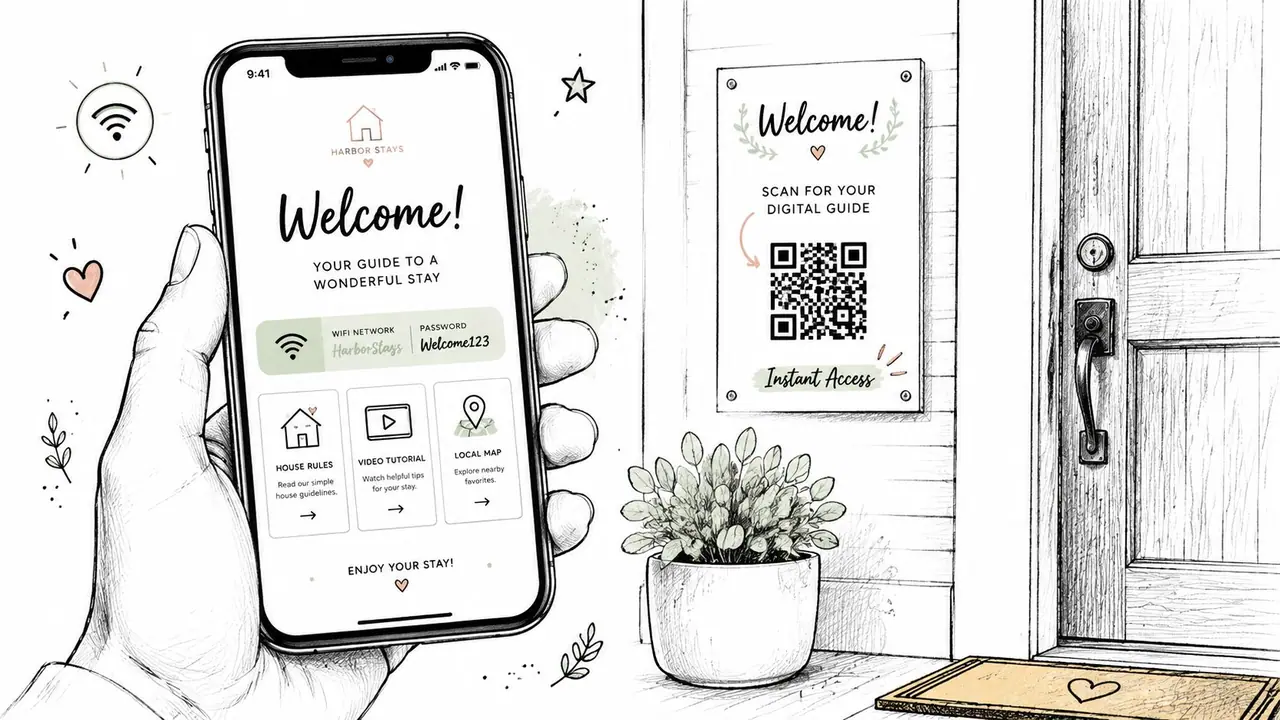
A digital guide works best when it is organized by timing, not by what the host wants to say first. Guests need arrival information at the top. House rules, appliance help, and local recommendations can come after that. Good hosting operations reduce friction by putting the right answer in front of the guest before they ask.
Put the essentials first
Start with the items guests look for under pressure:
- Wi‑Fi details: Network name, password, and where reception is strongest.
- Entry instructions: Which entrance to use, code details, and a backup access method.
- Parking rules: Assigned spot, street restrictions, permits, towing risks.
- Checkout basics: Departure time, key return steps, and any required cleaning tasks.
- Urgent contacts: Emergency services, building contact, and host backup contact.
I recommend writing each item as a short instruction, not a paragraph. Guests skim. If they have to read too much to find one answer, they message you anyway.
The guide should also cover the property's failure points. Add thermostat instructions, hot water quirks, TV login steps, trash day rules, and appliance use for anything guests can misuse or misunderstand. If you use smart access, include a short backup plan and point hosts toward the right hardware choices with this guide to the best smart lock for Airbnb hosts.
For layout ideas, review examples in this vacation rental welcome book guide. The useful versions do more than welcome the guest. They standardize information, reduce host dependency, and make it easier to run one property or ten with the same operating model.
2. Optimize Check-In and Check-Out Procedures
A guest lands late, the street is dark, parking is unclear, and the keypad times out on the first try. That reservation can still end in a five-star review, or it can turn into a support thread before the guest gets inside. The difference is usually the system behind the arrival.
Check-in and check-out need to run like an operating procedure, not a message you rewrite for every booking. A central guest tool such as ScanStay helps because it keeps one version of the instructions, delivers them at the right time, and reduces the small mistakes that create avoidable friction.
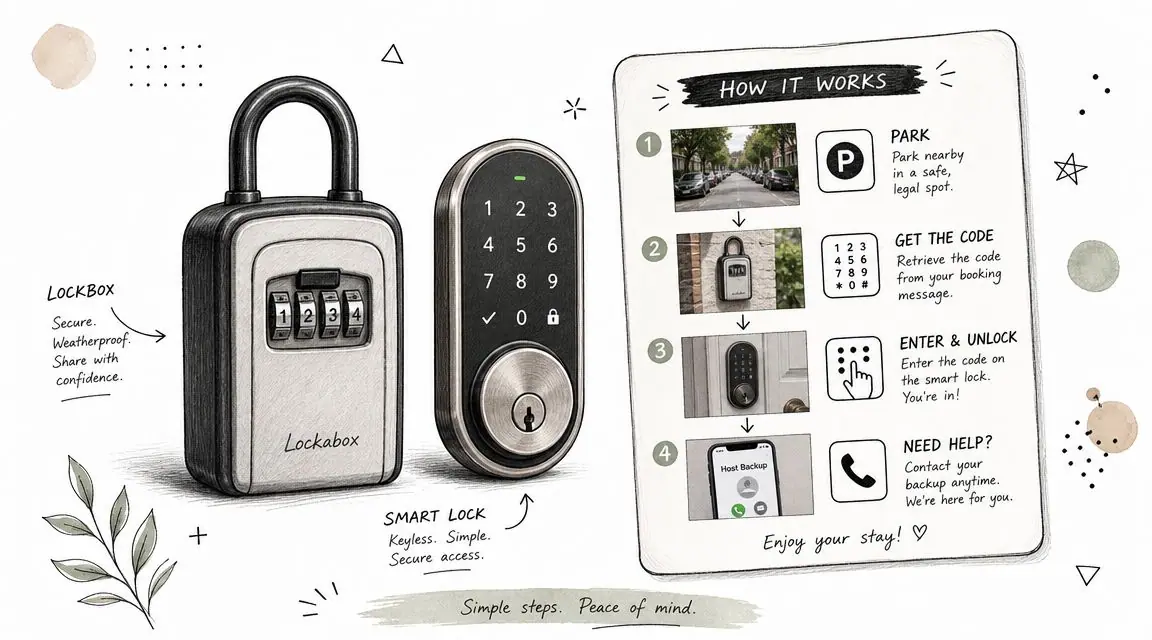
Show the arrival path clearly
Write arrival instructions for a tired guest who has never seen your building before. That means clear landmarks, short steps, and no vague phrasing.
Good instruction: “Turn left at the blue mailbox, enter the second gate, and use the keypad on the wall to your right.”
That level of detail cuts messages fast. It also protects your cleaning schedule, because every delayed check-in increases the chance of a late-night support issue or a next-day exception request.
Use photos for the exact parking spot, the entry door, the keypad, and the unit number. Put them in order. If your lock setup is changing, or you are comparing hardware before standardizing across properties, this guide to the best smart lock for Airbnb is a practical place to start.
Include a backup plan. Codes expire early. Batteries die. Cellular signal drops in garage entrances and elevator banks. Guests should know what to do in the first 30 seconds after something fails, not after they message you and wait.
Keep checkout short and realistic
Checkout instructions should take less than a minute to read. Guests do not need a speech. They need a short list they can follow while packing.
- State the exact checkout time: Use a specific hour.
- Limit the tasks: Trash in the bin, doors locked, keys returned if needed.
- Show the final steps: Add photos for thermostat settings, window checks, or lock confirmation if those details matter at your property.
Long chore lists hurt reviews and create inconsistent turnovers anyway. If you want the place reset to a professional standard, build that into your cleaning operation. Ask guests to do only the steps that protect the property or help your team turn the unit faster.
This kind of walkthrough works well in video too. A short visual explainer often fixes what text misses.
Guests rarely ignore instructions on purpose. In my experience, they miss them because the steps were too long, delivered too late, or written in a way that made sense only to the host.
3. Monetize Premium Services and Upsells
A guest books for three nights, then sends the same message you saw last week. Can we check in early? Do you have a crib? Is luggage storage possible after checkout? Those are not edge cases. They are buying signals.
Once the core stay information is handled inside your digital guide, paid add-ons become much easier to offer and fulfill. That is the operational upgrade many hosts miss. They answer these requests one by one in messages, quote custom prices, then try to remember what they promised. A central tool like ScanStay turns that into a repeatable system. Guests see the offer at the right moment, pricing stays consistent, and your team is not rebuilding the process for every reservation.
The best upsells solve a real guest problem and fit your turnover capacity. Early check-in and late checkout can produce extra revenue, but only when the cleaning window supports it. Baby gear, beach gear, parking, mid-stay cleans, and airport transfers work well because guests already understand the value. If a request appears often in your inbox, it is a strong candidate for a paid add-on.
Start with offers guests already ask for
Start small. Two or three offers are enough.
- Late checkout: Sell it only on days when the turnover schedule allows it.
- Early check-in: Offer it when the unit is already ready or the prior night is vacant.
- Equipment rentals: Useful near beaches, ski areas, and family destinations where guests would rather pay for convenience than shop locally after arrival.
Price each add-on clearly, state the cutoff time to request it, and explain any limits. If a guest still has to message you to ask how it works, the setup is incomplete.
Placement matters as much as the offer itself. Arrival-related add-ons belong near check-in details. Departure-related add-ons belong near checkout instructions. Property-specific extras should appear where the guest is planning that part of the stay. Done well, upsells feel like service, not sales.
I have found that hosts make more money from a short list of easy, reliable add-ons than from a long menu they cannot fulfill consistently. The goal is not to stuff the guide with options. The goal is to build a clean operating system that saves time, reduces mistakes, and adds revenue without creating new support work.
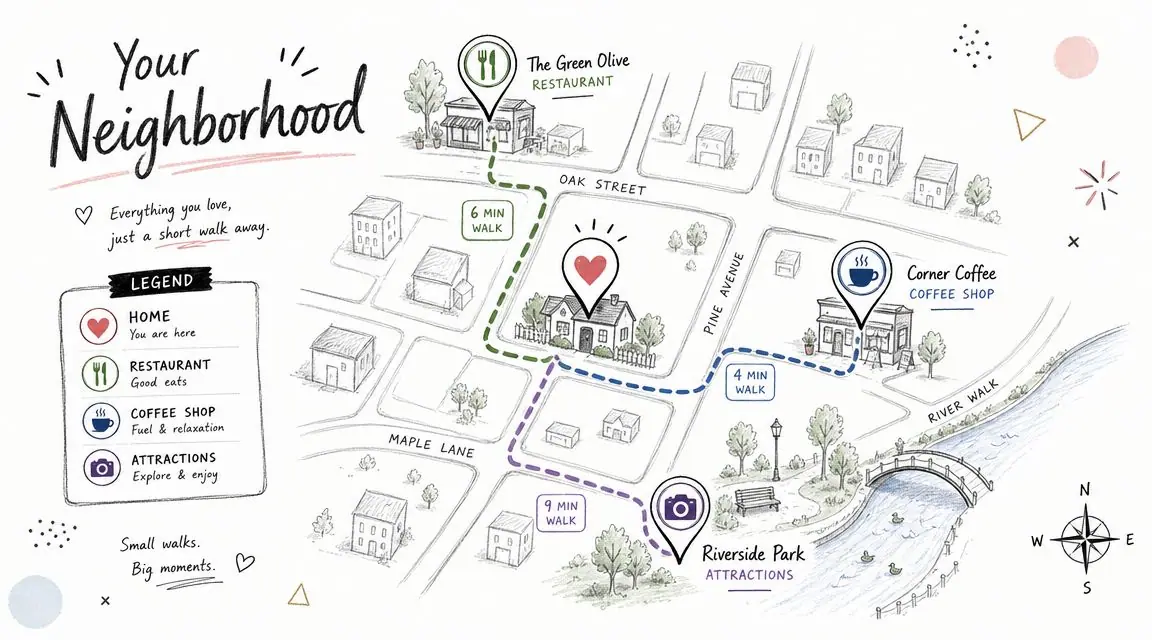
4. Curate Personalized Local Recommendations
Most hosts either give no local guidance or dump a long generic list into the binder. Neither works well. Guests want filtered recommendations. They want to know where to get breakfast nearby, what's worth walking to, where locals really eat, and what to skip if they only have one evening.
A digital guide does this better than a paper list because it can link straight to maps, opening hours, and route directions. It also lets you tailor recommendations by season, guest type, and length of stay.
Mainstream host content usually focuses on photos, pricing, and cleaning, while post-booking operations get much less attention. That gap is noted in Camels & Chocolate's host advice, which aligns with the practical reality that guests increasingly want mobile-first, self-serve information during the stay.
Build recommendations by guest type
One flat list of “favorite places” is lazy. Segment it.
For example, a family staying three nights needs different advice than a couple on a weekend trip. Families care about parking, stroller access, and casual food. Couples care about atmosphere, walkability, and reservation tips.
Try structuring it like this:
- For families: Easy breakfasts, parks, short drives, rainy-day backups.
- For couples: Date-night restaurants, wine bars, scenic walks.
- For remote workers: Cafes with outlets, quieter lunch spots, co-working options.
A useful recommendation saves the guest time. A great one makes them feel like they booked with a local.
Keep the list short enough to trust. Ten strong recommendations beat forty random ones every time.
5. Reduce Support Messages with Comprehensive FAQs
If you want fewer guest messages, stop answering them one at a time. Build a proper FAQ from your actual inbox.
Go back through the last few months of messages and pull every repeat question. Not what you think guests should ask. What they ask. That difference matters. Hosts often write polished explanations that miss the wording guests use in real life.
Write answers the way guests ask questions
A good FAQ sounds like this: “How do I connect to the Wi‑Fi if the smart TV is already using it?” or “Where do I park if the assigned spot is occupied?” It doesn't sound like “Internet access policy” or “vehicle accommodation guidance.”
Organize your FAQ by friction point:
- Arrival: parking, gate, keypad, elevator, building entry
- Inside the home: Wi‑Fi, thermostat, TV, hot water, appliances
- Rules: pets, visitors, quiet hours, smoking
- Neighborhood: groceries, pharmacy, transport, food delivery
Use short answers. Add photos where a wrong button or wrong door can create confusion.
I've found that the best FAQ sections don't feel like documentation. They feel like an experienced co-host standing beside the guest and giving a calm, direct answer. When the information is easy to scan, guests use it. When it's buried in long paragraphs, they message you instead.
6. Implement Multi-Language Support for International Guests
If you host in a destination market, language friction shows up fast. Guests may understand enough English to book, but not enough to catch safety details, appliance instructions, parking rules, or building access nuances. That's where mistakes happen.
Multi-language support is one of the simplest upgrades you can make once your guide is digital. It's far easier to maintain one structured source of truth than to rewrite the same instructions manually across separate message threads.
Translate the high-risk parts first
If you can't localize everything immediately, start with the parts where misunderstanding creates the biggest problems.
Translate:
- Check-in and lock access
- House rules
- Appliance and heating or cooling instructions
- Emergency contacts and safety information
Then move to local recommendations and upsells.
ScanStay supports 18 languages with AI translation, which is practical for hosts who want one guide that serves a broader guest mix without building separate systems for each language. The operational win isn't just convenience. It's consistency. Every guest gets the same baseline instructions, and your co-hosts aren't improvising translations in chat at odd hours.
Be careful with direct machine translation on house rules and anything safety-related. Review those sections manually. A small wording error in a listing description is harmless. A small wording error in a gas, lock, or checkout instruction can create a real problem.
7. Leverage Video Content for Engagement and Clarity
Some things are easier to show than explain. That's especially true in short-term rentals, where guests are using unfamiliar locks, thermostats, cooktops, remotes, blinds, and appliances under time pressure.
A short video often solves in thirty seconds what three paragraphs can't. Not because guests love watching content, but because movement removes ambiguity. They can see the exact button, exact door, exact switch, exact sequence.
Use video where mistakes are expensive
Don't record long property tours. Record practical how-tos.
Good video topics include:
- Entry walkthroughs: From curb to front door
- Thermostat use: Especially if the system is unusual
- Hot tub or pool basics: Cover startup and shutoff steps
- Appliance use: Washer, dryer, dishwasher, induction cooktop, coffee machine
Add captions. Many guests watch on mute, especially when they're checking instructions in a hallway or late at night.
Short operational videos beat polished marketing videos once the booking is confirmed.
Film from the guest's point of view. Keep the camera steady. Use natural speech. If there's one common mistake guests make, show it and correct it directly. A sixty-second clip that prevents one broken appliance callout is worth far more than a beautifully edited welcome montage.
8. Track Analytics and Guest Behavior Insights
A guest checks out late, leaves a four-star review, and writes, “Instructions were hard to find.” That usually means the problem was not the instruction itself. The problem was placement, timing, or wording.
Hosts who run on instinct keep rewriting the wrong sections. Hosts who use a digital guide with analytics can see what guests open, ignore, and revisit. That turns guest communication from a static document into an operating system you can improve week by week.
The goal is not more data. The goal is fewer avoidable mistakes, fewer support messages, and better conversion on paid extras.
Track points of friction
Start by watching behavior around the sections that affect operations and revenue.
Look for patterns such as:
- Repeated views on entry or parking instructions: Guests are uncertain, arriving under pressure, or not finding the right detail fast enough
- Low views on checkout steps: The section may be buried, mislabeled, or shown too late in the stay
- Strong clicks on add-ons but weak purchases: The offer may be priced wrong, explained poorly, or shown at the wrong moment
- Heavy traffic to one FAQ topic: That issue needs a clearer answer upstream, not more one-off replies
A good analytics setup helps you spot operational waste quickly. If guests keep opening the heating instructions at 11 p.m., the thermostat needs clearer labeling in the unit and better guidance in the guide. If hardly anyone opens your house manual but everyone opens Wi-Fi and parking, organize the guide around guest priorities instead of host assumptions.
For a practical breakdown of what to monitor, review this guide to vacation rental analytics.
I see this mistake often. Hosts spend hours polishing restaurant recommendations while the sections driving reviews are entry, parking, Wi-Fi, noise rules, and checkout. The glamorous content rarely fixes a bad arrival. Clear operational content does.
This is one of the strongest arguments for using a central tool such as ScanStay. When your guide, upsells, instructions, and guest behavior sit in one place, you can fix the exact points where stays break down and sales drop off. That saves time, cuts repeat errors, and makes each update pay for itself.
9. Maintain Consistency Across Multiple Properties
Once you manage more than one unit, inconsistency becomes expensive. One property has clear check-in instructions. Another has old parking notes. A third still mentions an appliance you replaced months ago. Guests notice, and cleaners feel the downstream effects.
The fix isn't writing more content. It's building a repeatable template with controlled customization. The core operating system should stay the same across the portfolio, while each property gets only the details that differ.
Standardize the core and customize the edges
Here's a practical split that works well:
- Template the universal sections: welcome, Wi‑Fi layout, house rules structure, emergency formatting, checkout format
- Customize the property-specific sections: parking, appliance quirks, amenity instructions, neighborhood highlights
- Lock your naming conventions: don't call the same feature three different names across listings
This matters even more because Airbnb's search and conversion environment is dynamic. Airbnb ranking factors include engagement signals such as clicks, contact attempts, wish-listing, pricing competitiveness, and suitability of minimum and maximum night requirements, as discussed in this video covering host tactics and ranking factors. If your listing drives bookings but your operations are inconsistent, you create avoidable review drag after the reservation.
Portfolio hosts should think like operators, not individual hosts. Standardize what repeats. Customize what must be local.
10. Build Social Proof and Review Amplification
Guests don't stop evaluating your property after they book. They keep checking for reassurance. They want to know they made the right choice, that the home matches the listing, and that other guests had a smooth stay.
That's where social proof helps. Not in a loud marketing way. In a calm trust-building way.
Reinforce the experience guests are about to have
Add a few selective review excerpts or guest comments into your digital guide, especially around the strengths you want to reinforce. If guests consistently praise your location, quiet sleep, family-friendly setup, or easy self-check-in, surface those themes where they support the stay.
Good uses of social proof include:
- Arrival reassurance: reviews mentioning easy entry or clear instructions
- Amenity reinforcement: comments about strong Wi‑Fi, comfortable beds, or stocked kitchen
- Neighborhood confidence: guest praise for walkability or nearby food spots
Keep it real. Avoid generic praise like “Amazing stay!” unless it supports a specific point. Stronger comments are tied to actual decisions a future guest cares about.
This also helps shape the review loop. When guests see the property's strengths clearly reflected in the guide and then experience those strengths in person, they're more likely to mention them again in their own review. That makes your messaging sharper over time without feeling scripted.
10-Point Comparison: Airbnb Host Suggestions
A host with one listing can get away with scattered notes, saved replies, and memory. A host trying to protect margins cannot. The comparison below shows which upgrades reduce guest friction fastest, which ones take more setup, and which ones work best once you run them through one central guest tool such as ScanStay instead of managing everything across messages, PDFs, and team chat.
| Item | 🔄 Implementation Complexity | ⚡ Resource Requirements | 📊 Expected Outcomes | 💡 Ideal Use Cases | ⭐ Key Advantages |
|---|---|---|---|---|---|
| Create a Digital Welcome Guide | Medium. Initial setup, content structure, and property-specific details take work upfront | Moderate. Writing, layout, QR code signage, and occasional translation updates | Fewer repeat questions, smoother arrivals, and a more professional guest experience | Any host who wants fewer support interruptions and clearer guest communication | One source of truth, fast updates, mobile access, and better consistency |
| Optimize Check-In and Check-Out Procedures | Moderate. Requires clear steps, testing, and visual instructions | Moderate. Entry photos, short videos, smart lock or lockbox setup, and process checks | Fewer entry problems, better checkout compliance, and less turnover chaos | Listings with self-check-in, apartment access quirks, or back-to-back reservations | Reduces late-night access issues, cuts confusion, and standardizes operations |
| Monetize Premium Services and Upsells | High. You need fulfillment, pricing discipline, and a reliable delivery process | High. Payment collection, scheduling, vendor coordination, and guest communication | New revenue per booking and fewer informal service requests that waste time | Hosts with strong demand, longer stays, premium amenities, or local service partners | Turns guest requests into paid add-ons, increases revenue, and keeps offers organized |
| Curate Personalized Local Recommendations | Medium. Good recommendations need updates and local knowledge | Moderate. Research, map building, and occasional refreshes as businesses change | Better guest feedback, stronger stay experience, and fewer local recommendation messages | Urban listings, destination stays, and hosts competing on experience rather than price alone | Sets the property apart, adds host value, and keeps guests from asking the same local questions |
| Reduce Support Messages with FAQ Content | Low. Straightforward to build if you already know the common guest issues | Low. Writing, categorization, and occasional edits after repeated guest questions | More guest self-service, faster problem resolution, and less time spent answering basics | Any host, especially high-volume operators or listings with smart devices and house rules | Saves time, keeps answers consistent, and highlights which issues need clearer instructions |
| Implement Multi-Language Support for International Guests | Medium. Translation is easy to start but needs review for accuracy | Moderate. AI translation tools, proofreading, and updates when house information changes | Fewer misunderstandings, better accessibility, and a stronger experience for global travelers | Properties near airports, major cities, or markets with frequent international bookings | Broadens appeal and lowers errors caused by unclear instructions |
| Use Video Content for Engagement and Clarity | Medium. Filming is simple. Keeping videos current takes discipline | Moderate. Phone or camera setup, basic editing, hosting, and occasional re-recording | Better understanding of appliances and access steps, with fewer misuse issues | Listings with unusual entry paths, hot tubs, heating systems, or complex appliances | Shows guests exactly what to do, reduces avoidable mistakes, and explains faster than text |
| Track Analytics and Guest Behavior Insights | Medium. Setup is manageable, but acting on the data matters most | Moderate. Analytics tools, dashboard review, and someone responsible for updates | Clearer view of what guests read, where they drop off, and which offers perform | Multi-property hosts, managers, and operators treating hosting like a business | Helps refine instructions, improve conversions on extras, and spot information gaps early |
| Maintain Consistency Across Multiple Properties | Medium. Templates help, but governance matters if multiple people edit content | Moderate. Shared templates, brand rules, and a central dashboard for updates | More reliable guest communication, faster onboarding, and less duplicated work | Hosts with several listings or property managers handling a portfolio | Scales cleanly, reduces errors, and keeps every property aligned |
| Build Social Proof and Review Amplification | Low. The main work is selecting and placing the right guest feedback | Low. Review collection process, approvals, and occasional content refreshes | Higher booking confidence, better expectation setting, and stronger trust | Competitive markets where guests compare similar listings closely | Reinforces credibility, supports conversion, and keeps positive themes visible |
The trade-off is simple. Some suggestions save time first. Others make money first. The best operators build both into one system so every guest touchpoint, from entry instructions to paid extras, runs from the same central setup.
Your Blueprint for a Smarter Hosting Business
A guest lands after a late flight, walks up to the building, and cannot get inside because the check-in message is buried three threads deep. Ten minutes later, you are on your phone solving a problem that should have been solved before they arrived.
That is the difference between casual hosting and running a clean operation.
Hosts who improve fastest stop treating guest communication, house information, upsells, and local tips as separate tasks. They put them into one organized system guests can access instantly on their phone. That cuts mistakes, reduces repeat questions, and makes the stay feel more professional without adding more manual work.
The field has matured. Guests compare listings quickly, expect mobile-first information, and notice gaps right away. If arrival instructions are unclear, the Wi-Fi is hard to find, or checkout steps are inconsistent, the problem is not the property. The problem is the operating system behind it.
Start with the point of highest friction.
If guests struggle to enter the property, fix check-in first. If you keep answering the same five questions, build a better guide and FAQ first. If your occupancy is solid but revenue is flat, add a small set of paid extras that fit the stay and are easy to buy. If you run more than one listing, standardize the core information before you add custom touches.
Good hosting gets better results when the backend is tight. Clear instructions protect reviews. Centralized information saves time. Well-placed upsells add revenue without creating more admin.
ScanStay is one practical way to run that model. It gives hosts a digital welcome book with QR access, local recommendations, video walkthroughs, upsells, multilingual support, and analytics in one place. Used well, it replaces scattered messages and outdated binders with a single source guests can use.
If you want to replace paper binders and repetitive guest messages with a single mobile-friendly guide, ScanStay is built for that workflow. It lets you organize check-in details, Wi‑Fi, house rules, local recommendations, videos, and upsells in one QR-powered welcome book that guests can open instantly in their browser.