10 QR Code Best Practices for Hospitality Hosts in 2026
Boost reviews with our top 10 QR code best practices for hosts. Learn design, placement, content, and monetization tips for your short-term rental.
Guests usually find your QR code when they're already under pressure, standing at the door, juggling luggage, or trying to get on Wi‑Fi before a meeting. If the scan fails, the result is rarely neutral. They message you, they get frustrated, and the stay starts with a support request instead of confidence. If it works cleanly, it handles the basics, from access instructions to local tips, and can even open the door to add-on revenue.
That's why qr code best practices for hospitality aren't about printing a square and hoping for the best. They're about the full guest journey, from the quality of the printed code to the structure of the destination page, the accessibility path, and the content updates you keep making after check-in. QR adoption is mainstream now, with Bitly reporting that over 90% of marketers used QR codes in 2025 and more than two-thirds of consumers scanned a QR code at least once in the last year (Bitly QR code statistics), so the main question isn't whether guests will scan. It's whether your code gives them a useful next step.
If you're comparing options for a digital welcome system, this practical guide pairs well with free QR menu platform benefits, because the same usability principles apply across guest-facing touchpoints.
Table of Contents
- 1. Optimize QR Code Size and Placement for Maximum Scannability
- 2. Create Clear Visual Hierarchy and Branding Around the QR Code
- 3. Mobile-First and Accessible Content Design
- 4. Include Actionable Information Hierarchy in Destination Content
- 5. Implement Analytics and Track Scan Metrics to Optimize Content
- 6. Use Error Correction Levels Appropriately for Environmental Conditions
- 7. Leverage Deep Linking and Pre-populated Fields for Seamless Guest Experience
- 8. Provide Multilingual Content and Localization for International Guests
- 9. Integrate Revenue-Generating Upsells and Service Booking Seamlessly
- 10. Maintain and Update QR Code Content Regularly for Accuracy and Relevance
- 10-Point QR Code Best Practices Comparison
- From Simple Square to Smart Hospitality System
1. Optimize QR Code Size and Placement for Maximum Scannability
A QR code can be technically correct and still fail in the field if it's too small, too low, too reflective, or tucked into a corner where nobody wants to crouch. Standards-informed guidance from the U.S. Department of Energy points hosts toward the underlying QR code standards, including the practical reality that printed placement matters as much as the code itself, and ISO/IEC 18004-based guidance notes that QR codes can hold substantial information while still remaining resilient in real-world use (U.S. Department of Energy QR code standards and best practices). In hospitality, that means your code has to be easy to reach, easy to see, and easy to scan without effort.
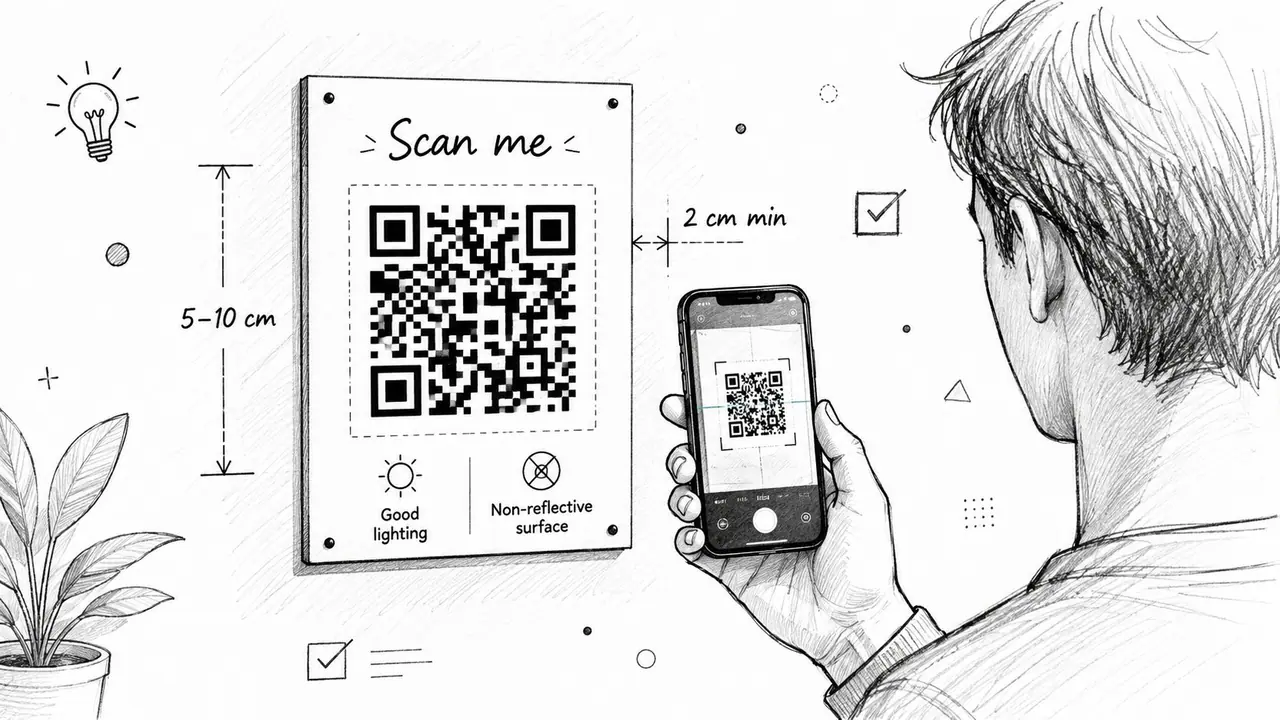
For close-range use, industry guidance recommends a minimum physical size of about 2 cm × 2 cm, while a practical sizing rule is code size ≈ viewing distance ÷ 10 (Lunyb QR code marketing best practices). That's especially relevant in guest rooms, because the same code may be scanned from arm's length on a bedside card or from several feet away on a hallway sign. I've seen hosts place one code on a welcome card near the entry and another in the kitchen, which works better than relying on a single tiny sticker near a dark doorway.
Practical rule: If a guest has to lean, crouch, or adjust their phone three times, the placement is wrong.
The cleanest installations usually follow a few habits:
- Use eye-level placement: A welcome display near the entrance or reception reads better than a low shelf or a crowded countertop.
- Keep the surface non-reflective: Glossy frames and laminated sheets can cause glare under warm indoor lighting.
- Print a real test copy first: Scan it from the actual viewing distance before you commit to dozens of prints.
- Create a primary and secondary location: Put the main code where guests first enter, then repeat it where they'll naturally need it, such as the kitchen or bedroom.
For hosts using a printable format, ScanStay's QR code generator fits this workflow because it supports a consistent on-site display instead of improvised printouts.
Here's the useful trade-off. Bigger codes are easier to scan, but they also demand more intentional signage. Smaller codes can look elegant, but they're less forgiving in low light or awkward placements. In hospitality, legibility usually wins over minimalism.
The image below is worth using as a reminder of the scanning posture guests naturally take.
2. Create Clear Visual Hierarchy and Branding Around the QR Code
Guests don't scan what they can't identify. A naked QR code on a sheet of paper looks unfinished, and in a rental it can even feel suspicious. Add a short heading, a recognizable brand cue, and one clear action so the guest instantly understands whether the code is for Wi‑Fi, house rules, check-out, or local recommendations.
Branding works best when it frames the code instead of competing with it. Real-world QR guidance consistently recommends keeping logos restrained and maintaining strong contrast, because too much decoration hurts scan reliability and too little context hurts trust (practical logo placement advice). In a hospitality setting, I'd rather see a simple card that says “Welcome, scan for guest info” than a highly designed sign that still leaves guests guessing what happens next. That one line does more operational work than a paragraph of vague hospitality language.
A useful structure looks like this:
- Headline first: Four to six words that name the benefit, not the feature.
- Brand cue second: A logo or property name that reassures the guest they're in the right place.
- CTA third: A direct instruction such as “Scan for Wi‑Fi and check-in details.”
- Supportive iconography: A Wi‑Fi symbol, key icon, or info mark can clarify purpose faster than text alone.
If you manage multiple units, consistent visual hierarchy also helps staff. A cleaner system means fewer questions like “Which code is for which property?” and fewer mistakes when you reprint signs for turnovers. It also makes your guest materials look intentional in listing photos, which matters because guests often notice whether the in-room experience matches the booking experience.
The sample signage image below shows how a branded guest-facing layout can carry both trust and function.
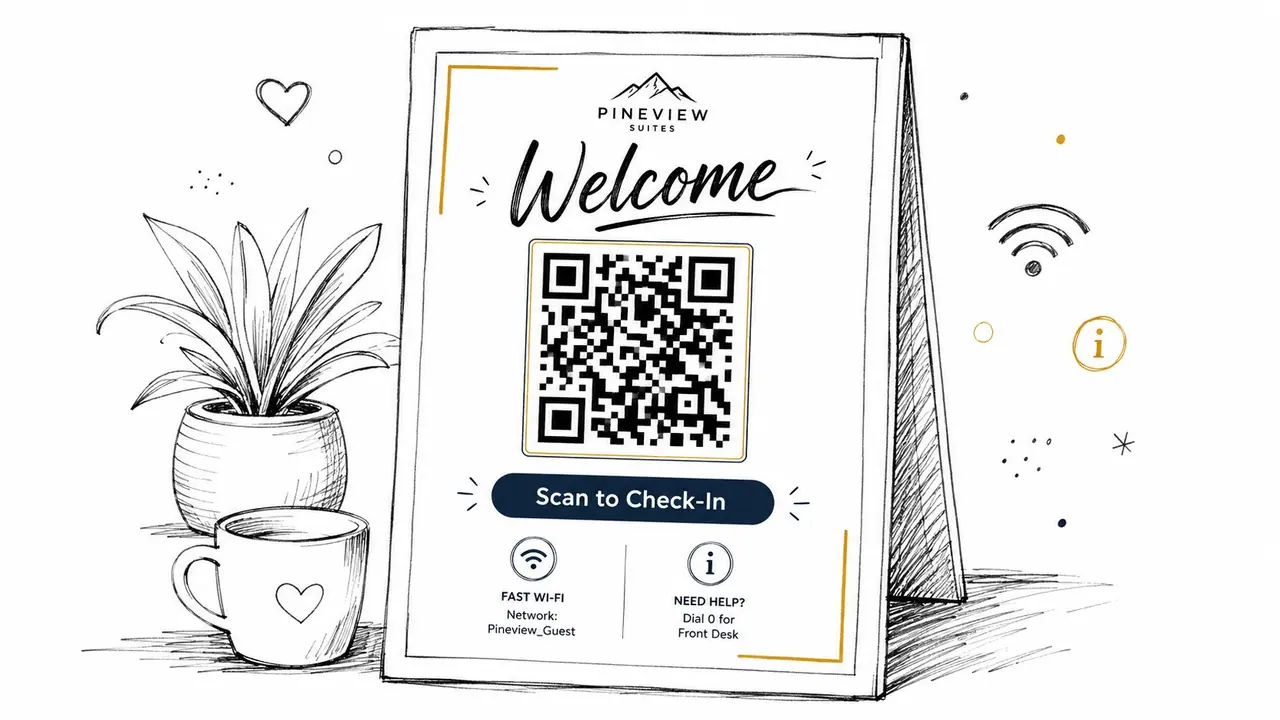
When the branding is subtle, the code feels like part of the property instead of an afterthought. That helps the guest move faster, and it makes the host look more organized before a single question gets asked.
3. Mobile-First and Accessible Content Design
A QR code only earns its place if the destination opens fast, reads cleanly on a phone, and doesn't trap people in tiny text or awkward menus. Nielsen Norman Group advises that QR codes should route to mobile-friendly pages and be used only when scanning is better than a direct link, which is exactly the decision point for guest guides and service requests (Nielsen Norman Group QR code guidelines). In practice, that means the page behind the code should behave like a purpose-built mobile tool, not a shrunk-down desktop brochure.
Accessibility matters here because QR code guidance often stops at the symbol itself. Section 508 guidance says QR codes in digital documents should include descriptive alt text and an adjacent text alternative or link, so guests using screen readers or low-vision tools aren't blocked from the same information (Section 508 QR codes guidance). For hospitality, that's not just a compliance issue. It's a service issue. A guest carrying bags, using assistive tech, or scanning in a dim hallway should still get the same information without friction.
A mobile-first guest page should do a few things well:
- Put the essentials above the fold: Wi‑Fi, check-in steps, lock codes, and emergency contacts belong at the top.
- Use readable typography: Sans-serif type and generous spacing outperform clever design in cramped phone screens.
- Keep tap targets large: Guests should never have to zoom to hit a button.
- Offer alternatives: If a code can't be scanned, the page should still include a readable link or text option.
The smartest host pages also avoid heavy image files and cluttered layouts. Guests don't need a decorative homepage, they need immediate answers. If you're using ScanStay, the value is that the guest experience stays in the browser, which keeps the flow simple and reduces the chance of app friction.
If a guest can't find the Wi‑Fi code in the first few seconds, they'll message you instead.
A clean mobile destination often saves more time than the code itself. It lowers confusion, trims repetitive messages, and gives guests a better first impression of how the property is run.
4. Include Actionable Information Hierarchy in Destination Content
The best guest guides don't feel long, they feel ordered. Guests scan them the same way they scan a hotel directory or a restaurant menu, looking for the one thing they need right now. That's why the strongest QR destinations separate urgent information from useful extras instead of dumping everything into one endless page.
Start with the information that reduces immediate friction. Wi‑Fi details, check-in and check-out steps, access instructions, and emergency contacts should sit at the top. Appliance notes, thermostat help, and house rules belong next. Local recommendations and upsells can come after that, once the guest has already solved the basics. This structure works because it mirrors the guest journey, not the host's internal checklist.
A practical content hierarchy usually looks like this:
- Quick Access: Wi‑Fi, lock code, check-in steps, emergency contact.
- House Basics: Trash, thermostat, appliances, parking, quiet hours.
- Helpful Extras: Streaming, coffee machine, laundry, pool or hot tub notes.
- Guest Experience: Nearby restaurants, attractions, late checkout, transfers.
The reason this matters is simple. Guests don't want to decode your property. They want to stay in it. A clear hierarchy cuts support messages because people can find answers without waiting for a reply, and it reduces the risk that a small but critical detail gets buried beneath lifestyle content.
The other advantage is operational. If a host receives repeated questions about the same device or rule, that's a sign the page structure needs adjustment, not just another text reply. I've seen hosts improve guest satisfaction by pinning the most-requested details to the top and moving optional content lower. That's not flashy, but it's exactly how good hospitality systems behave.
When the page is structured around urgency, the code becomes more than a shortcut. It becomes a service layer that handles questions before they turn into messages.
5. Implement Analytics and Track Scan Metrics to Optimize Content
A QR code without analytics is a guess. You might know that guests saw the sign, but you won't know whether they scanned it, which sections they used, or where the page lost them. For hospitality operators, that matters because the best guest guide is the one that keeps improving after the first print run.
Bitly reports that 69% of marketers update or redirect dynamic QR codes at least monthly (Bitly QR code statistics), and that lines up with how hosts should think about their own content. A QR destination is not a static poster. It's a living touchpoint. If Wi‑Fi messages are still generating questions, if local recommendations aren't getting clicked, or if your upsell page is ignored, the analytics should tell you that before the next turnover.
A good tracking setup focuses on a few useful signals:
- Scan volume: Are guests using the code, or just ignoring it?
- Section engagement: Which pages or tabs get the most attention?
- Device behavior: Do certain guests abandon the page on older phones or slow networks?
- Conversion actions: Are bookings, service requests, or message clicks happening?
If you're using a platform like ScanStay's vacation rental analytics, the goal is to connect the code to real operational decisions. For example, if a property gets many scans but few service bookings, the issue may be the wording, the placement, or the page order. If one property performs better than another, you can reuse the stronger layout across the portfolio.
The Forbes Council survey cited in the brief is a useful reminder that users engage when the next step is clear, with 90% of respondents interacting with QR codes weekly, 59% scanning them daily, and QR-linked destinations averaging a 37% click rate (Forbes Council survey on QR code use). For hosts, that means the scan itself isn't the finish line. The destination has to earn the click.
Track what guests do after the scan, not just the scan itself.
That's the metric that turns a QR code from a convenience into a management tool.
6. Use Error Correction Levels Appropriately for Environmental Conditions
Most hosts never think about error correction until a code starts failing on a scratched welcome card or a weathered outdoor sign. That's a mistake, because durability is part of the design decision. QR standards support error correction precisely so the code can survive wear, small obstructions, and real-world handling, with higher levels tolerating more damage at the cost of denser symbols (U.S. Department of Energy QR code standards and best practices).
The practical guidance is straightforward. Use a lower or standard level for protected indoor placements, and move to a higher tolerance when the code is exposed to traffic, moisture, sunlight, or repeated contact. That's especially relevant for vacation rentals with outdoor entry signs, pool areas, shared hallways, and laminated cards that live for months without replacement.
A simple operating rule helps:
- Use more protection indoors: Welcome cards and room posters can use standard settings.
- Use stronger tolerance outdoors: Entry signs, patio displays, and coastal properties need more resilience.
- Avoid over-customization: Logos and heavy design elements should stay restrained so the symbol remains readable.
- Re-test after wear: Printed signs age, especially in high-touch or high-light areas.
The trade-off is real. Higher error correction can make the code more complex, which may require a larger print size to stay easy to scan. That's why you can't treat design and durability as separate decisions. If you want a logo in the center, protect the code accordingly. If you want to place it outside, assume some degree of fading or physical wear.
For hosts, a clear production process pays off. Don't print one version for every use case. Keep a small set of templates based on environment, then deploy the right one for the specific placement. That saves reprints and reduces the chance that a “nice looking” sign becomes a dead sign after a few months.
Reliable QR codes don't just scan well on day one. They keep scanning after guests, cleaners, weather, and time have had their turn.
7. Leverage Deep Linking and Pre-populated Fields for Seamless Guest Experience
The fastest QR experience is the one that lands the guest exactly where they meant to go. If a person scans a code for service requests, they shouldn't have to search through a homepage to find a maintenance form. If they're asking for late checkout, they shouldn't have to re-enter the same contact details every time. Deep links and pre-populated fields remove that friction.
Hospitality guests are often scanning in motion, while carrying bags or trying to solve something quickly. A clear deep link can route them straight to the Wi‑Fi details, the check-in instructions, or the booking form they need. If the system also pre-fills non-sensitive fields like name or dates, the request feels easier and more personal without feeling invasive.
A practical deployment usually includes:
- Direct section routing: Send the guest to the exact page or tab they need.
- Secure tokens: Keep guest-specific links controlled and time-bound when possible.
- Fallbacks: If the deep link fails, route to a safe homepage or help page.
- Privacy-respecting prefill: Use only low-risk fields, never sensitive data.
For hosts, the benefit is fewer abandoned requests and better follow-through on upsells. A guest is much more likely to book a transfer or late checkout if the path is short and the form already feels half-complete. That's not because QR codes are magical, it's because they reduce the effort between intent and action.
The deeper operational lesson is that convenience is part of service quality. Guests interpret a smooth flow as competence. They interpret a clumsy one as friction, even if the property itself is great. That's why a well-designed QR destination should feel like a direct path, not an information maze.
If your QR code takes guests where they already wanted to go, it stops being a link and starts behaving like a concierge.
8. Provide Multilingual Content and Localization for International Guests
A guest guide written in one language and translated badly into another creates more problems than it solves. International guests need clarity, especially for house rules, safety instructions, entry steps, and contact details. That's why multilingual content should be built into the QR destination, not added as a last-minute copy-and-paste task.
ScanStay's language localization guide fits the hospitality use case because it treats language as part of the guest experience, not just a translation layer. The same logic appears in website localization guidance, which emphasizes adapting content for the user's language and context rather than swapping words mechanically (risk-free website localization). In practical terms, that means keeping critical details consistent across versions and testing the wording for accuracy, not just grammar.
A good multilingual setup usually does three things:
- Prioritize common guest languages: Use booking data and reservation patterns to decide what matters most.
- Keep core facts stable: Wi‑Fi names, addresses, phone numbers, and emergency contacts should match across every language version.
- Use short, plain sentences: Simple language translates more cleanly and reduces ambiguity.
This isn't just about foreign guests, either. Short, plain language also helps domestic travelers scan faster. Hosts sometimes overcomplicate house rules by writing them in formal or playful prose, but a clear instruction beats a charming paragraph when someone is trying to find the trash schedule at midnight.
If you operate in a tourist-heavy area, multilingual support can also reduce support calls from simple misunderstandings. That helps the stay feel smoother and lowers the odds that a small translation problem turns into a bad review. For example, a clean multilingual guide is much more useful than a single-language binder stuffed with screenshots and hope.
The strongest localization strategy is the one that makes every guest feel the property was prepared for them, not translated at the last second.
9. Integrate Revenue-Generating Upsells and Service Booking Seamlessly
A QR code is one of the few guest touchpoints that can handle both service and sales without feeling pushy, if you do it carefully. Late checkout, airport transfers, cleaning, equipment rentals, and local add-ons work best when they appear as optional choices inside the same mobile flow as the guest guide. The moment is important. Guests are already engaged, already inside the property context, and already thinking about what would make the stay easier.
A simple upsell layout should keep the offer clear and low-friction:
- Lead with the benefit: “Sleep in and check out at 2 PM” is easier to act on than a bare fee line.
- Limit the choices: Three to five services is enough. More than that starts to feel like clutter.
- Place the most relevant option first: In many properties, that's late checkout.
- Show a clean booking path: One-tap booking or a short request form beats a long sales pitch.
The business outcome is straightforward. You're monetizing convenience at the point where guests are most receptive to it. A guest who's happy with the stay is more open to paying for an extension or transfer than someone who has to email back and forth later. That's why the QR destination should support the sale directly instead of sending people to an unrelated contact form.
The broader trade-off is trust. If you over-sell, guests feel like they're being cornered. If you present useful, clearly optional services, the upsell feels like service. That distinction matters in hospitality, where the guest experience and the revenue strategy should support each other, not compete.
For hosts who want one system to manage this workflow, ScanStay's service upsell approach is relevant because it keeps the offer inside the same guest-facing mobile experience rather than splitting it across multiple tools.
10. Maintain and Update QR Code Content Regularly for Accuracy and Relevance
The biggest QR code failure in hospitality is often the most boring one. The code works, but the content behind it is stale. Wi‑Fi passwords change, check-out rules get updated, local businesses close, and seasonal instructions drift out of date. A QR code that points to old information turns convenience into confusion.
This is one reason Bitly's data on dynamic QR use matters. With 69% of marketers updating or redirecting dynamic QR codes at least monthly and dynamic QR codes holding 65% of market share in 2024, with projected growth at a 19.2% CAGR through 2030, the modern QR workflow is clearly built around change, not permanence (Bitly QR code statistics). The hospitality takeaway is simple. If your content might change, use a dynamic system and treat the page like a living asset.
A practical maintenance rhythm helps:
- Weekly review for urgent items: Wi‑Fi, access instructions, and contact details need immediate accuracy.
- Monthly review for operational details: House rules, check-in wording, and support pathways should be checked regularly.
- Quarterly refresh for seasonal content: Restaurant picks, local events, and amenity recommendations age quickly.
- Routine link testing: Broken URLs and dead phone numbers should be caught before guests do.
Maintenance also supports your team. Clean, current content means fewer messages asking whether the old instructions still apply. It also helps you reuse the same structure across multiple properties without creating a patchwork of stale pages. If you manage several rentals, bulk updates and change tracking become less of a nice-to-have and more of a sanity saver.
The value of QR best practices becomes clear here. A well-run code doesn't just scan well. It stays accurate, keeps the guest informed, and avoids the slow drip of support noise that comes from outdated details. That's the difference between a sign and a system.
10-Point QR Code Best Practices Comparison
| Item | Implementation Complexity 🔄 | Resource Requirements 💡 | Expected Outcomes ⭐📊 | Ideal Use Cases | Key Advantages ⚡ |
|---|---|---|---|---|---|
| Optimize QR Code Size and Placement for Maximum Scannability | 🔄 Low, basic testing and placement | Minimal: print materials, simple testing tools | Higher scan success; smoother check-in; fewer support tickets | All hosts; entry points, welcome cards, posters | Quick lift in scannability and guest satisfaction |
| Create Clear Visual Hierarchy and Branding Around the QR Code | 🔄🔄 Medium, design/layout work | Design assets or templates, branding time | ≈+25–30% scan rate; stronger brand trust | Portfolio managers, premium properties, agencies | Improved engagement and consistent presentation |
| Mobile-First and Accessible Content Design | 🔄🔄🔄 High, dev and accessibility testing | Front-end dev, performance optimization, accessibility audits | Faster loads, reduced frustration, inclusive UX; better reviews | Areas with variable connectivity; diverse guest populations | Better accessibility, engagement, and reduced support |
| Include Actionable Information Hierarchy in Destination Content | 🔄🔄 Medium, content strategy and structure | Content audit, UX copywriting, CMS organization | ↓ support messages (40–60%); faster task completion by guests | Multi-property managers; complex homes with many amenities | Reduces cognitive load; surfaces essentials first |
| Implement Analytics and Track Scan Metrics to Optimize Content | 🔄🔄🔄 Medium–High, tracking + analysis | Analytics tools, privacy compliance, analyst time | Data-driven content improvements; ROI and A/B testing insights | Portfolio managers, agencies tracking performance | Identify trends and optimize conversions over time |
| Use Error Correction Levels Appropriately for Environmental Conditions | 🔄🔄 Low–Medium, selection & testing | QR generator settings, print tests | Greater durability for printed codes; fewer replacements | Outdoor, high-traffic, or weather-exposed placements | Preserves functionality despite wear and damage |
| Leverage Deep Linking and Pre-populated Fields for Seamless Guest Experience | 🔄🔄🔄🔄 Very High, backend integration | Backend/dev work, secure tokens, device routing tests | Reduced friction; +15–30% upsell conversion; personalized flow | Hosts offering paid services; personalized check-ins | Seamless, personalized journeys that boost conversions |
| Provide Multilingual Content and Localization for International Guests | 🔄🔄🔄 Medium–High, translation & QA | Translation (AI + human review), localization testing | Removes language barriers (40–60% of guests); fewer misunderstandings | Properties in tourist destinations; international guest bases | Broader appeal, improved satisfaction, fewer support queries |
| Integrate Revenue-Generating Upsells and Service Booking Seamlessly | 🔄🔄🔄 High, commerce + operations | Payment integration, inventory/calendar sync, ops capacity | Ancillary revenue +10–25%; higher conversion when timed well | High-value markets; properties with deliverable services | Capture revenue at point of intent with low friction |
| Maintain and Update QR Code Content Regularly for Accuracy and Relevance | 🔄🔄 Medium, ongoing process | Content management, scheduling, bulk-edit tools | Current info; reduced support from stale content; better reviews | Multi-property portfolios; seasonal or frequently changing info | Keeps content trustworthy and reduces outdated errors |
From Simple Square to Smart Hospitality System
The best qr code best practices do more than improve scan rates. They give guests faster answers, reduce repetitive messages, and make your property feel easier to use from the moment they walk in. In hospitality, that translates into fewer check-in headaches, fewer late-night questions, and more opportunities to sell services in a way that feels helpful instead of forced.
If you look at the full lifecycle, the pattern is clear. Physical quality affects whether the scan happens. Visual hierarchy affects whether the guest trusts the code. Mobile-first content affects whether they stay on the page. Analytics, localization, and maintenance affect whether the system keeps working after the first week. That's why the strongest QR setup isn't a printed square, it's a managed guest experience.
For hosts running one property or many, the most effective next step is to audit what's already on the wall. Check the size, the placement, the destination page, the language, and the update process. Then fix the weakest link first. A single clean QR system can do the work of several paper binders, several repetitive messages, and several missed upsell moments.
If you want a practical starting point, use ScanStay to consolidate guest info, branded content, multilingual support, and one-tap service offers into one QR-based flow. It's a straightforward way to turn the code you already need into a guest tool that can also reduce support load and support ancillary revenue.